
How to Use AI Without Breaking Code: A Developer’s Quality & Safety Guide
AI coding tools promise dramatic productivity improvements, but many technical founders worry about the quality trade-offs. Can you really accelerate development with AI without introducing bugs, security vulnerabilities, or technical debt that will haunt your codebase for years?
The answer is yes—but only with proper quality guardrails and systematic approaches to AI-assisted development. This guide shows you how to implement AI coding tools while maintaining or even improving code quality standards that matter for production systems.
After helping dozens of engineering teams implement AI workflows, we’ve learned that teams with strong quality practices see 40-60% productivity improvements with AI tools, while teams without proper guardrails often see increased bug rates and technical debt that erase any productivity gains.
The AI Code Quality Challenge
Common Ways AI Tools Can Break Your Code
AI coding tools can introduce several categories of problems that aren’t immediately obvious during development but cause significant issues in production:
Silent Logic Errors
AI-generated code often looks syntactically correct but contains subtle logic errors that only surface under specific conditions. For example, AI might generate code that handles the happy path perfectly but fails on edge cases, empty inputs, or unexpected data types.
Architecture Violations
AI tools lack understanding of your specific architectural constraints and design patterns. They might suggest code that violates separation of concerns, introduces circular dependencies, or breaks established data flow patterns in your application.
Security Vulnerabilities
AI models trained on public code repositories often perpetuate common security anti-patterns. Generated code might include SQL injection vulnerabilities, missing input validation, insecure authentication patterns, or improper handling of sensitive data.
Performance Regressions
AI suggestions frequently prioritize code readability and functionality over performance considerations. This can result in inefficient algorithms, unnecessary database queries, memory leaks, or other performance issues that only become apparent under production load.
Integration Problems
AI-generated code might not integrate properly with your existing error handling, logging, monitoring, or other infrastructure concerns, creating gaps in your operational visibility and error recovery capabilities.
Why Traditional Code Review Isn’t Enough
Standard code review processes were designed for human-written code and often miss AI-specific quality issues:
Review Speed vs Quality Trade-off
AI tools dramatically increase the volume of code that needs review. Reviewers often focus on high-level functionality rather than carefully examining the implementation details where AI-specific problems typically hide.
Lack of AI Context
Reviewers may not know which parts of code were AI-generated, making it difficult to apply appropriate scrutiny. AI-generated code often looks plausible enough to pass superficial review even when it contains subtle problems.
Complexity Hiding
AI tools can generate complex code that appears to solve problems correctly but includes unnecessary complexity or subtle issues that are difficult to spot in traditional code review.
Missing Domain Knowledge
AI-generated code might miss domain-specific requirements or constraints that human developers would naturally consider but aren’t captured in the prompt or context provided to the AI.
The Cost of AI-Introduced Bugs in Production
The cost of AI-introduced bugs compounds over time and can be significantly higher than traditional bugs:
Difficult Debugging
AI-generated bugs are often harder to diagnose because the code logic may be unfamiliar to the team members who need to fix it. The original developer might not fully understand the AI-generated implementation.
Customer Impact
AI tools often fail on edge cases that human developers would consider, leading to bugs that affect real user workflows rather than obvious test scenarios.
Technical Debt Accumulation
Quick fixes for AI-generated code problems often introduce technical debt because teams don’t have time to fully understand and properly refactor the problematic code.
Team Confidence Issues
High-profile AI-introduced bugs can reduce team confidence in AI tools, leading to abandonment of AI workflows and loss of productivity benefits.
Real-world example: One startup saw their error rates increase 300% after adopting AI coding tools without proper quality controls. They spent 6 weeks debugging and refactoring AI-generated code, completely erasing the initial productivity gains.
Essential AI Code Quality Guardrails
Automated Testing and AI-Generated Code
Automated testing becomes even more critical when using AI coding tools because AI can introduce subtle bugs that human review might miss.
Test-First AI Development
Implement a test-first approach where tests are written (possibly with AI assistance) before generating implementation code:
- Write comprehensive test cases that cover happy paths, edge cases, and error conditions
- Use AI to generate additional test scenarios that human developers might overlook
- Generate implementation code using AI tools with tests as constraints
- Validate that all tests pass before considering code complete
AI-Specific Test Categories
Develop test categories that specifically target AI-generated code vulnerabilities:
Boundary Testing: AI tools often fail on edge cases. Test with null values, empty collections, maximum/minimum values, and unusual input formats.
Type Safety Testing: AI-generated code might make incorrect assumptions about data types. Include tests for type coercion, null handling, and type validation.
Integration Testing: AI tools focus on individual functions but may miss integration points. Test data flow between AI-generated components and existing systems.
Performance Testing: Include performance regression tests because AI-generated code might be functionally correct but inefficient.
Property-Based Testing
Use property-based testing frameworks to automatically generate test cases that explore AI code behavior:
– Generate random inputs within specified constraints
– Test that AI-generated functions maintain specified invariants
– Identify edge cases that weren’t considered during development
– Validate that AI-generated code handles unexpected inputs gracefully
Code Style and Architecture Compliance
AI tools must be configured to follow your team’s established patterns and architectural constraints.
Style Guide Integration
Configure AI tools to enforce your team’s coding standards automatically:
– Formatting standards: Ensure AI-generated code matches your team’s formatting preferences
– Naming conventions: Configure AI tools to use your established naming patterns for variables, functions, and classes
– Code organization: Ensure AI follows your file structure and module organization patterns
– Documentation requirements: Require AI to generate appropriate comments and documentation
Architecture Pattern Enforcement
Establish guardrails that prevent AI from violating your architectural decisions:
– Design pattern consistency: Ensure AI uses established design patterns (MVC, repository pattern, etc.)
– Dependency management: Prevent AI from introducing inappropriate dependencies or circular references
– Layer separation: Ensure AI-generated code respects architectural layer boundaries
– Error handling: Require AI to use your established error handling and logging patterns (Design pattern consistency)
Configuration Example for Cursor:
{
  "ai_guidelines": {
    "style": "Use TypeScript strict mode, functional patterns preferred",
    "architecture": "Follow clean architecture, no direct DB access from controllers",
    "error_handling": "Use Result<T, Error> pattern, log all errors with context",
    "testing": "Generate unit tests for all public methods, use jest framework"
  }
}
Security Scanning for AI Suggestions
AI-generated code requires enhanced security review because AI models can perpetuate common security vulnerabilities found in training data.
Automated Security Analysis
Integrate security scanning tools that specifically analyze AI-generated code:
– Static analysis tools: Use tools like SonarQube, CodeQL, or Semgrep to scan AI-generated code
– Dependency checking: Automatically scan for vulnerable dependencies that AI might introduce
– Secret detection: Ensure AI doesn’t accidentally include hardcoded secrets or sensitive data
– OWASP compliance: Check AI-generated code against OWASP Top 10 vulnerabilities
Common AI Security Patterns to Watch:
– SQL injection vulnerabilities: AI often generates string concatenation instead of parameterized queries
– Missing input validation: AI focuses on functionality and may skip input sanitization
– Insecure authentication: AI might implement weak authentication patterns from training data
– Cross-site scripting (XSS): AI-generated frontend code might not properly escape user input
– Insecure randomness: AI might use predictable random number generation for security-sensitive operations
Security Review Checklist for AI Code:
– [ ] All user inputs are properly validated and sanitized
– [ ] Database queries use parameterized statements
– [ ] Authentication and authorization are properly implemented
– [ ] Sensitive data is properly encrypted and protected
– [ ] Error messages don’t leak sensitive information
– [ ] Third-party dependencies are up-to-date and secure
Context Validation and Boundary Checking
AI tools work best when they have clear constraints and context about what they should and shouldn’t do.
Context Boundary Definition
Clearly define the scope and limitations for AI assistance:
– Code areas off-limits: Identify security-critical or business-critical code that requires human review
– Framework constraints: Specify which frameworks, libraries, and patterns AI should use
– Performance requirements: Set clear performance expectations for AI-generated code
– Compatibility requirements: Specify browser, platform, or system compatibility constraints
Validation Mechanisms
Implement systematic validation of AI-generated code:
– Architectural consistency checks: Automated tools that verify AI code follows established patterns
– Business logic validation: Human review of AI code that implements business rules
– Integration testing: Comprehensive testing of AI code integration with existing systems
– Performance benchmarking: Automated performance tests for AI-generated code
AI Context Configuration Example:
## AI Development Context
- **Framework**: React 18 with TypeScript, using functional components only
- **State Management**: Use Zustand, avoid Redux or Context API
- **Styling**: Tailwind CSS, no inline styles or CSS-in-JS
- **API Calls**: Use React Query for data fetching, include error handling
- **Performance**: All components must be under 100ms render time
- **Accessibility**: Follow WCAG 2.1 AA standards, include ARIA labels
AI Code Review Workflow Best Practices
Integrating AI Review into Existing Processes
Enhance your existing code review process to effectively evaluate AI-generated code without creating excessive overhead.
AI Code Identification
Clearly mark AI-generated or AI-assisted code in your version control system:
– Commit message conventions: Use tags like [AI-assisted] or [AI-generated] in commit messages
– Code comments: Mark AI-generated sections with comments indicating the AI tool and prompt used
– Pull request templates: Include checkboxes for AI-generated code that require additional review
– Review assignment: Assign AI-generated code reviews to developers experienced with the specific AI tool
Enhanced Review Criteria
Develop specific review criteria for AI-generated code:
Functionality Review:
– Does the code solve the intended problem completely?
– Are edge cases properly handled?
– Does the code integrate correctly with existing systems?
– Are error conditions appropriately managed?
Quality Review:
– Does the code follow team conventions and style guidelines?
– Is the code readable and maintainable by team members?
– Are there unnecessary dependencies or complexity?
– Is the code properly tested and documented?
Security Review:
– Are all inputs properly validated?
– Does the code follow security best practices?
– Are there any potential vulnerabilities or attack vectors?
– Is sensitive data handled appropriately?
Human-AI Code Review Collaboration
Create workflows where AI tools assist with code review while maintaining human oversight and decision-making.
AI-Assisted Review Process:
1. AI pre-review: Use AI tools to identify potential issues before human review
2. Human review: Focus human attention on areas flagged by AI plus architectural and business logic concerns
3. AI explanation: Use AI to explain complex code sections to reviewers
4. Collaborative resolution: Use AI to suggest fixes for identified issues
AI Pre-Review Configuration:
Configure AI tools to automatically check for common issues:
– Code style violations: Automatically flag deviations from team standards
– Potential bugs: Identify common programming errors and edge case problems
– Performance issues: Flag potentially inefficient code patterns
– Security concerns: Highlight potential security vulnerabilities
Reviewer Guidelines for AI Code:
– Understand the prompt: Ask to see the original prompt or request that generated the code
– Verify completeness: Ensure AI code handles all requirements from the original task
– Test integration: Pay special attention to how AI code integrates with existing systems
– Challenge assumptions: Question whether AI code makes appropriate assumptions about data, environment, and usage patterns
Tools and Automation for AI Code Quality
Implement tools that specifically support quality assurance for AI-generated code.
Static Analysis Integration
Configure static analysis tools to work effectively with AI-generated code:
– Custom rules: Create rules that check for common AI code quality issues
– AI-specific patterns: Implement checks for AI-generated code patterns that might be problematic
– Quality gates: Establish automated quality gates that AI-generated code must pass
– Reporting: Generate reports that highlight AI code quality trends and issues
Continuous Integration Enhancements
Enhance CI/CD pipelines to handle AI-generated code appropriately:
– Extended test coverage: Require higher test coverage for AI-generated code sections
– Performance benchmarks: Include performance regression tests for AI code
– Security scans: Run additional security scans on AI-generated code
– Dependency analysis: Check for inappropriate or vulnerable dependencies introduced by AI
Quality Monitoring Tools
Implement monitoring that tracks the impact of AI-generated code on system quality:
– Error rate tracking: Monitor error rates for AI-generated vs human-written code
– Performance monitoring: Track performance impact of AI-generated code in production
– Maintenance burden: Measure time spent maintaining and debugging AI-generated code
– Quality trend analysis: Analyze quality improvements or degradation over time
Review Checklists for AI-Assisted Development
Create comprehensive checklists that ensure consistent quality review for AI-generated code.
Pre-Review Checklist (Developer):
– [ ] AI-generated code is clearly marked in commits and pull requests
– [ ] Original prompt and context are documented for reviewer reference
– [ ] All tests pass, including new tests for AI-generated functionality
– [ ] Code follows team style guidelines and architectural patterns
– [ ] Security scan has been run and issues addressed
– [ ] Performance impact has been evaluated and is acceptable
Review Checklist (Reviewer):
– [ ] Functionality matches requirements and handles edge cases appropriately
– [ ] Code integrates properly with existing systems and patterns
– [ ] No obvious security vulnerabilities or performance issues
– [ ] Code is readable and maintainable by team members
– [ ] Appropriate error handling and logging are implemented
– [ ] Documentation and comments are adequate for future maintenance
Post-Review Checklist (Team):
– [ ] Knowledge transfer: Team understands how AI-generated code works
– [ ] Monitoring: Appropriate monitoring is in place for new functionality
– [ ] Documentation: Team documentation is updated with AI-generated patterns
– [ ] Learning: Insights from review are captured for improving future AI usage
Maintaining Code Quality Standards with AI Tools
Setting Up Quality Gates and CI/CD Integration
Implement automated quality gates that ensure AI-generated code meets your standards before reaching production.
Quality Gate Configuration:
– Test coverage thresholds: Require minimum test coverage (e.g., 80%) for AI-generated code
– Code complexity limits: Set maximum cyclomatic complexity limits for AI-generated functions
– Performance benchmarks: Establish performance thresholds that AI code must meet
– Security standards: Require zero high-severity security vulnerabilities
– Style compliance: Enforce 100% compliance with team coding standards
CI/CD Pipeline Enhancements:
ai_code_quality_checks:
  - name: "AI Code Test Coverage"
    threshold: 85%
    fail_on_below: true

  - name: "AI Code Security Scan"
    tools: ["sonarqube", "semgrep"]
    fail_on_high_severity: true

  - name: "AI Code Performance"
    benchmark_comparison: true
    regression_threshold: 10%

  - name: "AI Code Style Check"
    enforce_team_standards: true
    allow_exceptions: false
Automated Quality Reports:
Generate regular reports on AI code quality trends:
– Weekly quality metrics: Track test coverage, bug rates, and performance for AI vs human code
– Monthly trend analysis: Identify improving or degrading quality patterns
– Quarterly AI impact assessment: Measure overall impact of AI tools on code quality
Team Training on AI Code Review
Develop team expertise in effectively reviewing and maintaining AI-generated code.
Training Program Components:
AI Code Review Fundamentals (2 hours):
– Understanding common AI code quality issues and failure patterns
– Developing skills to quickly identify AI-generated code problems
– Learning to use AI tools to assist with code review and explanation
– Practicing review techniques with real AI-generated code examples
Advanced AI Code Analysis (2 hours):
– Deep-dive into AI-generated architecture and design pattern issues
– Security review techniques specific to AI-generated code
– Performance analysis and optimization of AI-generated code
– Integration testing strategies for AI-assisted development
Ongoing Skills Development:
– Monthly team sessions sharing AI code review insights and learnings
– Regular updates on new AI tool capabilities and quality considerations
– Cross-team knowledge sharing of AI code quality best practices
– Individual mentorship for developers struggling with AI code review
Team Competency Assessment:
– Regular assessment of team members’ AI code review skills
– Identification of additional training needs and knowledge gaps
– Recognition and sharing of effective AI code review techniques
– Continuous improvement of team AI code quality processes
Documentation and Knowledge Sharing
Capture and share knowledge about effective AI code quality practices across your organization.
AI Code Quality Documentation:
– Quality standards: Document specific quality requirements for AI-generated code
– Review guidelines: Comprehensive guides for reviewing AI code effectively
– Common issues: Catalog of common AI code problems and their solutions
– Best practices: Team-specific practices that work well for your codebase and domain
Knowledge Sharing Mechanisms:
– Regular tech talks: Share insights and learnings about AI code quality
– Internal wiki: Maintain searchable documentation of AI code quality practices
– Code review comments database: Searchable database of effective AI code review feedback
– Success story sharing: Document and share successful AI code quality improvements
Template and Pattern Library:
– AI prompt templates: Effective prompts that generate high-quality code
– Quality checklist templates: Standardized checklists for AI code review
– Testing pattern examples: Examples of effective test strategies for AI code
– Refactoring guides: Guides for improving AI-generated code quality
Continuous Quality Monitoring
Implement ongoing monitoring to ensure AI code quality standards are maintained over time.
Quality Metrics Dashboard:
– Real-time quality metrics: Live dashboard showing AI code quality trends
– Comparative analysis: AI-generated vs human-written code quality comparison
– Team performance: Individual and team AI code quality metrics
– Alert system: Automated alerts when AI code quality drops below thresholds
Quality Trend Analysis:
– Monthly quality reviews: Regular assessment of AI code quality trends
– Root cause analysis: Investigation of quality degradation patterns
– Improvement planning: Action plans for addressing quality issues
– Success measurement: Tracking improvement in AI code quality over time
Feedback Loop Integration:
– Developer feedback: Regular collection of developer insights on AI code quality
– Customer impact: Monitoring customer-reported issues related to AI-generated code
– Performance impact: Tracking production performance of AI-generated code
– Maintenance burden: Measuring time spent maintaining AI vs human-written code
Advanced AI Code Safety Techniques
Context-Aware Code Generation Limits
Implement sophisticated controls that ensure AI code generation stays within appropriate bounds for your specific system and requirements.
Dynamic Context Management:
Configure AI tools to understand and respect the specific context of your system:
– Architecture awareness: Ensure AI understands your system’s architectural constraints and patterns
– Domain-specific rules: Configure AI with business domain knowledge and restrictions
– Performance constraints: Set specific performance requirements that AI must consider
– Security boundaries: Define security-sensitive areas where AI assistance should be limited
Smart Boundary Detection:
Implement systems that automatically detect when AI is working outside safe boundaries:
– Pattern deviation detection: Automatically flag when AI generates code that deviates from established patterns
– Complexity monitoring: Alert when AI generates overly complex code that might be difficult to maintain
– Dependency analysis: Monitor and control the dependencies AI introduces to your codebase
– Resource usage tracking: Ensure AI-generated code doesn’t exceed resource consumption limits
Context Configuration Example:
{
  "ai_safety_limits": {
    "max_function_complexity": 10,
    "allowed_dependencies": ["lodash", "axios", "react"],
    "forbidden_patterns": ["eval()", "innerHTML", "document.write"],
    "performance_limits": {
      "max_execution_time": "100ms",
      "max_memory_usage": "10MB"
    }
  }
}
Rollback Strategies for AI-Introduced Issues
Develop comprehensive strategies for quickly identifying and rolling back problematic AI-generated code.
Automated Rollback Triggers:
Implement monitoring that can automatically trigger rollbacks when AI code causes issues:
– Error rate thresholds: Automatically rollback when error rates spike after AI code deployment
– Performance degradation: Trigger rollbacks when AI code causes performance regressions
– Security alerts: Immediate rollback for security vulnerabilities detected in AI code
– Customer impact monitoring: Rollback when AI code negatively impacts user experience
Granular Rollback Capabilities:
Implement rollback strategies that can target specific AI-generated changes:
– Feature-level rollback: Ability to disable specific AI-generated features without affecting other changes
– Component isolation: Design systems so AI-generated components can be easily replaced or disabled
– Database migration safety: Ensure AI-generated database changes can be safely reversed
– API version management: Use API versioning to allow rollback of AI-generated API changes
Rollback Testing:
– Regular rollback drills: Practice rollback procedures to ensure they work when needed
– Automated rollback testing: Include rollback scenarios in your automated testing suite
– Documentation maintenance: Keep rollback procedures up-to-date with system changes
– Team training: Ensure team members can execute rollbacks quickly under pressure
A/B Testing AI Code Suggestions
Use A/B testing to validate AI code suggestions before full deployment, especially for critical system components.
A/B Testing Framework for AI Code:
– Traffic splitting: Route percentage of traffic to AI-generated code implementations
– Metric comparison: Compare performance, error rates, and user experience metrics
– Statistical significance: Ensure sufficient sample size for reliable results
– Automated decision-making: Automatically promote or rollback based on test results
Testing Scenarios:
– Performance optimization: Test AI-generated performance improvements against existing code
– Bug fixes: Validate AI-generated bug fixes don’t introduce new issues
– Feature implementations: Compare AI vs human implementations of new features
– Refactoring validation: Test that AI refactoring maintains functionality while improving code quality
A/B Testing Best Practices:
– Isolated testing: Ensure A/B tests don’t interfere with each other or with production stability
– Comprehensive monitoring: Monitor all relevant metrics during A/B tests, not just primary success metrics
– Quick termination: Be able to quickly stop tests if AI code causes problems
– Learning capture: Document lessons learned from A/B tests to improve future AI code generation
Long-term Code Health Monitoring
Implement monitoring systems that track the long-term impact of AI-generated code on your system’s health and maintainability.
Code Health Metrics:
– Technical debt accumulation: Track whether AI code increases or decreases technical debt over time
– Maintenance burden: Measure time spent maintaining AI-generated vs human-written code
– Knowledge transfer effectiveness: Monitor how well team members can understand and modify AI code
– Evolution capability: Track how easily AI code can be modified and extended over time
Automated Code Health Assessment:
– Code quality trend analysis: Automated analysis of code quality metrics over time
– Architecture erosion detection: Monitor whether AI code maintains or violates architectural principles
– Dependency health: Track the health and security of dependencies introduced by AI tools
– Test coverage evolution: Monitor test coverage trends for AI-generated code
Long-term Success Indicators:
– Reduced bug rates: AI code should eventually lead to fewer bugs, not more
– Improved development velocity: Long-term productivity gains should compound over time
– Enhanced code quality: AI should help maintain or improve overall code quality standards
– Team satisfaction: Developers should find AI-enhanced workflows more satisfying and productive
Troubleshooting Common AI Code Quality Issues
Debugging AI-Generated Code Problems
Develop systematic approaches for identifying and resolving issues in AI-generated code.
AI Code Debugging Strategies:
Understand the Generation Process:
– Review the original prompt: Understand what the AI was asked to do and what context it had
– Analyze the AI’s interpretation: Identify where the AI might have misunderstood requirements
– Check context completeness: Ensure the AI had access to all necessary information
– Validate assumptions: Identify assumptions the AI made that might not be correct
Systematic Issue Identification:
– Input validation testing: Test AI code with various input types, including edge cases
– Integration point analysis: Focus on how AI code interacts with existing systems
– Error path testing: Ensure AI code handles error conditions appropriately
– Performance profiling: Identify performance bottlenecks in AI-generated code
Debug Information Enrichment:
– Enhanced logging: Add detailed logging to AI-generated code to aid debugging
– Assertion-based debugging: Use assertions to validate AI code assumptions
– State visualization: Create tools to visualize the state and behavior of AI-generated components
– Comparative analysis: Compare AI code behavior with equivalent human-written implementations
Common AI Code Bug Patterns:
– Off-by-one errors: AI often makes mistakes with array indexing and loop boundaries
– Null reference issues: AI may not properly handle null or undefined values
– Type coercion problems: AI might make incorrect assumptions about data types
– Race condition vulnerabilities: AI code might not properly handle concurrent operations
Performance Issues with AI Suggestions
Address performance problems that commonly occur with AI-generated code.
Performance Issue Categories:
Algorithmic Inefficiency:
– Poor algorithm choice: AI might choose less efficient algorithms when simpler ones would work
– Unnecessary complexity: AI can generate overly complex solutions for simple problems
– Missing optimizations: AI might miss obvious performance optimizations
– Inefficient data structures: AI might use inappropriate data structures for the use case
Resource Management Problems:
– Memory leaks: AI code might not properly clean up resources or event listeners
– Database query inefficiency: AI might generate N+1 queries or missing database indexes
– Network inefficiency: AI code might make unnecessary API calls or fail to implement caching
– CPU-intensive operations: AI might generate code that blocks the main thread inappropriately
Performance Monitoring and Optimization:
– Automated performance testing: Include performance tests in CI/CD for all AI-generated code
– Profiling integration: Use profiling tools to identify performance bottlenecks in AI code
– Benchmark comparison: Compare AI code performance against equivalent human implementations
– Performance regression detection: Alert when AI code introduces performance regressions
Performance Optimization Strategies:
– AI-assisted optimization: Use AI tools to suggest performance improvements for AI-generated code
– Collaborative optimization: Combine AI suggestions with human expertise for optimal performance
– Incremental improvement: Apply performance improvements iteratively rather than trying to optimize everything at once
– Performance culture: Establish team practices that prioritize performance in AI-assisted development
Maintenance and Technical Debt Concerns
Address long-term maintainability challenges that can arise with AI-generated code.
Technical Debt Prevention:
– Code review for maintainability: Focus code reviews on long-term maintainability, not just functionality
– Documentation requirements: Require comprehensive documentation for AI-generated code
– Refactoring planning: Plan regular refactoring sessions for AI-generated code
– Architectural consistency: Ensure AI code aligns with long-term architectural goals
Maintenance Burden Management:
– Knowledge transfer: Ensure multiple team members understand AI-generated code
– Documentation maintenance: Keep documentation current as AI-generated code evolves
– Test coverage: Maintain high test coverage for AI-generated code to enable safe modifications
– Monitoring and alerting: Implement monitoring that helps identify maintenance needs early
Technical Debt Measurement:
– Complexity metrics: Track cyclomatic complexity and other maintainability metrics for AI code
– Change frequency: Monitor how often AI-generated code needs modification or bug fixes
– Understanding time: Measure time required for developers to understand AI-generated code
– Modification difficulty: Track time and effort required to modify AI-generated code
FAQ: AI Code Quality and Safety
How to use AI without breaking code?
Using AI tools safely requires implementing comprehensive quality guardrails:
Establish Quality Gates: Implement automated testing, code review requirements, and quality metrics that all AI-generated code must pass before reaching production.
Use Test-Driven Development: Write comprehensive tests before generating code with AI. This constrains AI to produce code that meets your specific requirements and handles edge cases properly.
Implement Human Oversight: Require experienced developers to review all AI-generated code with special attention to integration points, error handling, and architectural compliance.
Configure AI Context: Provide AI tools with detailed context about your coding standards, architectural patterns, and business requirements to improve code quality.
Monitor Production Impact: Implement monitoring that tracks the performance and reliability of AI-generated code in production, enabling quick identification and resolution of issues.
The key is treating AI as a powerful assistant rather than a replacement for careful engineering practices.
How to maintain code quality with AI?
Maintaining code quality with AI requires adapting your development processes:
Enhanced Code Review: Develop specific review criteria for AI-generated code that focus on integration, edge cases, and architectural compliance.
Automated Quality Checking: Use static analysis tools, security scanners, and performance monitoring to automatically check AI code quality.
Team Training: Train your team to effectively review, debug, and maintain AI-generated code.
Quality Metrics: Track quality metrics specifically for AI-generated code and compare them to human-written code standards.
Continuous Improvement: Regularly assess and improve your AI code quality processes based on production experience and team feedback.
Success comes from enhancing rather than replacing your existing quality practices to account for AI-specific challenges.
What are AI code quality guardrails?
AI code quality guardrails are systematic controls that ensure AI-generated code meets your quality standards:
Automated Testing Requirements: Mandatory test coverage thresholds, automated security scanning, and performance regression testing for all AI-generated code.
Code Review Standards: Specific review criteria for AI code including functionality validation, architectural compliance, security assessment, and maintainability evaluation.
Configuration Controls: AI tool settings that enforce coding standards, architectural patterns, and security requirements automatically during code generation.
Quality Gates: CI/CD pipeline checkpoints that prevent AI-generated code from reaching production unless it meets defined quality criteria.
Monitoring Systems: Production monitoring that tracks the performance, reliability, and maintenance burden of AI-generated code over time.
These guardrails should be integrated into your development workflow to provide automatic protection against AI code quality issues.
How to review code using AI workflow?
Effective AI code review requires a structured approach:
Pre-Review Preparation: Clearly mark AI-generated code, document the original prompts and context, and ensure all automated quality checks have passed.
AI-Assisted Review: Use AI tools to help identify potential issues, explain complex code sections, and suggest improvements during the review process.
Human Focus Areas: Concentrate human review on business logic validation, architectural compliance, integration testing, and security considerations that AI tools might miss.
Quality Validation: Verify that AI code meets your team’s standards for readability, maintainability, performance, and security.
Knowledge Transfer: Ensure the team understands how the AI-generated code works and can maintain it effectively in the future.
The most effective approach combines AI assistance with focused human expertise on the areas where human judgment is most valuable.
Ready to implement AI coding tools safely? Start with our guide on implementing quality-focused AI workflows that integrate seamlessly with your existing development processes.
Looking to choose AI tools that prioritize code quality? Our comparison of AI tools with built-in quality features helps you select tools that support safe AI-assisted development.
For teams implementing AI pair programming, learn quality practices for AI pair programming that maintain high standards while maximizing productivity gains.
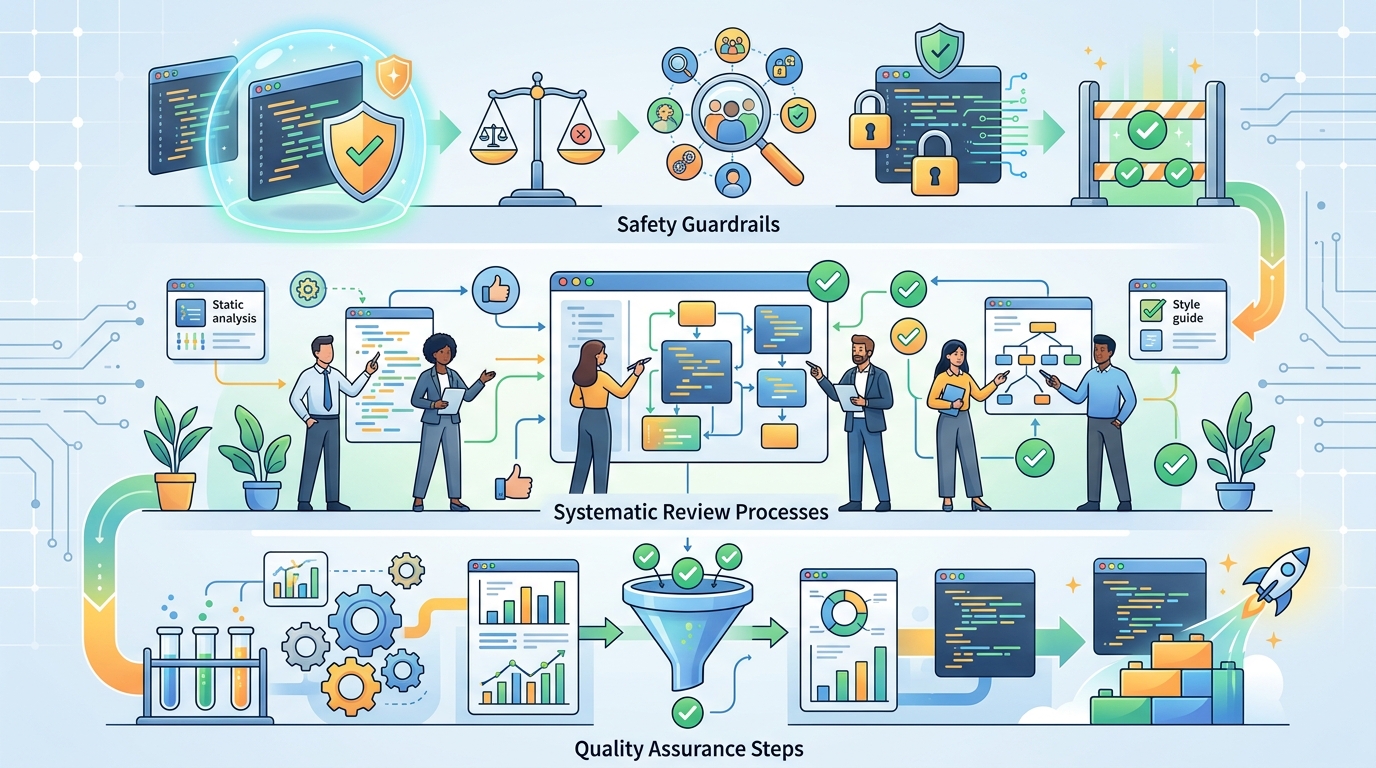
A comprehensive checklist guides development teams through AI code quality, ensuring safety guardrails and robust review processes are in place.
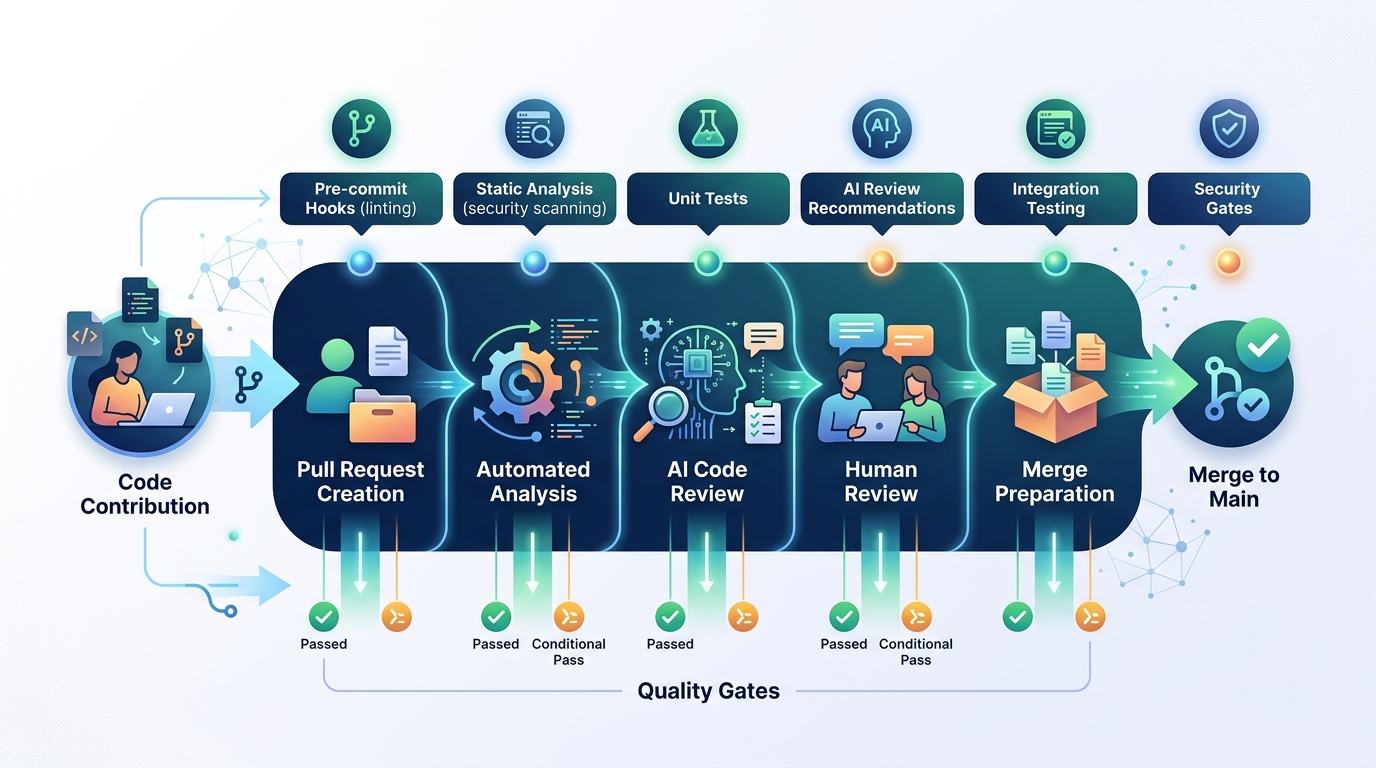
This diagram outlines a modern code review workflow, integrating AI for automated checks and quality gates to enhance efficiency and accuracy.