
How to Securely Connect AI Agents to Internal APIs
As organizations scale their automation efforts in 2026, AI agents have evolved from simple chatbots into autonomous software operators. However, for an agent to be truly useful, it must interact with an organization’s internal data and systems. Learning how to properly connect AI agents to internal APIs is the most critical hurdle for backend developers and technical operations leads today.
Doing this securely ensures that your internal endpoints are protected from data leaks, prompt injection attacks, and unauthorized external access.
The Challenge of Internal API Automation with AI
Integrating AI into backend systems introduces a unique set of security challenges. Traditional API consumers (like web apps or microservices) follow predictable logic paths. AI agents, however, are non-deterministic. They decide which APIs to call and what parameters to pass based on their reasoning loops.
If you connect a cloud-based LLM to an internal internal API, you risk sending sensitive backend data—such as database schemas, user PII, and proprietary application logic—to an external vendor’s server. Furthermore, exposing internal APIs directly to internet-hosted agents requires opening firewall ports, creating massive security vulnerabilities. To eliminate this risk entirely, many organizations first prioritize building a private AI agent infrastructure.
How to Securely Connect AI Agents to Internal APIs
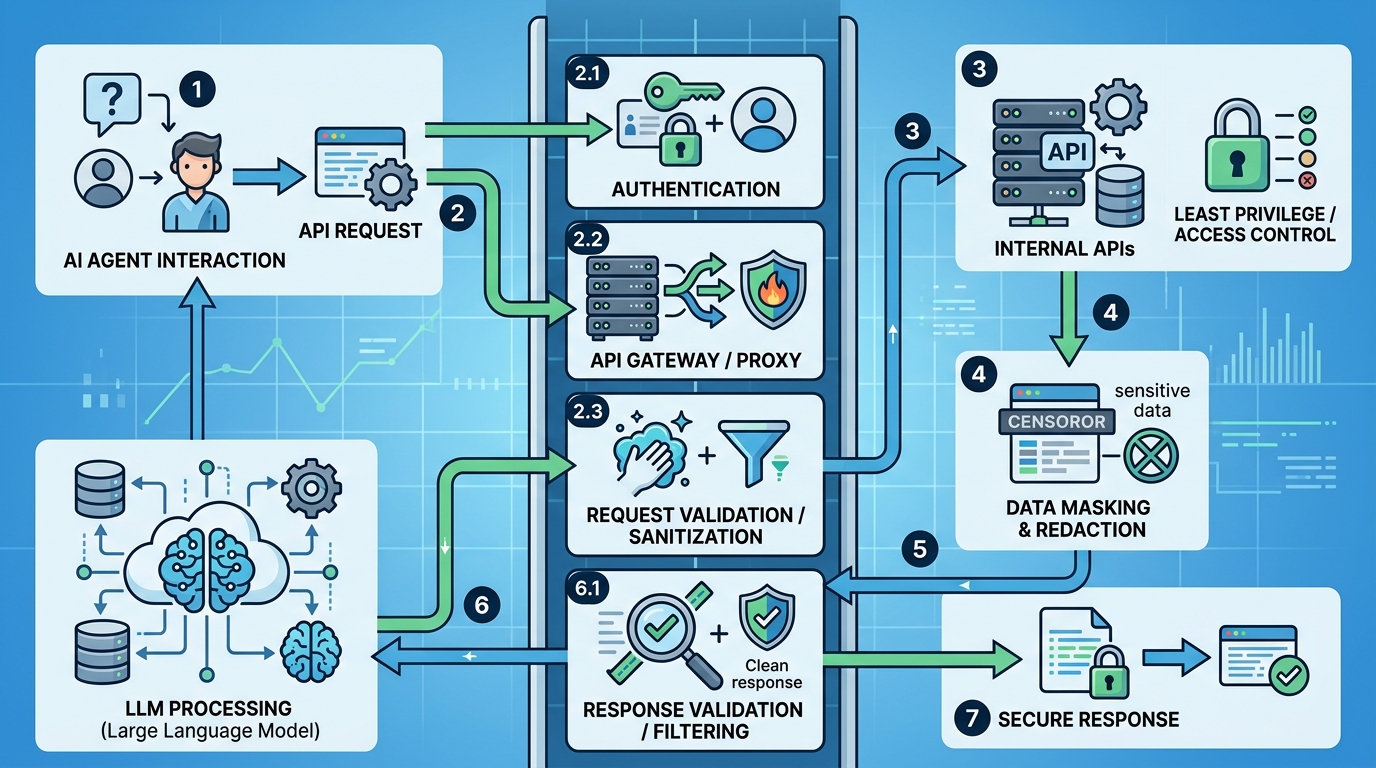
A secure workflow for internal API automation, illustrating how AI agents can safely integrate with an LLM through a validation proxy.
Establishing a secure pipeline between your AI agent frameworks and your internal services requires a zero-trust architecture approach. You must ensure the agent operates strictly within defined boundaries.
Secure LLM Integration Practices
Achieving secure LLM integration involves implementing strict operational guardrails:
- Principle of Least Privilege: Never provide an AI agent with admin-level API keys. Create dedicated, severely restricted service accounts specifically for the agent. If the agent only needs to read ticket statuses, do not grant it write permissions.
- Intermediate Proxy Layers: Never let the agent hit the core API directly. Route all agent requests through a validation proxy or API gateway. This gateway must validate the schema of the agent’s request and scrub out any anomalous parameters before passing it to the backend.
- Human-in-the-Loop (HITL) for State Changes: For any API call that modifies a database (POST, PUT, DELETE), configure the integration to require manual approval. The agent can draft the request, but an authorized human must approve it before execution.
Setting Up a Local Model for Internal Automation

Architecture for setting up a local model for internal automation, ensuring data remains within the corporate network.
The most secure way to handle internal API data is to never let it leave your corporate network. Using a local model for internal automation ensures that the model processing the API responses sits securely behind your own firewall.
- Deploy a Local LLM: Spin up an open-weight model on your local enterprise servers or a secure VPC.
- Configure Local Network Access: Because the model runs internally, it can communicate with internal microservices over secure LAN without routing traffic through the public internet.
- Implement Standard Auth: Equip the agent’s environment with OAuth2 or standard JWT authentication protocols just like any other internal microservice.
For a complete breakdown of endpoint configurations and local framework setup, refer to the NORA API integration documentation.
Secure AI Agent API Integration Examples
To illustrate what secure integration looks like in practice, consider these two enterprise examples:
Example 1: The Database Query Agent
An internal agent is built to answer business intelligence questions. Instead of giving the agent a live database connection string (which is a massive security risk), the engineering team provides the agent with an API endpoint that strictly accepts read-only GraphQL queries. The agent formulates the query, sends it to the internal API, the API validates the query against a strict schema, and returns the data.
Example 2: The IT Helpdesk Resolver
An agent acts as a Level 1 IT support resolver. When an employee requests a password reset, the agent gathers the context. Before executing the password reset API, the agent is programmed to halt execution and trigger a Slack message to an IT admin for approval. This guarantees safety while drastically speeding up the resolution process.
Executing these integrations correctly prevents disastrous system failures. If you are struggling with execution, understanding the fundamentals of building agent workflows is essential for maintaining production reliability.
Frequently Asked Questions
Is it safe to pass internal API keys to a cloud LLM?
No. Passing internal API keys to a cloud-based LLM or SaaS platform exposes your credentials to external servers. Always use a proxy, or ideally, process the data using a local model running on your own infrastructure.
How do I prevent prompt injection attacks from manipulating internal APIs?
You must validate all outputs generated by the AI before they reach the API. Use strict schema validation tools (like Pydantic or JSON schema validators) to ensure the AI’s API request perfectly matches expected parameters, rejecting any anomalies automatically.
Do AI agents need special API endpoints?
While agents can use existing REST or GraphQL endpoints, it is a best practice to build “agent-optimized” API endpoints. These endpoints should return clean, dense JSON data without unnecessary HTML or formatting, which reduces the token usage and improves the agent’s comprehension.