
For video creators paying $300–$600/month in AI subscriptions
What If the Six AI Tools Draining Your Account Every Month Were Actually One App?
Transcribe. Polish. Voice-synthesize. Generate images and video. Animate talking heads. Edit and export — all in one tool, using your own API keys.
Here’s something I want you to think about.
Right now, how many browser tabs do you open to produce a single AI video?
The transcription tool. The script polisher. The voice synthesis platform. The image generator. The video generator. The talking head service. The timeline editor. And then — the export, the re-import, the manual re-sync, and the quiet prayer that the audio still lines up.
Each one charges you a monthly fee. Each one caps what you can generate. Each one forces you deeper into their ecosystem, with their model choices, at their prices.
And when you need something longer than 10 seconds of AI video? The tools simply stop. You’re left manually stitching dozens of clips together with no visual continuity between them — a process that can turn a 5-minute finished video into a week of tedious work.
There is a fundamentally better way to do this. And once you see it, the subscription stack you’re running today will feel embarrassing.
One App. Every Stage. Zero Subscriptions.
HF AI Video Studio is a complete AI video production environment — one application that handles every stage of the pipeline, from raw audio to finished, exported MP4.
But here’s the detail that changes everything: it uses your own API keys.
That means you connect your Replicate, OpenAI, Gemini, and Google Cloud accounts. You pay those services directly — pay-per-use, at API rates, not inflated SaaS markups. The tool itself costs you nothing extra each month. No seat fees. No credit limits mid-project. No “upgrade to unlock” messages when you’re three hours into a production.
Think of it as owning the factory instead of renting floor space. You supply the raw materials at cost. The factory just runs.
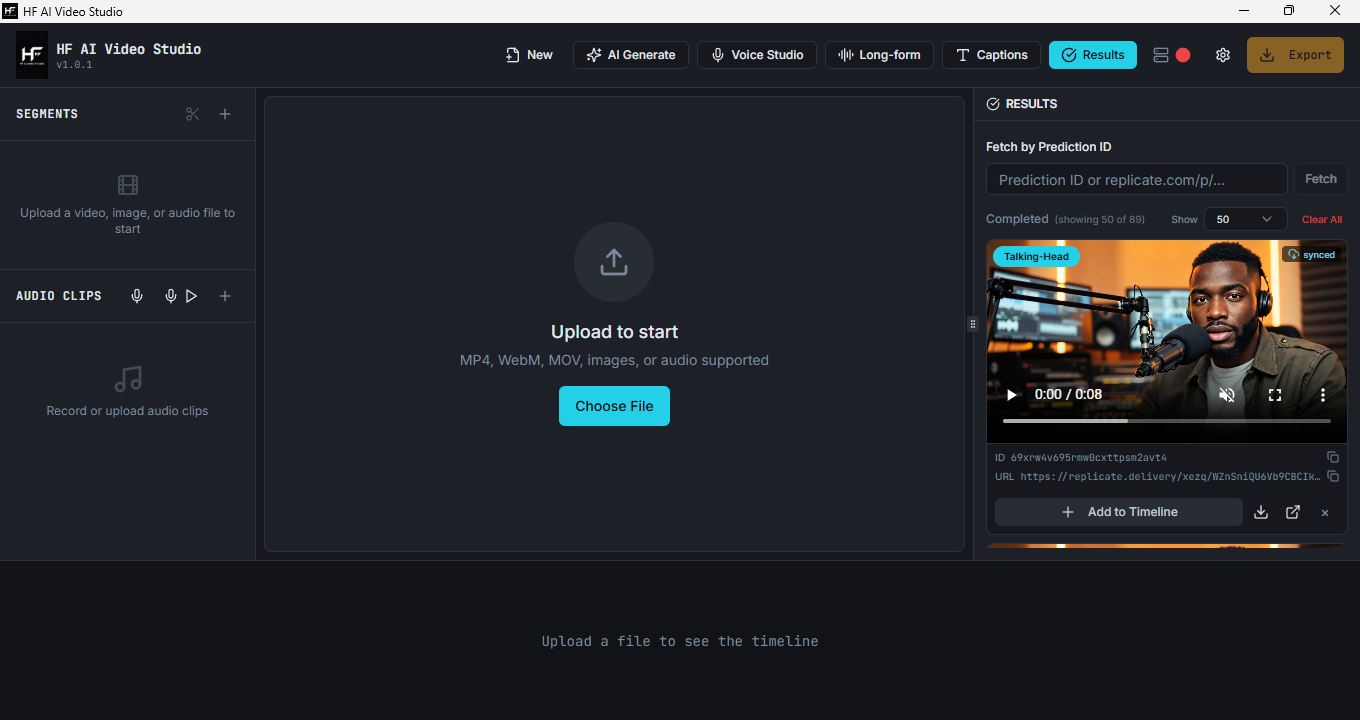
From Raw Audio to Finished Video — Without Leaving the App
Most tools do one thing. This one does all of them — in sequence, in one place, without exporting between steps.
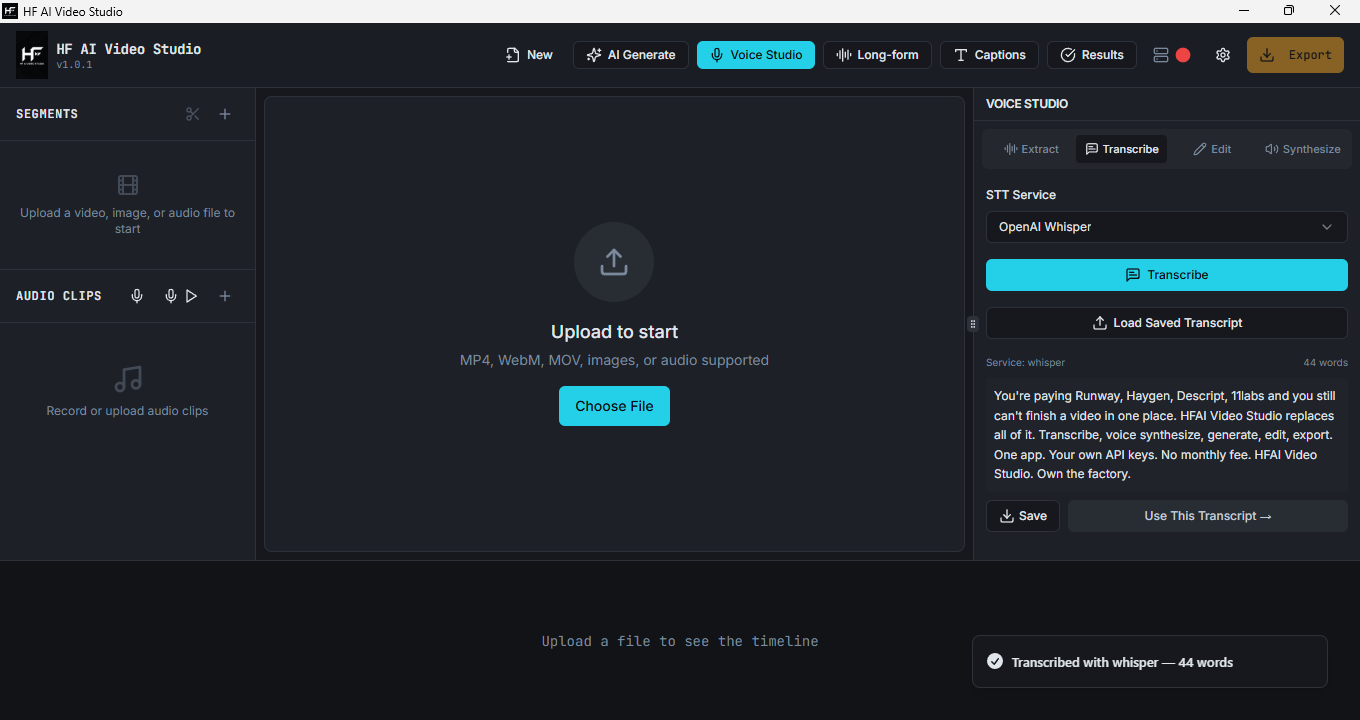
Step 1 — Voice Studio: Extract & Transcribe
Pull audio from any video file, upload a recorded clip, or record directly in the app. Then transcribe it with your choice of OpenAI Whisper, Google Cloud STT, or Gemini — with word-level timestamps. You’re not locked into one engine.
Step 2 — Script Polish
Edit the transcript right inside the app. Run it through Gemini AI for intelligent text polish. Add smart pause markup to control pacing. This is where raw speech becomes a production-ready script.
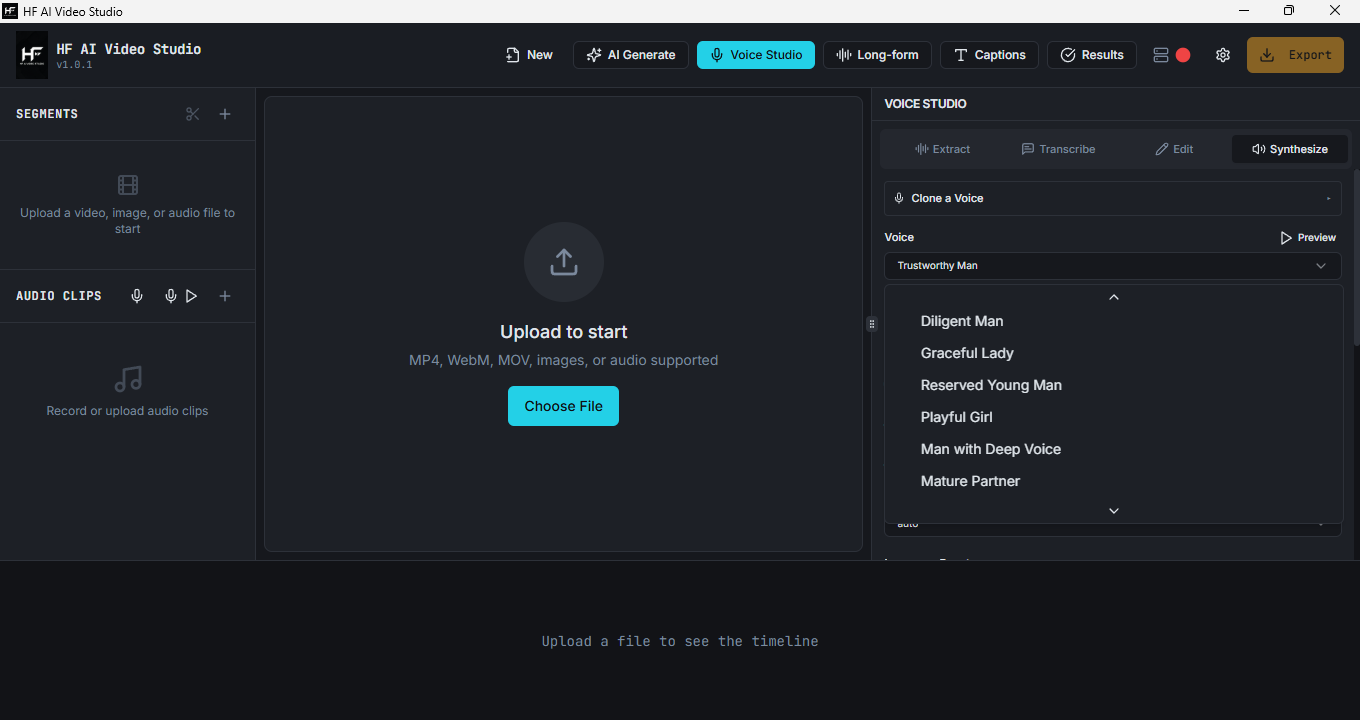
Step 3 — Voice Synthesis
Choose from 25+ voices via MiniMax TTS on Replicate. Adjust emotion, pitch, speed, and language boost per voice. Your synthesis history is saved with one-click playback — so finding the right take takes seconds, not minutes of re-rendering.
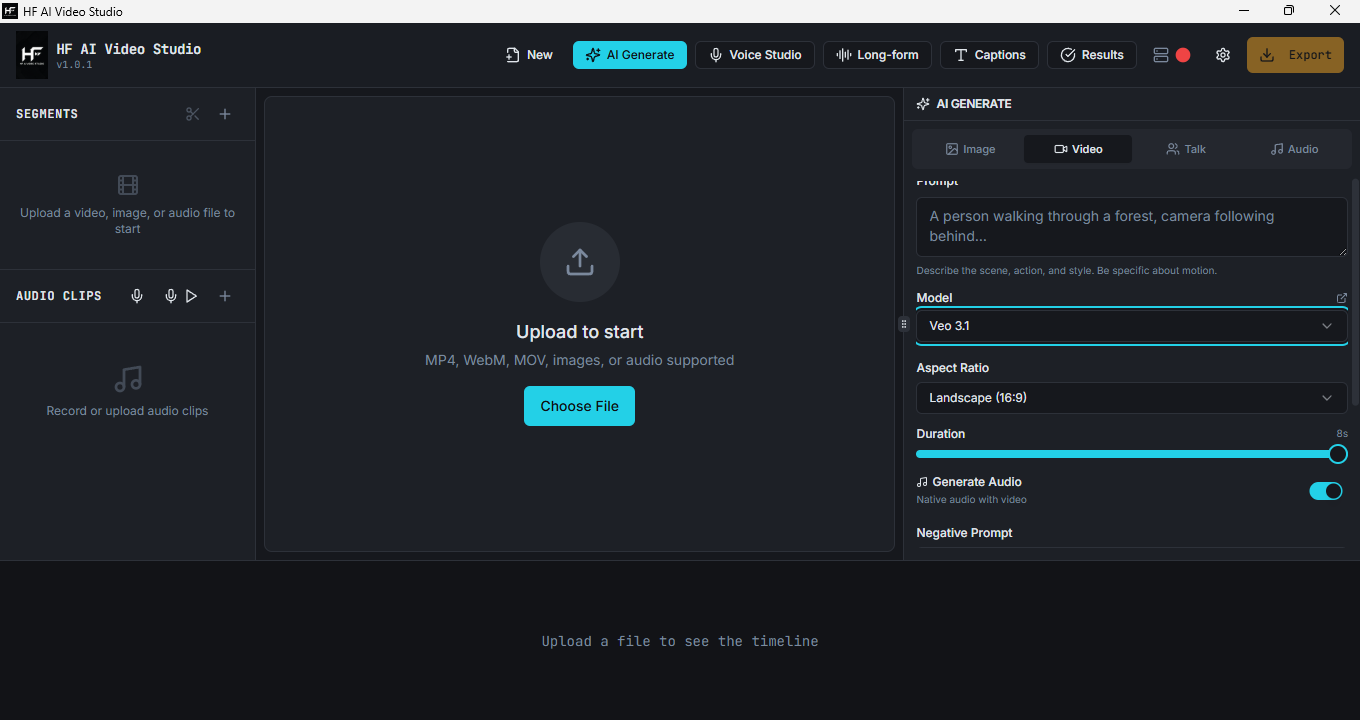
Step 4 — AI Image & Video Generation
Generate visual assets directly from text prompts using 10 image models (Flux, SDXL, Imagen 4, Seedream, Ideogram, and more) and 7 video models (MiniMax, Hailuo, Veo, Kling, Gen 4.5, and more). The UI adapts per-model — aspect ratio, duration, audio controls — so you’re never fighting the interface.
Step 5 — Talking Head Animation
Animate any face image with your synthesized audio using 4 talking head models: MultiTalk, OmniHuman (ByteDance), Wan 2.2 S2V, and Fabric 1.0 (VEED) — with Fabric supporting clips up to 60 seconds. Lip-sync that actually works, without a separate platform subscription.
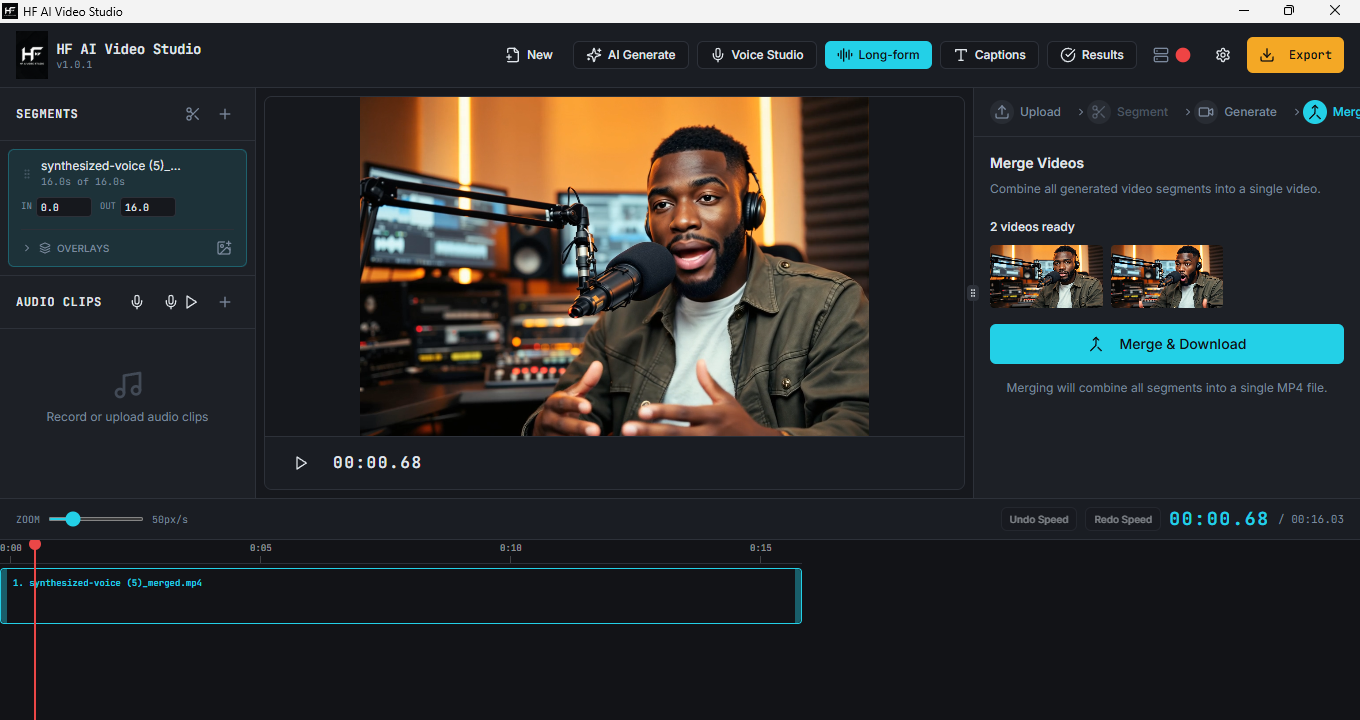
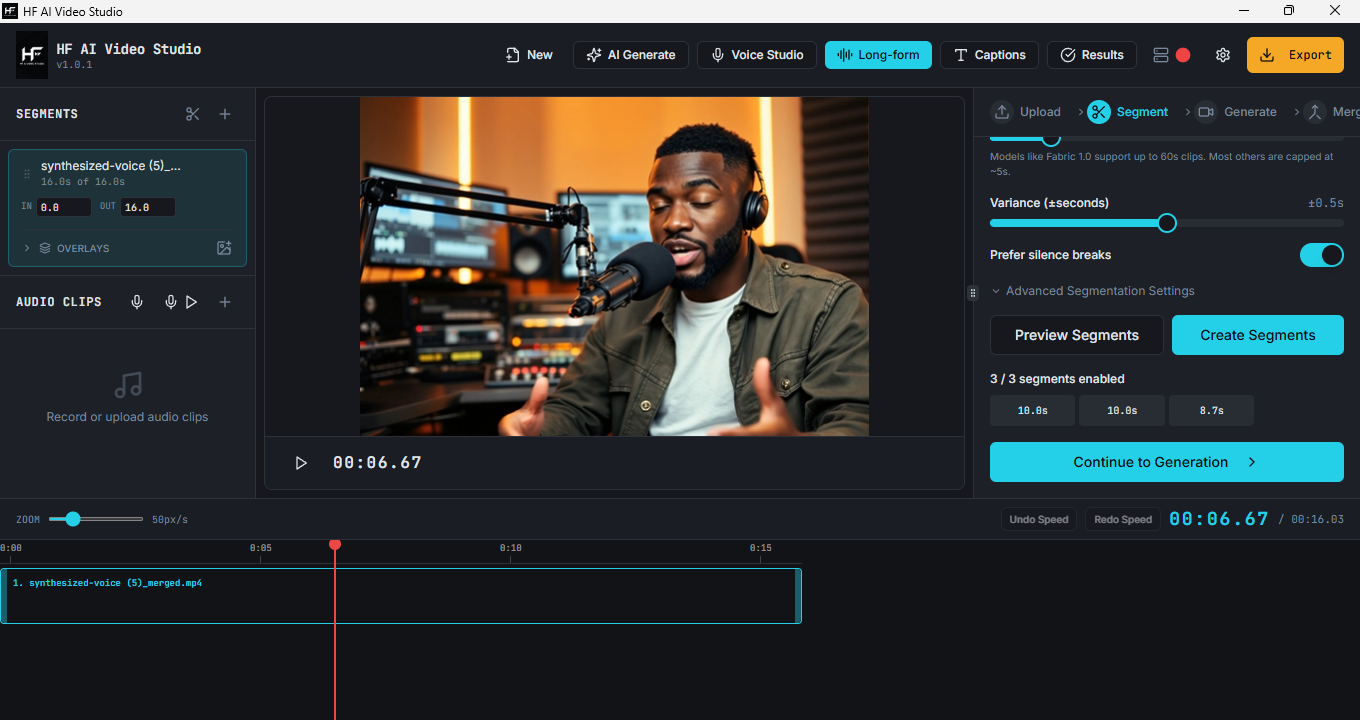
Step 6 — The Long-Form Pipeline
This is the feature that doesn’t exist anywhere else. Set your target clip duration (1–60 seconds). The app segments your audio, batch-generates sequential video clips with visual continuity maintained between segments, and merges them into a full-length production — automatically. What used to take days of manual stitching now runs while you’re doing something else.
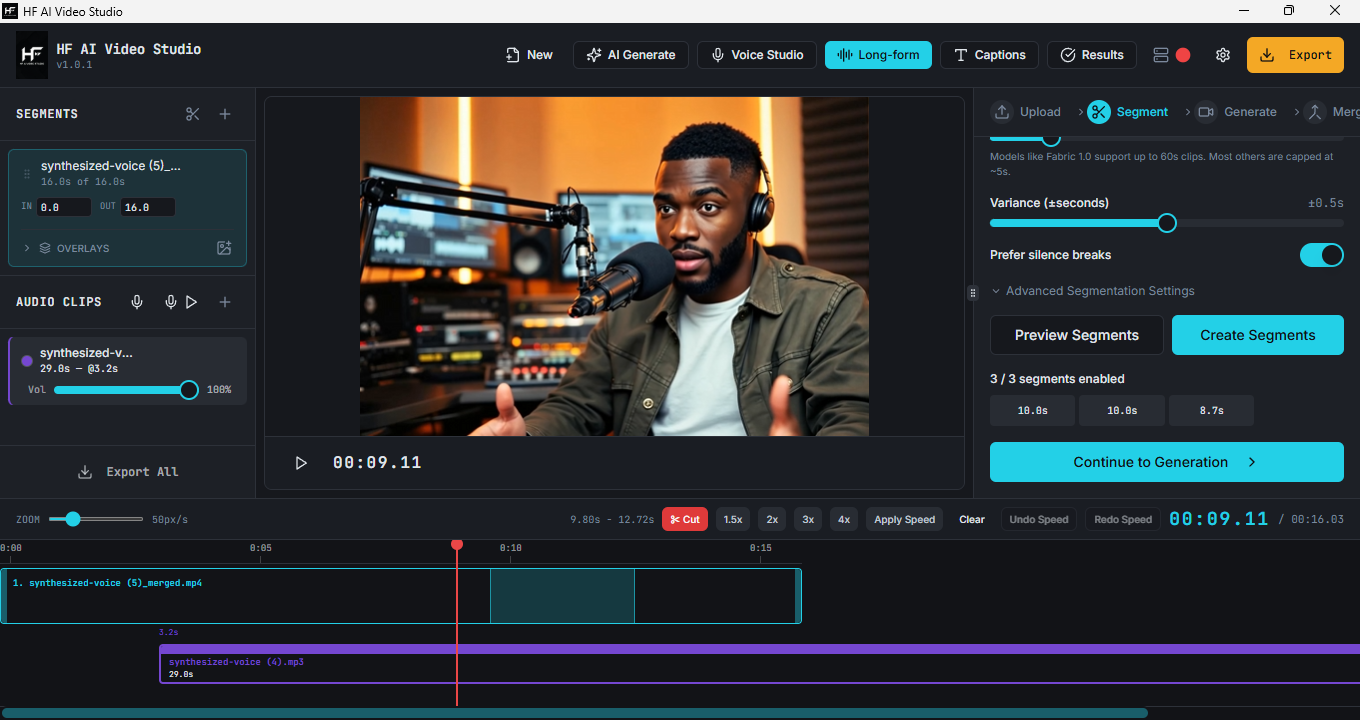
Step 7 — Multi-Track Edit & Export
Load your generated clips onto a multi-track timeline. Trim, split, reorder, and mix audio layers with per-clip volume control. Export to MP4 (video + audio) or MP3 via FFmpeg — right from the app.
AI-powered automation • Supported integrations
Integrates with the world’s best AI




GPT-5.5
GPT-4o
Claude Opus 4.7
Claude Sonnet 4.6
Claude Haiku 4.5
Gemini 2.5 Flash
Llama 3
Mistral
DeepSeek
FLUX 2 Max
Stable Diffusion
What If You Didn’t Have to Be There at All?
Everything you just read assumes you’re the one sitting there running it.
You click the buttons. You write the prompts. You wait for the render. You check the output. You move to the next step.
That’s already a massive improvement over juggling six tools. But I want you to consider a different scenario entirely.
What if the factory ran itself?
HF AI Video Studio includes a built-in Agent API Server — a local HTTP interface that exposes every capability of the studio to external programs. Image generation. Video generation. Voice synthesis. Talking head animation. Transcription. Cloud uploads. All of it, callable through simple HTTP requests from any script or tool on your machine.
Which means any program that can make an HTTP request can drive your entire production pipeline — without you touching a single button.
And the tool purpose-built to do exactly that is called NORA.
NORA is a Windows desktop application for visually orchestrating scripts, commands, and AI agents into fully automated workflows. You connect it to the Video Studio’s API server. You hand it a Claude or Gemini agent. And then something remarkable happens: the agent runs your entire production pipeline for you.
Let me be specific about what that means.
You tell the agent:
“Take this script, synthesize it with the Aria voice, generate a talking head using the OmniHuman model, and upload the final clip to S3.”
The agent autonomously:
Calls the voice synthesis endpoint. Polls until the audio is ready. Feeds the audio URL and a face image into the talking head endpoint. Polls until the video renders. Uploads the final file to your cloud storage. Reports back with the download URL. Done.
You didn’t open the app. You didn’t write a prompt. You didn’t watch a progress bar. An AI agent handled every API call, every polling check, every handoff between pipeline stages — start to finish, without intervention.
Now multiply that.
Need 15 talking head clips for an online course? Queue them. Need daily social media videos with consistent branding? Schedule them. Need to batch-produce explainer content across multiple voices and visual styles? Describe the matrix and let the agent grind through it overnight while you do literally anything else.
This is no longer “a tool that saves you time.” This is a production line that operates without a human on the floor.
HF AI Video Studio gives you the factory. NORA gives you the workforce that runs it while you sleep.
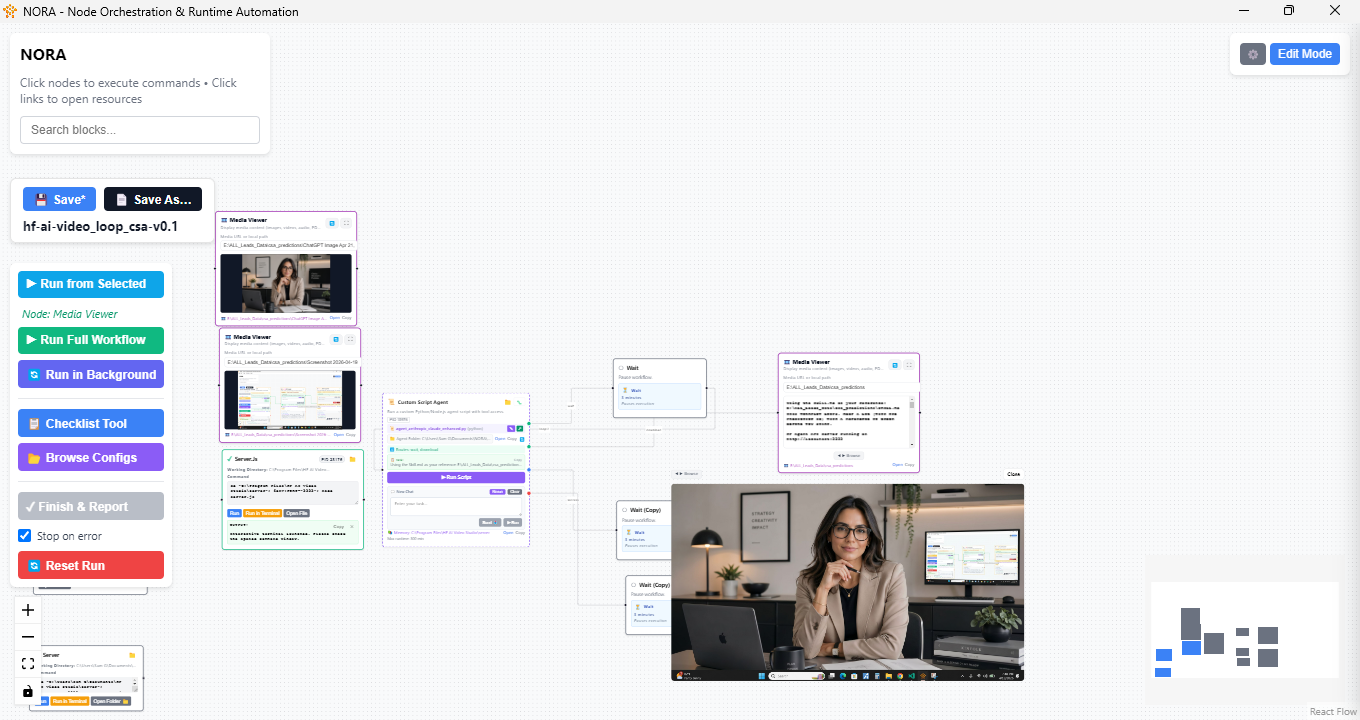
And here’s the part that makes this decision easy: HF AI Video Studio is included free with every NORA license.
You don’t buy them separately. You don’t unlock it later. The moment you own NORA, you own the full Video Studio — the complete production environment, the Agent API Server, and the ability to have AI agents produce finished videos autonomously. One purchase. Both products. No add-on fees.
The Real Cost of Your Current Stack (vs. What You Could Be Paying)
Here’s the full picture: what the SaaS tools charge, what their subscriptions actually include, and what API usage looks like if you run HF AI Video Studio instead.
First, the SaaS tools — and what their monthly fees actually buy you:
| Tool | Monthly Fee | What You Get |
|---|---|---|
| Runway (video gen) | $35/mo | ~125 sec of AI video/mo. Overage costs extra. |
| HeyGen (talking head) | $29–$89/mo | ~10–30 min of avatar video/mo. Per-credit overages. |
| ElevenLabs (voice) | $22–$99/mo | ~100–500 min of TTS audio/mo. Caps per tier. |
| Descript (transcription + edit) | $24/mo | Unlimited transcription. No AI video or image gen. |
| Midjourney (image gen) | $10–$30/mo | Tiered GPU hours. Doesn’t connect to any other tool. |
| Stack total | $120–$275/mo | Five separate logins. Zero integration. |
Now, what you’d actually pay to run HF AI Video Studio (API costs billed directly by the providers — not us):
| API Call | Rate (actual published prices) | Example Cost |
|---|---|---|
| Transcription (OpenAI Whisper) | $0.006 / min of audio | 10 min = $0.06 |
| Script polish (Gemini) | Fraction of a cent per request | ~$0.01 |
| Voice synthesis (MiniMax TTS via Replicate) | GPU compute ~$0.005–$0.02 / min of audio | 5 min = $0.03–$0.10 |
| Image generation (Flux Dev via Replicate) | $0.025 / image (Flux Dev) $0.003 Flux Schnell · $0.09 Ideogram v3 |
20 images = $0.50 |
| AI video clips (Wan 2.1, 480p via Replicate) | $0.09 / sec of output video 720p = $0.25/sec |
10 × 5s clips = $4.50 |
| Talking head animation | Varies by model and clip length | ~$0.50–$3.00 / clip |
What does a real month look like?
Light user — 2–3 short videos/month (mostly voice + images, minimal video gen)
Estimated API cost: $3–$8/month
Medium user — 8–10 videos/month with AI video clips at 480p
Estimated API cost: $20–$50/month
Heavy user — 20+ videos/month, 720p video clips, frequent talking head generation
Estimated API cost: $80–$180/month — potentially comparable to individual SaaS subscriptions at high volume.
Fair warning: AI video generation is the biggest cost driver. If you’re generating dozens of long, high-resolution clips every week, your API bill will reflect that — same as it would on Runway, just without the markup and without the cap forcing you to upgrade.
So who does this clearly make sense for?
- Anyone currently paying for multiple AI tools that don’t connect to each other
- Anyone who has slow months where subscriptions sit mostly idle
- Anyone doing heavy image generation — at $0.003–$0.025/image, API rates undercut every subscription by a wide margin
- Anyone doing voice work — voice synthesis at API rates is a fraction of ElevenLabs’ subscription tiers
- Anyone who wants a single workflow instead of five open tabs
- Anyone who wants to automate production entirely — the Video Studio comes free with NORA, so AI agents handle the pipeline while you focus on strategy
The one-time purchase pays for the tool. What you spend on APIs is entirely yours to control — and unlike a subscription, it stops the moment you stop generating.
“Sounds Great — But I Have Questions.”
“Managing my own API keys sounds complicated.”
It’s not. You paste your keys into the Settings panel once. From that point on, the app handles every API call. If you’ve ever signed up for an OpenAI account, you already have everything you need to get started.
“What if AI models change or get replaced?”
The app already supports 17+ models across image, video, and talking head — precisely because models come and go. When better models ship, you switch. You’re not locked into whatever a SaaS vendor decided to bundle this quarter.
“Will this work for my use case?”
If your work involves any combination of audio, voice, images, video clips, or long-form content production — yes. This was built for content creators, marketing teams, course producers, and anyone who needs to go from idea to finished video without a production crew.
“What’s NORA? Do I need it?”
NORA is our desktop workflow orchestration platform — a visual engine for chaining scripts, commands, and AI agents into fully automated pipelines. It’s a separate product ($1,297, one-time, perpetual license) — and every NORA license includes HF AI Video Studio for free. The Video Studio works perfectly as a standalone tool at $97. But if you want AI agents producing finished videos autonomously — scripts in, videos out, no babysitting — you get both products for the price of one when you go with NORA.
Here’s Exactly What You Get for $97
- Full Voice Studio — Extract, transcribe (3 engines), AI-polish, synthesize (25+ voices)
- AI Image Generation — 10 models including Flux, Imagen 4, Seedream, Ideogram
- AI Video Generation — 7 models including MiniMax, Hailuo, Veo, Kling, Gen 4.5
- Talking Head Animation — 4 models, up to 60-second clips
- Long-Form Pipeline — auto-segment, batch generate, auto-merge with visual continuity
- Multi-track timeline editor with trim, split, and reorder
- Multi-track audio mixer with per-clip volume control
- Export to MP4 or MP3 via FFmpeg
- Cloud storage integration (AWS S3, Cloudflare R2, S3-compatible)
- Job queue with persistence and background polling
- BYOK — your API keys, your cost control, your data
- Built-in Agent API Server — included free with NORA for fully autonomous production
- All future updates included during the launch period
Every one of these features is built and working today — not a roadmap promise.
Launch Pricing — Limited Time
HF AI Video Studio
One-time purchase. Yours to keep. No renewals.
Regular price
$297
$97
One payment. No subscription. No monthly fees ever.
🔒 Secure checkout · Instant delivery · 30-day money-back guarantee
Prefer Microsoft Store?
Download from Microsoft Store
Give customers a second purchase path with Microsoft-hosted distribution, Microsoft-signed delivery, and Store-managed updates.

Available direct or through Microsoft Store, depending on how your buyers prefer to install.
Or Get It Free
HF AI Video Studio Is Included with Every NORA License
NORA — desktop workflow orchestration for technical teams. AI agents, visual pipelines, scheduled execution, full audit trail. One-time purchase, perpetual license.
NORA license includes:
✓ Full NORA desktop app (perpetual license)
✓ HF AI Video Studio — FREE ($97 value)
✓ 17 production-ready workflow templates
✓ AI routing + autonomous agent nodes
✓ 1 year priority support
✓ 30-day money-back guarantee
Get NORA + Video Studio — $1,297
One-time purchase · Yours forever · No cloud dependency · Read the docs
⚠️ The $97 price will not last.
This is a launch price for early adopters who get in while the tool is new. As we add features and the user base grows, the price will move to $197 — and eventually to the full $297 retail price. There’s no launch sale timer here — just a straightforward statement that early buyers get the best deal, and that window closes when it closes.
The 30-Day “It Works or It’s Free” Guarantee
Buy it. Use it. Run a real project through it. If at any point in the first 30 days you feel it’s not worth every dollar you paid, email us and we’ll refund you in full. No forms. No interrogation. No hard feelings.
The only risk here is staying with the subscription stack you’re running today.
One-time payment · 30-day guarantee · Instant access
Or get it free with NORA — the full workflow automation platform:
Get NORA + Video Studio — $1,297
Perpetual license · Video Studio included · Documentation
P.S. — The tools you’re using right now will charge you again next month whether you publish anything or not. This purchase won’t. At $97 one-time, even if your API costs run $30–$40 a month, you’re still replacing a $120–$275/month subscription stack — and you only pay for what you actually generate.
P.P.S. — If you’re already considering NORA for workflow automation, the Video Studio comes free with your license. You get the full production environment, the Agent API Server, and the ability to have Claude or Gemini agents produce finished videos autonomously — included, not upsold. One purchase, both products, no add-on fees.
P.P.P.S. — This price is not a marketing tactic with a fake timer. It is genuinely the lowest this app will ever be sold. Early adopters have always gotten the best deals on software — that’s as true here as it has ever been. If you’re reading this page, you’re still early.