
Building Agent Workflows: Best Practices and Mistakes to Avoid
The transition from a successful local AI proof-of-concept to a robust, enterprise-grade deployment is notoriously difficult. As of 2026, many engineering teams find themselves struggling with systems that work perfectly in development but completely collapse under real-world loads. Building agent workflows that are resilient, predictable, and secure requires a fundamental shift in how developers approach software architecture.
This guide outlines exactly how DevOps teams and developers can design fault-tolerant agentic systems and ensure continuous, smooth operations in production environments.
Why Do AI Agent Projects Fail in Production?
Unlike traditional deterministic software code—where a specific input always yields the exact same output—AI agents operate probabilistically. They parse context, make decisions, and sometimes, they make the wrong choices. AI agent production failures usually stem from engineering teams treating LLM agents like traditional microservices.
When agents are deployed without strict operational boundaries, they are highly susceptible to infinite looping, context degradation, and hallucinated function calls.
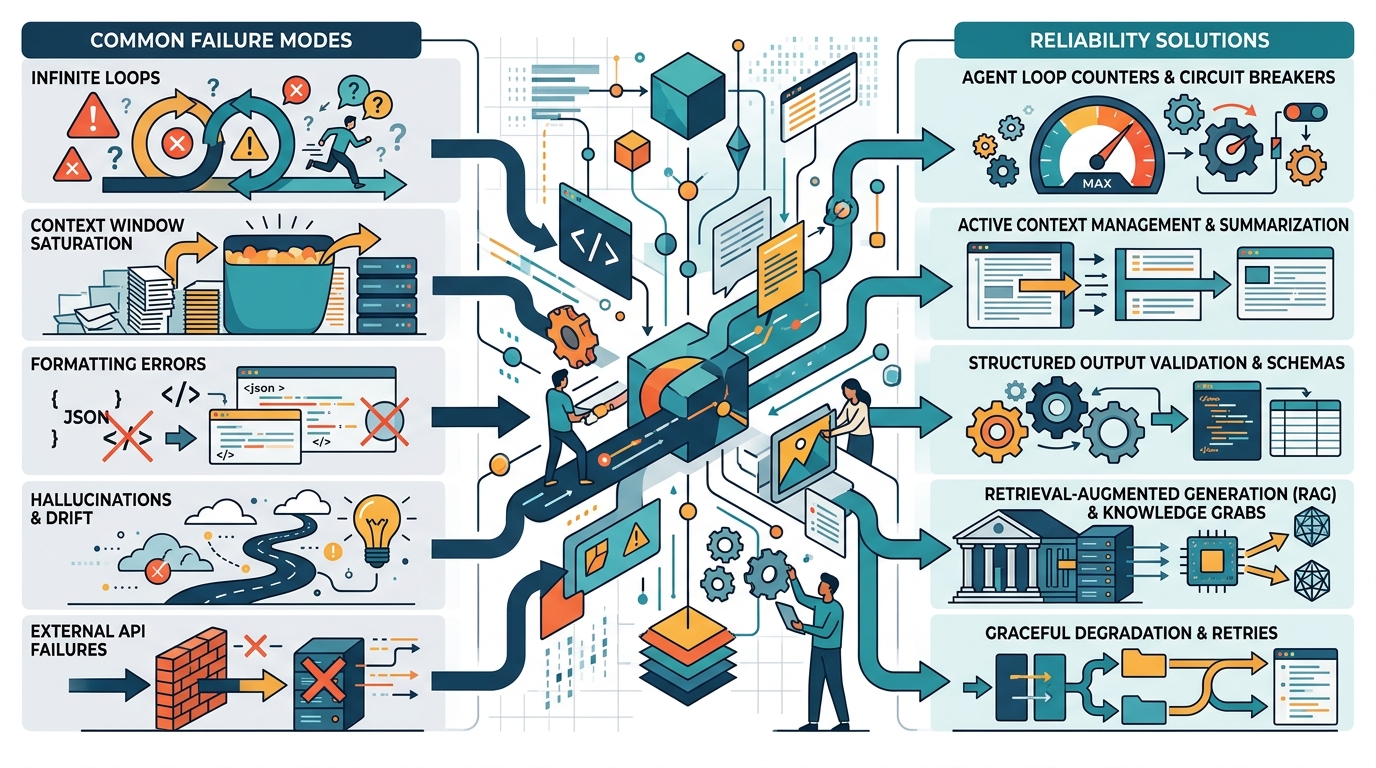
Common AI agent production failures and their corresponding reliability solutions.
Common AI Agent Reliability Issues
- The Infinite ReAct Loop: Agents built on the Reason-Act framework can sometimes get stuck trying to solve a problem, repeatedly calling the same API endpoint and failing, burning through compute resources and causing massive latency.
- Context Window Saturation: As a workflow progresses, the agent accumulates memory. If the workflow runs too long without summarizing or clearing history, the agent exceeds its context window, resulting in complete system crashes.
- Formatting Failures: Agents instructed to output strict JSON for downstream systems will occasionally generate conversational text or markdown artifacts, breaking the parsing logic of your application.
Top AI Agent Mistakes to Avoid
To guarantee reliability, engineering teams must recognize and mitigate the top AI agent mistakes to avoid:
- Over-Targeting Autonomy: The biggest mistake is giving an agent too much freedom. Agents should not be general-purpose problem solvers; they should be highly specialized tools confined to singular tasks.
- Neglecting Error Handling: AI will eventually output an incorrectly formatted response. Failing to build robust retry mechanisms and parsing fallbacks guarantees production outages.
- Ignoring Infrastructure Stability: Even the best workflow logic will fail if the underlying compute environment is unstable. Ensuring you have proper technical team AI infrastructure to handle the intense GPU loads is an absolute prerequisite.
Agent Workflow Best Practices for Developers
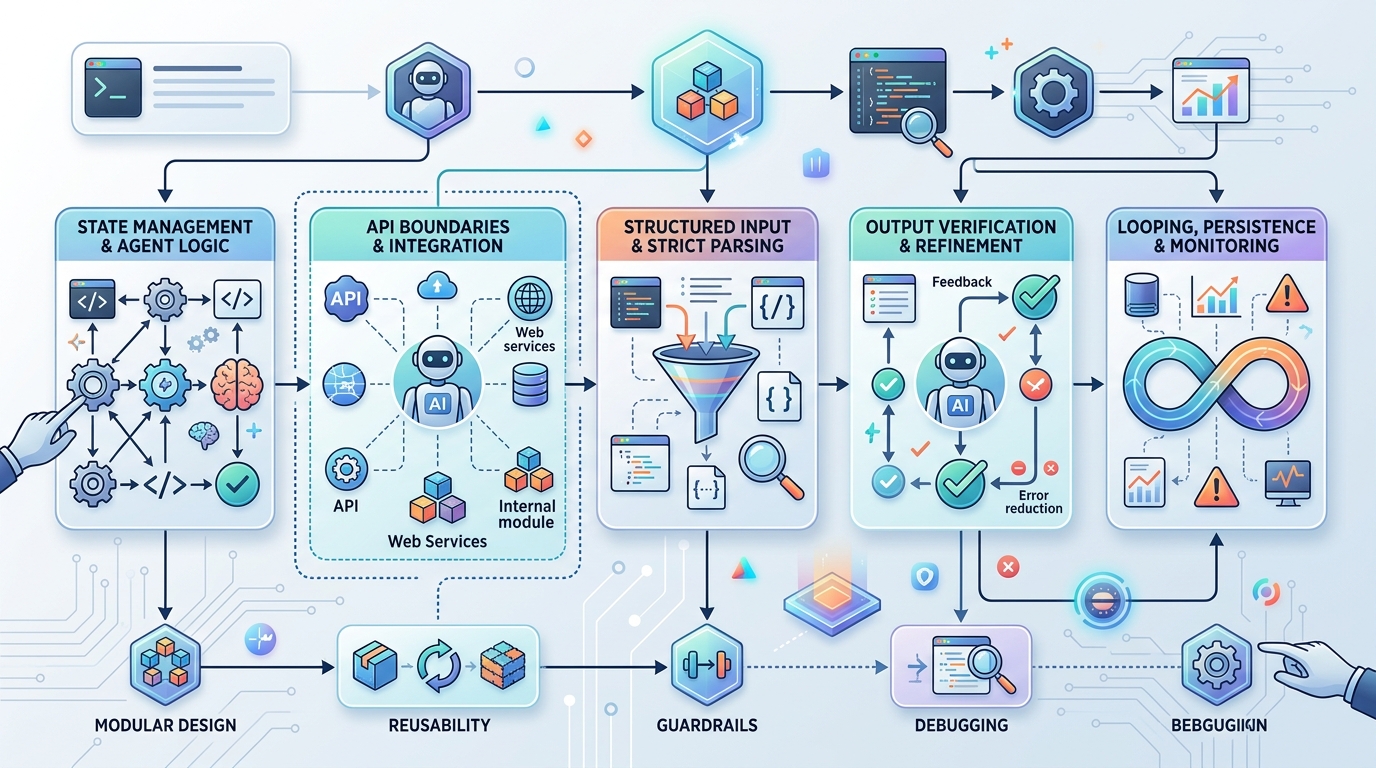
A flowchart detailing the steps for building agent workflows correctly, emphasizing best practices for developers.
Adopting strict agent workflow best practices allows you to build systems that scale gracefully.
- Implement State Machines: Instead of letting the LLM dictate the entire flow of the application, embed the LLM within a deterministic state machine (like LangGraph or a custom internal framework). The state machine controls the transitions; the LLM simply executes the logic within the current state.
- Strict Output Parsing: Always enforce output schemas. Use libraries that coerce the LLM to output valid JSON or employ a secondary, smaller validation model to check the output before it moves to the next step.
- Define Clear API Boundaries: When agents interact with your internal systems, precision is key. Ensure you securely connect AI agents to internal APIs using strict proxy validation, preventing the agent from passing hallucinated parameters to critical backend services.
Managing Self-Hosted AI Operations Smoothly
Achieving predictability in self-hosted AI operations means treating your AI stack with the same rigorous observability as your standard cloud infrastructure.
DevOps teams must implement comprehensive logging for every agent action. You need visibility into exactly what the prompt was, what the model predicted, and how long the inference took. By monitoring token usage, inference latency, and API error rates, you can quickly identify when an agent is drifting from its intended behavior.
If you are looking for battle-tested starting points, utilizing NORA agent workflow templates can drastically reduce the time it takes to set up a reliable, production-ready environment.
Frequently Asked Questions
Why does my AI agent keep looping infinitely?
Infinite loops happen when an agent fails to recognize that an action was unsuccessful, or when its instructions lack a definitive “stop” condition. Implementing a maximum iteration cap (e.g., max 5 steps) and utilizing deterministic state machines easily solves this problem.
How do I handle agents outputting bad JSON?
First, use models optimized for function calling. Second, implement strict system prompts instructing the model to output only JSON. Finally, wrap your agent calls in a retry block that catches parsing errors and feeds the error back to the agent so it can correct its own formatting mistake.
Is it better to use one large agent or several smaller ones?
Several smaller agents (a multi-agent workflow) are significantly more reliable. Breaking complex processes down into discrete steps handled by specialized, narrowly-focused agents reduces complexity, lowers latency, and minimizes the risk of the model losing track of the overarching goal.