
What is GGUF? The Local LLM File Format Explained
If you are exploring the world of local artificial intelligence, downloading model files from Hugging Face, or installing desktop applications like Ollama, LM Studio, or Jan, you have likely encountered terms like .gguf, .ggml, and .safetensors.
Understanding these file extensions is crucial. The file format you choose dictates how fast your model loads, how much computer memory (RAM or GPU VRAM) it requires, and whether it will run smoothly on your specific computer setup.
In this beginner-friendly guide, we will break down the fundamental question: what is GGUF, how does it differ from older file formats like GGML, and why has Safetensors become the default format for safe GPU execution?
The Basics of Local LLM Files
When an artificial intelligence model—such as Llama 3, Mistral, or Qwen—is trained, the result is a complex set of mathematical parameters called weights. These weights represent the knowledge and reasoning capabilities the neural network acquired during training.
In enterprise data centers, these weights are stored as massive, uncompressed files requiring thousands of dollars in high-end GPU infrastructure. However, for everyday users running AI on personal computers, laptops, or workstation desktops, storing and executing uncompressed weights is impractical.
To solve this problem, open-source developers created specialized single-file containers tailored for consumer hardware:
1. File Encapsulation: Packing all weights, layer architecture configurations, and vocabulary dictionaries into a single downloadable file.
2. Quantization: Compressing 16-bit floating-point numbers into 4-bit or 8-bit integer formats, drastically reducing file size while maintaining high response quality.
Understanding these underlying structures helps users navigate the diverse ecosystem of common local LLM file types.
GGUF File Format Explained
When asking what is GGUF, the simplest answer is that GGUF (GPT-Generated Unified Format) is the modern industry-standard file format designed specifically for fast, memory-efficient local LLM inference on consumer hardware.

The GGUF format unifies model weights, architecture, and metadata into a single file for streamlined local LLM execution.
Introduced in August 2023 by the open-source llama.cpp development team, GGUF replaced older file structures by introducing a flexible, unified architecture. (llama.cpp) Here is what makes the GGUF file format explained in simple terms:
- All-in-One Architecture: A
.gguffile contains the compressed neural network weights, model architecture parameters, context window limits, and tokenization rules all inside a single file header. You do not need separate metadata or configuration files. - Extensible Key-Value Metadata: GGUF uses a standardized key-value metadata store inside its header. This means software developers can add new capabilities or support new AI model architectures without breaking compatibility with existing software tools.
- Instant Model Loading (mmap): GGUF leverages memory mapping (
mmap), allowing operating systems to stream tensor data directly into system RAM or GPU VRAM without tedious file conversion steps upon launch. - Flexible CPU and GPU Hybrid Execution: GGUF models excel at offloading layers across both CPU system memory and dedicated GPU VRAM, allowing users with modest GPUs (such as 6GB or 8GB VRAM) to run larger 14B or 32B models by delegating remaining computations to CPU RAM.
If you are running desktop tools like Ollama or LM Studio on Windows, macOS, or Linux, GGUF is almost certainly the format powering your local AI assistant.
GGML File Format Explained
To appreciate why GGUF exists, it helps to understand its direct predecessor: GGML (GPT-Generated Model Language).
In the early days of open-source local AI (early 2023), developer Georgi Gerganov created GGML as a C++ library to run LLaMA models on Apple Silicon and Intel/AMD CPUs. When looking at the GGML file format explained, its primary contribution was proving that consumer CPUs could run large language models through 4-bit quantization.
However, GGML had significant architectural limitations:
* Rigid Data Structure: Metadata was hardcoded into rigid binary positions. If developers wanted to introduce a new parameter (such as longer context windows or custom RoPE scaling), old GGML readers would crash.
* Frequent Breaking Updates: Every minor update to the software required downloading completely new model files.
* Poor Tokenizer Integration: Model vocabularies were easily corrupted or misaligned, causing weird output glitches.
Because of these flaws, GGML was officially phased out in late 2023. Today, all modern inference tools require .gguf files instead. If you want a deeper technical breakdown between these two generations, check out our in-depth GGUF vs GGML comparison.
What Are Safetensors?
While GGUF rules the realm of quantized, CPU-and-hybrid local inference, Safetensors is the premier open-source format for full-precision weights, model training, fine-tuning, and dedicated GPU workflows.
Developed by Hugging Face, Safetensors was created to solve a critical security hazard in the AI community: Python Pickle vulnerability.
Historically, PyTorch models were distributed as .bin or .pt files, which utilized Python’s pickle serialization library. Pickle files have a severe vulnerability: when loaded, they can execute arbitrary Python code on the host machine. Malicious actors could easily embed harmful malware or backdoor code inside a shared model file.
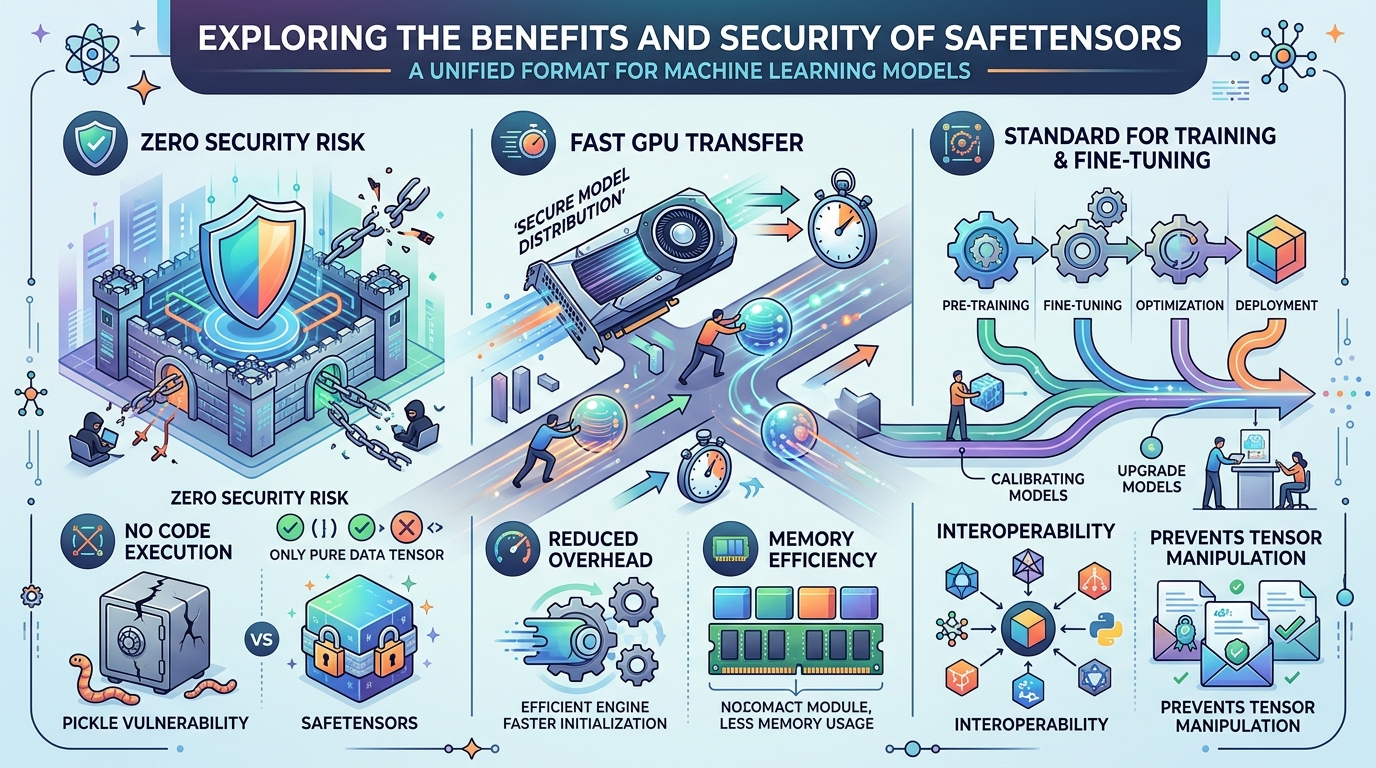
Safetensors offers robust security by preventing arbitrary code execution and enables rapid, zero-copy loading for GPU-intensive AI workloads.
Safetensors Benefits & Security
When examining safetensors file format explained, the primary safetensors benefits center around rock-solid security and raw GPU performance:
- Zero Security Risk: Safetensors files contain strictly zero executable code. They hold only pure binary numerical tensors and a lightweight JSON header. Loading a
.safetensorsfile cannot execute code or infect your system. - Lightning-Fast GPU Transfer: Safetensors supports zero-copy memory mapping directly to GPU VRAM. When running heavy GPU workloads on NVIDIA or AMD hardware, Safetensors streams weights into memory at maximum bus speed.
- Training & Fine-Tuning Standard: Because Safetensors retains full uncompressed precision (
FP16orBF16), it is the primary format used by AI researchers, developers, and creators training custom LoRAs, Stable Diffusion image generators, or base foundation models.
Frequently Asked Questions
What is GGUF?
GGUF (GPT-Generated Unified Format) is a file format designed for running quantized local language models efficiently on consumer hardware. It stores model weights, vocabulary, and metadata in a single file, supporting fast execution across CPUs, GPUs, and Apple Silicon.
What is GGML?
GGML was the original C++ file format that pioneered CPU-based local LLM execution. It introduced early 4-bit quantization but was deprecated in August 2023 due to inflexible metadata limits and replaced by GGUF.
What are Safetensors?
Safetensors is a secure file format developed by Hugging Face for storing deep learning tensor weights safely. It replaces unsafe Python pickle checkpoints, prevents malicious code execution, and enables rapid model loading directly into GPU memory.
Choosing the Right Format for Your Setup
Now that you understand what GGUF, GGML, and Safetensors are, you can confidently navigate local AI repositories.
* If you are running local desktop apps on consumer hardware, you should choose the best local LLM format for your hardware specifications.
* If you plan to build custom automated workflows or integrate local AI models into desktop productivity tools, understanding file compatibility ensures your local agent setup runs smoothly and reliably.