
How to Build a Self-Hosted AI Stack for Internal Teams
In 2026, the demand for complete control over enterprise data has pushed many operations teams to transition from third-party cloud AI APIs to entirely local deployments. Creating a private, self-hosted AI environment ensures your data never leaves your network. This guide details how to architect, deploy, and manage a self-hosted AI stack specifically designed for internal teams, covering hardware, software, and practical workflow automation.
What is a Self-Hosted AI Stack?
A self-hosted AI stack is a collection of hardware and software infrastructure that allows an organization to run artificial intelligence models—particularly Large Language Models (LLMs)—entirely on their own servers or local machines. Unlike relying on external providers like OpenAI or Anthropic, a self-hosted approach means all inference, data processing, and model fine-tuning happen internally.
For technical operators and DevOps teams, this translates to maintaining the server environments, managing GPU workloads, and handling the API endpoints that internal applications will communicate with.
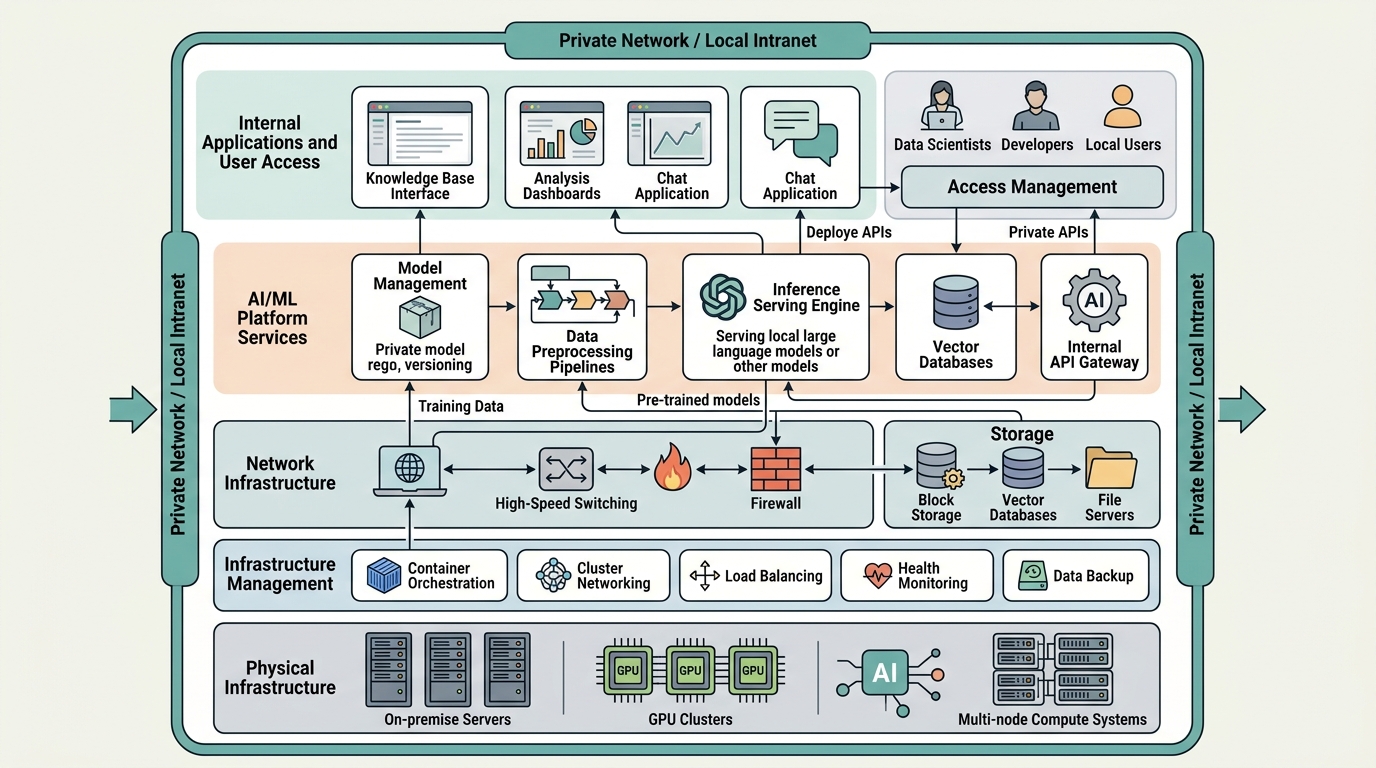
An architectural overview of a self-hosted AI stack, highlighting the internal infrastructure for private model deployment.
Why Build Local AI for Operations Teams?
Operations teams handle highly sensitive internal workflows. Integrating AI into these processes introduces unique challenges that self-hosted environments naturally solve.
Overcoming Cloud API Limitations
Cloud APIs often come with rate limits, unpredictable latency, and hidden costs at scale. When an operations team builds internal tooling heavily reliant on LLMs, hitting API bottlenecks can stall mission-critical processes. By shifting to a local deployment, teams bypass external rate limits entirely and gain predictable throughput based directly on their hardware capacity.
Ensuring Security and Control
The primary driver for moving away from the cloud is data security. Sending proprietary logs, internal documentation, or customer information to a third-party server creates significant compliance risks. By keeping everything local, operators maintain absolute control over data residency. For teams concerned with these compliance requirements, ensuring local LLM data privacy is a non-negotiable step in their AI adoption journey.
Core Components of Private LLM Infrastructure Setup
Successfully deploying a self-hosted AI stack requires careful selection of both hardware and software. The infrastructure must be robust enough to handle the specific models your team intends to run.
Hardware Requirements (GPUs, RAM)
The foundation of any local AI deployment is hardware. Large Language Models are heavily bound by memory (RAM/VRAM) and compute.
- VRAM: The most critical component. Models are loaded directly into VRAM. A typical 7B parameter model quantized to 4-bit precision requires roughly 6-8GB of VRAM, while a 70B model might require 40GB+.
- GPUs: NVIDIA remains the standard for local AI due to CUDA support. Enterprise environments typically utilize A100 or H100 GPUs, while smaller internal teams might leverage RTX 4090s or even Mac Studio setups with unified memory.
- System RAM and Storage: High-speed NVMe SSDs are required for quickly loading model weights into memory. System RAM should generally exceed the total VRAM available to prevent bottlenecking during complex operations.
Software & Frameworks (Ollama, LM Studio, etc.)
Once the hardware is provisioned, the software layer manages model execution and API exposure.
- Ollama: A lightweight, highly popular tool for running LLMs locally. It abstracts away the complexity of llama.cpp and provides a clean REST API.
- vLLM: Excellent for high-throughput environments requiring continuous batching and efficient memory management.
- LM Studio: Often used for testing and validation on desktop environments before pushing models to a centralized server.
Self-Hosted AI Tools for Internal Use
Beyond the core inference engines, a complete stack requires front-end interfaces and workflow integration tools. Open-source solutions like Open WebUI provide ChatGPT-like interfaces for internal users, connecting seamlessly to local Ollama or vLLM backends. Additionally, integrating tools like LangChain or LlamaIndex allows teams to build Retrieval-Augmented Generation (RAG) pipelines directly against internal databases.
Building Local Model Automation Workflows
The true value of a self-hosted AI stack emerges when models are integrated into daily operations. Operations teams can set up local model automation workflows to parse incoming support tickets, summarize server logs, or automatically draft incident reports based on internal telemetry data.
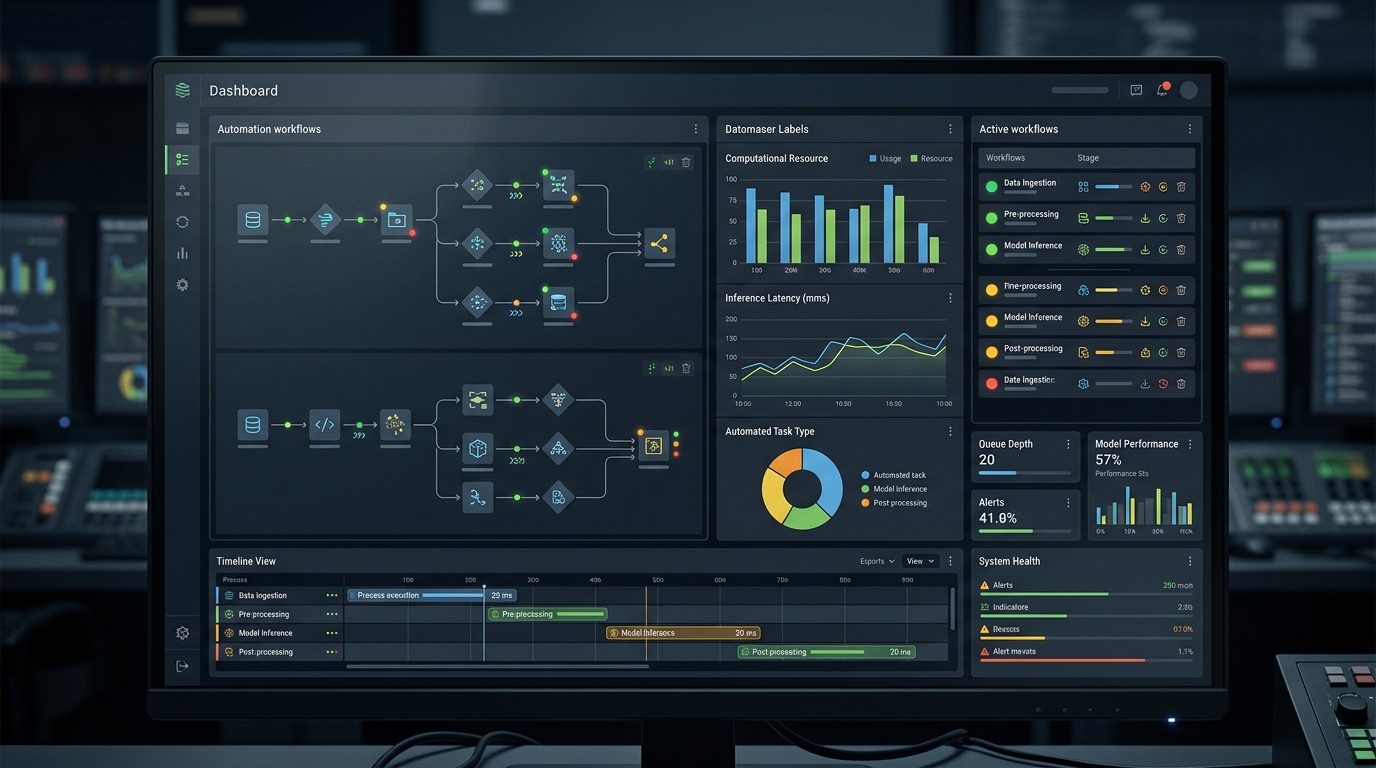
A dashboard view illustrating the real-time monitoring and management of local AI model automation workflows for internal operations.
Because the models run locally, these automated processes can trigger continuously without incurring per-token costs. Sysadmins can script cron jobs or integrate AI steps into CI/CD pipelines, allowing the LLM to act as a localized, intelligent agent reviewing code commits or configuration changes before deployment.
Open Source LLM Deployment Best Practices
When deploying open-source models (like Llama 3 or Mistral) internally, consider the following best practices:
- Quantization: Always utilize quantized models (e.g., GGUF format) to drastically reduce memory footprint with minimal loss in reasoning capability.
- API Standardization: Ensure your local server exposes an OpenAI-compatible API. This allows existing tools and scripts built for cloud APIs to transition to your local models by simply swapping the base URL.
- Monitoring: Treat your LLM server like any other critical infrastructure. Monitor VRAM usage, inference times, and queue lengths.
For teams looking to scale their deployments, learning how to run multiple local LLMs simultaneously becomes essential for handling varied workloads without resource contention.
Next Steps: Implementing Your Local AI Strategy
Building a self-hosted AI stack is a strategic investment in privacy and operational efficiency. Begin by auditing the hardware currently available to your team. Next, select a lightweight model and deploy it via Ollama to establish a proof of concept. Once the initial endpoint is stable, gradually integrate it into non-critical automation scripts to test reliability and latency.
If you are ready to scale these efforts across your organization without the overhead of manual infrastructure management, explore our enterprise AI solutions tailored for privacy-first operations teams.
Frequently Asked Questions (FAQ)
What is the minimum hardware required for a self-hosted AI stack?
For basic 7B parameter models, a single machine with at least 8GB of VRAM (or a Mac with 16GB of unified memory) is sufficient for a proof of concept.
Is a self-hosted AI stack cheaper than using cloud APIs?
It depends on volume. For low-volume tasks, cloud APIs are often cheaper. However, for continuous, high-volume automation, the fixed cost of local hardware quickly becomes more economical than paying per token.
Can I run multiple models on the same server?
Yes, provided you have sufficient VRAM to hold the active weights of all models, or you utilize frameworks that efficiently swap models in and out of memory based on request queues.