
Replicate API Tutorial: Rapid Prototyping to Production
Replicate is often used by developers who want to test AI models quickly without managing GPU infrastructure. That makes it useful for prototypes, internal tools, and early product experiments. But the real question is how to move from a quick script to a reliable production workflow.
This Replicate API tutorial shows how to think about Replicate API Python implementation, rapid AI prototyping with Replicate, production architecture, and webhook handling for long-running tasks.
The examples are intentionally generic because model IDs, versions, pricing, and API behavior can change. Always verify provider-specific details in Replicate’s official documentation before deploying. Where exact provider claims would be required, this article uses implementation patterns rather than fabricated benchmarks. (Replicate’s official documentation)

A conceptual illustration of Python code for authenticating with the Replicate API, emphasizing secure token management.
How to Use Replicate for AI Workflows
Replicate provides API access to AI models so developers can run inference without hosting the model themselves. In practical terms, you send an input payload to a model endpoint, receive a prediction or job reference, and use the result in your application.
Replicate can fit into many AI workflows, including:
- Image generation or transformation
- Text generation or summarization
- Audio or video processing
- Embedding or classification workflows
- Internal AI tools and product prototypes
- Multi-step pipelines where one model output feeds another step
A typical workflow looks like this:
- User submits text, image, audio, or another input.
- Your backend validates the request.
- Your backend sends a model request to Replicate.
- Replicate runs the model.
- Your application receives the result directly or through an asynchronous completion pattern.
- Your backend validates and stores the output.
- The final result is returned to the user or sent to another system.
For simple experiments, you may call the API directly from a local script. For production, place Replicate behind your own backend so you can protect credentials, validate requests, enforce user permissions, monitor cost, and handle failures.
If your Replicate workflow is one step in a broader model chain, you may also want to orchestrate multi-model pipelines instead of wiring every call directly into application routes.
Rapid AI Prototyping with Replicate
Rapid AI prototyping with Replicate is about reducing setup time. Instead of configuring infrastructure, you can focus on whether a model’s output is useful for your product.
During prototyping, evaluate the model against realistic examples:
- What inputs represent your actual users?
- What outputs are acceptable, unacceptable, or ambiguous?
- Does the model require preprocessing?
- Does the output need post-processing or validation?
- How long does the workflow feel from a user perspective?
- What failure modes appear during repeated tests?
Avoid testing only with clean, ideal inputs. Include malformed files, long prompts, empty fields, unsupported formats, edge-case languages, and adversarial instructions where relevant.
A prototype should produce more than a working demo. It should produce a decision record:
- Which model did you test?
- Which inputs performed well?
- Which inputs failed?
- What prompt or parameter settings were used?
- What validation logic is required?
- What operational risks need to be addressed before production?
This record becomes the foundation for a production implementation.
Step-by-Step Replicate API Python Implementation
The Python implementation pattern is straightforward: configure authentication, prepare inputs, call the model, handle the response, and wrap the call with production safeguards.
The exact package, method names, and model references should be confirmed against Replicate’s current documentation. The structure below shows the application design pattern rather than asserting provider-specific API syntax.
Authentication and Setup
Keep API tokens out of source code. Use environment variables or a managed secrets system.
A typical setup flow looks like this:
- Create or locate your Replicate API token.
- Store it in an environment variable such as
REPLICATE_API_TOKEN. - Load the token in your backend process.
- Initialize your API client or HTTP wrapper.
- Fail fast if the token is missing in non-local environments.
In production, authentication setup should also include:
- Secret rotation procedures
- Separate tokens or projects for development and production when supported
- Restricted access to deployment environments
- Logs that never print raw tokens
- Alerts for authentication failures

Illustrative representation of Python code demonstrating secure environment-based API token loading and client initialization for Replicate.
A clean implementation usually wraps Replicate access in a service class or module. That wrapper should be the only part of your application that knows the provider-specific request format.
Running Your First Image/Text Model
When running your first model, start with a minimal input that matches the model’s documented schema. Then add validation and observability before integrating it into the product.
A practical execution flow:
- Validate input type, size, and required fields.
- Create a workflow or prediction record in your database.
- Submit the model request.
- Record the provider job ID or response metadata.
- Wait for the result if the job is synchronous, or return a pending status if asynchronous.
- Normalize the model output into your own internal format.
- Validate the final output.
- Store the result and return it to the user.
For text models, output validation may check for required fields, JSON structure, length limits, or policy constraints. For image models, validation may check whether an asset URL exists, whether the file can be fetched, and whether the output meets downstream requirements.
The most important production habit is normalization. Do not let raw provider responses spread throughout your codebase. Convert them into a stable internal object such as:
statusprovider_job_idmodel_referenceoutput_typeoutput_urloroutput_texterror_typelatency_mscreated_atcompleted_at
This makes your application easier to test, monitor, and change.
Scaling the Replicate API for Production Use
Replicate API production use requires more than increasing traffic. You need controls around reliability, latency, cost, and user experience.
Focus on these production patterns.
Use background jobs for long-running work
Do not keep user-facing HTTP requests open indefinitely while waiting for model inference. Submit the job, store the status, and return a tracking ID. Let the frontend poll your backend or receive an event when the work completes.
Add idempotency
If a user retries an upload or refreshes during a timeout, your backend should avoid creating duplicate expensive model jobs. Use request IDs or content hashes where appropriate.
Classify errors
Separate bad input, authentication failure, provider timeout, rate limit, unavailable model, and malformed output. Each category should produce a different response and operational action.
Manage rate limits and concurrency
Use queues, worker concurrency limits, and backpressure so spikes do not overwhelm the provider or your own application. For broader reliability patterns, see automating best practices for API reliability.
Track cost signals
Log the model used, number of attempts, workflow duration, and any provider metadata useful for cost estimation. Use official pricing pages placeholders in internal planning documents until exact pricing data is pulled from provider billing or official pricing pages.
Version your model configuration
Model references, parameters, prompts, and post-processing rules should be versioned. If output behavior changes, you need to know what changed.
Production readiness is ultimately about control. Your application should remain predictable even when an external model is slow, unavailable, or returns something unexpected.
Handling Webhooks and Long-Running Tasks
Many AI workloads are not ideal for synchronous request-response flows. Image, video, and large model jobs may take longer than a normal web request should stay open. Webhooks help by allowing the provider to notify your backend when a job changes status or completes.
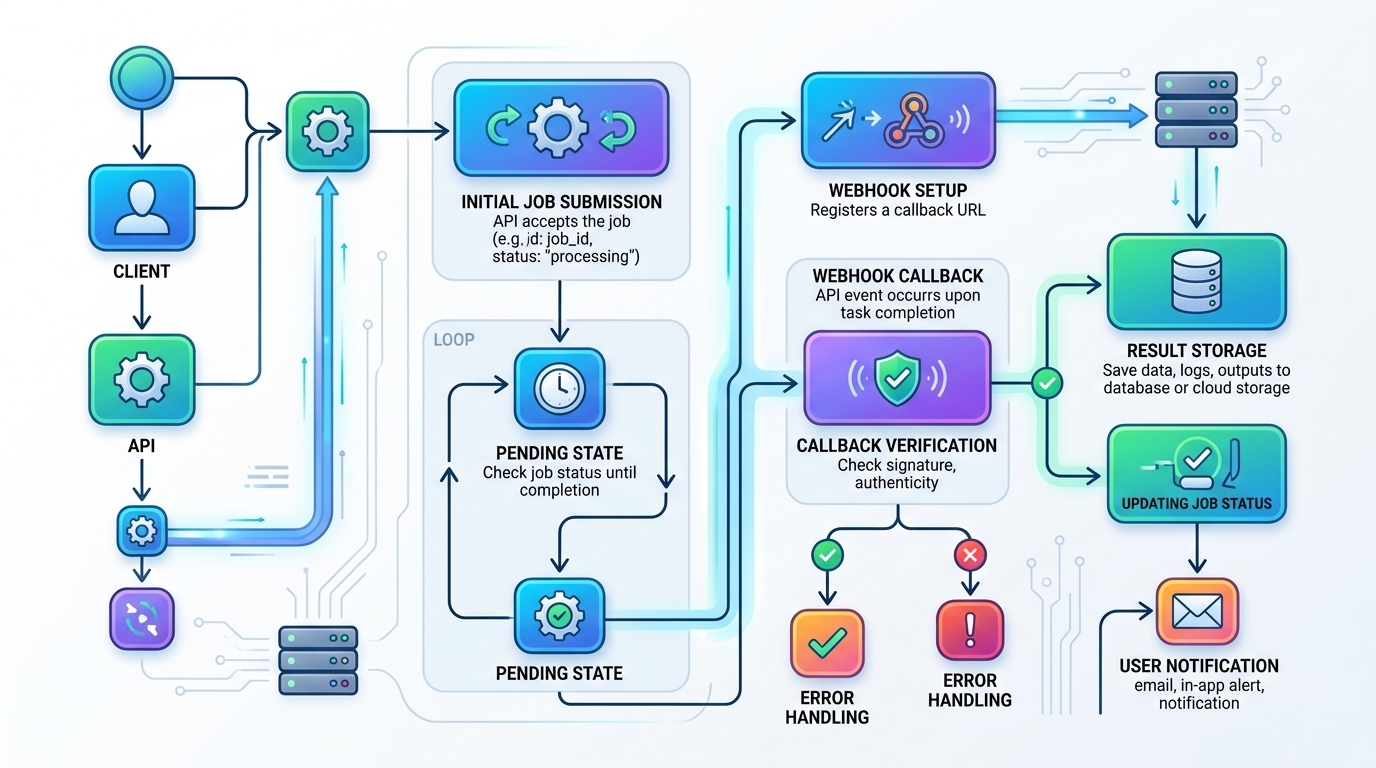
A flowchart detailing the asynchronous workflow for long-running tasks using webhooks in the Replicate API, from initial job submission to final user notification.
A robust webhook flow looks like this:
- Your backend receives a user request.
- Your backend validates the input and creates a local job record.
- Your backend submits the job to Replicate with callback information if supported.
- Your backend stores the provider job ID and marks the job as pending.
- Replicate sends a webhook when the job updates or completes.
- Your webhook endpoint verifies the callback where verification mechanisms are available.
- Your backend fetches or validates the final result.
- Your backend updates the local job record.
- The user interface receives the completed result through polling, realtime updates, or notification.
Webhook endpoints should be idempotent. Providers may retry callbacks, and network failures can cause duplicate events. If the same completion event arrives twice, your system should update the record once and ignore the duplicate safely.
Also plan for missing webhooks. A production system should have a reconciliation job that checks pending jobs after a threshold and updates stale records. Webhooks are useful, but they should not be the only path to completion.
If you are comparing Replicate with other hosted inference options before committing, see how Replicate compares to Hugging Face.
FAQ
What is Replicate used for in AI workflows?
Replicate is commonly used to run hosted AI models through an API so developers can prototype and integrate model inference without managing model infrastructure directly.
Should I call the Replicate API from the frontend?
For production applications, call Replicate from your backend. This protects API credentials, allows request validation, and gives you control over logging, rate limits, user permissions, and error handling.
How do I handle long-running Replicate jobs?
Use an asynchronous pattern. Create a local job record, submit the model request, store the provider job ID, and update the job when a webhook or reconciliation process confirms completion.
What makes a Replicate prototype production-ready?
A production-ready workflow includes validation, authentication controls, background jobs, idempotency, error classification, monitoring, cost tracking, webhook handling, and versioned model configuration.