
Building Internal Automation Tools with Local LLMs
In 2026, enterprise IT and DevOps teams are facing a critical dilemma: the demand for AI-driven automation is higher than ever, but the risks of piping sensitive internal data through third-party cloud APIs are simply unacceptable for many organizations. The solution lies in using a local LLM for internal tools.
By deploying internal automation with local models, engineering teams can harness the reasoning power of generative AI without compromising data sovereignty. This guide explores the architecture and implementation of self-hosted LLM automation, focusing on practical, secure, and cost-effective solutions for modern engineering teams.
The Case for LLM Automation Without Cloud
For years, developers have defaulted to cloud-based APIs for AI features. However, when building tooling meant exclusively for internal use—such as log analyzers, internal documentation assistants, or CI/CD troubleshooting bots—cloud dependency becomes a liability.
LLM automation without cloud ensures that your proprietary source code, customer support tickets, and strategic internal communications never leave your secure network perimeter. Furthermore, internal tools often require high-volume, repetitive inference tasks. Running these tasks against a paid cloud endpoint can quickly exhaust budgets, whereas self-hosted infrastructure allows for unlimited queries at a fixed hardware cost.
Key Benefits of Self-Hosted LLM Automation
Transitioning to a self-hosted architecture provides several distinct advantages that appeal directly to technical leadership and security teams.
Data Privacy and Security
The most compelling reason for internal automation with local models is strict data privacy. When an LLM is hosted on your own virtual private cloud (VPC) or bare-metal servers, you retain complete chain-of-custody over your data. This is non-negotiable for industries operating under strict regulatory frameworks like HIPAA, SOC2, or GDPR. You cannot accidentally leak API keys or expose customer data to third-party model training pipelines if the network is entirely isolated.
Cost Control and Predictable Latency
Cloud LLM pricing models are inherently variable, based on token counts that fluctuate wildly depending on usage. Self-hosted setups shift this from an unpredictable operational expense (OpEx) to a predictable capital expense (CapEx).
Additionally, internal tools often require rapid, chained inferences. By keeping the compute adjacent to your databases, you eliminate the network latency associated with external API calls, resulting in snappier, more responsive automation workflows.
Internal Automation with Local Models in Practice
How do you actually build this? The ecosystem has matured significantly, and utilizing platforms like Ollama makes deployment trivial.
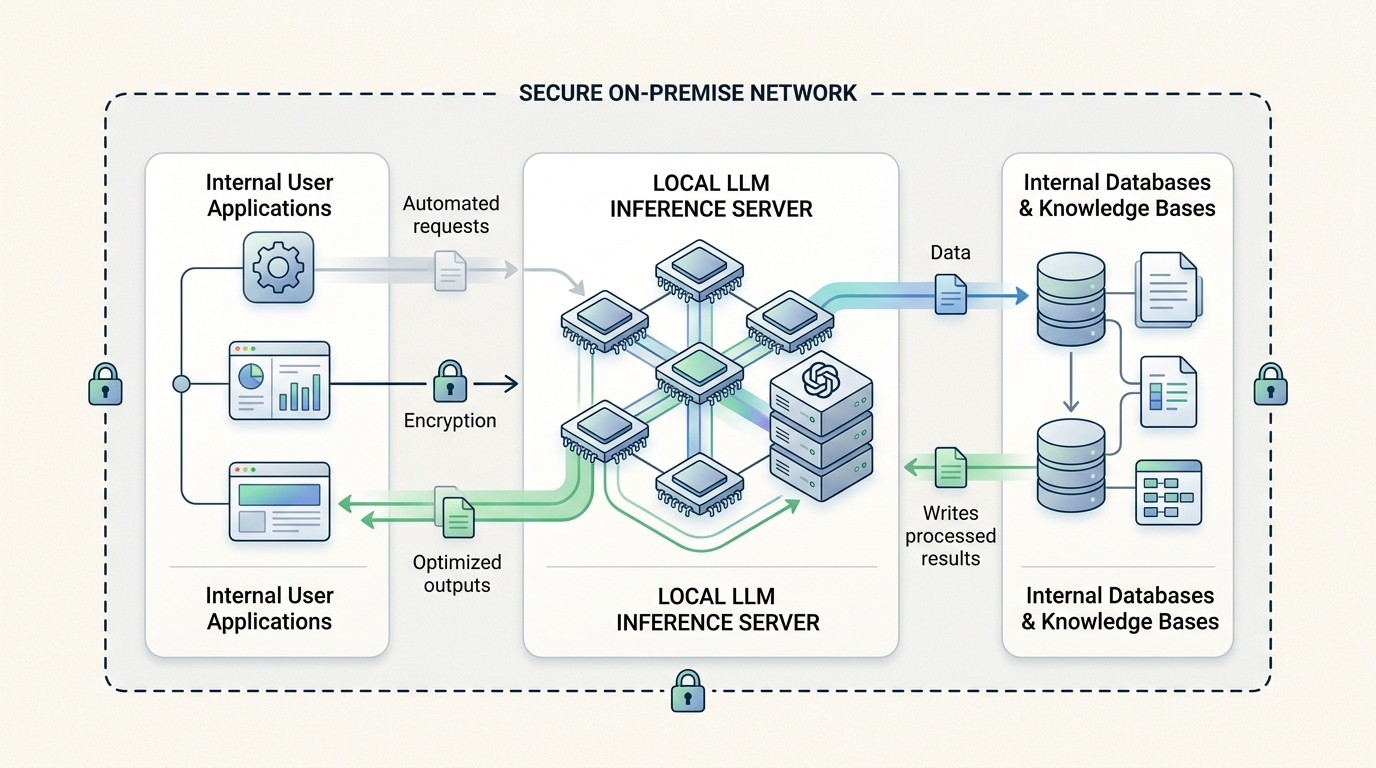
An architectural overview of internal automation leveraging local LLMs, highlighting secure data flow within an organization’s private network.
Ollama API Integration for Custom Tooling
The easiest way to stand up local infrastructure is via Ollama. It acts as a seamless inference server that can run containerized alongside your existing internal applications.
Ollama API integration is straightforward because it provides a RESTful interface that mimics common cloud provider endpoints. If you are building a custom Slack bot to summarize Jira tickets, you simply point your bot’s HTTP requests to your internal server’s IP address on port 11434.

Visualizing the seamless integration of Ollama’s local API into custom internal applications for secure, on-premise LLM functionality.
import requests

def summarize_error_log(log_data):
    response = requests.post('http://internal-ai-server:11434/api/generate', json={
        "model": "llama3",
        "prompt": f"Summarize this error log and suggest a fix: {log_data}",
        "stream": False
    })
    return response.json()['response']
For a comprehensive walkthrough on getting the server running, refer to our guide on how to run local LLMs with Ollama.
Setting up Ollama Local Automation Workflows
Once the API is accessible, you can wire it into your CI/CD pipelines. Ollama local automation can be used to automatically review pull requests, flag potential security vulnerabilities in commits, or generate release notes based on git diffs.
Because the inference is free, you can afford to have the LLM evaluate every single commit, rather than selectively batching them to save money. If you encounter issues with these workflows breaking down, it is crucial to understand debugging production AI agent failures in internal tools to maintain reliability.
Scaling Your Private AI Infrastructure
Starting with a single local model is easy, but scaling requires deliberate architecture patterns for internal automation. As internal adoption grows, you will need to implement:
- Load Balancing: Distributing inference requests across multiple GPU nodes to handle concurrent internal users.
- Model Caching: Storing frequent queries in a fast Redis cache to bypass the LLM entirely for repeated tasks.
- Dedicated Embedding Servers: Separating the text-generation models from the embedding models used for internal search (RAG) to optimize hardware utilization.
By investing in self-hosted LLM automation today, engineering teams build a secure, scalable foundation that accelerates internal velocity without sacrificing control over their most valuable asset: their data.
Frequently Asked Questions
Why use a local LLM instead of cloud APIs for internal tools?
Local LLMs guarantee data privacy by keeping sensitive internal data—like source code, customer logs, and internal communications—entirely within your secure network. They also offer predictable, fixed hardware costs compared to the variable per-token pricing of cloud providers.
How difficult is it to integrate Ollama into existing internal applications?
It is extremely straightforward. Ollama exposes a standard REST API that can be queried using simple HTTP requests from any programming language, allowing developers to easily swap out cloud endpoints for their local server IP.
What hardware is required for self-hosted LLM automation?
For internal tools, performance depends on the model size. Small to medium models (like Llama 3 8B or Mistral 7B) require a single consumer-grade GPU (such as an NVIDIA RTX 3090 or 4090 with 24GB VRAM) or a modern Apple Silicon Mac, making the hardware investment relatively low.