
How to Build an Automated Video Production Pipeline
Content teams increasingly need to create more video assets from the same amount of source material. A webinar becomes short clips. A product demo becomes social cuts. A training recording becomes chaptered lessons. A campaign needs versions for multiple channels. When every cut, resize, caption, export, and file handoff is manual, production becomes difficult to scale.
An automated video production pipeline uses Python and media tools to standardize repetitive editing and processing tasks. It does not remove creative direction. Instead, it gives producers and content teams a repeatable system for handling predictable work.
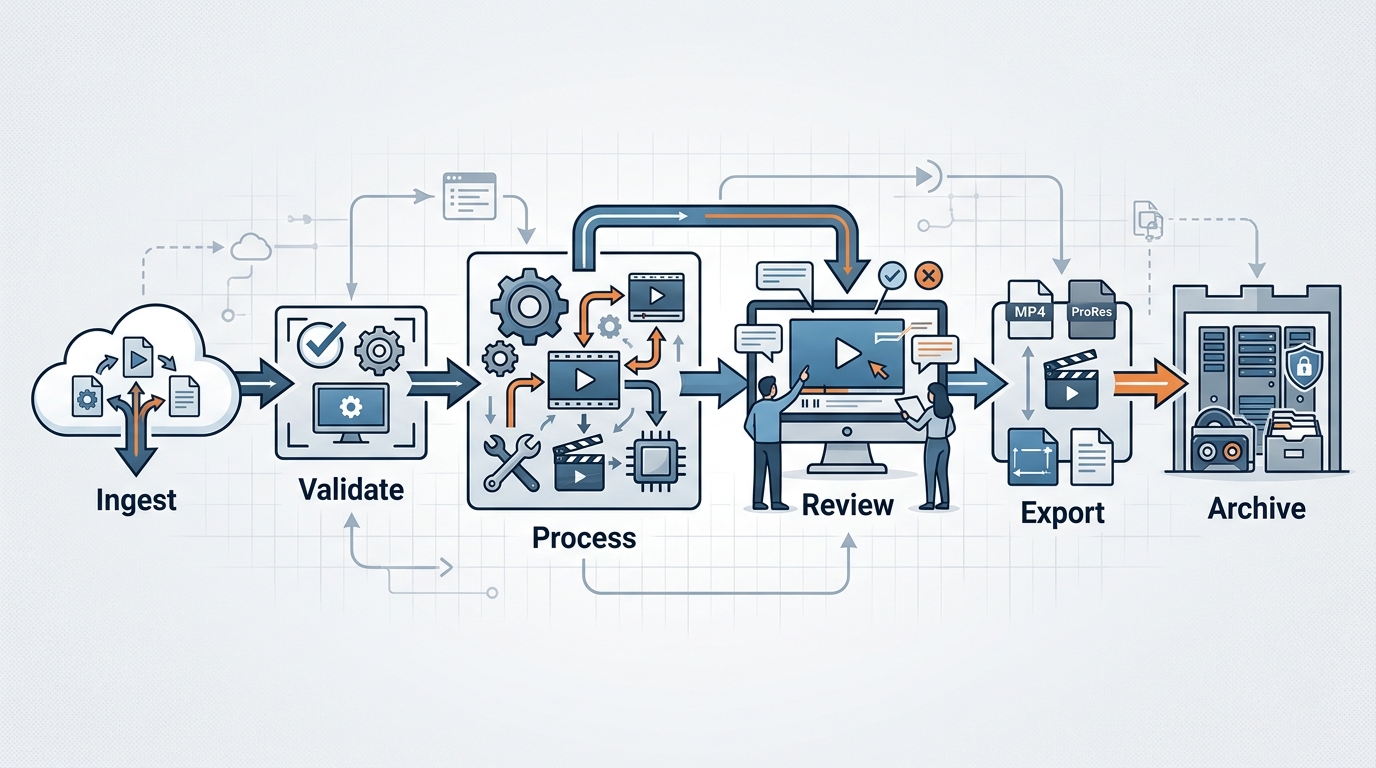
An automated video production pipeline streamlines content creation from ingest to archive.
The Need for Video Editing Automation for Content Teams
Video production often contains a mix of creative decisions and mechanical tasks. Creative decisions include messaging, pacing, storytelling, and visual style. Mechanical tasks include trimming files, resizing aspect ratios, adding standard intro or outro clips, extracting audio, generating thumbnails, converting formats, and moving files into the right folders.
Automation is most valuable for the mechanical tasks. These tasks are important, but they do not always require a person to perform them one by one.
Common use cases for video editing automation for content teams include:
- Batch converting source files to a standard format
- Cutting clips based on timestamps
- Adding intro and outro assets
- Resizing videos for different channels
- Extracting audio for transcription workflows
- Burning in captions when required
- Creating preview clips
- Organizing final exports by campaign or channel
This is where python media automation becomes useful. Python can coordinate file discovery, metadata, processing commands, naming conventions, and output routing. Tools such as MoviePy and FFmpeg can handle many media operations, while Python orchestrates the workflow.
If your team is also using generative tools, this pipeline can connect with AI video generation workflows. Generated assets still need editing, formatting, quality checks, and delivery.
How to Build a Video Pipeline with Python
To build video pipeline with Python successfully, start with the workflow rather than the code. Define what enters the pipeline, what transformations happen, and what outputs should be created.
A typical pipeline has these stages:
- Ingest: Locate source videos, audio, images, captions, or metadata files.
- Validate: Confirm required files exist and use expected naming conventions.
- Process: Trim, resize, combine, transcode, watermark, or caption assets.
- Review: Create preview outputs or logs for human quality checks.
- Export: Save final versions in the required formats.
- Archive: Move source and final files into organized folders.
A basic folder structure might look like this:
video_pipeline/
  input/
  assets/
    intros/
    outros/
    overlays/
  metadata/
  work/
  output/
    social/
    web/
    archive/
  logs/
  scripts/
The metadata folder can store CSV or JSON files that define cuts, titles, output names, or channel versions. Metadata-driven automation is easier to maintain because producers can update a structured file without changing Python code.
Python Automate Video Processing Basics
Before automating editing decisions, start with basic processing. For example, you can scan a folder for video files and create standardized output names.
from pathlib import Path

input_folder = Path("input")
output_folder = Path("output/web")
output_folder.mkdir(parents=True, exist_ok=True)

video_files = list(input_folder.glob("*.mp4"))

if not video_files:
    raise FileNotFoundError("No MP4 files found in the input folder.")

for video in video_files:
    output_path = output_folder / f"{video.stem}_web.mp4"
    print(f"Would process {video} -> {output_path}")
This small script does not edit video yet, but it establishes the pattern: discover files, define outputs, and loop through work items.
Next, use Python to call FFmpeg for a simple conversion. FFmpeg must be installed and available in your environment.
import subprocess
from pathlib import Path

input_folder = Path("input")
output_folder = Path("output/web")
output_folder.mkdir(parents=True, exist_ok=True)

for video in input_folder.glob("*.mp4"):
    output_path = output_folder / f"{video.stem}_720p.mp4"

    command = [
        "ffmpeg",
        "-y",
        "-i", str(video),
        "-vf", "scale=-2:720",
        "-c:v", "libx264",
        "-c:a", "aac",
        str(output_path)
    ]

    subprocess.run(command, check=True)
This is a foundation for python automate video processing workflows. You can extend it with bitrate settings, audio normalization, thumbnail extraction, or caption handling based on your requirements.
Writing Your First Python Video Automation Script
A first python video automation script should do one useful job end to end. For example: read a CSV of clip timestamps, cut clips from a source video, and export each clip with a standard name.
Example metadata file:
source_file,start,end,output_name
webinar.mp4,00:01:10,00:02:05,clip_intro.mp4
webinar.mp4,00:05:30,00:06:45,clip_feature.mp4
Python script:
import csv
import subprocess
from pathlib import Path

input_folder = Path("input")
output_folder = Path("output/social")
metadata_file = Path("metadata/clips.csv")
output_folder.mkdir(parents=True, exist_ok=True)

with metadata_file.open(newline="", encoding="utf-8") as file:
    reader = csv.DictReader(file)

    for row in reader:
        source_path = input_folder / row["source_file"]
        output_path = output_folder / row["output_name"]

        if not source_path.exists():
            raise FileNotFoundError(f"Missing source file: {source_path}")

        command = [
            "ffmpeg",
            "-y",
            "-i", str(source_path),
            "-ss", row["start"],
            "-to", row["end"],
            "-c", "copy",
            str(output_path)
        ]

        subprocess.run(command, check=True)
This script lets a producer define clips in a spreadsheet-like metadata file, while Python and FFmpeg perform the repetitive cutting.
For more editing-specific examples, use a MoviePy automation tutorial to compare Python-native editing patterns with FFmpeg command orchestration.
Scaling Your Content Automation Pipeline
A prototype script can save time, but a scalable content automation pipeline Python workflow needs reliability, documentation, and review.
Start by adding logging:
import logging

logging.basicConfig(
    filename="logs/video_pipeline.log",
    level=logging.INFO,
    format="%(asctime)s %(levelname)s %(message)s"
)

logging.info("Video pipeline started")
Log source files, output files, processing steps, and failures. Logs make it easier to diagnose pipeline issues without guessing what happened.
Next, add validation. Before processing, check:
- Required source files exist
- Metadata files include required columns
- Output folders are writable
- File names follow team conventions
- Intro, outro, caption, or overlay assets are available when needed
For quality control, create review outputs before final publishing. For example, you might export low-resolution previews to a review folder, then only generate final files after approval.
A scalable pipeline may include:
- Metadata-driven processing: Editors define clips and versions in CSV or JSON.
- Reusable templates: Standard intros, outros, overlays, and caption styles.
- Batch processing: Multiple assets processed in one run.
- Human review gates: Producers approve previews before final export.
- Error reporting: Failures are logged clearly and surfaced to the owner.
- Archive rules: Source files and final outputs are stored consistently.
Avoid automating unclear creative decisions too early. If every video requires unique judgment, automation should focus on file handling and export steps. If a task follows a consistent rule, it is a better candidate for automation.
For teams managing many files beyond video, the same principles apply to file processing workflows: define inputs, validate structure, process consistently, and create auditable outputs.
A mature automated video production pipeline often becomes a shared operating system for the content team. Producers define the creative intent, automation handles repetitive processing, and reviewers focus on quality instead of mechanics.
FAQ
How do I build an automated video production pipeline?
Map your video workflow, define inputs and outputs, use Python to orchestrate file handling, use tools like FFmpeg or MoviePy for processing, add validation and logging, and include human review gates.
What can Python automate in video editing?
Python can automate file discovery, trimming, resizing, transcoding, audio extraction, thumbnail generation, caption processing, naming, folder routing, and batch exports.
Should I use MoviePy or FFmpeg for video automation?
MoviePy is convenient for Python-native editing workflows. FFmpeg is powerful for command-line media processing. Many teams use Python to orchestrate FFmpeg commands.
What is a metadata-driven video pipeline?
It is a workflow where cuts, timestamps, titles, output names, and versions are defined in structured files such as CSV or JSON, then processed automatically by Python.
Do automated video pipelines still need human review?
Yes. Automation can handle repetitive processing, but humans should review messaging, quality, brand fit, captions, and final publishing readiness.