
How to Build an Automated Asset Creation Workflow
An automated asset creation workflow helps marketing teams produce visual variations without routing every resize, background swap, product scene, or campaign derivative through a fully manual creative process. For technical marketing teams, the opportunity is not just faster generation. It is building a repeatable system that connects campaign inputs to approved, usable assets.
The strongest workflows combine AI generation, prompt templates, product data, brand rules, review gates, and publishing integrations. That lets creative teams define the system while marketing engineers automate the repetitive production layer.
This guide explains how to structure automated visual asset creation for marketing use cases, especially when product imagery, campaign variation, and channel-specific outputs create recurring bottlenecks.

This flowchart illustrates the key stages of an automated asset creation workflow, from structured intake to final publishing, highlighting the integration of AI generation and human review.
The Bottleneck in Manual Creative Asset Production
Manual creative production is effective for strategic concepts, major campaigns, and high-value brand moments. It becomes inefficient when teams need many variations of a known asset pattern.
Common bottlenecks include:
- Repeating the same layout across many products.
- Creating social, email, landing page, and ad variants from one concept.
- Swapping backgrounds or scenes for seasonal campaigns.
- Producing localized or audience-specific versions.
- Waiting for small derivative requests to fit into design capacity.
- Rebuilding assets because naming, metadata, or source files were not organized.
The problem is not that creative teams work slowly. The problem is that production requests often mix strategic creative decisions with repetitive formatting tasks. An automated workflow separates those concerns.
Creative specialists should define campaign direction, brand standards, templates, and approval rules. Automation should handle structured generation, resizing, naming, export, and routing.
A useful first question is: “Which asset requests are repetitive enough to template?” If the answer is clear, automation can help.
Core Elements of an AI Image Pipeline for Marketing
An AI image pipeline for marketing needs to connect business context with generation logic. Prompting alone is not enough. The workflow should understand products, campaigns, channels, formats, and approval states.
Core elements include:
- Request intake: A structured form, spreadsheet, product feed, or campaign brief.
- Template selection: Asset type, layout, background style, aspect ratio, and channel.
- Prompt construction: Brand-safe prompt templates with controlled variables.
- Generation backend: Cloud API, dedicated GPU worker, or internal model service.
- Post-processing: Cropping, resizing, compression, background handling, overlays, and format conversion.
- Metadata capture: Product ID, campaign ID, prompt, model, output path, reviewer, and approval state.
- Review workflow: Human QA for brand fit, product accuracy, and campaign readiness.
- Publishing integration: DAM, CMS, ad platform staging area, or shared asset library.
This is where engineering an AI image pipeline for marketing becomes important. If the system is designed only as a generation tool, it will not solve operational friction. If it is designed as a pipeline, it can support asset lifecycle from request to reuse.
A marketing workflow should also define what automation is not allowed to do. For example, the system may generate draft assets but require approval before export. Or it may produce internal mockups while production imagery requires stricter QA.
Implementing AI Product Image Automation at Scale
AI product image automation works best when inputs are structured. Product name, category, color, materials, target audience, campaign theme, and required format should be fields, not buried in freeform notes.
A basic workflow might look like this:
- A marketer uploads a CSV of products and campaign variables.
- The system validates required fields.
- Each record is mapped to an approved prompt template.
- Image generation jobs are submitted in batches.
- Outputs are post-processed into channel-specific formats.
- Metadata is saved for each asset.
- Reviewers approve, reject, or request regeneration.
- Approved assets are exported to the correct destination.
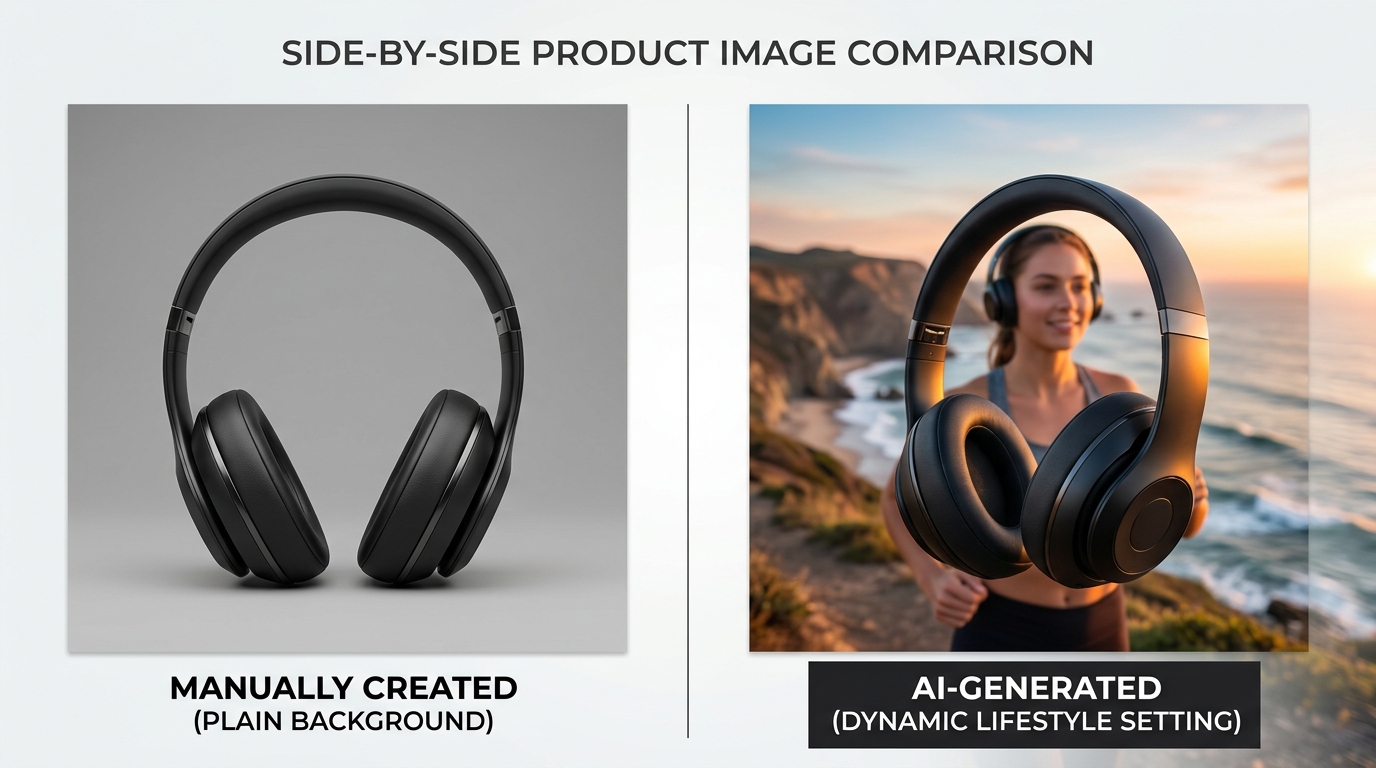
A side-by-side comparison showcasing how AI product image automation can transform a basic product shot into a dynamic, lifestyle-oriented visual, enhancing creative output at scale.
For implementation, many teams begin by writing scripts for image generation API automation. A script can read product data, call an API, save files, and generate metadata quickly. As volume grows, that script can become a queue worker or be integrated into a larger operations platform.
Dynamic Prompting and Brand Templating
Dynamic prompting uses structured variables to generate consistent prompts at scale. Instead of writing a new prompt for every product, the system fills a template.
Example template structure:
Create a {channel} marketing image for {product_name}, a {product_category}.
Use a {background_style} setting with {lighting_style} lighting.
Follow the brand direction: {brand_style}.
The composition should support {campaign_goal}.
Avoid: incorrect product details, extra logos, distorted text, off-brand colors.
Variables might include:
- Product name.
- Product category.
- Campaign theme.
- Channel.
- Aspect ratio.
- Background style.
- Lighting style.
- Brand palette.
- Audience segment.
The goal is controlled flexibility. Marketing operators can change approved variables without inventing prompts from scratch. Creative leads can own the templates and guardrails.
Brand templating should define:
- Approved visual styles.
- Prohibited styles or elements.
- Composition rules.
- Background options.
- Color and lighting guidance.
- Product accuracy requirements.
- Channel-specific constraints.
This helps prevent the workflow from producing a random collection of images that do not look connected.
Integrating with DAMs and CMS Platforms
Automation becomes much more valuable when generated assets land where teams already work. Exporting images to a local folder is fine for a prototype. Production workflows should integrate with asset systems.
Common destinations include:
- Digital asset management platforms.
- Content management systems.
- Product information management systems.
- Shared cloud storage.
- Ad creative staging folders.
- Internal review tools.
A DAM or CMS integration should preserve metadata. At minimum, include product ID, campaign ID, asset type, generation date, approval state, and usage notes. If the platform supports custom fields, store prompt template ID and model profile as well.
Publishing should be gated. Generated does not mean approved. A safe workflow keeps generated drafts separate from approved assets until QA is complete.
Measuring ROI on Automated Visual Asset Creation
Measuring ROI on automated visual asset creation should focus on operational improvements, not unsupported claims about creative performance. Use your own baseline data.
Useful metrics include:
- Time from request to first draft.
- Time from request to approved asset.
- Number of variants produced per campaign.
- Percentage of assets approved without regeneration.
- Designer hours spent on repetitive derivative work.
- Cost per approved asset based on internal accounting.
- Number of campaigns supported with the same creative capacity.
- Reuse rate of templates and approved assets.
Avoid measuring only output volume. Generating more assets is not automatically better. The workflow should produce usable assets with clear approval criteria.
A simple ROI model can compare the old process with the new one:
- Manual production steps and average handling time.
- Automated steps and human review time.
- Infrastructure or API costs.
- Engineering maintenance time.
- Creative time shifted from derivatives to higher-value work.
The best early indicator is often cycle time. If the team can move from campaign input to reviewable drafts faster while maintaining brand control, the workflow is doing useful work.
Structuring the Tech Stack for Your Marketing Engineers
A practical tech stack should match your team’s maturity. Do not start with a complex platform if a script and review folder will prove the workflow. But do design with clean boundaries so the system can grow.
A starter stack may include:
- Spreadsheet or form for structured intake.
- Prompt templates in version control.
- Python script for generation and downloads.
- Cloud inference API.
- Shared storage for outputs.
- Metadata file or lightweight database.
- Manual review board or DAM folder.
A more mature stack may include:
- Internal request UI.
- Queue-based job processing.
- Multiple inference backends.
- DAM/CMS integrations.
- Metadata database.
- Approval workflow.
- Monitoring and failure alerts.
- Template management and versioning.
Some teams may use hosted inference APIs first, then add dedicated GPU capacity or integrating a RunPod image generation workflow for custom processing. Others may keep the generation backend simple and invest more in review, metadata, and publishing.
The right stack should let marketing engineers answer:
- What asset was requested?
- Which template generated it?
- Which product or campaign does it belong to?
- Where is the approved version?
- Can we regenerate it with controlled changes?
- Which outputs are safe to publish?
When the workflow can answer those questions consistently, it becomes an operational asset rather than a novelty.
FAQ
What is an automated asset creation workflow?
An automated asset creation workflow is a system that uses structured inputs, templates, AI generation, post-processing, metadata, and review steps to produce marketing assets more efficiently.
How does AI product image automation work?
AI product image automation maps product and campaign data into approved prompt templates, generates image variants, processes outputs, stores metadata, and routes assets through review before publishing.
Should marketing teams automate all creative production?
No. Automation is best for repeatable asset patterns and derivatives. Strategic concepts, major brand decisions, and sensitive campaign work still need strong creative direction and human review.
What should be included in marketing asset metadata?
Useful metadata includes product ID, campaign ID, asset type, prompt template ID, model profile, generation date, output path, approval state, and reviewer notes.
What is the best first asset type to automate?
Start with a repetitive, structured asset type such as product tiles, background variants, social ad derivatives, or campaign image crops. Choose a workflow with clear inputs and approval criteria.