
How to Give AI Agents File System Access Securely
Sooner or later, every useful AI agent needs to touch the file system — reading configs, writing reports, editing code, processing data drops. And the moment you grant that access, you’ve created a security decision that deserves real engineering attention. An agent with unrestricted file access can read secrets, overwrite production configs, or delete things it misunderstood.
This guide covers AI agent file system access safe setup end to end: why permissions matter, sandboxing techniques that actually contain an agent, permissions best practices, and the guardrails that catch mistakes before they become incidents.
Why AI Agent Permissions Matter
The core issue is simple: an AI agent’s behavior is probabilistic, but file system damage is permanent. A script does what it’s written to do. An agent interprets instructions — and interpretation can go wrong in ways you didn’t anticipate:
- Misread intent. Asked to “clean up the logs directory,” an agent might interpret the scope more broadly than you meant.
- Prompt injection. If an agent reads files whose contents you don’t control (user uploads, scraped data, third-party docs), those contents can contain instructions that manipulate the agent’s behavior. A file the agent reads is input to the model — treat it as untrusted.
- Secret exposure. An agent with read access to
~/.aws/,.envfiles, or SSH keys can leak those values into logs, model context, or outputs. - Cascade effects. Agents chain actions. One wrong file write early in a run can compound through every subsequent step.
The goal isn’t to deny agents file access — they need it to be useful. The goal is to give an AI agent access to files securely: exactly the files it needs, in the modes it needs, with everything else invisible or read-only.
If you’re still deciding where agents fit in your stack, our overview of AI agents ops teams real use cases 2026 covers the workflows where file access typically becomes necessary.
AI Agent File System Sandboxing Techniques
AI agent file system sandboxing means running the agent in an environment where, even if it behaves incorrectly, it physically cannot touch anything outside its designated workspace. Defense should not depend on the agent following instructions.
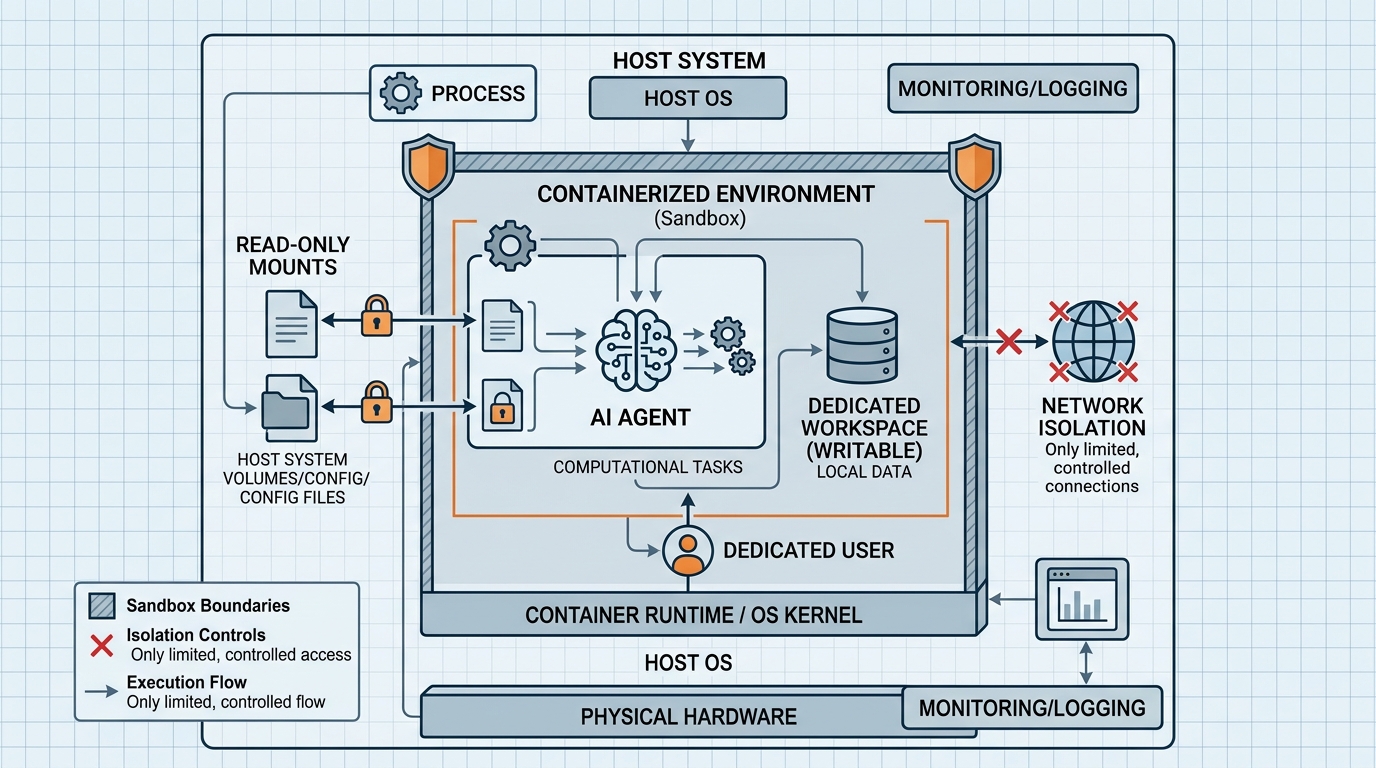
An architectural overview of an AI agent operating within a secure, isolated container, demonstrating file system sandboxing techniques.
Setting up the Sandbox
You have several isolation options, in increasing order of strength:
1. Dedicated working directory (baseline, not sufficient alone).
Give the agent a workspace like /srv/agent-workspace/ and configure your agent framework to treat it as the root for all file operations. Most agent frameworks and tools (including Claude Code) support restricting operations to a working directory. This is a good first layer, but it’s policy enforcement in software — combine it with OS-level controls.
2. Dedicated OS user with minimal permissions.
Run the agent process as its own user (e.g., svc-agent) that owns only its workspace:
sudo useradd --system --create-home --home-dir /srv/agent-workspace svc-agent
sudo chmod 750 /srv/agent-workspace
Now standard Unix permissions prevent the agent from reading other users’ home directories, system secrets, or application data — regardless of what the model decides to attempt.
3. Container isolation (recommended default for production).
Run the agent inside a container with only its workspace mounted:
docker run --rm \
  --user 1001:1001 \
  --read-only \
  -v /srv/agent-workspace:/workspace:rw \
  -v /srv/agent-input:/input:ro \
  --tmpfs /tmp \
  --network none \
  agent-image:latest
Key flags: --read-only makes the container’s own filesystem immutable, the workspace is the only writable mount, reference data is mounted read-only, and --network none (where the workflow allows) removes exfiltration paths entirely.
4. VM or microVM isolation (for untrusted or high-stakes workloads).
When agents process untrusted input or run agent-generated code, a VM boundary gives you the strongest containment with a full kernel separation.
Restricting Read/Write Privileges
Within the sandbox, apply mode separation — most agent tasks need far less write access than teams initially grant:
- Read-only inputs. Mount source data, configs, and reference material as read-only. The agent can analyze without any possibility of modification.
- Write-only or append-only outputs. Reports and logs can go to a directory the agent can write but not re-read or delete, which limits both tampering and context pollution.
- Explicit denylists on top of allowlists. Even inside a workspace, block patterns like
.env,*.pem,id_rsa*, and.git/configat the tool layer, so credential-shaped files never enter model context. - Size and count quotas. Apply filesystem quotas to the workspace so a confused agent can’t fill a disk:
# Example: cap the agent workspace with a quota-enabled mount
sudo mount -o loop,usrquota /srv/agent-fs.img /srv/agent-workspace
AI Agent Permissions Best Practices
Beyond sandboxing mechanics, these AI agent permissions best practices keep access safe as your usage grows:
1. Default deny, allowlist explicitly. Start from zero access. Add specific directories as specific workflows require them. Never start broad and try to narrow later — you won’t.
2. Scope permissions per workflow, not per agent. The “same” agent doing log analysis and config editing should run with two different permission profiles. Task-scoped credentials shrink the blast radius of any single run.
3. Keep secrets out of reach entirely. Agents should never read credential files. Inject secrets through environment variables scoped to specific tool calls, or better, have tools authenticate on the agent’s behalf so raw credentials never enter the agent’s context.
4. Require approval for destructive operations. Deletes, moves, and overwrites outside a scratch directory should be staged as proposals: the agent writes a manifest of intended changes, and a human (or a strict policy engine) approves before execution.
5. Use short-lived, revocable access. If the agent needs temporary access to something unusual, grant it for that run only and revoke automatically. Standing exceptional access becomes forgotten exceptional access.
6. Version-control the permission policy. Your allowlists, denylists, and mount configurations are security-critical code. Review changes to them like you’d review a change to a firewall rule.
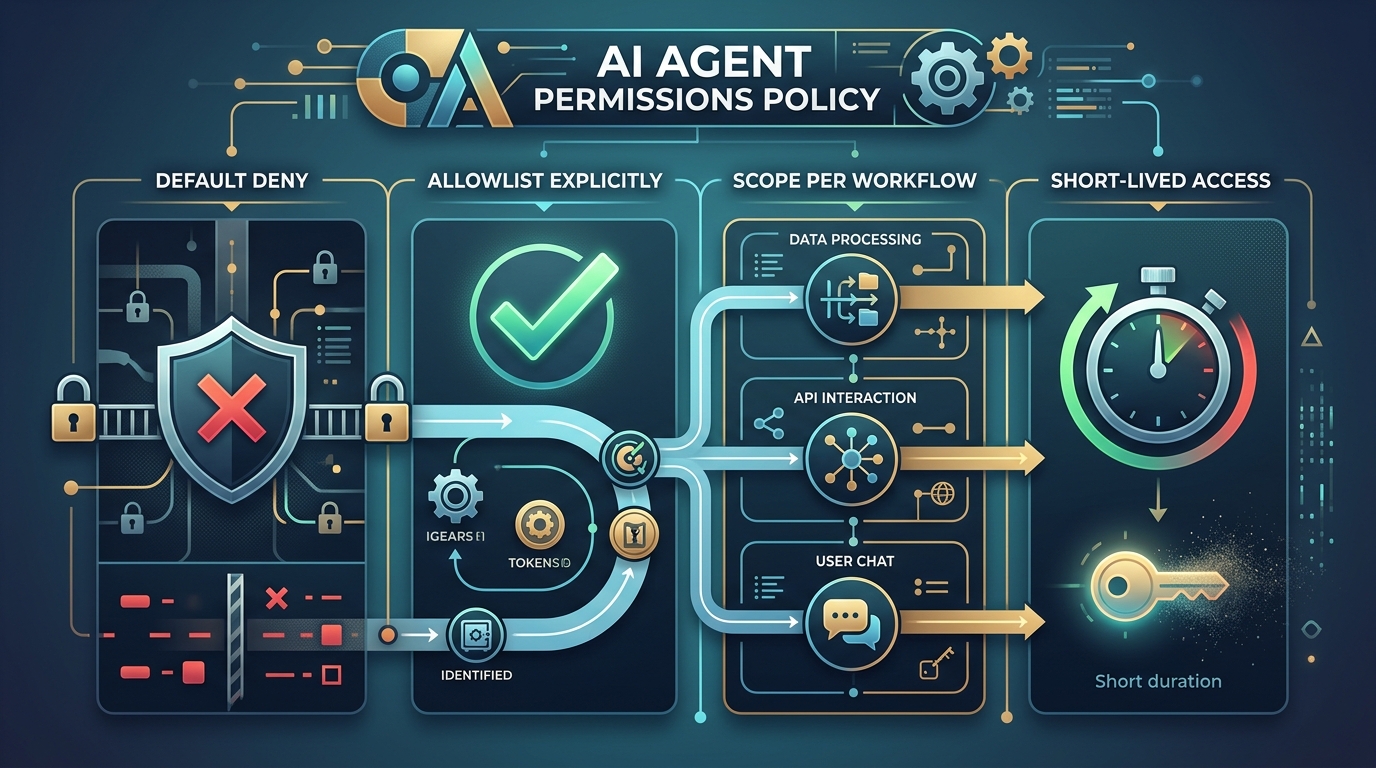
A visual representation of an AI agent’s permission configuration, highlighting best practices for secure file system access.
7. Test the boundaries adversarially. Periodically prompt your own agent to read /etc/shadow or escape its workspace. The sandbox should stop it. If a test succeeds, you’ve found the gap before an incident does.
Implementing AI Agent Guardrails & Security
Sandboxing controls what the agent can touch. AI agent guardrails security controls what the agent actually does within its permissions — and ensures you can prove it afterward.
Path validation at the tool layer. Every file tool the agent calls should canonicalize paths (resolving .. and symlinks) and verify the result stays inside the workspace before executing:
from pathlib import Path

WORKSPACE = Path("/workspace").resolve()

def safe_path(user_path: str) -> Path:
    resolved = (WORKSPACE / user_path).resolve()
    if not resolved.is_relative_to(WORKSPACE):
        raise PermissionError(f"Path escapes workspace: {user_path}")
    return resolved
This single check defeats the most common escape class: path traversal via crafted relative paths or symlinks.
Rate and volume limits. Cap file operations per run (e.g., no more than N writes, no more than X MB). Legitimate tasks have predictable footprints; a run that suddenly wants to modify 10,000 files should halt and page a human.
Content scanning on writes. Before the agent writes a file, scan the content for secrets patterns (keys, tokens) to prevent accidental credential propagation into outputs.
Snapshot before, diff after. For workflows that edit important files, snapshot the workspace before the run and generate a diff after. Recovery becomes trivial, and review becomes concrete.
Complete audit logging. Every file operation — path, mode, size, timestamp, run ID — should land in an append-only log the agent itself cannot modify. This is non-negotiable for production use; our guide to AI agent monitoring logging audit trail setup covers the full pattern, from structured log formats to compliance-ready retention.
Guardrails on tool exposure. Often the best control is not giving the agent raw file access at all, but exposing purpose-built tools (“read_report_data”, “write_summary”) through a controlled interface. An MCP server AI agent integration is the clean way to do this: the server enforces the rules, and the agent only ever sees the safe, narrow operations you chose to expose.
Putting It Together: A Reference Setup
A production-ready safe setup for AI agent file system access looks like this:
- Container with read-only root filesystem and no unnecessary network access
- Dedicated non-root user inside the container
- One writable workspace mount, quota-limited; inputs mounted read-only
- Tool-layer path validation, denylist for secret-shaped files, write-volume caps
- Snapshot/diff around any run that edits meaningful files
- Append-only audit log shipped off-host
- Approval gates for deletes and out-of-workspace proposals
Each layer assumes the previous one might fail. That’s the posture that lets you grant agents real file access — and sleep.
FAQ
Can I just tell the agent in its prompt not to touch certain files?
Prompt instructions are a useful hint but not a security control. Models can misinterpret instructions, and prompt injection can override them. Enforce boundaries at the OS, container, and tool layers, where the model’s output has no authority.
What’s the minimum viable sandbox for a small team?
A dedicated OS user plus a designated workspace directory with tool-layer path validation covers the basics. Move to containers as soon as the agent handles untrusted input or runs unattended.
Should AI agents ever have write access to production configs?
Only through a staged workflow: the agent writes a proposed change to its workspace (ideally as a pull request), and a human or policy engine approves promotion. Direct in-place writes to production configuration are rarely worth the risk.
How do I stop an agent from leaking secrets it encounters in files?
Prevent the encounter: denylist credential-shaped files, keep secrets out of the workspace, and have tools authenticate on the agent’s behalf. Add content scanning on outputs as a second layer to catch anything that slips through.