
How to Setup AI Agent Monitoring & Audit Trails
The question every team hits shortly after deploying an AI agent: “Wait — what did it actually do?” If you can’t answer that question precisely, for any run, at any time, you don’t have a production agent. You have a liability with API keys.
This guide covers AI agent monitoring logging audit trail setup from the ground up: what to log, how to structure it, which observability tools fit agent workloads, how to monitor agents in real time, and how to build audit trails that satisfy compliance reviewers.
The Importance of AI Agent Observability
Traditional software observability answers “is the system healthy?” Agent observability must answer a harder question: “is the system making good decisions?”
Agents differ from conventional services in ways that break standard monitoring assumptions:
- Non-deterministic execution. The same task can produce different tool-call sequences on different runs. You can’t diff behavior against a fixed expectation — you have to record what actually happened, every time.
- Actions have consequences outside the process. An agent writes files, calls APIs, opens tickets, changes configs. The interesting telemetry isn’t CPU and memory; it’s effects on other systems.
- Failures can look like successes. An agent can complete a run cheerfully while having done the wrong thing. Only a review of its actions and reasoning reveals the problem.
- Trust is built on evidence. The path to expanding an agent’s autonomy runs through months of reviewable history proving it acts correctly. No logs, no trust, no expansion.
Observability is also a prerequisite, not an afterthought, for everything else in agent operations: AI agent production deployment best practices all assume you can see what the agent is doing, and permissioning work like an AI agent file system access safe setup is only verifiable if file operations are logged.
How to Log AI Agent Actions in Production
The core discipline for how to log AI agent actions in production: log at the action level, tie everything to a run, and make the log append-only.
Structuring Your Log Data
Every agent action should produce a structured event with, at minimum:
run_id— unique ID for the overall agent invocation (the unit a human reviews)step— sequence number within the runtimestamp— ISO 8601, UTCagent/agent_version— which agent, which prompt/config versionaction_type—tool_call,file_write,api_request,decision,escalationtool+parameters— what was invoked, with what arguments (secrets redacted)result— outcome summary, status, error if anytrigger— what started the run (cron, alert ID, human request)
A production log line looks like this:
{
  "run_id": "run_20260722_0600_a8f3",
  "step": 7,
  "timestamp": "2026-07-22T06:04:18Z",
  "agent": "nightly-triage",
  "agent_version": "1.4.2",
  "action_type": "tool_call",
  "tool": "ticketing.create_ticket",
  "parameters": {"severity": "high", "title": "Disk >90% on db-04"},
  "result": {"status": "success", "ticket_id": "OPS-4412"},
  "trigger": "cron:nightly-triage"
}
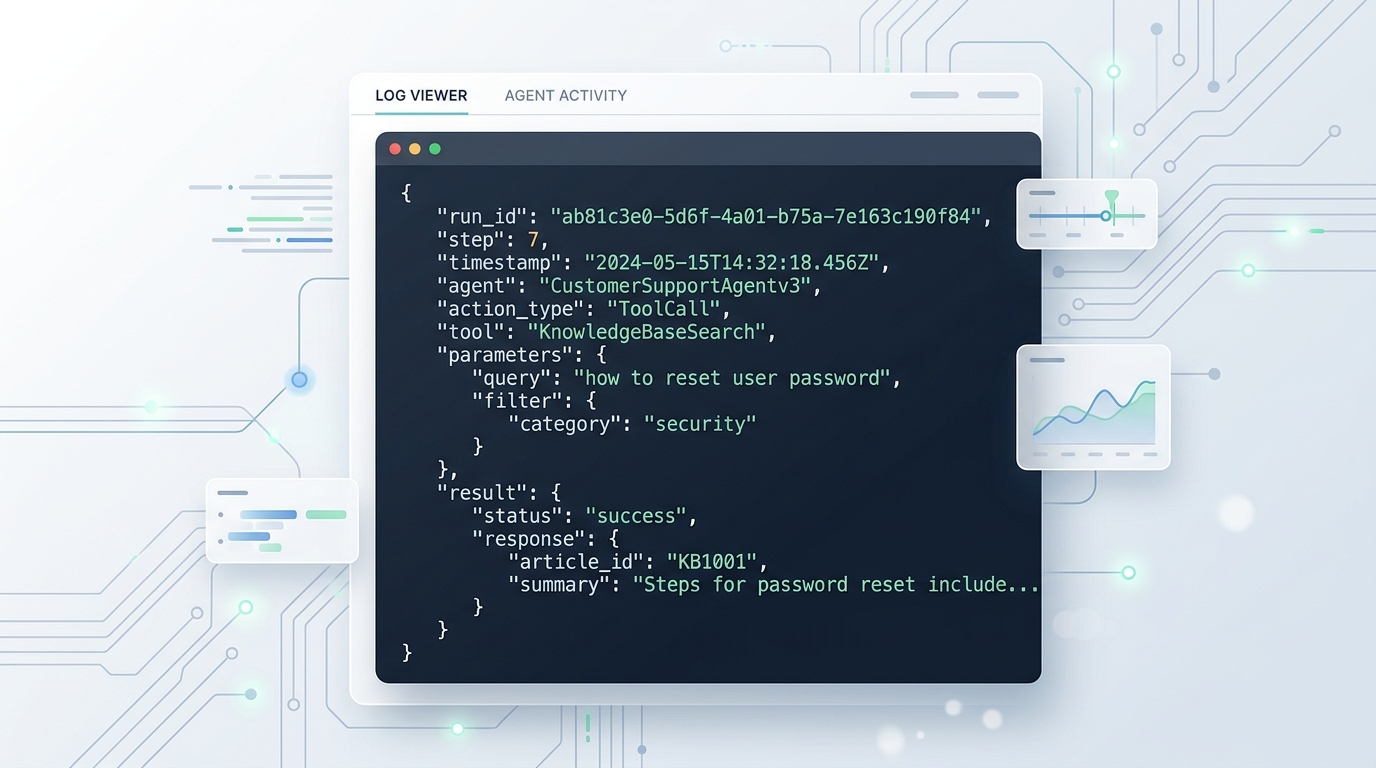
A visual representation of structured JSON log data for AI agent actions, detailing run_id, step, timestamp, agent, action_type, tool, parameters, result, and trigger.
Practical rules that save you later:
- Log intent alongside action. Capture the agent’s stated reasoning (“disk trend exceeds threshold, opening ticket per runbook §3”) as a
decisionevent before the tool call. When something goes wrong, the why is what you’ll need. - Redact at write time, not read time. Secrets, tokens, and PII should be scrubbed before the event is persisted. You cannot un-log a credential.
- Log the inputs the agent saw. Store (or reference) the alert payload, file contents hash, or prompt context each run received. Reproducing an agent decision requires knowing what it knew.
- Make the trail append-only and agent-inaccessible. The agent must not be able to read, modify, or delete its own audit log. Ship events off-host (or to a write-only endpoint) as they occur.
Recommended AI Agent Observability Tools
You likely don’t need a new stack — you need to point your existing one at agent-shaped data. Categories of AI agent observability tools to combine:
- Structured log pipeline (foundation). Whatever you already run — an ELK/OpenSearch stack, Loki with Grafana, or a cloud logging service — works fine for agent events, since they’re just structured JSON. Index on
run_id,agent, andaction_type. - LLM/agent tracing tools. Purpose-built tracing platforms for LLM applications (such as Langfuse, LangSmith, or OpenTelemetry-based GenAI instrumentation) capture prompts, tool calls, token usage, and latency per step, and visualize a run as a trace tree. These excel at debugging reasoning, not just actions.
- Metrics and alerting. Export counters and gauges — runs started/succeeded/failed, tool-call counts, tokens and cost per run, run duration — to Prometheus/Grafana or your equivalent, and alert on anomalies.
- Ticketing/chat integration. Run summaries posted to a review channel turn passive logs into active human oversight with near-zero friction.
Selection principle: prefer tools that let you follow one run_id across all layers — from the trace of the agent’s reasoning, to the structured action log, to the metrics rollup. Correlation is the whole game.
How to Monitor What Your AI Agent is Doing
Logging is retrospective. To monitor what your AI agent is doing as it operates, add three real-time layers:
1. Live run dashboards. A dashboard per agent showing: currently active runs and their current step, run outcomes over time, tool-call volume by type, duration and cost per run, and escalation rate. Most of this falls straight out of the structured events above.
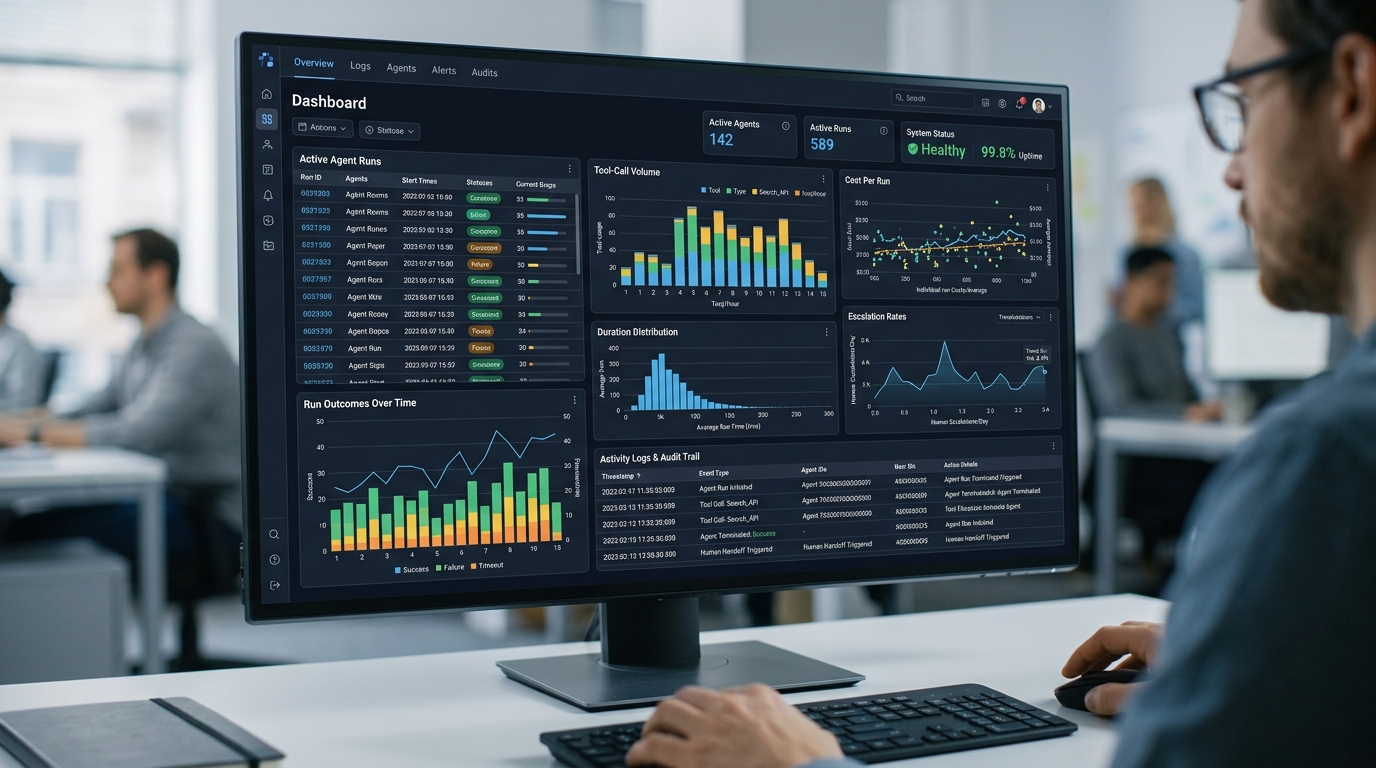
A dashboard interface designed for real-time monitoring of AI agents, showcasing key metrics, active runs, tool-call volumes, and anomaly alerts for effective audit trail management.
2. Behavioral anomaly alerts. Alert on deviations from the agent’s normal envelope rather than only hard failures:
- Run duration or tool-call count far above baseline (possible loop or confusion)
- Action types the agent has never used before
- Sudden spikes in file writes or API mutations
- Repeated retries of the same failing operation
- Cost per run exceeding budget
A confused agent rarely throws an exception — it behaves weirdly. Envelope alerts catch weird.
3. Checkpoint summaries for humans. Have the agent emit a plain-language summary at run end (and at key decision points in long runs): what it found, what it did, what it deliberately didn’t do. Post these where the team already looks. Thirty seconds of human skim per run is the cheapest, highest-value monitoring layer that exists.
These same signals feed remediation: anomaly detection is the trigger that hands a failing workflow to a self-healing automation AI agent error handler, which can then act on the failure with full context from the logs.
Ensuring AI Agent Audit Logging Compliance
When agents act on production systems, auditors and security teams will — rightly — ask hard questions. AI agent audit logging compliance means being able to answer them with evidence:
1. Completeness. Every state-changing action attributable to the agent appears in the trail. No sampled logging for actions — sampling is fine for debug traces, never for the audit record.
2. Attribution. Each event identifies the agent, its version, its trigger, and the identity/credentials under which it acted. Agents should run under dedicated service identities (never a human’s account) so their actions are cleanly separable in downstream system logs too.
3. Integrity. The trail must be tamper-evident: append-only storage, restricted write paths, and ideally hash-chaining or a WORM (write once, read many) storage target. Crucially, the agent itself has no access to its own audit records.
4. Retention. Match your organization’s audit retention policy for privileged automation — agent logs are privileged-account activity logs and should be retained accordingly. Confirm the specific retention period with your compliance team, since it varies by industry and regulation.
5. Reviewability. A trail nobody reads satisfies no one. Establish a cadence: automated summaries daily, human spot-review of sampled runs weekly, and a full review whenever an agent’s permissions are expanded.
6. Change control on the agent itself. Prompts, tool configurations, and permission policies are behavior-defining artifacts. Keep them in version control, and log which version executed each run (agent_version above) so every historical action can be tied to the exact configuration that produced it.
A useful framing for stakeholders: the agent is a privileged operator, and its audit trail should be at least as good as what you’d require for a human contractor with the same access — with the advantage that, unlike humans, agents can log everything without complaint.
FAQ
What exactly should I log from an AI agent in production?
Every tool call, file operation, and API mutation with parameters and results; the agent’s stated reasoning at decision points; the trigger and input context of each run; and run-level metadata (agent version, duration, cost, outcome). Redact secrets at write time and tie everything to a run_id.
How do I monitor what my AI agent is doing in real time?
Combine a live dashboard built from structured action events, behavioral anomaly alerts (unusual duration, tool-call spikes, novel action types), and end-of-run plain-language summaries posted where your team already works.
Do I need special observability tools for AI agents?
Your existing logging and metrics stack handles the foundation, since agent events are structured JSON. Purpose-built LLM tracing tools add value for debugging reasoning chains — prompts, tool sequences, and token costs per step — which conventional tools don’t visualize well.
Why can’t the agent have access to its own logs?
An agent that can read its own audit trail can leak it into context or outputs; one that can write to it can corrupt the record — accidentally or via prompt injection. Audit integrity requires that the trail live outside the agent’s reach, on append-only or WORM storage.
How long should AI agent audit logs be retained?
Treat them like privileged-account activity logs and follow your organization’s existing retention policy for that category. The right period depends on your industry and applicable regulations, so confirm specifics with your compliance team.