
Real Use Cases for AI Agents in DevOps & Ops (2026)
If you work in operations, you’ve heard the pitch a hundred times: AI agents will automate your toil away. The pitch is loud; the practical detail is usually missing. This guide skips the hype and walks through what ops and DevOps teams are actually doing with AI agents in 2026 — runbook automation, infrastructure triage, deployment support — and the guardrails that separate a useful agent from a liability in production.
By the end, you’ll know how to use AI agents in DevOps for concrete tasks, which workflows are ready for agentic automation today, and the deployment practices that keep an autonomous system from becoming your next incident.
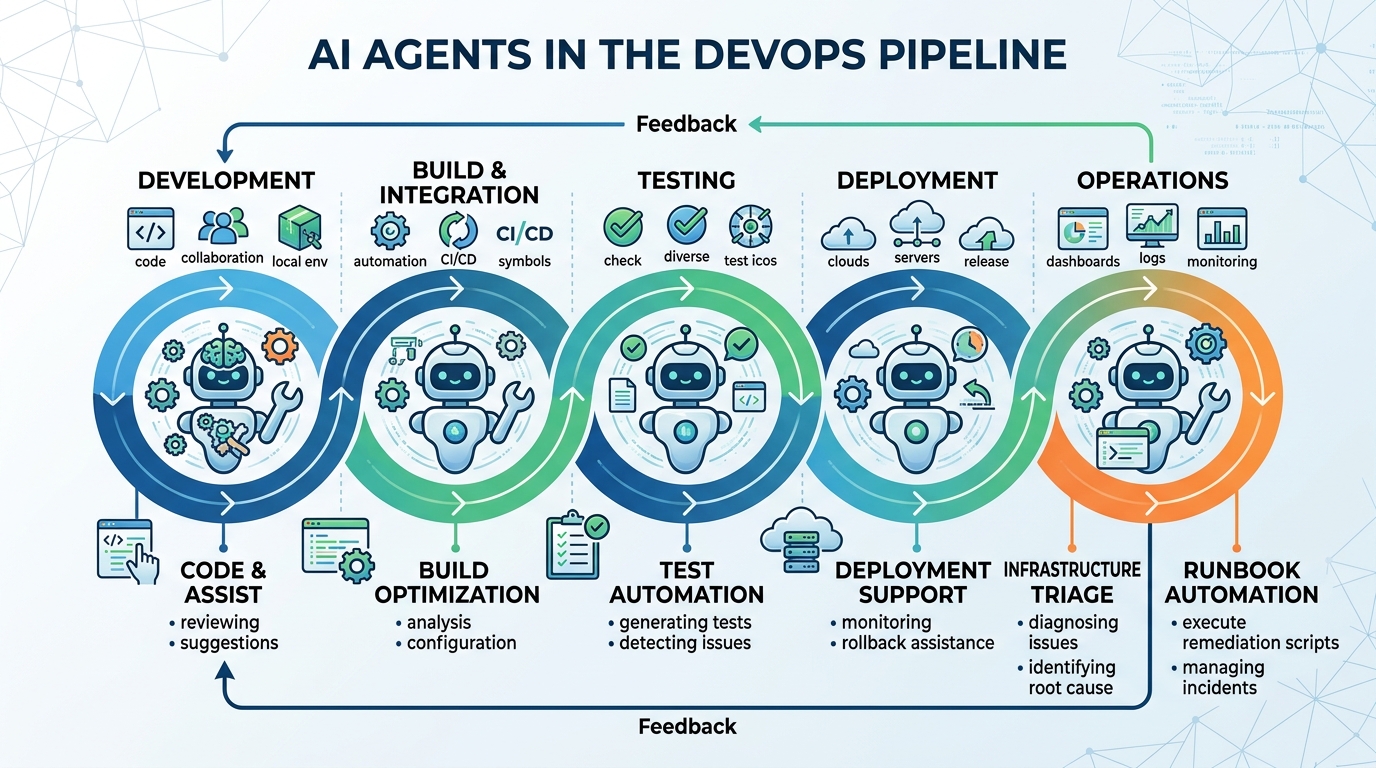
AI agents are increasingly integrated into DevOps pipelines to automate tasks, improve efficiency, and reduce manual toil across development, testing, and operations.
The Shift to Agentic Workflow Automation in Ops
Traditional ops automation is deterministic: a script does exactly what it was written to do, and nothing else. That works beautifully until reality drifts — an API changes shape, a disk fills up in a new place, a vendor renames a field — and the script fails silently or loudly at 3 a.m.
Agentic workflow automation for ops changes the model. Instead of hard-coding every branch, you give an AI agent:
- A goal (“verify the nightly backup completed and remediate if it didn’t”)
- A set of tools (shell access, API clients, ticketing integrations)
- Constraints (what it may touch, what requires human approval)
The agent reads context, decides on next steps, executes tool calls, and reports what it did. The critical difference from a script is adaptation: when the environment doesn’t match expectations, an agent can investigate rather than crash.
That flexibility is also the risk. An agent that can adapt can also act in ways you didn’t anticipate, which is why the second half of this guide is about boundaries: permissions, monitoring, and error handling. Teams that succeed with agents in ops treat them like junior engineers with elevated access — capable, fast, and in need of supervision.
What makes a workflow a good candidate for an agent?
Not everything should be agentic. The best candidates share three traits:
- High frequency, moderate variability. Tasks that happen constantly but differ slightly each time (log triage, ticket enrichment, dependency updates).
- Well-documented procedures. If a runbook exists, an agent can follow it.
- Reversible or low-blast-radius actions. Start where a mistake is annoying, not catastrophic.
Keep fully deterministic tasks in plain scripts. Agents earn their keep where judgment and context-reading are required.
Top Use Cases: How to Use AI Agents in DevOps
Here are the use cases delivering real value for ops teams in 2026, ordered roughly by how easy they are to adopt.
AI Agent Runbook Automation
AI agent runbook automation is the most natural entry point. Most teams already maintain runbooks — step-by-step procedures for handling known scenarios: certificate renewals, disk cleanup, service restarts, failed job recovery. The problem has never been the documentation; it’s that a human still has to wake up and execute it.
An agent turns a runbook from a document into an executor:
- Alert-triggered execution. An alert fires, the agent pulls the matching runbook, executes the diagnostic steps, and either remediates or escalates with a full summary of what it found.
- Ticket enrichment. Before an on-call engineer even opens the ticket, the agent has attached relevant logs, recent deploys, and the runbook section that applies.
- Procedural drift detection. When the runbook’s steps no longer match reality (a renamed service, a moved config file), the agent flags the discrepancy instead of failing blind — and can propose an updated runbook for review.
Practical tip: start by having the agent execute runbooks in read-only diagnostic mode for two to four weeks. Compare its conclusions against what your on-call engineers actually did. Only grant remediation permissions for the scenarios where it consistently reaches the right answer.
Autonomous AI Agent Infrastructure Management
The next maturity level is autonomous AI agent infrastructure work — letting agents manage routine infrastructure hygiene with limited human involvement:
- Resource cleanup: identifying orphaned volumes, stale snapshots, unattached IPs, and abandoned test environments, then opening a change request (or deleting, once trusted).
- Configuration drift checks: comparing live infrastructure against IaC definitions and drafting the pull request that reconciles them.
- Capacity watching: noticing sustained trends (a queue that keeps growing, a disk trending toward full) and acting before a threshold alert would ever fire.
- Dependency and patch triage: reading CVE feeds, checking which services are affected, and preparing prioritized patch plans.
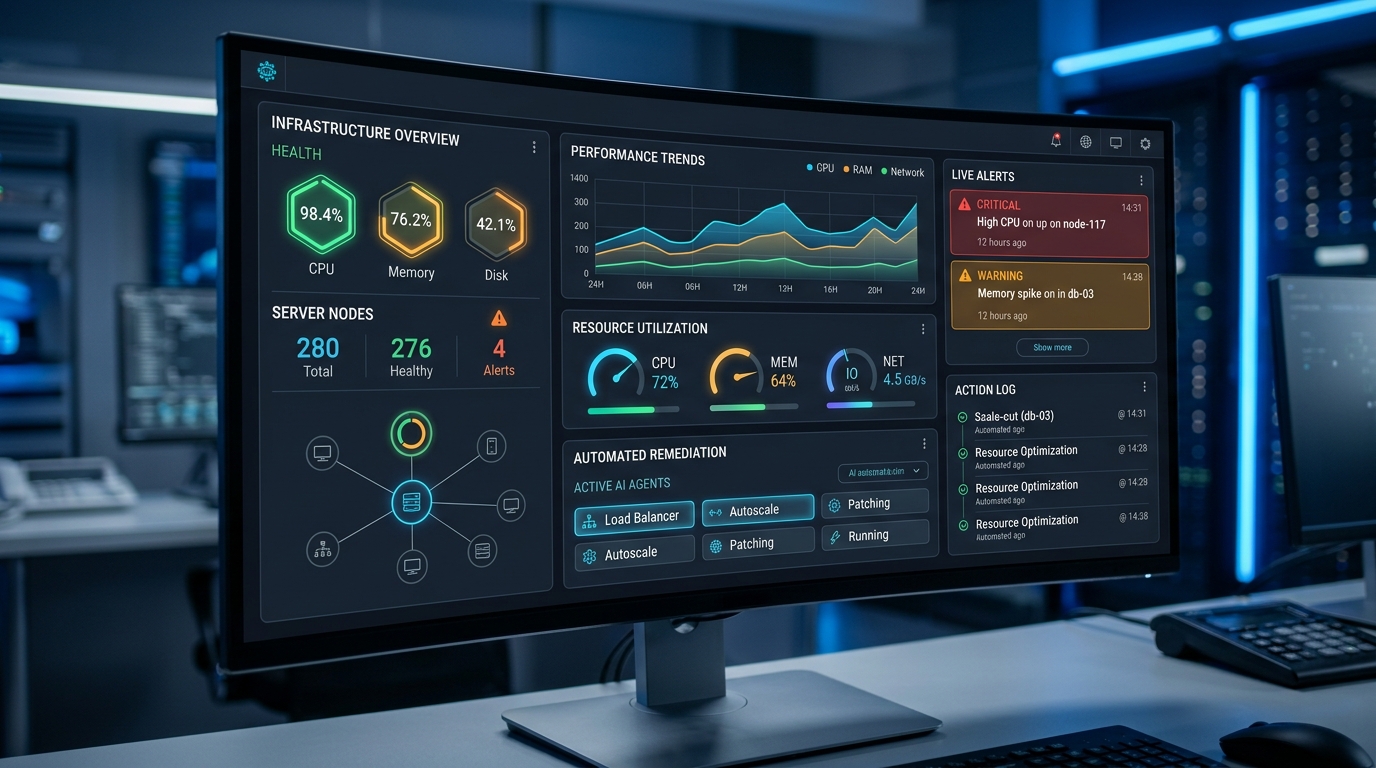
Autonomous AI agents can monitor infrastructure, identify issues, and even initiate remediation actions, often visualized through advanced monitoring dashboards.
The pattern across all of these: the agent does the investigation and preparation, and a human approves the state-changing action — at least until the agent has a track record. Autonomy is granted incrementally, per task type, based on observed reliability.
AI Ops Automation 2026: What’s New?
What distinguishes AI ops automation in 2026 from the earlier chatbot-era experiments? Three practical shifts:
1. Standardized tool access via MCP. The Model Context Protocol (MCP) has become a common way to expose internal tools — CI systems, ticketing, observability stacks — to agents through a consistent interface. Instead of writing one-off glue code per integration, teams stand up MCP servers once and every agent can use them. This dramatically lowers the cost of giving agents useful capabilities.
2. Scheduled and event-driven agents, not just interactive ones. The early pattern was a human chatting with an assistant. The 2026 pattern is agents running unattended — on cron schedules, triggered by alerts, or reacting to webhook events — with humans reviewing summaries rather than driving every step.
3. Operational maturity around agents themselves. Teams now apply standard ops discipline to their agents: structured logging of every action, audit trails, permission scoping, and error-recovery design. The agents became part of the production estate, so they get treated like production systems.
The teams getting the most value aren’t the ones with the most powerful models — they’re the ones with the best operational scaffolding around ordinary models: tight permissions, good tools, clear escalation paths.
AI Agent Production Deployment Best Practices
Running an agent on your laptop is easy. Running one against production systems requires the same rigor you’d apply to any privileged automation. These practices come up consistently across teams operating agents in production:
1. Scope permissions to the task, not the agent. Don’t give an agent a god-mode credential because it’s convenient. Each workflow should run with the minimum access it needs. For file operations specifically, follow a hardened approach to secure AI agent file system access — sandboxed working directories, explicit allowlists, and read-only defaults.
2. Log everything the agent does. Every tool call, every decision point, every file touched. If you can’t reconstruct what an agent did last Tuesday, you can’t trust it with more responsibility. Set up AI agent monitoring and logging before you grant write access anywhere, not after.
3. Design for failure from day one. Agents fail in stranger ways than scripts — they can misread context, retry the wrong step, or stall. Build self-healing automation AI agent error handlers that detect failure, gather context, attempt bounded recovery, and escalate cleanly when recovery isn’t possible.
4. Use approval gates for state-changing actions. A simple pattern: the agent prepares the action (a command, a PR, a config change) and posts it for one-click human approval. As confidence grows, specific low-risk action types graduate to full autonomy.
5. Set budgets and timeouts. Cap the number of tool calls, tokens, and wall-clock time per run. A runaway agent should hit a hard limit, not your cloud bill.
6. Version and review agent prompts and configs like code. System prompts, tool definitions, and permission policies belong in version control with code review — they are the agent’s behavior.
7. Start narrow, expand deliberately. One workflow, in shadow mode, measured against human performance. Then remediation rights for that one workflow. Then the next workflow. Teams that try to deploy a “do everything” agent on day one almost always retreat and start over narrow.
Getting Started: A Practical First Project
If you’re beginning this quarter, here’s a proven sequence:
- Pick one noisy, well-documented runbook (disk alerts and failed-job recovery are common first choices).
- Stand up the agent in diagnostic-only mode with read-only access and full logging.
- Run it for every matching alert for a month. Grade its analysis against your on-call engineers’.
- Grant remediation for the top one or two scenarios it handles reliably, behind an approval gate.
- Remove the approval gate for those scenarios once the track record justifies it.
This gets you real value in weeks while building the operational muscle — logging, permissions, review — that every later agent project will reuse.
FAQ
What are the best first use cases for AI agents in ops teams?
Alert triage and runbook execution are the most common starting points. They’re high-frequency, well-documented, and can begin in read-only diagnostic mode, which limits risk while the team builds trust in the agent’s judgment.
How is an AI agent different from a normal automation script?
A script executes a fixed sequence and fails when reality deviates from its assumptions. An AI agent works toward a goal using tools, adapting its steps to context. That adaptability handles variability that breaks scripts — but it also requires permissions, monitoring, and guardrails that scripts don’t need.
Are AI agents safe to run in production?
They can be, with the right controls: least-privilege permissions, sandboxed file access, complete action logging, approval gates for state-changing operations, and hard budgets on runtime and tool calls. Treat agents like privileged automation, not like chatbots.
Do AI agents replace DevOps engineers?
No. In practice, agents absorb toil — triage, enrichment, routine remediation — and engineers shift toward designing workflows, reviewing agent output, and handling the genuinely hard problems. The teams seeing the best results pair agents with engineers rather than substituting one for the other.
How do I measure whether an agent is actually helping?
Track the same metrics you’d use for any ops improvement: mean time to resolution for the alerts it handles, percentage of incidents resolved without human paging, on-call interrupt volume, and the error/escalation rate of the agent itself.