
AI Orchestration for Small Business: A Non-Technical Guide
Meta Description: Learn AI orchestration basics for small business owners. Non-technical guide to AI automation platforms, implementation, and ROI analysis.
AI is everywhere in the headlines, but most guides about it are written for data scientists and software engineers. If you’re a small business owner trying to figure out whether AI orchestration can actually help your business – without needing a computer science degree – this guide is for you.
We’ll explain what AI orchestration is, how it differs from traditional automation, and how real small businesses are using it today. No jargon. No hype. Just practical information you can act on.
Table of Contents
- What is AI Orchestration? (Simple Explanation)
- AI Orchestration vs Traditional Automation
- How Small Businesses Use AI Orchestration
- AI Orchestration Platforms: Cloud vs Desktop
- Getting Started: AI Agent for Your Business
- Common AI Orchestration Use Cases
- Implementation Roadmap for Small Business
- Frequently Asked Questions
What is AI Orchestration? (Simple Explanation)
AI orchestration is the process of coordinating multiple AI tools and services to work together as part of a larger automated workflow. Instead of using AI for a single isolated task (like asking ChatGPT a question), orchestration connects AI capabilities into a chain of actions that accomplish real business objectives.
Here’s an analogy: Using AI on its own is like having a talented employee who can only do one thing at a time when you ask them. AI orchestration is like giving that employee a complete playbook – a sequence of tasks to perform automatically, making decisions along the way, and handing off work to the right tools at the right time.
A Practical Example
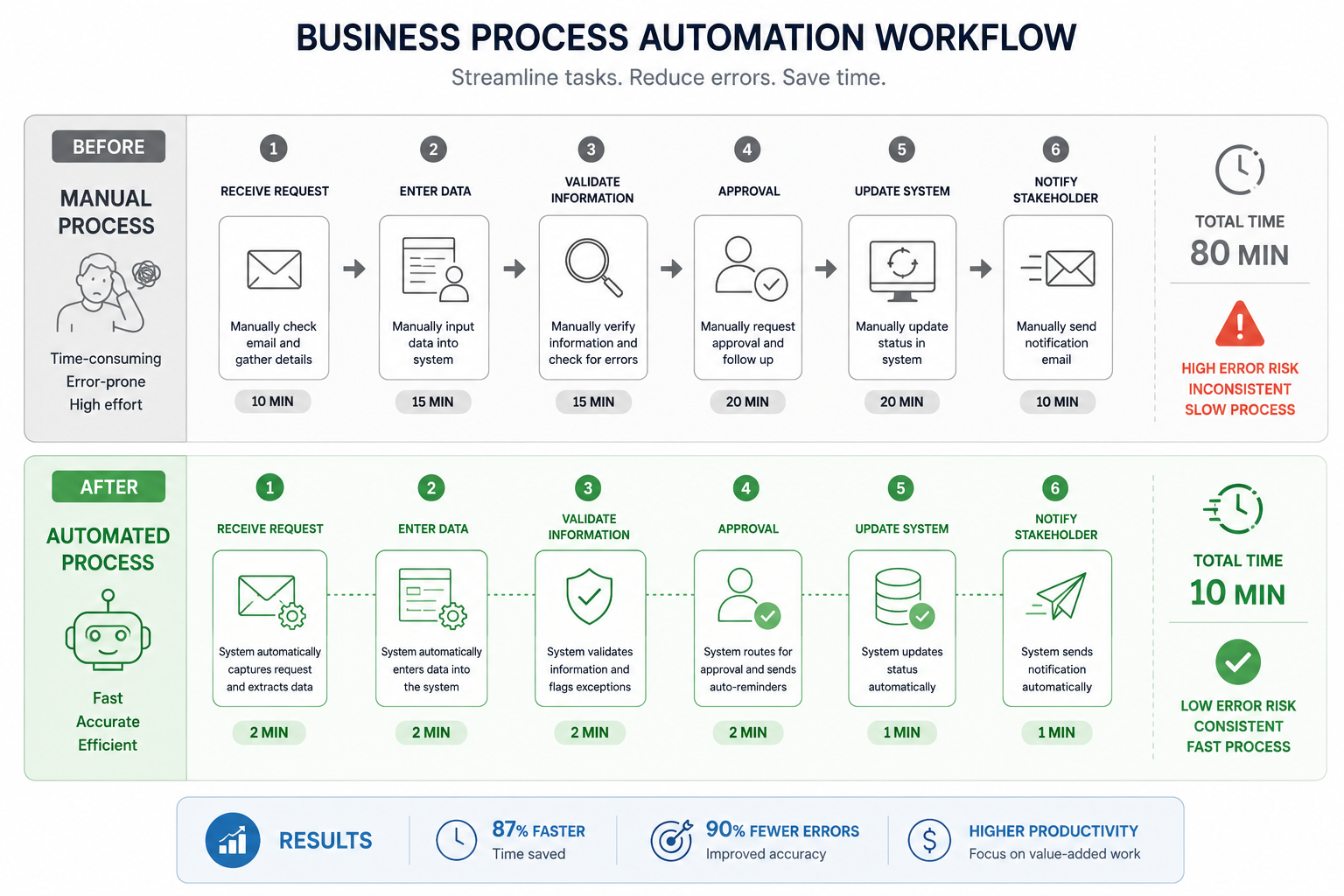
Imagine you receive 50 customer support emails per day. Without AI orchestration, you read each one, decide its priority, route it to the right person, and draft a response. With AI orchestration, here’s what happens automatically:
- AI reads the incoming email and understands the customer’s intent
- AI classifies the request – billing question, technical support, general inquiry, or complaint
- The orchestration system routes it to the correct team or response template
- AI drafts a response tailored to the specific question
- The system logs everything in your customer database for tracking
Each step uses a different AI capability, and the orchestration layer ties them all together into a seamless workflow. That’s AI orchestration in action.
[IMAGE: AI orchestration workflow diagram showing automated decision-making process for small business tasks]
AI Pipeline Basics for Non-Technical Users
You might hear the term AI pipeline used interchangeably with AI orchestration. They’re closely related:
- An AI pipeline is a sequence of data processing and AI steps that transform an input into an output (like raw customer feedback → categorized insights → summary report)
- AI orchestration is the management layer that runs, monitors, and coordinates those pipelines
Think of the pipeline as the recipe and orchestration as the kitchen manager making sure every dish comes out right, on time, and in the correct order.
AI Orchestration vs Traditional Automation
If you’re already familiar with traditional automation tools – or you’ve read our guide on AI vs traditional orchestration – you know that automation isn’t new. So what makes AI orchestration different?
Traditional Automation: Rules-Based
Traditional automation follows explicit rules you define:
- “If a file appears in this folder, move it to that folder”
- “Every Monday at 8 AM, run this report”
- “When a form is submitted, send a confirmation email”
These rules work perfectly for predictable, structured processes. But they break down when tasks require judgment, interpretation, or handling of unstructured data (like free-text emails, varied document formats, or ambiguous requests).
AI Orchestration: Intelligence + Rules
AI orchestration combines rule-based automation with intelligent decision-making:
- “Read this email, determine what the customer needs, and route it appropriately”
- “Analyze this sales data and generate a summary highlighting unusual patterns”
- “Review this document, extract the key information, and fill in the database fields”
The AI handles the parts that require understanding and judgment. The orchestration layer handles the routing, scheduling, error handling, and coordination – just like traditional automation.
Side-by-Side Comparison
| Capability | Traditional Automation | AI Orchestration |
|---|---|---|
| Structured data processing | Excellent | Excellent |
| Unstructured data (emails, documents) | Poor – needs exact formats | Strong – understands context |
| Decision-making | Fixed rules only | Intelligent judgment + rules |
| Setup complexity | Lower | Moderate |
| Handling exceptions | Fails or follows fallback rule | Adapts to variations |
| Cost | Lower | Higher (AI service costs) |
| Predictability | Very high | High but variable |
| Best for | Repetitive, structured tasks | Tasks requiring understanding |
The Practical Reality
Most small businesses benefit from a combination of both. Use traditional automation for predictable, structured tasks (file management, scheduled reports, data transfers). Add AI orchestration when you need intelligence – processing customer communications, analyzing unstructured data, or making classification decisions.
How Small Businesses Use AI Orchestration
AI orchestration isn’t just for tech companies with massive budgets. Small businesses across industries are finding practical, affordable ways to use it.
Customer Communication Management
The problem: Customer inquiries arrive through email, web forms, and social media in unpredictable formats. Manually reading, categorizing, and responding takes hours daily.
The AI orchestration solution:
– AI reads and categorizes incoming messages by intent and urgency
– Urgent issues get flagged for immediate human attention
– Common questions receive AI-drafted responses for human review
– All interactions are logged and categorized automatically
Time saved: Businesses report reducing email processing time by 60-70% while maintaining or improving response quality.
Document Processing and Data Extraction
The problem: Invoices, contracts, receipts, and forms arrive in different formats. Manually extracting data from each document into your business systems is tedious and error-prone.
The AI orchestration solution:
– AI reads documents regardless of format or layout
– Key data points (amounts, dates, names, line items) are extracted automatically
– Extracted data is validated against business rules
– Clean data is entered into your accounting, CRM, or inventory system
Content Creation and Marketing
The problem: Creating marketing content, social media posts, and business communications takes significant time, especially for small teams.
The AI orchestration solution:
– AI generates first drafts based on your brand guidelines and topic
– Content is automatically formatted for different channels (email, social, blog)
– Generated content is queued for human review and approval
– Approved content is scheduled for publication
Reporting and Business Intelligence
The problem: Compiling data from multiple sources into meaningful reports requires manual collection, analysis, and formatting.
The AI orchestration solution:
– Data is automatically collected from your business tools
– AI analyzes patterns, anomalies, and trends
– Reports are generated in plain language with actionable insights
– Reports are distributed to the right stakeholders on schedule
AI Orchestration Platforms: Cloud vs Desktop
Just like traditional automation tools, AI orchestration platforms come in cloud-based and desktop-based varieties. The choice affects your costs, data privacy, and workflow capabilities.
Cloud AI Orchestration Platforms
Cloud AI platforms run entirely in the browser, processing your data on remote servers.
Popular options include:
– Zapier + AI Actions – Adds AI steps (like GPT-powered text processing) to Zapier’s existing automation workflows
– Make (Integromat) + AI modules – Connects AI services into visual workflow pipelines
– LangChain (developer tool) – Python framework for building AI-powered applications and agents
– Microsoft Power Automate + AI Builder – AI capabilities within Microsoft’s automation ecosystem
Cloud advantages:
– Pre-built AI connectors and templates
– No local processing power needed
– Automatic model updates
– Easy team collaboration
Cloud drawbacks:
– Your data is sent to external AI services for processing
– Per-use AI costs add up (each AI call has a cost)
– Internet dependency for all AI processing
– Less control over which AI models are used
Desktop AI Orchestration Platforms
Desktop AI platforms run on your local computer, connecting to AI services only when needed.
Why desktop AI orchestration matters:
– Data control – Your documents and business data stay on your computer until you specifically choose to send something to an AI service
– Cost predictability – No per-workflow charges; you control which tasks use paid AI services
– Hybrid approach – Use local processing for tasks that don’t need AI and connect to AI services only when intelligence is required
– Offline capability – Non-AI workflow steps continue running without internet
A desktop AI automation platform like NORA lets you build workflows that combine local automation with AI capabilities – giving you the benefits of intelligence without surrendering all your data to the cloud.
Cost Considerations and ROI
AI services add cost to your workflows. Every time an AI model processes text, classifies a document, or generates content, there’s a per-use charge from the AI provider (like OpenAI or Anthropic).
Cost management strategies:
– Use AI selectively – Not every workflow step needs AI. Use it only where intelligence adds clear value.
– Batch AI requests – Process multiple items in a single AI call instead of one at a time.
– Cache AI results – If the same type of request comes up repeatedly, store and reuse AI responses.
– Start small – Pilot AI on one workflow before expanding to others.
Getting Started: AI Agent for Your Business
An AI agent is a system that uses AI to take actions on your behalf – reading information, making decisions, and executing tasks. Setting up your first AI agent doesn’t require technical expertise if you choose the right platform.
Step 1: Identify a High-Value Use Case
Start with a task that:
– Consumes significant time each week
– Involves reading, categorizing, or processing information
– Has clear success criteria (you’ll know when the AI does it right)
– Is low-risk for initial testing (mistakes are easily caught and corrected)
Good first AI projects:
– Email categorization and response drafting
– Document data extraction
– Content draft generation
– Report summarization
Bad first AI projects:
– Financial transactions (too much risk for initial testing)
– Complex decision-making with legal implications
– Anything where errors are costly or difficult to reverse
Step 2: Choose Your Platform
Based on your needs:
– Non-technical, mostly web-based work → Cloud platform with AI modules (Zapier, Make)
– Need desktop automation + AI → Desktop platform with AI integration (NORA)
– Have developers on staff → Python frameworks (LangChain, Prefect)
Step 3: Build a Simple Prototype
Your first AI workflow should be simple:
- Input – A trigger or data source (e.g., new email arrives)
- AI step – One AI action (e.g., classify the email)
- Output – A result action (e.g., move to the correct folder)
Don’t try to build a 20-step AI workflow on day one. Start with a 3-step process, verify it works correctly, then add complexity.
Step 4: Test and Refine
AI isn’t perfect. Expect to:
– Review AI outputs carefully during the first week
– Adjust your prompts and instructions to improve accuracy
– Add error handling for cases where AI gets confused
– Gradually increase the complexity and autonomy of your AI workflows
Data Privacy and Security
When using AI services in your workflows:
– Know what data you’re sending – Review exactly which information gets sent to AI services
– Use reputable AI providers – Major providers (OpenAI, Anthropic, Google) have clear data handling policies
– Consider data sensitivity – Some information (like client personal data) may not be appropriate to send to external AI services
– Check compliance requirements – If you’re subject to industry regulations, verify that AI data processing meets your obligations
Common AI Orchestration Use Cases
Here are proven use cases where AI orchestration delivers measurable value for small businesses:
Use Case 1: Intelligent Email Management
Workflow: Incoming email → AI classification → Priority routing → Draft response → Human review
AI handles: Reading email content, understanding intent, classifying urgency, drafting contextual responses
Human handles: Reviewing AI-drafted responses, handling complex cases, making final decisions
Use Case 2: Invoice and Receipt Processing
Workflow: Document scan/upload → AI data extraction → Validation → Accounting system entry → Filing
AI handles: Reading varied document formats, extracting amounts, dates, vendor names, line items
Human handles: Reviewing extracted data for accuracy, approving entries, handling exceptions
Use Case 3: Content Repurposing
Workflow: Blog post → AI reformatting → Social media versions + Email newsletter version + Summary
AI handles: Adapting content for different formats and platforms, maintaining consistent voice
Human handles: Reviewing for accuracy and brand alignment, selecting final versions
Use Case 4: Customer Feedback Analysis
Workflow: Reviews/surveys collected → AI sentiment analysis → Categorization → Trend reporting → Alert on negative trends
AI handles: Reading unstructured feedback, identifying sentiment, categorizing themes, spotting patterns
Human handles: Strategic decisions based on insights, responding to critical feedback
Use Case 5: Lead Qualification
Workflow: New lead info → AI research → Scoring → CRM update → Routing to sales
AI handles: Researching lead company, evaluating fit against criteria, assigning priority scores
Human handles: Following up with qualified leads, building relationships, closing deals
Integration with Existing Tools
AI orchestration works best when it connects to the tools you already use. When evaluating platforms, check for integration with your:
- Email provider (Gmail, Outlook, etc.)
- CRM (HubSpot, Salesforce, etc.)
- Accounting software (QuickBooks, Xero, etc.)
- File storage (local folders, Google Drive, Dropbox, etc.)
- Communication tools (Slack, Microsoft Teams, etc.)
For a broader look at connecting your business tools, explore our guide on AI-powered business processes.
Implementation Roadmap for Small Business
Here’s a phased approach to adding AI orchestration to your business – designed for owners without technical backgrounds.
Phase 1: Foundation (Weeks 1–2)
Goal: Get familiar with AI capabilities and identify your best automation candidates.
Actions:
1. List your top 10 most time-consuming weekly tasks
2. Mark which tasks involve reading, categorizing, or processing information (these are your AI candidates)
3. Choose one task as your first pilot project
4. Research and select a platform (see recommendations above)
5. Set up your account or install your software
Phase 2: First Automation (Weeks 3–4)
Goal: Build and validate your first AI-powered workflow.
Actions:
1. Document every step of your chosen process as it works today
2. Build a simple 3-5 step automated version
3. Run the automation alongside your manual process for 5 business days
4. Compare results – accuracy, speed, quality
5. Adjust and refine based on what you learn
Phase 3: Expansion (Month 2)
Goal: Add complexity and automate additional processes.
Actions:
1. Add error handling and edge-case logic to your first workflow
2. Identify your next 2-3 automation candidates
3. Build and test each new workflow individually
4. Start measuring time savings and quality improvements
Phase 4: Optimization (Month 3+)
Goal: Refine and scale your AI automation strategy.
Actions:
1. Review AI costs vs. time savings – ensure positive ROI
2. Optimize AI prompts for better accuracy and lower costs
3. Connect workflows to create end-to-end automated processes
4. Document your automation playbook for team training
Measuring AI Automation Success
Track these metrics to understand your ROI:
- Time saved per week – Hours reclaimed from automated tasks
- Accuracy rate – How often AI output is correct without human correction
- Cost per automation – AI service fees + platform costs
- Error reduction – Fewer mistakes compared to manual processing
- Employee satisfaction – Are team members freed up for more valuable work?
Frequently Asked Questions
Is AI orchestration too expensive for a small business?
Not necessarily. You can start with free-tier AI APIs and low-cost automation platforms. The key is starting small – automate one process, measure the time savings, and expand only when the ROI is proven. Many businesses find that automating even a single email management workflow saves enough time to justify the costs.
Do I need to know how to code to use AI orchestration?
No. Modern AI orchestration platforms offer visual, no-code interfaces where you drag and drop workflow steps. Platforms like NORA and Zapier are designed for non-technical users. You’ll need to write clear instructions (prompts) for the AI, but that’s closer to writing an email than writing code.
What is an AI agent, and how is it different from a chatbot?
A chatbot is a conversational interface – it responds to questions in real time. An AI agent is a system that takes autonomous actions on your behalf – it can read data, make decisions, interact with software, and execute multi-step processes. An agent is more like a virtual employee, while a chatbot is more like an information desk.
Will AI replace my employees?
AI orchestration is designed to augment your team, not replace it. The most effective implementations keep humans in the loop for review, decision-making, and handling complex exceptions. AI takes over the repetitive, time-consuming parts of a process – freeing your team to focus on work that requires creativity, relationships, and strategic thinking.
How accurate is AI for business tasks?
Accuracy varies by task type. AI is highly accurate for classification tasks (routing emails, categorizing documents) – often 90%+ with well-designed prompts. It’s moderately accurate for content generation (requiring human review). It’s least reliable for tasks requiring nuanced judgment or specialized domain expertise. Always start with human-in-the-loop workflows and gradually increase AI autonomy as you verify performance.
What’s the difference between AI orchestration and traditional workflow automation?
Traditional automation follows fixed rules you define explicitly (“if X, then Y”). AI orchestration adds intelligence to those rules – the ability to understand unstructured data, make classifications, generate content, and handle variations. Most businesses benefit from combining both: traditional automation for structured tasks and AI for tasks requiring understanding.
Can AI orchestration work with my existing business tools?
Yes. AI orchestration platforms are designed to connect with common business tools – email, CRM, accounting software, file storage, and more. The specific integrations available depend on the platform you choose. A desktop AI automation platform like NORA can interact with any Windows application, while cloud platforms typically connect to web-based services.
Ready to explore AI automation for your business? Start with a desktop AI automation platform that keeps your data local while giving you access to powerful AI capabilities – no subscriptions, no cloud dependency, no technical degree required.