
How to Replace Manual Excel Work with Python Automation
For the vast majority of operations teams, Microsoft Excel is the center of the universe. It is flexible, accessible, and powerful. However, as an organization scales, relying heavily on manual spreadsheet updates quickly transforms from a convenience into a severe operational liability. In 2026, business leaders must aggressively seek to replace manual Excel work with automated, code-driven solutions. By leveraging Python, companies can dramatically increase efficiency, reduce overhead, and empower their workforce.
1. The Hidden Costs of Manual Spreadsheet Tasks
The costs of manual Excel workflows extend far beyond the hourly wage of the analyst performing the data entry.
Every minute spent copying data from one sheet to another is a minute not spent optimizing supply chains, improving customer experiences, or analyzing macro business trends. Furthermore, manual entry is notorious for human error. A single copy-paste mistake, a deleted formula, or a missed row can severely skew financial projections, leading to catastrophic business decisions. Additionally, repetitive data entry leads to high employee burnout and turnover, directly impacting organizational morale.
2. Can Python Replace Manual Excel Reporting Completely?
The short answer is yes. Thanks to modern Python Excel automation libraries, almost any routine workflow that a human can perform in a spreadsheet can be completely replicated by a script.
Common Bottlenecks and How to Eliminate Them
Operations teams face consistent bottlenecks: standardizing messy data received from third-party vendors, consolidating hundreds of daily files into monthly roll-ups, and building routine status reports.
By utilizing Python, you can comprehensively eliminate manual Excel reporting. Scripts can be configured to watch email inboxes or network folders, automatically trigger when new data arrives, clean the data instantly, and output a pristine, finalized report without a single human click.
3. Excel Automation for Operations Teams: A Business Case
Securing buy-in for automation initiatives requires demonstrating clear return on investment (ROI) to leadership.
Saving Hours Each Week
Time is the most straightforward metric to measure. Consider an operations manager tasked with generating a daily supply chain report. If gathering the data, cleaning it, and formatting the dashboard takes 90 minutes a day, that translates to nearly 400 hours per year. Excel automation for operations teams can reduce that 90-minute process to a 10-second background script. The ROI on time saved pays for the development of the automation almost instantly.
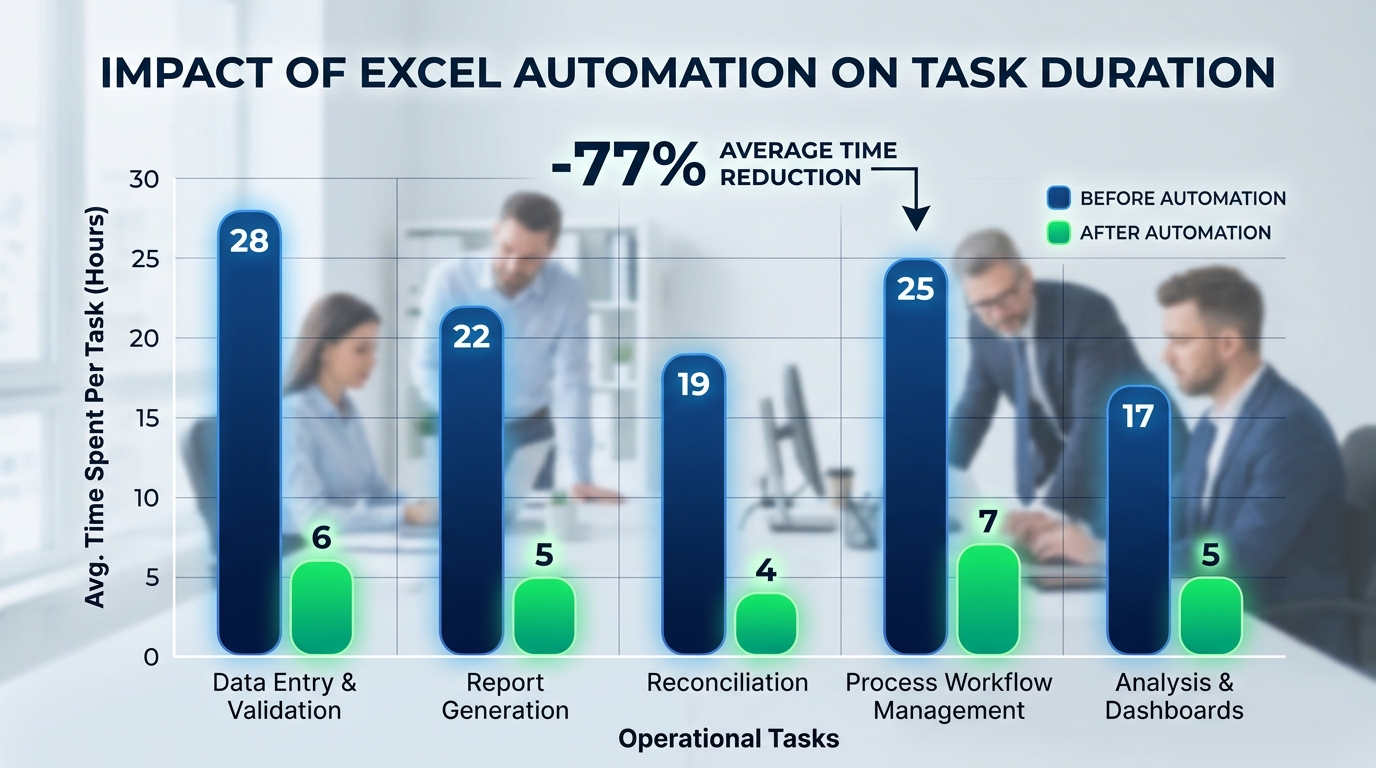
Visualizing the efficiency gains: Excel automation dramatically reduces the hours operations teams spend on manual tasks.
Reducing Errors and Improving Data Quality
Automation guarantees perfect adherence to business logic. When you automate Excel data processing, the Python script never gets tired, it never accidentally deletes a cell, and it never forgets a step in the formatting process. This elevates overall data quality, ensuring that executive leadership is making strategic decisions based on 100% accurate, reliable information.
4. Steps to Eliminate Manual Excel Reporting
Transitioning an operations team to an automated environment should be approached systematically:
- Audit Existing Processes: Identify the most time-consuming, highly repetitive reports that are currently being updated manually on a daily or weekly basis.
- Standardize Inputs: Before you can write a script, ensure that the incoming raw data formats are relatively consistent.
- Develop the Script: Work with a developer or an up-skilled operations analyst to automate Excel reports with Python, focusing on the heavy lifting of data transformation.
- Deploy and Validate: Run the automated script parallel to the manual process for a few weeks. Once the script’s output is validated and trusted, retire the manual process completely.

Empowering operations teams: Automation frees up valuable time, allowing teams to focus on strategic initiatives rather than manual data entry.
FAQ
Do we need to hire a full-time software engineer to build these automations?
Not necessarily. Python has a very gentle learning curve. Many modern operations analysts and data-savvy professionals can learn enough Python to automate their own workflows, or you can leverage specialized consultants to build the initial infrastructure.
What happens if the structure of our raw data changes?
Automated scripts are highly adaptable. If a vendor changes a column name or a file format, the script can easily be updated in minutes to accommodate the new structure, allowing the pipeline to continue running smoothly.