
How to Setup and Run LangChain with a Local LLM
Building generative AI applications traditionally required sending sensitive prompt data over HTTP to remote APIs managed by OpenAI, Anthropic, or Google. While cloud-hosted models offer high performance, enterprise software engineering teams, privacy-conscious developers, and healthcare or financial institutions increasingly demand LangChain local LLM workflows.
Running a LangChain self-hosted LLM or LangChain offline LLM grants total control over data governance, eliminates per-token API costs, enables offline execution, and removes reliance on external API rate limits and vendor uptime. In this comprehensive 2026 guide, you will learn how to design, execute, and optimize a complete local model LangChain integration without relying on the OpenAI API.
Why Use a Private LLM with LangChain?
Integrating a LangChain private LLM into your software stack shifts your infrastructure from a reactive consumer of third-party SaaS models to an autonomous, air-gapped AI provider.

This diagram illustrates a local, air-gapped workflow where LangChain’s LCEL interacts directly with a local LLM engine and GPU VRAM, ensuring data privacy and autonomy.
Benefits of Offline and Self-Hosted LLMs for Developers
- Zero Data Leakage & Total Privacy: When running a LangChain open source LLM locally, source code, proprietary enterprise data, and personally identifiable information (PII) never leave your private subnet or workstation network interface.
- Predictable Operational Costs: Standard cloud API billing scales linearly with volume. Switching to local inference transforms variable operational expenses into fixed infrastructure investments.
- Low-Latency Air-Gapped Workflows: In environments with strict compliance regulations or degraded internet connectivity, LangChain local development ensures deterministic latency and continuous execution without external network handshakes.
- Complete Customization & Control: Local execution allows you to select specific open-source quantizations, apply fine-tuned weights, and customize context parameters without forced model deprecation or system prompt changes imposed by external vendors.
When you transition beyond basic experimentation, exploring specific local AI tools like Ollama provides lightweight runtime managers that streamline GGUF model execution alongside your LangChain pipelines.
Performance Differences: Local vs Cloud LLMs in LangChain
While private local models offer undeniable governance advantages, developers must consider key trade-offs in throughput, parameter scale, and resource availability:
| Feature Dimension | Cloud API (e.g., OpenAI / Anthropic) | Local Open Source Model (e.g., Llama 3 / Mistral) |
|---|---|---|
| Data Privacy | Subject to cloud provider privacy policies & logs | 100% private and air-gapped on local hardware |
| Cost Model | Pay-per-token (unlimited scaling cost) | Upfront hardware / GPU infrastructure cost |
| Latency & Speed | Variable (network latency + queue time) | Deterministic (bound by local VRAM & compute bandwidth) |
| Max Parameter Size | 100B+ parameters (Mixture of Experts) | Typically 7B to 70B parameters depending on local VRAM |
| Offline Capability | Requires active internet connection | Runs entirely offline without network calls |
Hardware Requirements for LangChain Local AI
Executing a LangChain local AI environment efficiently depends heavily on hardware selection, memory bandwidth, and quantization levels.
- Minimum Requirements (CPU-Only / Basic Testing):
- Processor: 8-core x86-64 or Apple Silicon (M1/M2/M3/M4)
- RAM: 16 GB system memory
- Storage: 20 GB available NVMe SSD storage
-
Supported Models: 7B parameter models using 4-bit quantization (Q4_K_M GGUF format) at 5–12 tokens per second.
-
Recommended Requirements (Developer Workstation):
- GPU: NVIDIA RTX 3090 / 4090 (24 GB VRAM) or Apple Silicon with 32 GB–64 GB Unified Memory
- RAM: 32 GB–64 GB system memory
- Storage: 100 GB High-Performance PCIe 4.0 NVMe SSD
-
Supported Models: 7B to 14B parameter models unquantized or 8-bit, or 70B parameter models at 4-bit quantization running at 30+ tokens per second.
-
Enterprise Server / Local Cluster Setup:
- GPU: Dual NVIDIA A6000 (48 GB VRAM each) or H100 PCIe (80 GB VRAM)
- RAM: 128 GB+ ECC DDR5
- Storage: RAID-0 NVMe array
- Supported Models: Full 70B+ parameter models running FP16 or high-bit precision multi-GPU inference with high concurrency.
How to Run LangChain Without the OpenAI API
Executing LangChain without OpenAI API dependencies requires swapping ChatOpenAI or OpenAI client instances for local wrappers such as ChatOllama, LlamaCpp, or HuggingFacePipeline.
LangChain’s unified expression language (LCEL) uses standard interface abstractions (BaseChatModel and LLM), making the underlying LLM engine completely interchangeable.
Here is a conceptual architectural contrast:
[ Traditional Cloud Workflow ]
User Input -> LangChain LCEL -> OpenAI REST API (HTTPS) -> External Servers -> Response

[ Local Air-Gapped Workflow ]
User Input -> LangChain LCEL -> Local LLM Engine (Ollama / Llama.cpp / vLLM) -> Local GPU VRAM -> Response
When building complex applications, developers often extend this foundation to build local RAG systems using local vector stores like ChromaDB alongside local embedding models.
Step-by-Step Local Model LangChain Integration
Let’s walk through initializing a production-ready LangChain custom LLM setup in Python.
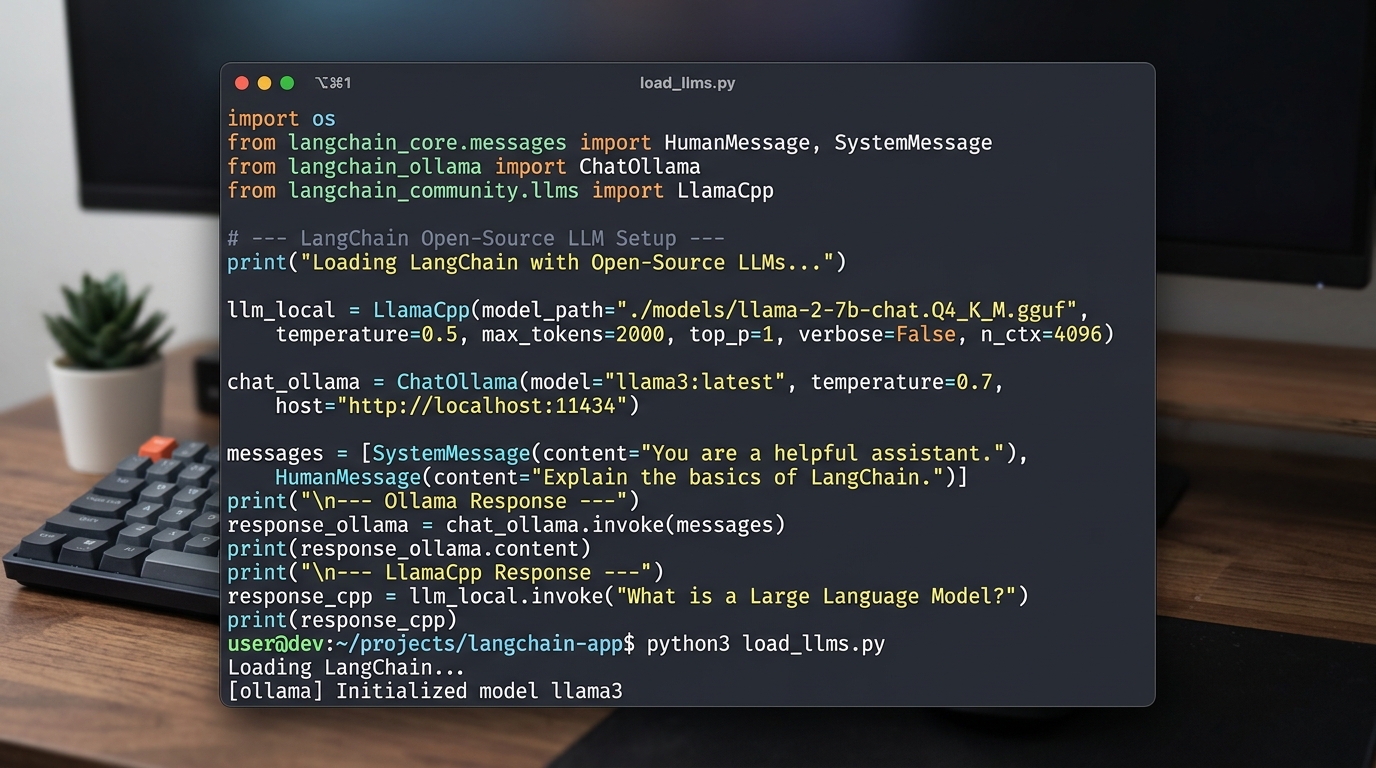
Example Python code demonstrating how to initialize and use local LLMs like Ollama and LlamaCpp within a LangChain application.
Setting up the Python Environment
First, create an isolated Virtual Environment to isolate dependencies and install the official LangChain packages along with local provider drivers:
# Create and activate virtual environment
python -m venv langchain-local-env
source langchain-local-env/bin/activate  # On Windows use: langchain-local-env\Scripts\activate

# Install required Python libraries for 2026 local LLM workflows
pip install --upgrade langchain langchain-core langchain-community langchain-ollama llama-cpp-python
Loading Your Custom Open Source LLM
Once dependencies are installed, you can initialize your local model in Python. The example below demonstrates two primary approaches: using ChatOllama for local server execution and LlamaCpp for direct in-process GGUF bindings.
# local_langchain_setup.py
import sys
from langchain_core.prompts import ChatPromptTemplate
from langchain_core.output_parsers import StrOutputParser
from langchain_ollama import ChatOllama

def run_ollama_local_chain():
    """Executes a chain using a local Ollama instance running Llama 3 or Mistral."""
    print("--- Initializing ChatOllama Model ---")

    # Initialize local model wrapper running on localhost:11434
    llm = ChatOllama(
        model="llama3:8b",
        temperature=0.2,
        base_url="http://localhost:11434"
    )

    # Construct prompt pipeline
    prompt = ChatPromptTemplate.from_messages([
        ("system", "You are an expert Python software architect specializing in local AI systems."),
        ("user", "Explain how memory management works when loading GGML/GGUF local models: {concept}")
    ])

    # Combine into LCEL chain
    chain = prompt | llm | StrOutputParser()

    # Invoke chain offline
    response = chain.invoke({"concept": "VRAM offloading to CPU RAM"})
    print("\nModel Output:\n", response)

if __name__ == "__main__":
    run_ollama_local_chain()
If you prefer binding directly to a downloaded GGUF file without running an external background daemon service, use llama-cpp-python:
from langchain_community.llms import LlamaCpp

def run_direct_gguf_chain():
    """Directly loads a GGUF model binary file using llama-cpp bindings."""
    model_path = "./models/mistral-7b-instruct-v0.2.Q4_K_M.gguf"

    llm = LlamaCpp(
        model_path=model_path,
        temperature=0.1,
        max_tokens=512,
        n_ctx=4096,
        n_gpu_layers=-1,  # Offload all layers to GPU (set to 0 for CPU-only)
        verbose=False
    )

    response = llm.invoke("Summarize the benefits of air-gapped AI deployments.")
    print("\nDirect GGUF Output:\n", response)
To review comprehensive architecture patterns, benchmarking tests, and troubleshooting steps, refer to our extended guide on LangChain local model best practices.
Frequently Asked Questions
What is the best local LLM for LangChain?
The best local LLM for LangChain depends on your target hardware, context length needs, and specific task requirements:
- Meta Llama 3 / 3.1 (8B & 70B): The leading general-purpose open-source model family. Llama 3 8B offers exceptional performance for coding, reasoning, and instruction following while easily fitting inside consumer GPUs (8 GB–16 GB VRAM).
- Mistral / Mixtral 7B & 8x7B: Highly efficient for function calling, RAG pipelines, and structured outputs (JSON). Excellent token generation throughput.
- Qwen 2.5 (7B, 14B, 32B): Outstanding multilingual support, long context window retention, and highly capable python code generation benchmarks.
- Phi-3 / Gemma 2: Ideal for constrained edge devices, laptops without discrete GPUs, or CPU-only microservices.