
Building Multi-Model Python Pipelines with the Replicate API
One model rarely solves a real product problem. You generate an image, then you upscale it. You transcribe audio, then you summarize the transcript. You caption a photo, then you feed the caption into a language model. Replicate’s unified API makes this kind of model chaining unusually clean: every model speaks the same request/response protocol, so wiring outputs into inputs becomes plain Python.
This tutorial walks through designing and building a production-grade multi-model pipeline: data flow, error handling, latency management, and a complete working example that chains image generation into upscaling.
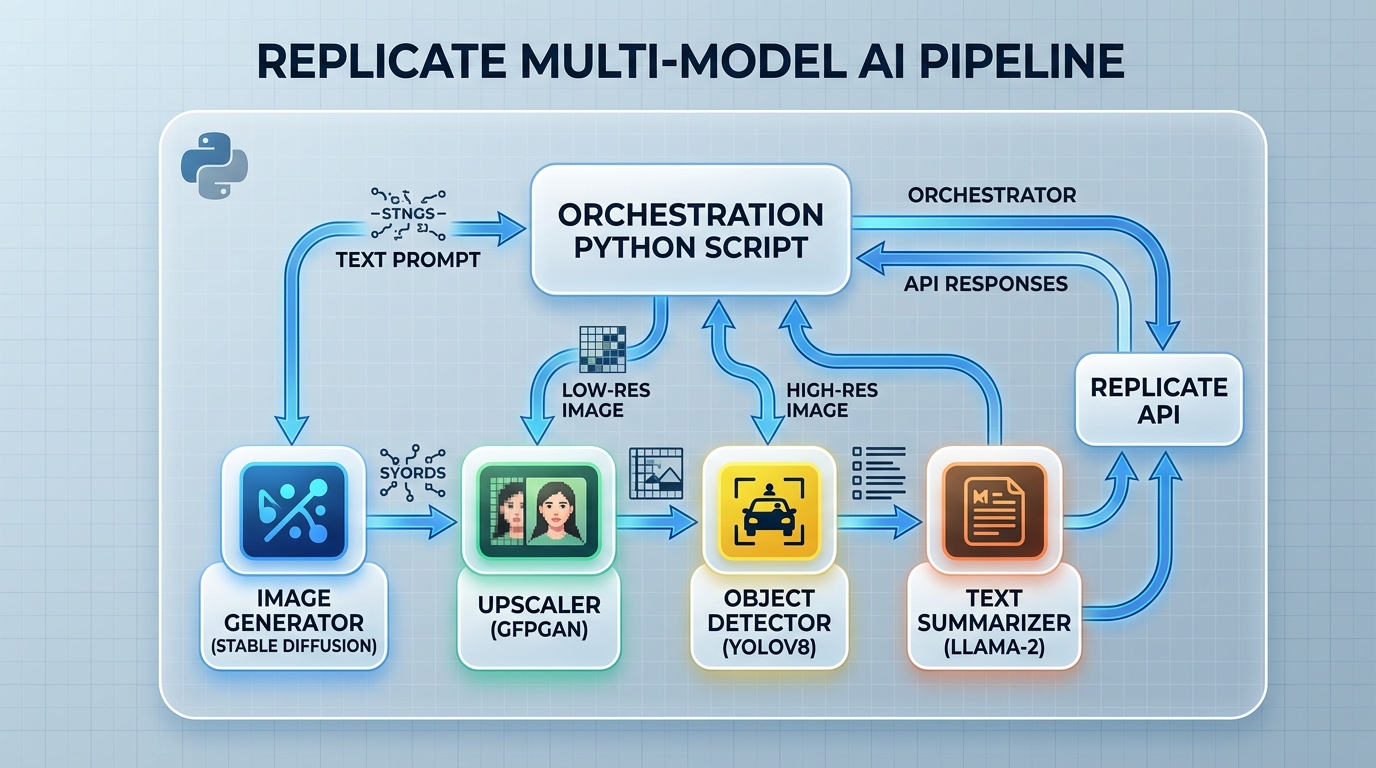
A conceptual diagram illustrating how a Python script orchestrates a multi-model AI pipeline on Replicate, seamlessly passing outputs from one model as inputs to the next.
What is Model Chaining in Replicate?
Model chaining means using the output of one model as the input to another, orchestrated by your own code. Replicate doesn’t impose a workflow engine — your Python script is the orchestrator. Because every Replicate model is invoked the same way (replicate.run("owner/name:version", input={...})), a chain is conceptually just:
step_1_output = replicate.run(MODEL_A, input={...})
step_2_output = replicate.run(MODEL_B, input={"input": step_1_output})
Common chaining patterns include:
- Sequential refinement: generate → upscale → face-restore.
- Modality translation: audio → transcript → summary → translation.
- Analysis then action: image → caption → prompt-rewriting → regeneration.
- Custom + off-the-shelf: a fine-tuned model for your domain feeding a general-purpose post-processor. If you haven’t built one yet, integrating a fine-tuned custom model into a chain is often where pipelines create the most differentiated value.
The advantage of chaining on one platform is uniformity: one authentication scheme, one client library, one billing surface, and file outputs (URLs) that can be passed directly as inputs to the next model.
Designing a Multi-Model Workflow
Before writing code, sketch the pipeline as a directed graph. For each edge, answer three questions:
- What type flows across it? A URL to a file? Raw text? A JSON structure?
- What can go wrong at the upstream node? Model failure, content filter rejection, timeout, malformed output.
- Is the downstream step mandatory or optional? An upscaler failing shouldn’t necessarily kill the pipeline if the base image is usable.
Passing Outputs from One Model to Another
Replicate models typically return one of:
- File outputs — the Python client returns file-like objects (or URLs) for images, audio, and video. Most image-accepting models take a URL directly, so you can usually pass an output straight through without downloading it.
- Text/JSON outputs — returned as strings, lists, or dicts, sometimes streamed token-by-token for language models.
Two rules keep chains robust:
- Normalize at boundaries. Immediately after each model call, convert the raw output into a well-defined intermediate (e.g., always a single URL string, always UTF-8 text). Downstream code should never care which model produced the data.
- Validate before forwarding. Check that the list isn’t empty, the URL is reachable, and the text isn’t a refusal message before spending money on the next step.
def normalize_image_output(output) -> str:
    """Coerce Replicate image output into a single URL string."""
    if isinstance(output, list):
        if not output:
            raise ValueError("Model returned an empty output list")
        output = output[0]
    url = str(output)
    if not url.startswith("http"):
        raise ValueError(f"Unexpected output format: {url[:80]}")
    return url
Setting Up the Python Pipeline
Install the client and set your token:
pip install replicate
export REPLICATE_API_TOKEN=r8_your_token_here
Structure the pipeline as small, testable functions — one per model — plus an orchestrator. Pin exact version hashes so behavior doesn’t shift under you.
Example Code: Image Generation to Upscaling
Here’s a complete two-stage pipeline: generate an image from a prompt, then upscale the result. Replace the version hashes with the current versions from each model’s Replicate page.
import logging
import time

import replicate

logging.basicConfig(level=logging.INFO)
log = logging.getLogger("pipeline")

GENERATOR = "black-forest-labs/flux-schnell"          # text -> image
UPSCALER = "nightmareai/real-esrgan:<version-hash>"    # image -> upscaled image

MAX_RETRIES = 2
RETRY_BACKOFF = 5  # seconds


def run_with_retries(model: str, model_input: dict):
    """Run a Replicate model with bounded retries and backoff."""
    last_error = None
    for attempt in range(1, MAX_RETRIES + 2):
        try:
            log.info("Running %s (attempt %d)", model, attempt)
            start = time.time()
            output = replicate.run(model, input=model_input)
            log.info("Completed %s in %.1fs", model, time.time() - start)
            return output
        except Exception as exc:  # narrow this to replicate exceptions in prod
            last_error = exc
            log.warning("Attempt %d failed: %s", attempt, exc)
            time.sleep(RETRY_BACKOFF * attempt)
    raise RuntimeError(f"{model} failed after retries") from last_error


def generate_image(prompt: str) -> str:
    output = run_with_retries(GENERATOR, {"prompt": prompt, "num_outputs": 1})
    return normalize_image_output(output)


def upscale_image(image_url: str, scale: int = 4) -> str:
    output = run_with_retries(UPSCALER, {"image": image_url, "scale": scale})
    return normalize_image_output(output)


def pipeline(prompt: str) -> dict:
    """End-to-end: prompt -> generated image -> upscaled image."""
    result = {"prompt": prompt, "generated": None, "upscaled": None}

    result["generated"] = generate_image(prompt)

    try:
        result["upscaled"] = upscale_image(result["generated"])
    except RuntimeError:
        # Upscaling is enhancement, not essential — degrade gracefully.
        log.error("Upscale stage failed; returning base image only")

    return result


if __name__ == "__main__":
    final = pipeline("an isometric illustration of a solar-powered greenhouse")
    print(final)
Note the design decisions: retries are bounded, each stage logs its duration, outputs are normalized at boundaries, and the optional stage fails soft instead of killing the run.

Visual representation of a Python code example demonstrating how image outputs are passed between chained Replicate models for tasks like image generation and upscaling.
Handling Errors and Managing Latency
Multi-model pipelines multiply both failure modes and wait times. Plan for both explicitly.
Error handling principles:
- Classify errors. Input validation failures should never be retried (they’ll fail again); transient network or capacity errors should be retried with backoff; content-policy rejections need to bubble up to the caller.
- Bound your retries. Each retry of a GPU-backed model costs money. Two or three attempts with increasing backoff is a sensible ceiling.
- Preserve partial results. If stage 3 of 4 fails, persist stages 1–2 so a rerun can resume rather than restart. Even a JSON file keyed by input hash goes a long way.
- Set timeouts. Wrap each stage in an overall deadline so a hung prediction doesn’t stall the whole batch.
Latency realities:
Total pipeline latency is the sum of stage latencies plus any cold starts — and each distinct model in your chain can cold start independently. A two-model chain where both models are cold can be painfully slow for the first request, then fast afterward. That has direct billing implications too; the cost implications of multi-model chaining are worth understanding before you scale a chain to thousands of runs.
For long-running stages, blocking synchronous calls tie up your workers. The cleaner pattern is implementing async webhooks for long-running models: create predictions asynchronously and let Replicate call you back when each stage completes.
Optimizing the Chaining Process for Speed
Once the pipeline is correct, make it fast:
- Parallelize independent branches. If two stages don’t depend on each other (e.g., generating four candidate images), run them concurrently with
asyncioand the client’s async API (replicate.async_run) or a thread pool.
import asyncio
import replicate

async def generate_variants(prompt: str, n: int = 4):
    tasks = [
        replicate.async_run(GENERATOR, input={"prompt": prompt})
        for _ in range(n)
    ]
    return await asyncio.gather(*tasks)
- Pass URLs, don’t ferry bytes. Let Replicate’s infrastructure move files between stages. Downloading an image just to re-upload it to the next model adds seconds and bandwidth for nothing.
- Warm your chain before bursts. If you know a batch is coming, send one throwaway request through each model first so real work hits warm instances.
- Trim generation parameters. Fewer inference steps, smaller intermediate resolutions (upscale at the end, not the middle), and shorter max token counts all compound across stages.
- Cache deterministic stages. If the same input recurs, cache stage outputs keyed by (model version, input hash). Captioning the same image twice is pure waste.
When a chain graduates from script to service, the concerns shift to queues, concurrency limits, and observability — covered in our guide to scaling your model chaining workflow.
Conclusion
Model chaining on Replicate is orchestration in plain Python: normalize each model’s output, validate before forwarding, bound your retries, and treat latency as a budget spent across stages. Start with a simple sequential script like the generation-to-upscaling example above, then layer in async execution, caching, and webhooks as volume grows. The unified API means the hard part isn’t wiring models together — it’s the engineering discipline around failures and speed, and now you have a template for both.
FAQ
How do I chain Replicate models in a Python pipeline?
Call the first model with replicate.run(), normalize its output (typically a file URL or text), validate it, and pass it as an input field to the next model. Wrap each stage in a function with bounded retries and orchestrate the sequence in plain Python.
Can I pass an image output directly to another Replicate model?
Usually yes. Image models return file outputs accessible as URLs, and most image-accepting models take a URL as input, so you can forward outputs without downloading and re-uploading the file.
How do I handle a model failing in the middle of a chain?
Classify the error first: retry transient failures with backoff, fail fast on invalid inputs, and degrade gracefully on optional stages. Persist intermediate outputs so reruns can resume from the last successful stage instead of paying for the whole chain again.
Why is the first run of my pipeline so slow?
Each distinct model in the chain can hit a cold start — the time Replicate needs to load model weights onto a GPU. Subsequent runs against warm models are much faster. Warm-up requests or batching work into bursts mitigates this.
Should I use synchronous calls or webhooks for multi-model pipelines?
Synchronous replicate.run() calls are fine for scripts and short chains. For long-running models or high-volume services, create predictions asynchronously and use webhooks so your workers aren’t blocked waiting on GPU jobs.