
How to Connect Claude to Internal Tools Using MCP Servers
Connecting Claude to your internal tools transforms it from a chat interface into a working member of your engineering stack — one that can query your database, read your internal docs, and act on your systems through a controlled, auditable interface. The mechanism that makes this possible is the Model Context Protocol (MCP), and this tutorial walks through the entire setup: environment configuration, server connection, agent tool access, and a deep dive into internal database integration.
This guide assumes you’re comfortable with a terminal, JSON configuration, and basic environment management. Every step includes the exact commands and config you need.
Why Connect Claude to Internal Databases & Tools?
Out of the box, Claude only knows what’s in its training data and what you paste into the conversation. For real engineering and operations work, that’s not enough. Claude agent internal tool access solves four concrete problems:
- Stale context. Instead of copy-pasting query results or docs into a prompt, Claude reads live data directly from your systems at the moment it needs it.
- Manual glue work. Without tool access, a human sits between Claude and every system — running queries, fetching logs, updating tickets. MCP removes the human relay.
- Integration sprawl. MCP replaces one-off scripts and bespoke API wrappers with a standardized protocol. Build a server once; every MCP-compatible client in your org can use it.
- Uncontrolled access. Paradoxically, giving Claude structured tool access is safer than ad-hoc alternatives. An MCP server is a policy boundary: it decides exactly which operations are exposed, with which credentials, at which scope.
Common model context protocol use cases in internal environments include read-only analytics against production replicas, internal wiki and document retrieval, ticket triage and creation, log search during incident response, and CI/CD status checks — all without granting Claude raw credentials to anything.
If you’re still evaluating the architecture itself, start with our breakdown of the differences between MCP and traditional REST APIs — it explains why MCP is the right interface layer for agents rather than pointing Claude at your existing endpoints.
Prerequisites for Claude Code MCP Integration
Before starting the Claude Code MCP integration guide steps below, make sure you have:
- Claude Code installed (
npm install -g @anthropic-ai/claude-code) or Claude Desktop, depending on your workflow. - Node.js 18+ and/or Python 3.10+ — most MCP servers run on one of the two runtimes.
uvorpipx(for Python-based servers) ornpx(for Node-based servers) so servers can be launched without global installs.- Network access from your workstation to the internal tool (database host, internal API, VPN if required).
- A scoped service account for the tool you’re connecting — never your personal admin credentials. For a database, that means a dedicated read-only user.
- Basic familiarity with JSON configuration files.
Create the scoped database user before anything else. For PostgreSQL:
CREATE ROLE claude_readonly WITH LOGIN PASSWORD 'use-a-secrets-manager';
GRANT CONNECT ON DATABASE analytics TO claude_readonly;
GRANT USAGE ON SCHEMA public TO claude_readonly;
GRANT SELECT ON ALL TABLES IN SCHEMA public TO claude_readonly;
ALTER DEFAULT PRIVILEGES IN SCHEMA public GRANT SELECT ON TABLES TO claude_readonly;
This single step eliminates the largest risk class in the entire setup: an agent with write access it doesn’t need.
Step-by-Step: Claude MCP Server Setup Tutorial
This claude mcp server setup tutorial uses a PostgreSQL server as the worked example, but the pattern is identical for any internal tool: configure the environment, register the server, verify the connection, grant access.
Step 1: Configuring Your Internal Environment
First, isolate credentials in environment variables rather than embedding them in config files that get committed or synced.
# ~/.zshrc / ~/.bashrc or a project-level .env (never committed)
export ANALYTICS_DB_URL="postgresql://claude_readonly:<password>@db.internal:5432/analytics"
Confirm connectivity from your workstation before involving Claude — this separates network problems from MCP problems later:
psql "$ANALYTICS_DB_URL" -c "SELECT 1;"
If this fails, fix DNS, VPN, or firewall rules now. An MCP server cannot reach anything your shell can’t reach.
Step 2: Setting Up the MCP Server Connection
Option A — Claude Code (CLI). Register the server with claude mcp add. The -- separator marks the launch command:
claude mcp add analytics-db \
  --env DATABASE_URL="$ANALYTICS_DB_URL" \
  -- npx -y @modelcontextprotocol/server-postgres "$ANALYTICS_DB_URL"
You can scope the server to the current project (--scope project, which writes a shareable .mcp.json) or to your user account (--scope user) for availability across all projects.
Option B — JSON configuration. For Claude Desktop, edit claude_desktop_config.json (macOS: ~/Library/Application Support/Claude/; Windows: %APPDATA%\Claude\). For project-level Claude Code config, use .mcp.json in the repo root:
{
  "mcpServers": {
    "analytics-db": {
      "command": "npx",
      "args": [
        "-y",
        "@modelcontextprotocol/server-postgres",
        "postgresql://claude_readonly:${DB_PASSWORD}@db.internal:5432/analytics"
      ],
      "env": {
        "DB_PASSWORD": "${DB_PASSWORD}"
      }
    }
  }
}
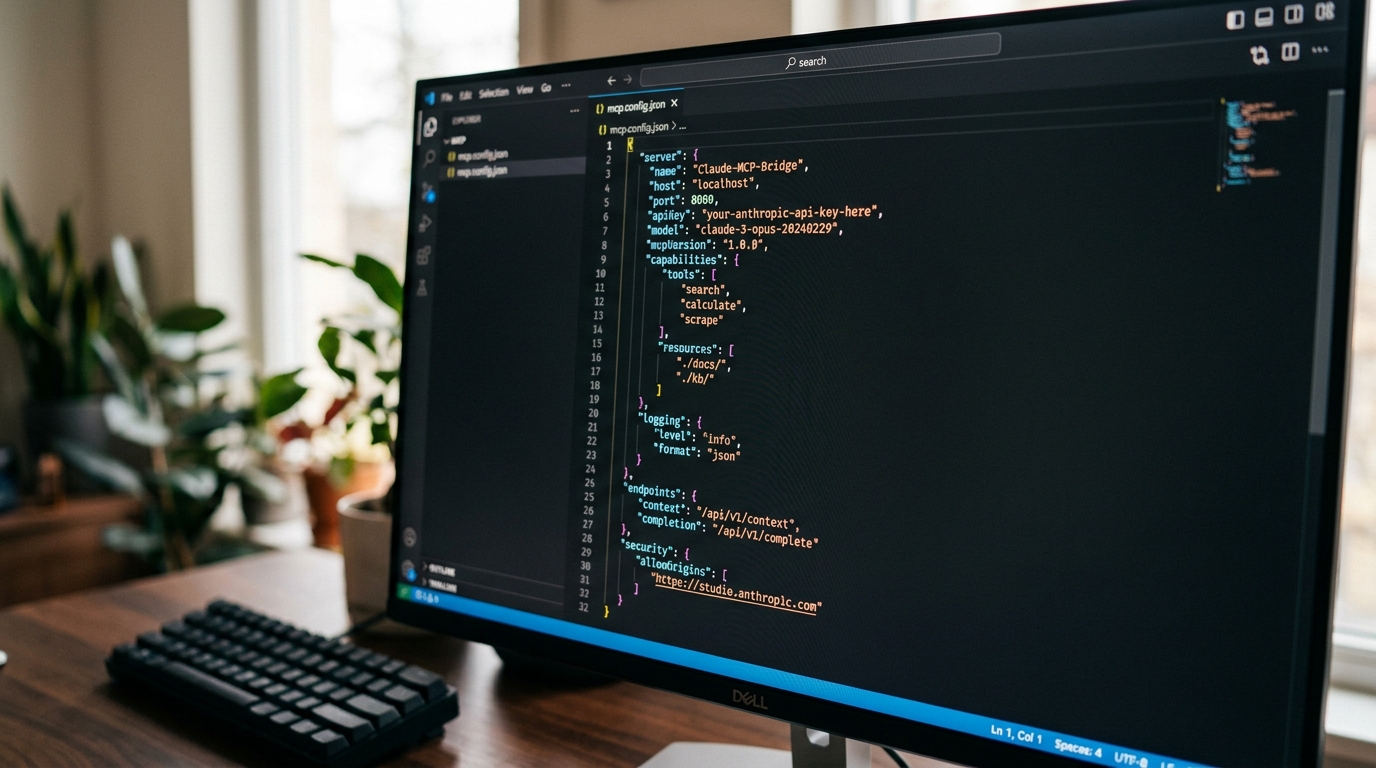
An example of JSON configuration for connecting a Claude MCP server, detailing the command, arguments, and environment variables for secure setup.
Key configuration rules:
command+argsdefine exactly how the client spawns the server subprocess (stdio transport).envinjects environment variables into the server process — this is where secrets belong, ideally referenced from your shell environment rather than hardcoded.- One entry per server; you can register a database server, a filesystem server, and an internal API server side by side under
mcpServers.
Restart Claude Desktop, or run /mcp inside a Claude Code session, to load the new configuration.
Step 3: Granting Claude Agent Tool Access
With the server registered, verify that Claude can see and use it:
claude mcp list # confirm the server is registered and healthy
Then, inside a session, run /mcp to inspect connection status and the tools each server exposes. When Claude first attempts to call a tool, Claude Code prompts you to approve the invocation. You control this trust boundary:
- Per-call approval (default) — safest for early testing.
- Allowlisting — pre-approve specific tools using the
--allowedToolsflag or permission settings, e.g.mcp__analytics-db__query, so routine read operations don’t require constant confirmation.
Test with a natural prompt:
“Using the analytics-db tools, list the five largest tables by row count.”
If Claude invokes the server’s query tool and returns live results, your integration is working end to end.

Successful terminal output confirming a Claude agent’s internal tool access, demonstrating a working Model Context Protocol (MCP) server connection.
If the server shows as failed or tools never appear, work through our guide to debug MCP server connection issues — it covers the most common failure modes: path problems, environment variables not propagating, and transport timeouts.
Deep Dive: Using Claude Tools with an Internal Database
The claude tool use internal database pattern deserves special attention because it’s both the highest-value integration and the one with the sharpest edges.
Schema context is everything. Claude writes dramatically better SQL when the server exposes schema information as MCP resources. Database-oriented MCP servers typically advertise table schemas so Claude can inspect column names and types before composing queries. If your server supports it, let Claude read the schema first — you’ll eliminate most hallucinated column names.
Design the tool surface deliberately. You have two options:
- Generic query tool — a single
querytool accepting arbitrary SQL. Maximum flexibility; requires read-only credentials as a hard backstop. - Curated tools — purpose-built tools like
get_customer_by_idorrevenue_by_monthwith typed parameters. Less flexible, but far safer for write paths and far more predictable for non-analytics workflows.
For production internal tools, the curated approach wins whenever writes are involved. Reserve the generic query tool for read-only replicas.
Point at replicas, not primaries. Even read-only agent queries can be expensive. Route Claude’s access to a read replica or warehouse so an ambitious JOIN never competes with production traffic. Set a statement timeout on the claude_readonly role as an additional guardrail:
ALTER ROLE claude_readonly SET statement_timeout = '10s';
Log everything. Because all agent access flows through one MCP server process, you get a single audit chokepoint. Log every tool invocation with timestamp, tool name, and arguments. This audit trail is what turns “we let an AI touch the database” into an approvable architecture during security review.
Context Extension Tools for Claude Code
Beyond databases, claude code context extension tools solve a different problem: getting the right knowledge into Claude’s working context. Claude code external tools integration generally falls into three categories:
- Filesystem servers — expose selected directories (design docs, runbooks, ADRs) so Claude reads authoritative internal documentation instead of guessing. Scope the allowed paths tightly; never expose
$HOMEwholesale. - Fetch/HTTP servers — let Claude retrieve internal wiki pages or API documentation on demand, converting pages into model-friendly text.
- Memory/knowledge servers — persist facts across sessions (architecture decisions, naming conventions, environment quirks) so you stop re-explaining your stack in every conversation.
The practical effect of pairing context extension with action tools is a compounding one: Claude reads your runbook via the filesystem server, then executes the corresponding queries via the database server — a complete internal workflow with zero copy-paste.
When you outgrow local stdio servers — because a whole team needs shared access, or the tool lives deep in a private network — the next step is a self-hosted MCP server setup running as a network service with proper authentication, containerization, and monitoring.
Frequently Asked Questions
How do I securely manage database credentials?
Never hardcode credentials in claude_desktop_config.json or .mcp.json — these files are easy to leak through backups, screen shares, and accidental commits. Instead: (1) store secrets in your OS keychain or a secrets manager (Vault, AWS Secrets Manager, 1Password CLI); (2) inject them into the server process via environment variables at launch; (3) use a dedicated, read-only service account with a statement timeout; (4) rotate the credential on a schedule, which is painless because only the MCP server’s environment references it. For team deployments, move to a self-hosted server where credentials live server-side and clients authenticate with their own tokens.
Can Claude modify my database through MCP?
Only if you let it. The database role’s permissions are the hard boundary — a SELECT-only role cannot write regardless of what SQL Claude generates. For write workflows, expose narrow, curated tools (e.g., create_ticket) rather than generic SQL execution, and keep per-call approval enabled.
Do MCP servers work with Claude Desktop and Claude Code simultaneously?
Yes. Both are MCP hosts. The same server can be registered in Claude Desktop’s claude_desktop_config.json and in Claude Code via claude mcp add. Each host spawns (or connects to) its own session with the server.
What’s the difference between project-scoped and user-scoped servers in Claude Code?
Project scope writes the server definition to .mcp.json in the repository, making it shareable with teammates via version control (with secrets referenced from each user’s environment). User scope registers the server globally for your account across all projects. Use project scope for team tooling, user scope for personal utilities. (project-scoped and user-scoped servers)
Does connecting internal tools send my data to Anthropic?
Tool results that Claude reads become part of the conversation context, which is processed by the model like any other message. Design your tool surface so only necessary data is returned — apply row limits, column filtering, and redaction inside the MCP server before results ever reach the model.