
Complete Guide to Claude API Node.js Integration
Adding a large language model to a Node.js application unlocks a whole class of automation: summarizing scraped data, classifying incoming documents, drafting responses, and transforming messy text into structured JSON. Anthropic’s Claude models are a popular choice for these tasks, and the official SDK makes integration straightforward — but a production-grade integration needs more than a hello-world call.
This guide covers the full claude api nodejs integration lifecycle: SDK setup, secure authentication, making calls from JavaScript, and handling rate limits gracefully with retries and backoff.
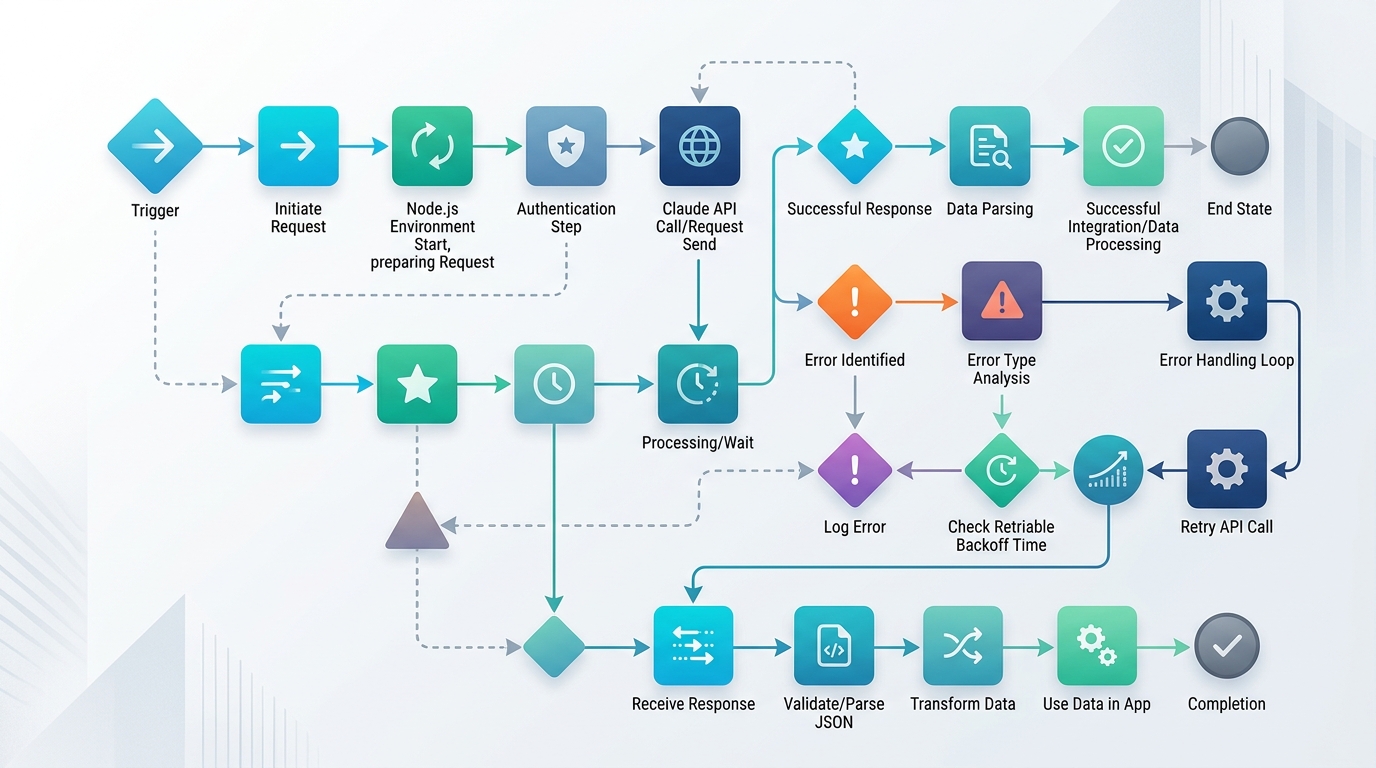
A robust Claude API integration in Node.js involves careful handling of the request lifecycle, from authentication to error management.
How to Integrate the Claude API in a Node.js Application
Setting up the Anthropic SDK (Node.js Example)
Anthropic publishes an official Node.js SDK that handles request formatting, response parsing, and sensible defaults. Install it alongside dotenv for environment management:
npm install @anthropic-ai/sdk dotenv
Get an API key from the Anthropic Console, put it in .env, and initialize the client. Here’s a minimal anthropic sdk nodejs example:
require('dotenv').config();
const Anthropic = require('@anthropic-ai/sdk');

const anthropic = new Anthropic({
  apiKey: process.env.ANTHROPIC_API_KEY,
});

async function askClaude(prompt) {
  const message = await anthropic.messages.create({
    model: 'claude-sonnet-4-20250514',
    max_tokens: 1024,
    messages: [{ role: 'user', content: prompt }],
  });

  return message.content[0].text;
}

askClaude('Summarize the benefits of async/await in Node.js in two sentences.')
  .then(console.log)
  .catch(console.error);
Key parameters to understand from day one:
model— which Claude model to use. Check Anthropic’s documentation for current model names, since available models and identifiers change over time.max_tokens— the maximum length of the response. Required on every request; set it to what you actually need, since it bounds cost and latency.messages— the conversation history as an array of role/content pairs. For multi-turn use, append the assistant’s previous replies.system(optional) — a top-level system prompt that sets behavior and constraints for the whole conversation.
How to Handle Claude API Authentication Securely in Node.js
nodejs claude api authentication is deliberately simple — a single API key sent via header, which the SDK handles for you. The security work is entirely about how you store and expose that key:
- Never hardcode keys. Keys belong in environment variables or a secrets manager, injected at runtime.
.envfiles must be in.gitignore. - Never expose the key to browsers. All Claude calls should go through your Node.js backend. If a key ships to the client, treat it as compromised — anyone can extract it and spend on your account.
- Fail fast on missing configuration:
if (!process.env.ANTHROPIC_API_KEY) {
  throw new Error('ANTHROPIC_API_KEY is not set. Aborting startup.');
}
- Scope and rotate. Use separate keys per environment (dev/staging/prod) so a leaked dev key never touches production quota, and rotate keys periodically or immediately upon any suspected exposure.
- Set spend limits in the Anthropic Console so a bug or leak can’t run up unbounded costs.
- Proxy client-facing features. If your frontend needs AI features, build an authenticated endpoint on your server that validates the user, applies your own rate limits, and then calls Claude server-side.

Securely handling API authentication in Node.js for the Anthropic SDK is crucial to protect sensitive keys and prevent unauthorized access.
Calling the Claude API from JavaScript
Beyond the basic call, three patterns cover most real-world needs when you call claude api from javascript.
1. System prompts and structured output. For automation pipelines, you usually want machine-parseable responses:
async function classifyTicket(ticketText) {
  const message = await anthropic.messages.create({
    model: 'claude-sonnet-4-20250514',
    max_tokens: 256,
    system:
      'You are a support ticket classifier. Respond ONLY with JSON: ' +
      '{"category": string, "priority": "low"|"medium"|"high"}',
    messages: [{ role: 'user', content: ticketText }],
  });

  return JSON.parse(message.content[0].text);
}
Wrap JSON.parse in a try/catch and validate the shape — treat model output as untrusted input, the same way you’d treat user input.
2. Multi-turn conversations. Maintain history by appending each exchange:
const history = [];

async function chat(userInput) {
  history.push({ role: 'user', content: userInput });
  const reply = await anthropic.messages.create({
    model: 'claude-sonnet-4-20250514',
    max_tokens: 1024,
    messages: history,
  });
  history.push({ role: 'assistant', content: reply.content[0].text });
  return reply.content[0].text;
}
3. Streaming responses. For user-facing features, streaming shows tokens as they’re generated instead of waiting for the full reply:
const stream = anthropic.messages.stream({
  model: 'claude-sonnet-4-20250514',
  max_tokens: 1024,
  messages: [{ role: 'user', content: 'Explain event loop phases briefly.' }],
});

stream.on('text', (text) => process.stdout.write(text));
await stream.finalMessage();
These calls slot naturally into automation pipelines — for example, summarizing metrics collected by a dashboard scraping setup before they’re emailed to stakeholders.
What is the Best Way to Handle Claude API Rate Limiting in Node.js?
Every production integration eventually hits a rate limit — a 429 response when you exceed your requests-per-minute or tokens-per-minute quota. Robust claude api rate limiting nodejs handling has two halves: reacting correctly when limits hit, and avoiding them proactively.
Implementing Retry Logic and Backoff
The standard reaction pattern is exponential backoff with jitter, honoring the retry-after header when the API provides one:
async function callWithRetry(fn, maxRetries = 5) {
  for (let attempt = 0; attempt <= maxRetries; attempt++) {
    try {
      return await fn();
    } catch (err) {
      const retryable = err.status === 429 || err.status >= 500;
      if (!retryable || attempt === maxRetries) throw err;

      const retryAfter = err.headers?.['retry-after'];
      const backoff = retryAfter
        ? Number(retryAfter) * 1000
        : Math.min(1000 * 2 ** attempt, 30000);
      const jitter = Math.random() * 500;

      console.warn(`Rate limited (attempt ${attempt + 1}). Retrying in ${backoff + jitter}ms`);
      await new Promise((r) => setTimeout(r, backoff + jitter));
    }
  }
}

// Usage
const result = await callWithRetry(() => askClaude('Summarize this report...'));
Note that the official SDK includes built-in retry behavior with configurable maxRetries — check the current SDK documentation and decide whether its defaults suffice or you need the explicit control above.
Proactive strategies that prevent 429s in the first place:
- Queue and throttle. Use a concurrency limiter (e.g.,
p-limitor a lightweight queue) so batch jobs never fire hundreds of simultaneous requests. - Batch sensibly. One request summarizing ten items is cheaper and gentler on quotas than ten separate requests.
- Cap
max_tokensto realistic values — token throughput limits count output tokens too. - Cache repeated prompts. If the same input recurs, cache the response instead of re-asking.
- Monitor usage. Log token counts from each response (
message.usage) so you can see quota pressure building before it bites.
The same retry-with-backoff wrapper belongs around every external API call in your async automation scripts — it’s a general resilience pattern, not a Claude-specific one. For how these calls fit into larger pipelines with queues, schedules, and error handling, see our guide to async automation scripts.
FAQ
How do I authenticate with the Claude API in Node.js?
Create an API key in the Anthropic Console and pass it to the SDK client via an environment variable (ANTHROPIC_API_KEY). Never hardcode the key, never commit it to version control, and never expose it to browser-side code — route all calls through your backend.
Can I call the Claude API directly from frontend JavaScript?
You shouldn’t. Calling it from the browser exposes your API key to anyone who inspects the network traffic. Instead, create an authenticated endpoint on your Node.js server that calls Claude on the client’s behalf, with your own validation and rate limiting in front.
What happens when I hit Claude API rate limits?
The API returns a 429 status code, potentially with a retry-after header. Handle it with exponential backoff plus jitter, honor retry-after when present, and add request queuing or throttling so batch workloads stay under your quota.
Does the Anthropic Node.js SDK support streaming?
Yes. The SDK provides a streaming interface that emits text chunks as they’re generated, which is ideal for user-facing chat interfaces where perceived latency matters.
Which Claude model should I use in my Node.js app?
It depends on your cost, latency, and capability requirements — faster, cheaper models suit high-volume classification tasks, while more capable models suit complex reasoning and generation. Check Anthropic’s current documentation for the available model lineup and identifiers, as these change over time.