
How to Handle Node.js Webhook File Processing Reliably
Webhooks are the connective tissue of modern automation: a payment provider notifies you of an invoice PDF, a document service pushes a signed contract, a form tool delivers an uploaded attachment. And when they fail, they tend to fail silently — the sender got a 200, your handler crashed halfway through, and the file is simply gone.
This tutorial shows how to build nodejs webhook file processing that doesn’t drop payloads: a hardened Express listener, safe file handling, and an acknowledge-then-process architecture that survives crashes and retries.
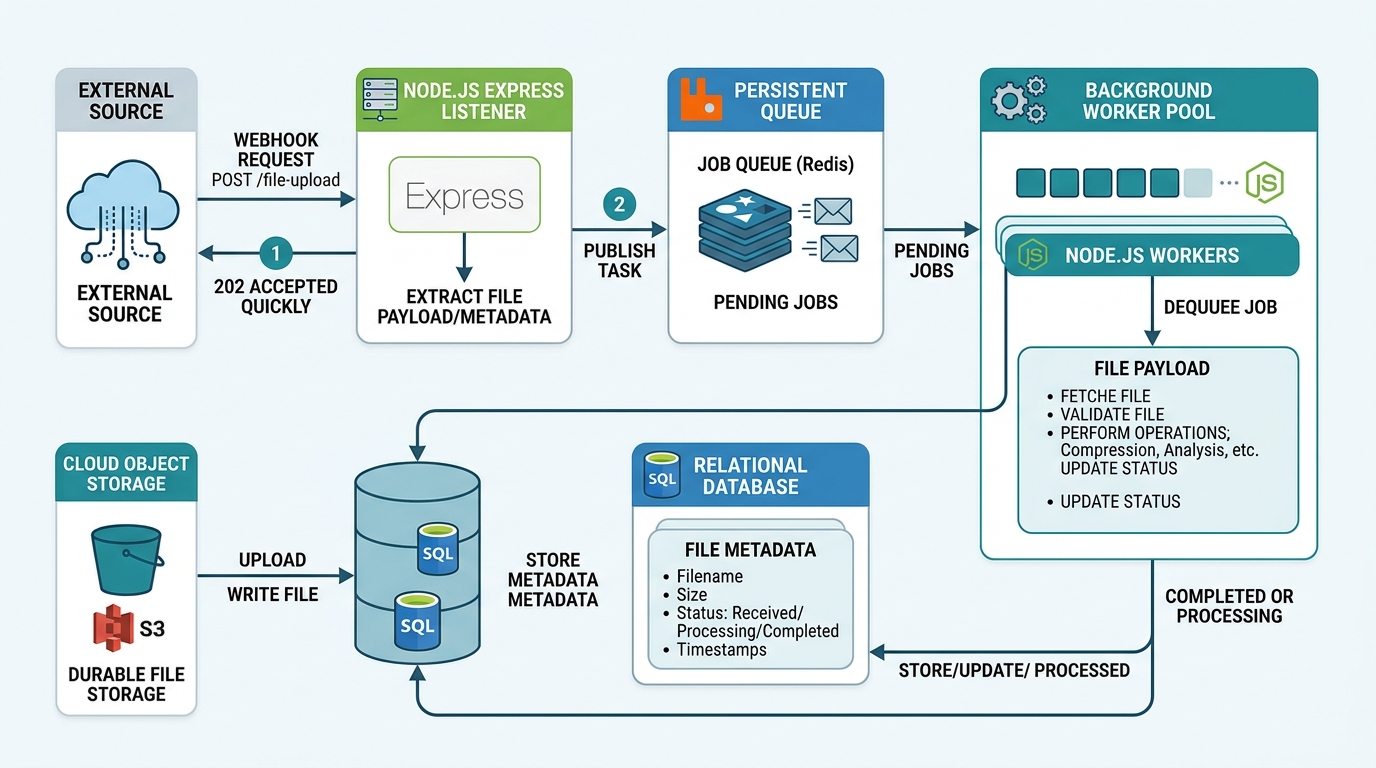
A robust Node.js webhook file processing architecture ensures no payloads are dropped by persisting data before acknowledging and processing asynchronously.
Why Webhooks Fail Silently in Node.js
Understanding the failure modes is half the fix. The most common ways webhook handlers lose data:
- Responding 200 before the work is durable. If your handler sends
res.sendStatus(200)and then processes the file, a crash after the response means the sender believes delivery succeeded and will never retry. The payload is lost forever. - Doing too much inside the request handler. Long-running processing inside the HTTP handler causes sender-side timeouts. Many webhook providers treat a timeout as failure and retry — now you’re processing duplicates and racing your own earlier invocation.
- Body parser mismatches and size limits. Express’s default JSON body limit is small; a large base64-encoded file silently gets rejected or truncated, and without an error handler, nothing tells you.
- Unhandled async errors. A rejected promise inside an
asyncroute handler without a try/catch can leave the request hanging until timeout — no log, no response, no file. - No verification of the sender. An unauthenticated endpoint accepts garbage (or malicious) payloads, polluting your pipeline in ways that surface far from the cause.
The unifying principle for the fixes below: persist first, acknowledge second, process third.
How to Set Up an Express Webhook Listener in Node.js
Start with a minimal, correct nodejs webhook listener setup:
npm install express multer
const express = require('express');
const crypto = require('crypto');

const app = express();

// Capture the raw body — needed for signature verification
app.use(
  '/webhooks',
  express.json({
    limit: '10mb',
    verify: (req, res, buf) => {
      req.rawBody = buf;
    },
  })
);

app.post('/webhooks/files', async (req, res) => {
  try {
    await persistPayload(req.body); // durable write FIRST
    res.sendStatus(200);            // acknowledge SECOND
    processInBackground(req.body);  // heavy work THIRD, after response
  } catch (err) {
    console.error('Webhook persist failed:', err);
    res.sendStatus(500); // tell the sender to retry
  }
});

app.listen(3000, () => console.log('Webhook listener on :3000'));
Creating a Secure Express Webhook Endpoint
An express webhook endpoint nodejs setup exposed to the internet needs authentication and validation:
- Verify signatures. Most providers sign payloads with a shared secret (typically HMAC-SHA256 over the raw body). Verify before trusting anything:
function verifySignature(req, secret) {
  const signature = req.headers['x-webhook-signature'];
  if (!signature) return false;

  const expected = crypto
    .createHmac('sha256', secret)
    .update(req.rawBody)
    .digest('hex');

  return crypto.timingSafeEqual(
    Buffer.from(signature),
    Buffer.from(expected)
  );
}
- Use the raw body for verification — a re-serialized parsed body may not match byte-for-byte, causing valid signatures to fail.
- Serve over HTTPS only, and reject unexpected content types early.
- Set explicit body-size limits that match your largest legitimate payload, and log rejections so oversized files are visible, not silent.
- Return quickly. Aim to respond well inside the sender’s timeout window; anything slow belongs in background processing.
How to Process File Uploads via Webhook in Node.js
Files arrive via webhook in two main shapes, and each needs different handling:
1. Multipart form uploads — use multer to stream them to disk:
const multer = require('multer');
const upload = multer({
  dest: '/var/data/incoming',
  limits: { fileSize: 25 * 1024 * 1024 }, // 25MB cap
});

app.post('/webhooks/upload', upload.single('file'), async (req, res) => {
  if (!req.file) return res.status(400).json({ error: 'No file received' });

  await recordIncomingFile(req.file); // durable metadata record
  res.sendStatus(200);
  enqueueProcessing(req.file.path);
});
2. URL references — the webhook contains a link to download the file. Stream it, never buffer it wholly in memory:
const fs = require('fs');
const { pipeline } = require('stream/promises');

async function downloadFile(url, destPath) {
  const response = await fetch(url);
  if (!response.ok) throw new Error(`Download failed: ${response.status}`);
  await pipeline(response.body, fs.createWriteStream(destPath));
}
Building a Robust File Upload Webhook Handler
A production nodejs file upload webhook handler adds these safeguards on top:
- Stream, don’t buffer. Large files buffered into memory are how Node processes run out of heap under load.
- Write to a temp path, then atomically rename once the write completes — downstream consumers never see half-written files.
- Validate before processing: check file size, expected type (from content inspection, not just the extension), and reject anomalies with a logged reason.
- Record every received file in a database table (
file_id,source,received_at,status) before acknowledging. This ledger is your source of truth for what arrived. - Deduplicate by idempotency key. Providers retry; use the webhook’s event ID or a content hash to ensure the same file isn’t processed twice.

Building a robust Node.js file upload webhook handler involves streaming files, atomic writes, and thorough validation to prevent data loss and ensure security.
Error Handling and Preventing Dropped Payloads
The architecture that eliminates silent drops is acknowledge-then-process with a persistent queue:
- Receive → verify signature → persist raw payload/file + a status record → respond
200. - A separate worker picks up
pendingrecords, processes them, and marks themdoneorfailed. - Failed items stay visible in the ledger with error details and retry counts — nothing evaporates.
// Worker loop (simplified)
async function processPending() {
  const item = await queue.claimNext();
  if (!item) return;

  try {
    await handleFile(item);
    await queue.markDone(item.id);
  } catch (err) {
    await queue.markFailed(item.id, err.message);
    if (item.attempts < MAX_ATTEMPTS) await queue.requeueWithDelay(item);
    else await alerting.notify(`File ${item.id} permanently failed: ${err.message}`);
  }
}
Complete the reliability picture with:
- A global Express error handler so no route failure goes unlogged.
- Alerts on the dead-letter state — permanently failed files should page a human.
- Reconciliation: if the sender provides an event log or list API, periodically compare it against your ledger to catch deliveries you never received. This audit pass runs well as one of your scheduled cron tasks.
Webhook ingestion is typically the entry point of a longer pipeline — parsing, transformation, notification — and the queue-and-worker pattern here extends naturally into full async automation workflows.
FAQ
Why do my Node.js webhooks fail without any errors?
The usual culprits are acknowledging before the work is durable (so crashes lose data invisibly), body-size limits silently rejecting large payloads, and unhandled promise rejections in async route handlers. Persist first, respond second, and add a global error handler.
Should I process webhook files before or after responding with 200?
After — but only once the payload is durably persisted. The correct order is: verify, persist to disk/database, respond 200, then process in a background worker. Responding before persistence risks permanent data loss; processing before responding risks sender timeouts and duplicate retries.
How do I secure an Express webhook endpoint?
Verify HMAC signatures against the raw request body using crypto.timingSafeEqual, serve HTTPS only, enforce content-type and body-size limits, and log every rejection. Never trust a payload just because it arrived at your URL.
How do I handle duplicate webhook deliveries?
Providers retry on timeouts and errors, so duplicates are normal. Store each event’s unique ID (or a content hash) and check it before processing — if you’ve seen it, acknowledge with 200 and skip the work.
What’s the best way to handle large files in a webhook handler?
Stream them. Use multer with disk storage for multipart uploads, or stream.pipeline for URL downloads, with explicit size limits. Buffering entire files in memory leads to out-of-memory crashes under concurrent load.