
Architecting a Scalable AI Image Generation Pipeline
An AI image generation pipeline is more than a prompt box connected to a model. For technical creative operators, marketing engineers, and product teams, the real challenge is repeatability: generating the right assets, with the right constraints, at the right volume, without turning every request into a manual art-directing session.
A production-ready pipeline has to coordinate prompts, models, brand rules, queues, storage, review states, metadata, and downstream publishing. It also needs to give engineers enough observability to debug failed jobs, compare model outputs, and reproduce previous generations when a stakeholder asks, “Can we make more like this?”
This guide breaks down the architecture behind a scalable AI image workflow and the decisions that matter when moving from isolated experiments to a repeatable AI image generation system.
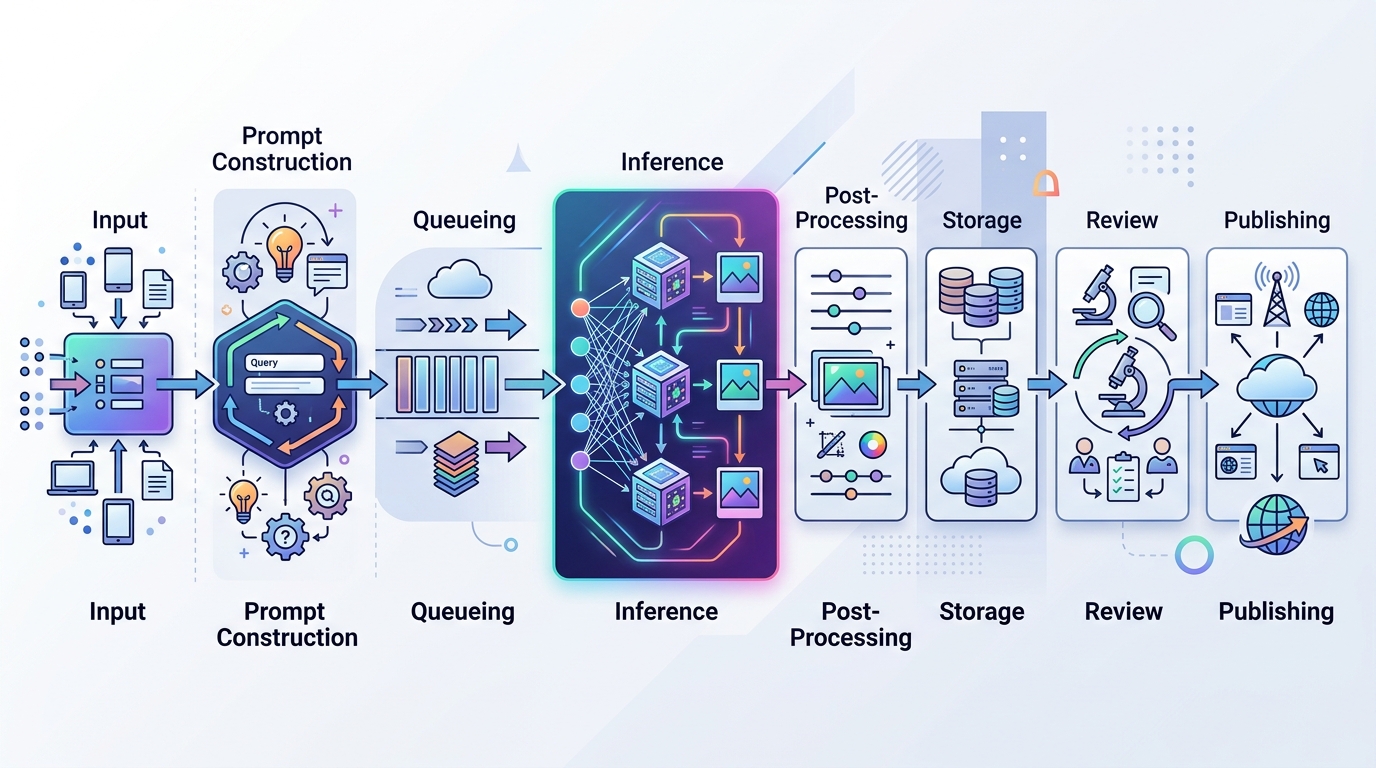
A high-level architectural diagram of a scalable AI image generation pipeline, outlining the key components and their flow.
The Need for Automated Image Generation at Scale
Manual image production breaks down when demand becomes variable, personalized, or campaign-driven. A designer can create a small set of hero assets. A creative team can build a seasonal campaign. But when the business needs hundreds or thousands of variations across products, channels, audiences, languages, and aspect ratios, manual production becomes the bottleneck.
This is where AI image generation at scale becomes useful. The goal is not to remove creative judgment. The goal is to automate the repeatable production layer so creative specialists can define systems instead of hand-producing every derivative.
Typical scale drivers include:
- Product catalogs that need images for different SKUs, bundles, backgrounds, or use cases.
- Performance marketing campaigns requiring rapid creative testing across multiple variants.
- Marketplace listings that need consistent visuals across many product categories.
- Content programs that require blog, social, email, and landing page visuals from a shared visual language.
- Localization workflows where text overlays, cultural context, or seasonal elements change by region.
A one-off generation workflow can be run by a single operator. A production pipeline must be able to answer operational questions:
- Where did this asset come from?
- Which prompt, model, seed, and parameters produced it?
- Who approved it?
- Can we regenerate it with controlled changes?
- Can the system fail gracefully when an API is unavailable?
- Can assets be routed into the correct DAM, CMS, or campaign folder?
If those questions are not designed into the system early, the team ends up with a folder full of generated images and no reliable operating model.
Core Components of a Repeatable AI Image Generation System
A repeatable AI image generation system has several layers. Some teams start with a simple script and evolve toward orchestration. Others begin with an internal tool. Either path needs a clean separation between inputs, generation logic, output handling, and approval.
A practical architecture usually includes:
- Input layer: product data, campaign briefs, style rules, template variables, and generation requests.
- Prompt construction layer: reusable prompt templates, negative prompts, brand constraints, and controlled variables.
- Inference layer: model endpoint, hosted API, self-hosted GPU worker, or a hybrid of both.
- Queue and orchestration layer: job scheduling, retries, throttling, and state tracking.
- Post-processing layer: upscaling, cropping, background removal, format conversion, and naming.
- Storage and metadata layer: files, parameters, seeds, versions, approvals, and lineage.
- Review and publishing layer: human QA, compliance checks, DAM/CMS export, or campaign deployment.
The central design principle is traceability. Every generated asset should be connected to the request that created it, the parameters used, and the approval state it passed through.
Image Generation Workflow Builders and Orchestration
An image generation workflow builder can be useful when non-engineers need to compose generation steps visually. However, workflow builders should not become black boxes. Whether you use a visual tool, a custom queue worker, or an orchestration framework, the system should expose:
- Job status: pending, running, failed, completed, approved, rejected.
- Input parameters: prompt variables, product IDs, template IDs, campaign IDs.
- Model configuration: model name, version, guidance settings, seed, size, sampler, or equivalent parameters.
- Output references: storage location, generated file names, thumbnails, and metadata.
- Failure reasons: invalid request, model timeout, content filter rejection, missing source file, or downstream upload failure.
For teams implementing the execution layer directly, scripting programmatic image generation is often the fastest way to turn an approved workflow into a dependable internal service. Python scripts can call APIs, load CSVs, generate prompt permutations, and push assets into storage while preserving metadata.
The orchestration layer should also decide how jobs are batched. Some jobs are independent and can run concurrently. Others need sequencing, such as generating a base product shot before creating channel-specific crops and overlays. A scalable pipeline should handle both patterns.
Storage, Versioning, and Asset Management
Generated images need a storage strategy before the first large batch run. Without it, teams often lose track of what was generated, which version was approved, and whether an image can be reused.
At minimum, store:
- Original generation output before editing or compression.
- Processed derivatives for web, social, email, ads, and marketplace formats.
- Prompt and parameter metadata as JSON or database records.
- Source references such as product IDs, campaign IDs, or customer segments.
- Approval state and reviewer notes.
- Model/version information so assets can be traced if model behavior changes.
A common pattern is to use object storage for files and a database for metadata. File names should be deterministic enough for operations, but not so overloaded that they become the source of truth. Use metadata records for truth; use file names for convenience.
Versioning matters because AI output is probabilistic. Even if the same prompt is used, changes to model version, seed behavior, or processing steps can alter the result. A robust pipeline records enough information to reproduce or audit the generation process where possible.
Designing a Scalable AI Image Workflow
A scalable AI image workflow should be designed around job lifecycle, not just model invocation. The model call is only one step in a broader system.
A practical workflow may look like this:
- Request intake: A marketer, product manager, or system submits a structured request.
- Validation: The pipeline checks required fields, asset references, prompt variables, and policy constraints.
- Prompt assembly: The system combines brand templates, product attributes, campaign context, and negative prompts.
- Queue placement: Jobs are added to a queue with priority, retry rules, and concurrency limits.
- Inference execution: A worker calls a cloud API, local model, or dedicated GPU endpoint.
- Post-processing: Outputs are resized, compressed, cropped, background-processed, or upscaled.
- Metadata capture: The system records parameters, model version, status, and output paths.
- Review routing: Assets move to human QA, automated checks, or both.
- Publishing/export: Approved assets are sent to a DAM, CMS, ad platform staging area, or internal library.
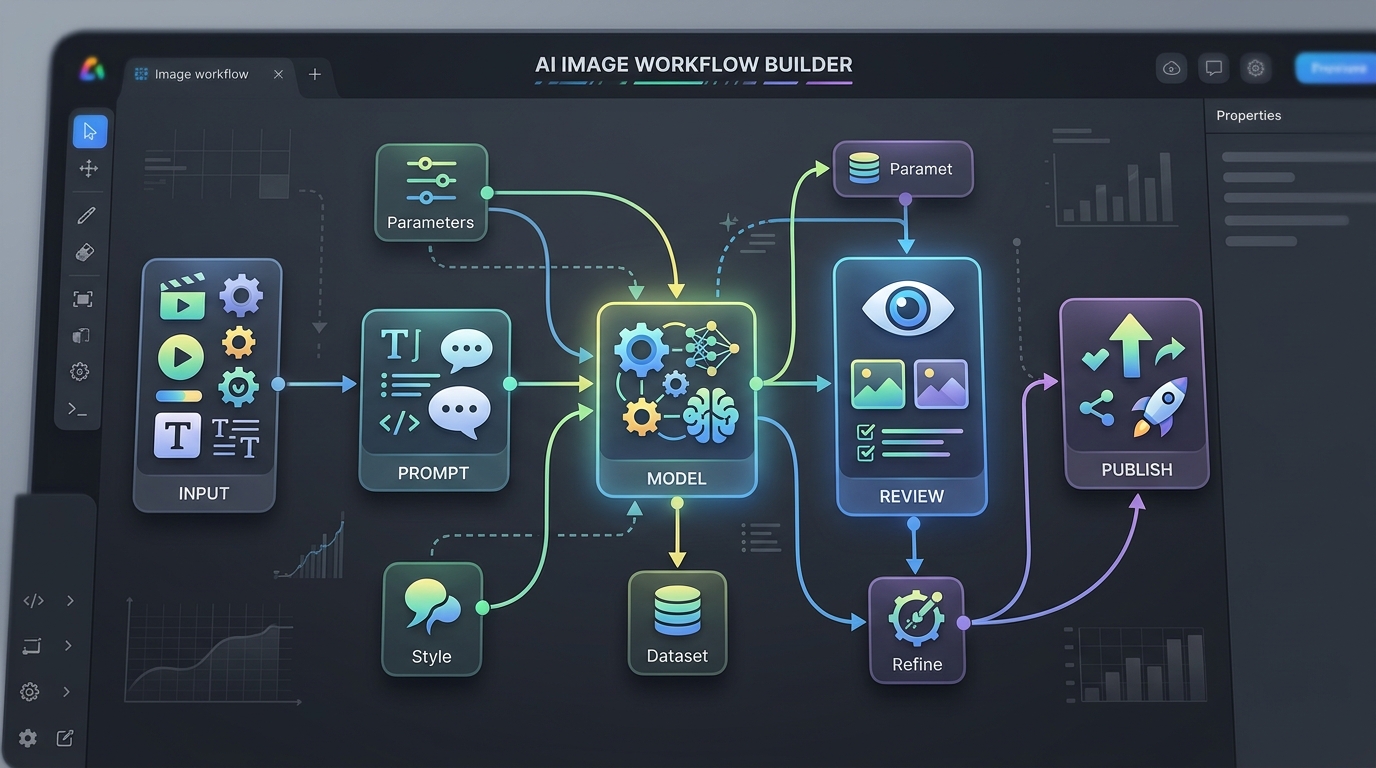
A visual representation of an image generation workflow builder interface, designed to orchestrate and manage the various steps in an AI image production pipeline.
At small scale, a synchronous script may be enough. At larger scale, asynchronous execution is usually safer. Queue-based architecture prevents operators from waiting on long-running jobs and gives engineers better control over retry behavior, rate limits, and capacity.
The pipeline should also support multiple inference backends. For example, a team might use a cloud API for burst capacity and private AI image generation infrastructure for sensitive product concepts or controlled internal workloads. Designing the inference layer behind an interface makes it easier to swap providers or route jobs by policy.
A simple routing rule might be:
- Public campaign concepts: cloud endpoint.
- Confidential unreleased product imagery: private infrastructure.
- High-priority creative testing: dedicated GPU pool.
- Low-priority bulk derivatives: queued batch processing.
This keeps the architecture flexible as cost, privacy, and performance requirements change.
Managing Consistency in High-Volume Production
Consistency is the hardest operational problem in AI image systems. Generating one impressive asset is easy compared with generating 500 assets that look like they belong to the same campaign.
Consistency depends on several controls:
- Prompt templates: Use structured prompt components instead of freeform ad hoc prompting.
- Brand constraints: Define style, lighting, composition, palette, background rules, and prohibited elements.
- Reference assets: Use approved source images, style boards, or product photography where supported by the workflow.
- Parameter locking: Control model version, aspect ratio, seed behavior, and generation settings.
- Review rubrics: Give QA reviewers clear acceptance criteria instead of subjective “looks good” feedback.
- Post-processing templates: Apply consistent crop, layout, overlay, and export rules.
For marketing use cases, consistency also depends on campaign taxonomy. A pipeline should know whether it is producing product tiles, lifestyle scenes, paid social variants, landing page visuals, or email hero images. Each asset type should have its own template and QA criteria.
Teams building toward scaling automated visual asset creation should treat consistency as a systems problem. The more variables a user can change, the more guardrails the pipeline needs. Open-ended prompt input may be fine for exploration, but production requests should rely on constrained fields and validated templates.
Quality control can be layered:
- Automated checks for dimensions, file size, format, naming, and missing metadata.
- Policy checks for restricted terms or unsupported use cases.
- Visual QA by creative operators for brand fit and product accuracy.
- Approval gates before assets reach public channels.
Avoid designing the pipeline so that every generated image automatically becomes a production image. Generation and publishing should be separate states.
Next Steps: Moving from Prototype to Production
Moving from prototype to production is mostly about reducing ambiguity. A prototype proves that a model can generate useful images. A production pipeline proves that the organization can reliably request, generate, review, store, and reuse assets.
Start with a narrow workflow. For example, choose one campaign asset type, one model backend, one prompt template, and one export destination. Then define the job lifecycle and metadata requirements before expanding.
A production-readiness checklist should include:
- Structured request format.
- Prompt templates with controlled variables.
- Queue-based processing for long-running jobs.
- Retry and failure handling.
- Output storage with metadata.
- Review and approval states.
- Clear naming and versioning conventions.
- Integration with DAM, CMS, or campaign operations.
- Monitoring for job failures and throughput.
- Documented ownership for prompt templates, infrastructure, and QA.
The strongest AI image generation pipelines are modular. They let teams change models, add new asset types, route sensitive work to private infrastructure, and connect outputs to marketing systems without rewriting the whole stack.
For most teams, the right path is iterative: start with a scripted workflow, add orchestration and metadata, then formalize review and publishing. Once the pipeline can support one asset family reliably, it can be extended to more campaigns, channels, and teams.
FAQ
What is an AI image generation pipeline?
An AI image generation pipeline is an automated system for turning structured requests into generated images and approved assets. It typically includes prompt construction, model inference, queueing, storage, metadata capture, review, and publishing.
How is a scalable AI image workflow different from a prompt tool?
A prompt tool helps a user generate individual images. A scalable workflow manages many jobs, tracks state and metadata, handles failures, routes review, and connects outputs to downstream systems.
What should be stored with each generated image?
Store the prompt, parameters, model version, seed if applicable, source data, output path, processing steps, approval state, and related campaign or product identifiers.
Should an AI image generation pipeline use cloud APIs or self-hosted models?
It depends on privacy, cost, latency, control, and operational maturity. Many teams use a hybrid model: cloud APIs for speed and burst capacity, private infrastructure for sensitive or specialized workloads.
What is the best first workflow to automate?
Start with a repetitive asset type that has clear inputs and review criteria, such as product tiles, social variants, or campaign header images. Avoid starting with the most subjective creative work first.