Python Direct Mail Automation: Building an End-to-End Real Estate Lead Processing Pipeline
Executing a direct mail campaign in real estate prospecting often involves dealing with raw, fragmented data. Lead lists gathered from public records, expired listings, or paid list provider exports typically arrive in disorganized CSV files filled with duplicate addresses, unparsed corporate entities, complex trust designations, and incorrect ZIP codes. Sending physical letters to unvalidated addresses wastes direct mail budget on non-deliverable mail, while sending duplicate mailers to the same property owner damages sender credibility.
Implementing Python direct mail automation transforms this messy manual task into a structured ETL (Extract, Transform, Load) workflow. By combining rule-based parsing, generative AI for complex entity resolution, official USPS address standardization via Google’s API, and batch document merging, you can transform raw spreadsheets into deliverable print campaigns and updated CRM records automatically.
Why Automate Your Real Estate Direct Mail Pipeline with Python?
Manual list processing relies on ad-hoc Excel formulas and tedious copy-pasting, introducing human error at every stage. For instance, when an East Coast ZIP code starting with zero (e.g., 07001) is opened in Excel without explicit formatting, the application strips the leading zero, turning it into a four-digit string (7001) that fails postal routing. Similarly, direct-mail labels often suffer from doubled address inputs like "872 Belhaven 872 BELHAVEN DR", caused by mismatched export fields from county tax assessor databases.
+-----------------------------------------------------------------------------------+
|                            RAW DATA INPUT (CSVs / Excel)                          |
|         (ListSource, Cash Buyer Exports, Expired Listings, Master Suppression)    |
+-----------------------------------------------------------------------------------+
                                          |
                                          v
+-----------------------------------------------------------------------------------+
|                         1. PANDAS INGESTION & FORMATTING                          |
|        - Preserve String Types (dtype=str) to protect leading zero ZIPs           |
|        - Prepend custom headers via add_header_csv_expired.py                     |
+-----------------------------------------------------------------------------------+
                                          |
                                          v
+-----------------------------------------------------------------------------------+
|                        2. HYBRID NAME & ENTITY CLEANING                           |
|        - Offline Regex (standardize_name.py): Strips %, Estate, Trust syntax      |
|        - NORA Agent (name_standardize_agent.py): LLM parsing for complex names   |
+-----------------------------------------------------------------------------------+
                                          |
                                          v
+-----------------------------------------------------------------------------------+
|                     3. CASS ADDRESS VALIDATION & DEDUPLICATION                    |
|        - Google Maps API (enable_usps_cass=True) in address_verif.py              |
|        - Regex deduplication of street fields + suppress_9_config.py filtering    |
+-----------------------------------------------------------------------------------+
                                          |
                                          +-----------------------------------------+
                                          |                                         |
                                          v                                         v
+---------------------------------------------------+ +---------------------------------------------------+
|         4. BATCH MAIL MERGE GENERATION            | |             5. CRM INTEGRATION & ARCHIVE        |
| - Format proper case for letters & envelopes      | | - Create/update leads in HubSpot CRM            |
| - Preserve docx run styles (font, weight, size)   | | - Export CSV with utf-8-sig (Excel BOM)         |
| - Batch 20-file folders for docx2pdf conversion   | | - Timestamp outputs & move raw files to 'old/'  |
| - Merge into final print-ready PDF via pypdf      | |                                                 |
+---------------------------------------------------+ +---------------------------------------------------+
Automating this pipeline using Python provides several clear structural advantages:
- Deliverability Enforcement: Filtering lists against do-not-mail master files (
suppress_9_config.py) and checking premise-level deliverability using USPS CASS standardization drastically cuts bounce rates. - Multi-Source Aggregation: Scripts like
match_append_csv_General.pyautomatically align owner-level records with property-level records on standardized name keys. - CRM Synchronization: Scripts like
create_hubspot_leads_direct-mail.pyandbulkupdate_MAILED_leads_direct-mail.pypush validated campaign lists directly to HubSpot CRM via REST API, ensuring call teams possess real-time context on direct-mail touchpoints. - Print-Ready Batch Processing: Converting individual personalized Word templates into consolidated print batches prevents local word-processor driver crashes.
Hybrid Name Cleaning: Combining Regex Rules with an LLM AI Workflow
Real estate lead sheets present varied owner syntax. Standard individual listings (e.g., JOHN SMITH) sit alongside couples (JOHN & JANE DOE), corporate entities (BLUE SKY HOLDINGS LLC), trusts (DOE JOHN TR & JANE TR), and estates (ESTATE OF ROBERT JONES).
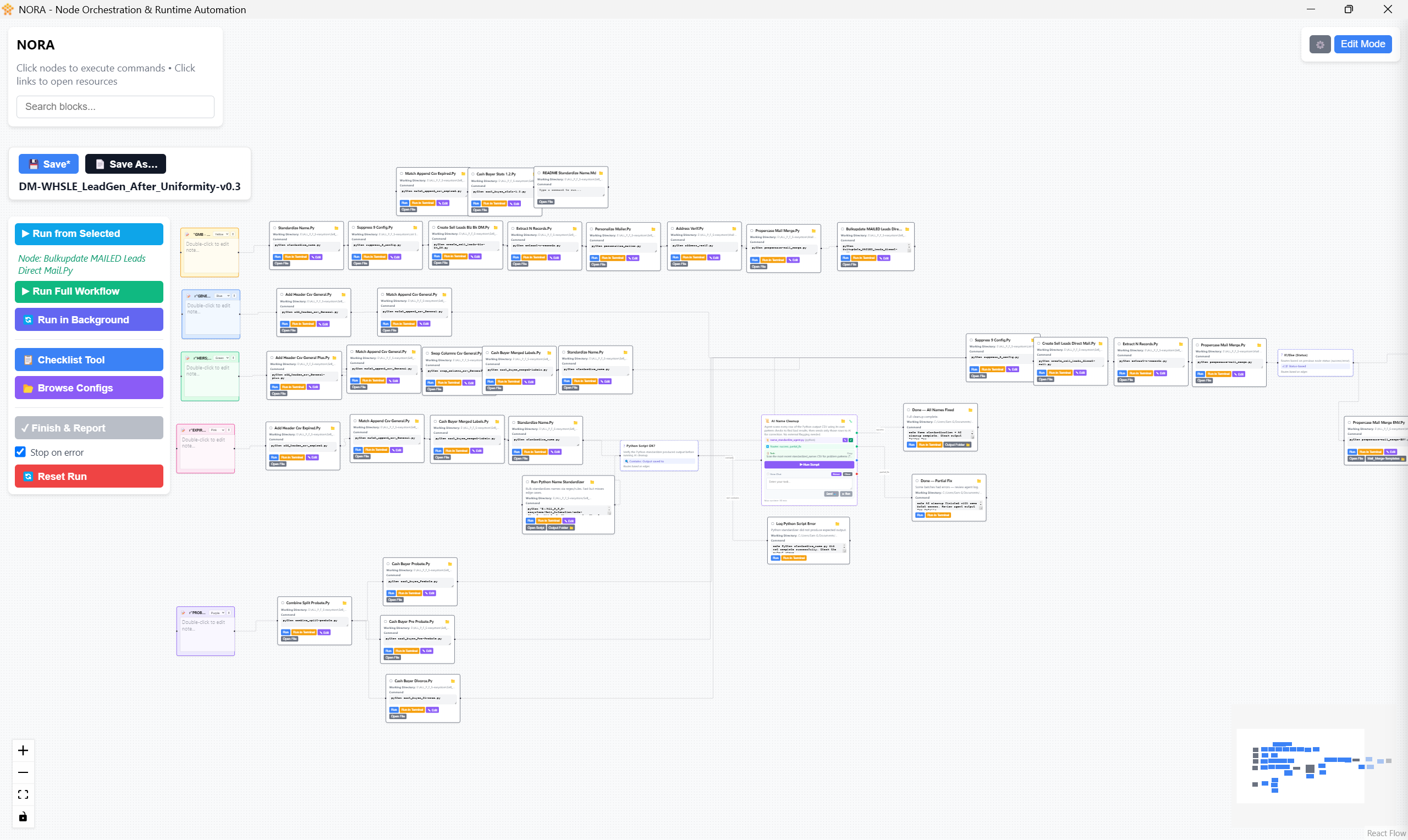
A single approach to cleaning this data falls short. Rule-based regex engine standardize_name.py executes fast offline operations to strip legal percentage interests and standardized suffixes without network overhead. However, unpredictable human phrasing requires contextual intelligence. The NORA automation workflow agent (name_standardize_agent.py) handles complex edge cases using LLM APIs (Anthropic, OpenAI, Gemini) equipped with prompt caching to extract primary individuals accurately.
import re

def standardize_name_regex(raw_name: str) -> str:
    """
    Standardize raw human/entity names offline using pattern matching.
    Strips percentage interests, estate/trust flags, and legal noise.
    """
    if not raw_name or not isinstance(raw_name, str):
        return ""

    # Remove percentage ownership syntax (e.g., "50% INT", "100%")
    cleaned = re.sub(r'\b\d+(\.\d+)?%\s*(INT)?\b', '', raw_name, flags=re.IGNORECASE)

    # Remove common legal designations for base normalization
    cleaned = re.sub(r'\b(ESTATE OF|TRUSTEE|TR|ET AL)\b', '', cleaned, flags=re.IGNORECASE)

    # Standardize spaces and strip whitespace
    return " ".join(cleaned.split())

# Example Usage:
# Input: "SMITH JOHN TR 50% INT" -> Output: "SMITH JOHN"
Why Use a Hybrid Architecture?
Using LLM calls for every row in a 50,000-record dataset introduces unnecessary API costs and latency. By running standardize_name.py first, deterministic records are parsed instantly. Only ambiguous, multi-entity strings pass to name_standardize_agent.py. The agent isolated in NORA processes the complex syntax, identifies primary contact names, and returns standardized output ready for campaign insertion.
Verifying Address Deliverability using Google Address Validation CASS API
Addressing inaccuracies are among the largest sources of waste in direct mail. Standard geocoding APIs confirm where a coordinate sits on a map, but they do not verify whether the United States Postal Service (USPS) delivers mail to a specific door or unit.
In address_verif.py, address cleaning relies on google.maps.addressvalidation_v1 with enable_usps_cass=True.
Why Use a Single Google Address API for CASS?
Traditionally, real estate pipelines required two distinct APIs: a geocoding API to evaluate spatial attributes and a secondary USPS CASS vendor API for mailability checks. Enabling USPS CASS directly within the Google Address Validation payload provides CASS-standardized street names, ZIP+4 codes, and premise-level deliverability flags in a single API request, eliminating redundant infrastructure.
import pandas as pd
import re

def load_and_clean_lead_csv(file_path: str) -> pd.DataFrame:
    """
    Reads lead CSV preserving data types and fixes doubled street strings.
    """
    # Preserve leading zeros in East Coast ZIP codes
    df = pd.read_csv(file_path, dtype=str)

    def clean_duplicate_street_name(address: str) -> str:
        if not address or pd.isna(address):
            return ""
        # Fix doubled street numbers (e.g., '872 Belhaven 872 BELHAVEN DR' -> '872 BELHAVEN DR')
        pattern = r'^(\d+\s+[\w\s]+?)\s+\1'
        return re.sub(pattern, r'\1', address, flags=re.IGNORECASE).strip()

    if 'address_line1' in df.columns:
        df['address_line1_clean'] = df['address_line1'].apply(clean_duplicate_street_name)

    return df
When reading lead CSV files using Pandas, specifying dtype=str guarantees that ZIP codes containing leading zeros retain their full length instead of converting to truncated integers.
Automated Mail Merge: Batch Word-to-PDF Generation for Direct Mailers
Generating personalized letters and envelopes requires injecting structured lead data into Word templates (.docx) while ensuring the visual design remains intact. This step is handled by propercase-mail_merge-LETTER.py and propercase-mail_merge-ENV.py.
Preserving Character Formatting Across Runs
A common problem in python-docx occurs when replacing string placeholders (e.g., {validation_address_line1}). Word splits text across multiple underlying XML nodes called “runs.” Replacing text in a paragraph without inspecting these runs can strip custom font weights, sizing, or brand typography.
def replace_placeholder_preserve_style(paragraph, placeholder: str, replacement: str):
    """
    Replaces template variables while capturing and reapplying run-level formatting.
    """
    if placeholder in paragraph.text:
        for run in paragraph.runs:
            if placeholder in run.text:
                # Capture original run font styling
                font_name = run.font.name
                font_size = run.font.size
                is_bold = run.bold
                is_italic = run.italic

                # Mutate underlying run text
                run.text = run.text.replace(placeholder, replacement)

                # Reapply font parameters explicitly
                run.font.name = font_name
                run.font.size = font_size
                run.bold = is_bold
                run.italic = is_italic
Why Batch Word-to-PDF Conversion?
When rendering thousands of individualized letters, sending an entire folder of .docx files simultaneously to docx2pdf (which calls Microsoft Word’s COM automation interface in the background) leads to severe process memory leaks and system crashes.
To resolve this issue, the pipeline divides output documents into subfolders containing exactly 20 .docx files. It converts each small batch into PDF format, closes the MS Word application background handle cleanly, and then merges the batch files into a final print-ready PDF using pypdf.
[ Individual .docx Files ] ---> Split into Subfolders (20 Docs Each)
                                         |
                                         v
                             [ Batch docx2pdf Conversion ]
                                         |
                                         v
                             [ pypdf Concatenation ] ---> ( Output: Combined Campaign PDF )
Pipeline Architecture: Building the Pandas ETL and Archiving Automation Tool
The end-to-end execution flow connects data collection to CRM tracking and batch document output. Each python module handles a dedicated operational phase:
                  ┌──────────────────────────────────────────┐
                  │          Raw Lead Files (.csv)           │
                  └────────────────────┬─────────────────────┘
                                       │
                                       v
                  ┌──────────────────────────────────────────┐
                  │        add_header_csv_expired.py         │
                  │   Prepend Standard Headers for IMAPP     │
                  └────────────────────┬─────────────────────┘
                                       │
                                       v
                  ┌──────────────────────────────────────────┐
                  │         match_append_csv_General.py      │
                  │     Join Owner & Property CSV Data       │
                  └────────────────────┬─────────────────────┘
                                       │
                                       v
                  ┌──────────────────────────────────────────┐
                  │         suppress_9_config.py             │
                  │ Apply Do-Not-Mail & Deduplication Rules  │
                  └────────────────────┬─────────────────────┘
                                       │
                                       v
                  ┌──────────────────────────────────────────┐
                  │         cash_buyer_merged-labels.py      │
                  │   Summarize Cash Buyer Target Stats      │
                  └────────────────────┬─────────────────────┘
                                       │
                                       v
            ┌──────────────────────────┴──────────────────────────┐
            │                                                     │
            v                                                     v
┌───────────────────────────────────────┐   ┌────────────────────────────────────────┐
│     propercase-mail_merge-LETTER.py   │   │  create_hubspot_leads_direct-mail.py   │
│   Generate Letters & Print PDFs       │   │     Sync Validated Leads to CRM        │
└───────────────────────────────────────┘   └────────────────────────────────────────┘
            │                                                     │
            v                                                     v
┌───────────────────────────────────────┐   ┌────────────────────────────────────────┐
│       propercase-mail_merge-ENV.py    │   │ bulkupdate_MAILED_leads_direct-mail.py │
│   Generate Envelopes & Print PDFs     │   │      Update CRM Interaction Notes      │
└───────────────────────────────────────┘   └────────────────────────────────────────┘
Key Architectural Decisions
- Excel-Compatible BOM Encoding (
utf-8-sig): Real estate team members frequently inspect output CSVs directly inside Microsoft Excel. Standardutf-8exports missing a Byte Order Mark cause Excel to render special characters incorrectly. Saving all Pandas exports withutf-8-sigpreserves text formatting across spreadsheet software. - ISO Timestamped Archiving: When scripts run, they place output files into timestamped directories and automatically transfer raw input sources into an
old/directory. This approach establishes a clear audit trail and prevents accidental duplicate mailings if scripts are rerun. - Data Enrichment and Aggregation: Script
cash_buyer_merged-labels.pycalculates transaction metrics across unique entity names, appending high-value tags to target records before generating final letters.
Getting Started: Implementation Checklist
To build and deploy this Python direct mail automation pipeline, structure your local environment around these core operational steps:
- Environment Setup: Install required Python dependencies:
bash

pip install pandas python-docx docx2pdf pypdf google-maps-addressvalidation google-api-core google-auth requests - API Configuration: Set environment variables for your Google Maps Address Validation API key (ensuring the Address Validation API is enabled in your Google Cloud Console) alongside your OAuth tokens for HubSpot CRM.
- Template Preparation: Draft target
.docxletters and envelope layouts using standard variable tags such as{validation_address_line1},{first_name}, and{city_state_zip}. - Folder Organization: Establish a clean workspace containing dedicated drop directories:
/input_raw/for incoming lists/templates/for letter and envelope layouts/output_pdf/for final print files/old/for timestamped archiving
By combining fast offline rule engines, LLM name parsing, official address validation APIs, and reliable batch document rendering, this pipeline streamlines direct mail generation—maximizing deliverability while saving hours of manual preparation.
—
Additional Notes:
After we have completed the process within NORA, the next step would be to upload our finished pdf envelopes and letters to Iti direct mail for printing and delivery.
—
Snapshot of the varying direct mail workflows we manage in NORA: