
Nora Automation: Your Local Script Orchestrator
In an era dominated by heavy cloud platforms and complex SaaS subscriptions, system administrators and IT operations managers need a simpler way to manage daily automation scripts.
Nora Automation is a lightweight, local-first desktop workflow orchestrator designed specifically for IT operations, sysadmins, and DevOps engineers. Nora allows you to chain standalone PowerShell, Python, Bash, and batch scripts into robust visual workflows—without managing server infrastructure or paying monthly SaaS fees. (PowerShell)
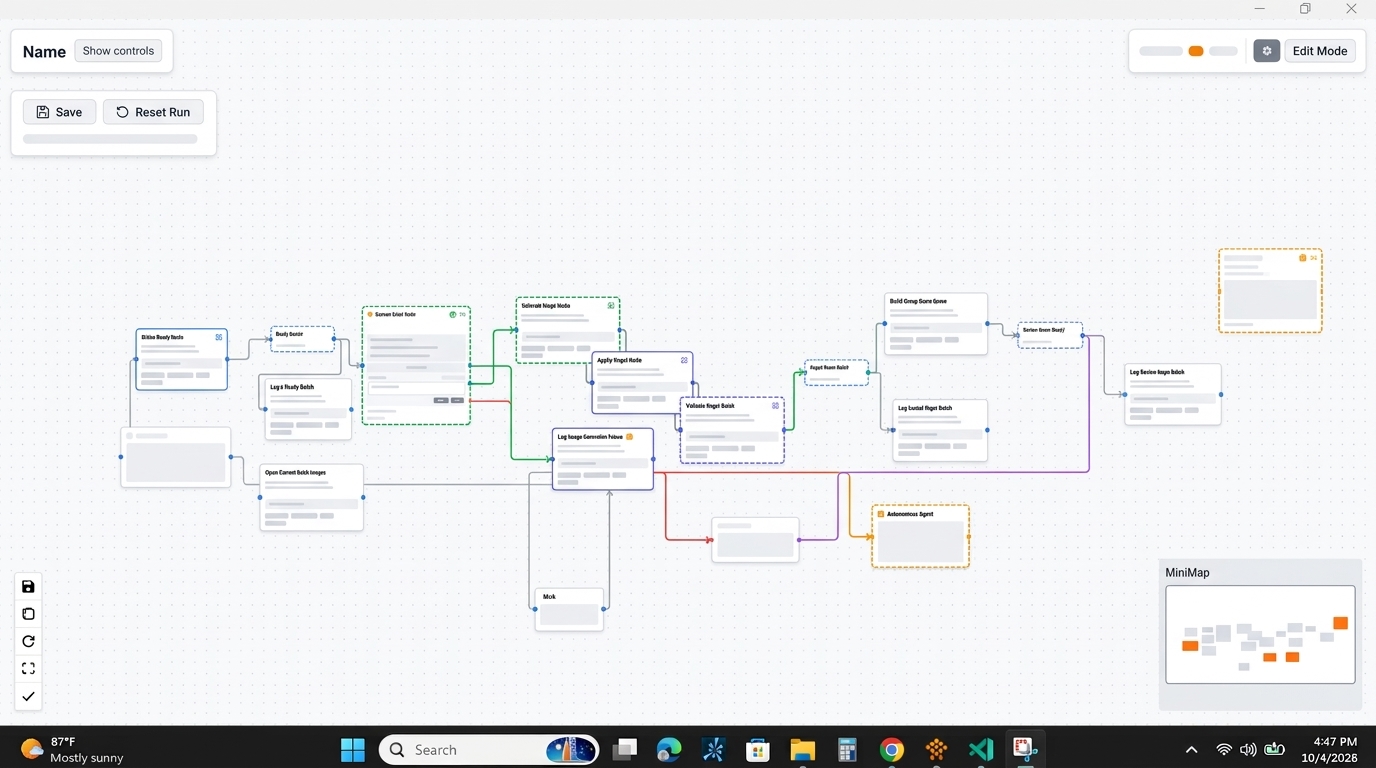
An illustrative representation of the Nora Automation local desktop workflow orchestrator interface, designed for visual clarity and efficient script management.
What is Nora Automation?
Nora Automation is a standalone desktop application that transforms fragmented operational scripts into organized visual workflows. Operating directly on your local workstation or Windows server, Nora gives you complete control over script execution, dependency management, and real-time status monitoring.
Unlike cloud-heavy tools like Apache Airflow or Prefect, Nora installs in seconds, requires zero backing databases or container daemons, and keeps all system telemetry inside your network firewall.
Our Mission: Simplifying IT and Ops Workflows
At Nora Automation, our mission is to eliminate infrastructure friction from daily IT operations. We believe that automating routine administrative tasks should not require managing complex orchestration servers or paying recurring subscription fees.
By focusing on speed, visual clarity, and execution privacy, Nora empowers IT professionals to automate their environments with confidence.
Core Capabilities and Features
Nora combines intuitive visual design with native local execution speed.

An illustrative diagram of the drag-and-drop script editor in Nora Automation, showcasing the visual creation of multi-step execution graphs.
Operating With No Cloud Dependency
Nora runs entirely locally on your hardware. It requires no active internet connection, no external cloud APIs, and no remote authentication servers. Workflows execute natively within your local domain security context, ensuring sensitive credentials, active directory data, and system logs remain 100% private.
Visual Drag-and-Drop Editor
Build multi-step execution graphs visually without writing complex wrapper scripts:
- Polyglot Script Support: Sequence PowerShell 7, Windows PowerShell 5.1, Python, Bash, and executable binaries within a single visual DAG.
- Dynamic Variable Passing: Pass output values and parameters seamlessly between sequential script steps.
- Visual Error Branching: Define failure handling paths, automated retries, and local alert triggers visually.
- Live Console Streaming: Monitor stdout, stderr, and execution progress live directly on your desktop.
Getting Started With Your First Workflow
Transforming your manual scripts into automated visual workflows with Nora takes under five minutes:
- Download and Launch: Install the lightweight Nora desktop application on your PC or server.
- Add Your Scripts: Import your existing PowerShell or Python script files into visual workflow nodes.
- Connect Dependencies: Drag visual connectors between nodes to define execution sequences and error retry logic.
- Run and Monitor: Trigger your workflow manually or attach a local schedule trigger to monitor real-time execution live.
Explore our full suite of local automation tools to discover how Nora enhances your IT stack. If you operate primarily on Windows OS, learn more about our visual Windows automation software capabilities or discover how Nora serves as a powerful script orchestration tool for enterprise teams.
Frequently Asked Questions
What operating systems does Nora Automation support?
Nora Automation is optimized natively for Windows operating systems (Windows 10, Windows 11, Windows Server 2019/2022/2026), with native execution support for PowerShell, Python, and Windows Command Prompt binaries.
Do I need to modify my existing scripts to use Nora?
No. Nora executes your standard .ps1, .py, .sh, or .bat files directly using native system shells, requiring no custom imports or SDK wrapper modifications.
How is Nora Automation licensed?
Nora Automation is available via a perpetual license model. You pay a single upfront price to own the software outright, eliminating recurring monthly SaaS subscription fees.
Can Nora run when no user is logged into the machine?
Yes. Nora can be configured as a native background service to execute scheduled workflows continuously regardless of user logon sessions.