
Streamline Ops with n8n IT Ticketing Automation
Every IT operations team knows the drill: an alert fires, someone notices it (eventually), someone creates a ticket (manually), someone pings the right channel (if they remember), and someone updates the ticket when it’s resolved (sometimes). Each manual hop adds latency, and each latency gap is where SLAs go to die.
n8n IT ticketing automation removes those hops. With a self-hosted, low-code workflow platform sitting between your monitoring tools, your ticketing system, and Slack, alerts become tickets automatically, the right people get notified instantly, and every status change is broadcast without anyone lifting a finger. This tutorial shows you how to build it.
Why Automate IT Ticketing and Alerting?
Manual ticketing processes fail in predictable ways:
- Latency. The time between “alert fired” and “ticket exists with an owner” is pure response-time waste. Automation drives it to seconds.
- Dropped events. Alerts that arrive at 2 a.m., during a busy incident, or in an unwatched inbox simply get missed. A workflow never gets distracted.
- Inconsistent data. Manually created tickets have inconsistent titles, missing severity fields, and no linked context. Automated tickets are uniform, searchable, and reportable.
- Notification sprawl. Without a defined routing flow, either everyone gets pinged about everything (alert fatigue) or nobody gets pinged about the thing that mattered.
- Invisible workload. When ticket creation is manual, a chunk of your team’s actual work never appears in metrics.
There’s also a strategic reason to build this on n8n rather than a SaaS automation tool: your alerting pipeline is operational infrastructure. It should not depend on a third party’s uptime, rate limits, or data handling. A self-hosted n8n instance keeps the entire alert-to-ticket-to-notification chain inside your network. If you haven’t deployed yet, start with our guide to self host n8n on a VPS, then come back here.
How to Automate IT Ticketing and Slack Notifications with n8n
We’ll build the canonical ops workflow: an incoming alert creates a ticket, posts a formatted Slack notification, and routes by severity. The pattern applies whether your source is a monitoring tool, a form, an email inbox, or another system’s webhook.
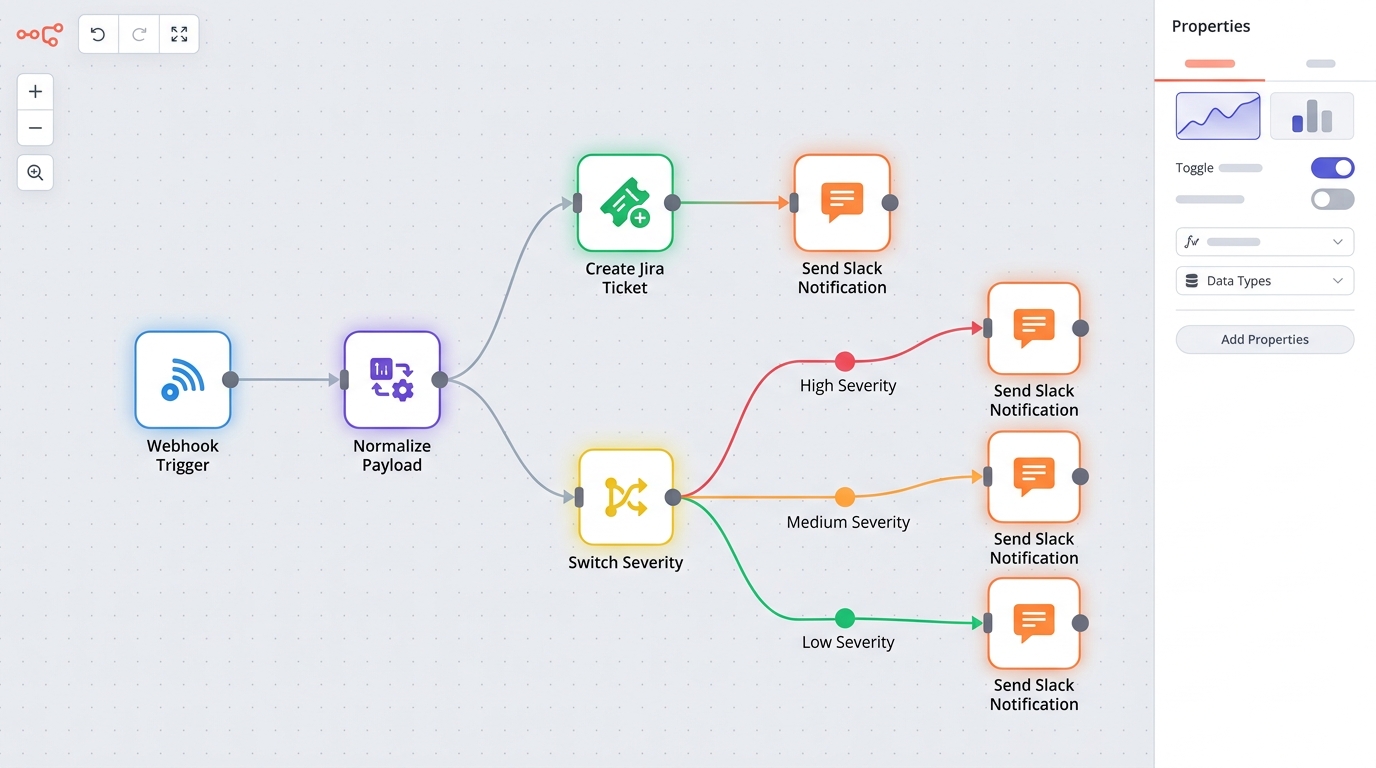
An n8n workflow canvas illustrating the automation of IT ticketing and Slack notifications, from alert reception to ticket creation and routed messages.
Setting up the n8n Slack Notification Workflow
Step 1 — Create the trigger. Add a Webhook node to a new workflow. This gives you a unique HTTPS URL that your monitoring system (Prometheus Alertmanager, Zabbix, Uptime Kuma, Datadog — anything that can send an HTTP POST) will call when an alert fires. Set the method to POST and note the production URL.
Step 2 — Normalize the payload. Add a Set node (or a Code node for messier payloads) to extract the fields you care about into a consistent shape: severity, service, summary, source, timestamp. Normalizing early means every downstream node works the same regardless of which tool sent the alert.
Step 3 — Connect Slack. Create a Slack app with a bot token in your workspace, grant it permission to post to your ops channels, and add the credential to n8n. Then add a Slack node configured to post a message.
Step 4 — Format the message for action, not noise. A good alert message answers three questions at a glance: what broke, how bad is it, and where do I click? Use Slack Block Kit formatting via the Slack node to include:
- Severity emoji and label (🔴 critical / 🟡 warning / 🔵 info)
- Service name and short summary
- A link to the ticket (added in the next section)
- Timestamp and alert source
Step 5 — Route by severity. Add a Switch node on the severity field: critical alerts go to #ops-incidents with an @here mention, warnings to #ops-alerts, informational events to a digest channel. This single node is your cure for alert fatigue.

Illustrating a Slack notification workflow, where an update to a Jira ticket automatically triggers a message in Slack.
Connecting your Ticketing System (Jira, Zendesk, etc.)
Now make the workflow create the ticket before it notifies, so the Slack message can link to it.
Step 1 — Add your ticketing node. n8n ships with nodes for major ticketing systems — Jira, Zendesk, ServiceNow, Linear, GitHub Issues, and more. Add the node for your system between the normalization step and the Slack node.
Step 2 — Map the fields. Configure the node to create an issue using your normalized data: summary becomes the ticket title, severity maps to priority, service maps to a component or label, and the raw payload goes into the description for debugging context.
Step 3 — Deduplicate. Alerts often fire repeatedly for the same incident. Before creating a ticket, add a search step (e.g., Jira’s search with a JQL query on open tickets matching the service and alert key). If an open ticket exists, add a comment to it instead of creating a duplicate — an IF node handles the branch.
Step 4 — Pass the ticket URL to Slack. The ticketing node’s response includes the new issue key and URL. Reference it in the Slack message so responders jump straight from notification to ticket.
Step 5 — Close the loop. Build a second, small workflow triggered by your ticketing system’s webhook (e.g., Jira’s “issue updated” event): when a ticket is resolved, post the resolution to the same Slack thread. Your channel now shows the full incident lifecycle without anyone typing a status update.
That’s the complete n8n Slack notification workflow: webhook in, normalize, ticket, route, notify, close the loop. On a self-hosted instance, every execution is free and every payload stays on your infrastructure.
Best Practices for Internal Ops Workflows
As your automation library grows beyond this first workflow, these practices keep it maintainable:
- Attach an error workflow. The workflow that reports failures must not fail silently itself. Configure n8n’s Error Workflow to alert you (via a separate channel or email) if the ticketing automation errors out.
- Secure your webhooks. Use hard-to-guess webhook paths, validate a shared secret header in the first node, and keep your instance behind TLS.
- Keep workflows single-purpose. One workflow per pipeline (alert→ticket, ticket→resolution notice) is easier to debug than one mega-flow. Use sub-workflows for shared logic like message formatting.
- Test with realistic payloads. Use n8n’s pinned test data to develop against real alert payloads, and keep a “test severity” that routes to a sandbox channel.
- Version your workflows. Export workflow JSON to git so changes are reviewable and reversible.
- Extend the same pattern to adjacent ops. Once alert-to-ticket runs itself, the same trigger-normalize-act pattern powers scheduled ops: you can automate workflow from Google calendar event triggers for maintenance windows and on-call handoffs, or build a document ingestion automation pipeline to auto-summarize incident reports and postmortems.
Start small — one alert source, one channel, one ticketing project — and expand once the pattern proves itself. Most teams find that the first workflow pays for the entire n8n setup within weeks of reclaimed toil.
FAQ
How do I automate IT ticketing and Slack notifications with n8n?
Create a workflow with a Webhook trigger that receives alerts from your monitoring system, normalize the payload with a Set node, create a ticket via your ticketing system’s node (Jira, Zendesk, ServiceNow, etc.), then post a formatted message with the Slack node, routing by severity with a Switch node. The full steps are outlined above.
Which ticketing systems does n8n integrate with?
n8n includes built-in nodes for popular systems including Jira, Zendesk, ServiceNow, Linear, and GitHub Issues. For anything without a dedicated node, the generic HTTP Request node can call any REST API, so virtually any ticketing system with an API can be integrated.
Can n8n replace tools like PagerDuty?
n8n can handle alert routing, notification, and ticket creation, which covers many teams’ needs. Dedicated incident-management platforms add on-call scheduling, escalation policies, and paging. Many teams use n8n alongside such tools — or build lightweight escalation logic in n8n itself for simpler environments.
How do I prevent duplicate tickets from repeated alerts?
Add a search step before ticket creation that checks for an existing open ticket matching the alert’s service and key. Use an IF node to branch: comment on the existing ticket if found, create a new one if not. This deduplication pattern is described in the tutorial above.
Is it safe to run alerting automation on a self-hosted n8n instance?
Yes — arguably safer than SaaS, since alert payloads (which often contain infrastructure details) never leave your network. Follow standard hardening: TLS via a reverse proxy, secret validation on webhooks, an error workflow for failure visibility, and external uptime monitoring of the n8n instance itself.