
The Guide to AI Product Image Generation for Marketing Teams
AI product image generation is changing how marketing and ecommerce teams plan, produce, and update visual assets. Instead of treating every product image, lifestyle scene, campaign variation, and channel crop as a separate creative request, teams can build repeatable systems that turn product data and brand direction into ready-to-review images.
For marketing leaders, the opportunity is not simply “more images.” The real value is a more responsive creative operation: faster campaign testing, more consistent product visuals, and less friction between merchandising, creative, and growth teams.

AI product image generation streamlines the creative process, offering a faster and more scalable alternative to traditional manual methods.
The Shift to Automated Asset Creation AI
Traditional product image workflows depend on a chain of manual steps: creative briefing, photography, editing, resizing, approval, upload, and channel adaptation. That process still matters for hero campaigns and high-stakes brand work, but it can become slow when teams need large volumes of variations.
Automated asset creation AI gives teams a new production layer. Product information, brand rules, prompt templates, and generation settings can be combined into a repeatable process. The result is not a replacement for creative strategy; it is a way to reduce repetitive production effort.
Common use cases include:
- Product listing visuals for ecommerce catalogs.
- Seasonal background variations.
- Paid social ad concepts.
- Marketplace image variations.
- Email and landing page visuals.
- Product category banners.
- Concept exploration before a formal shoot.
A strong workflow keeps human review in place. AI can generate options quickly, but teams still need brand, legal, merchandising, and product accuracy checks before public use.
Can You Automate Product Photography with AI?
Yes, you can automate parts of product photography with AI, especially background variation, scene generation, creative concepting, and channel-specific asset production. However, teams should be precise about what “automate” means.
Automated product photography AI is best understood as a production assistant for defined visual tasks. It can help create lifestyle-style scenes, place products into brand-aligned contexts, generate creative directions, and scale image variations. It should not be treated as a guaranteed substitute for every type of product photography, especially when exact physical accuracy, regulated claims, or premium brand shoots are involved.
A practical approach is to separate image needs into tiers:
- Tier 1: Hero assets. High-touch creative direction, often still requiring photography, retouching, and executive approval.
- Tier 2: Scalable campaign assets. AI-assisted variations for channels, audiences, and themes.
- Tier 3: Operational assets. Catalog, marketplace, and testing images that benefit most from automation.
This tiering helps teams use AI where it creates operational leverage while preserving quality controls where stakes are higher.
Key Benefits of an AI Image Pipeline for Marketing
An AI image pipeline for marketing connects creative strategy to production execution. Instead of asking individuals to prompt manually, the team creates structured systems that generate, organize, review, and deliver assets.
The biggest benefits are workflow benefits:
- Faster creative iteration: teams can explore multiple directions before committing production resources.
- Better asset coverage: more products, categories, and campaigns can receive visuals.
- Consistent production rules: prompts, style guidance, output sizes, and naming conventions can be standardized.
- Reduced manual resizing and reformatting: post-processing can be included in the pipeline.
- Improved collaboration: marketers, designers, and technical teams can work from the same workflow.
For a deeper technical blueprint, see how to build a scalable AI image pipeline.
Speeding Up Marketing Asset Automation AI
Marketing asset automation AI is most valuable when campaigns require many variations. A single campaign may need images for paid social, organic social, email, landing pages, display ads, marketplace modules, and internal sales enablement.
Automation speeds up the repetitive parts:
- Translating briefs into prompt templates.
- Generating aspect-ratio variations.
- Creating multiple background concepts.
- Naming and saving output files.
- Routing images to reviewers.
- Preparing assets for downstream upload.
The aim is not to eliminate creative review. It is to compress the time between idea and usable draft.
Scaling AI Image Generation for Ecommerce
AI image generation for ecommerce often starts with product catalog pain. Teams may have many SKUs but limited visual variety. Some products have studio shots but no lifestyle context. Others need seasonal updates or marketplace-specific adaptations.
A scalable ecommerce workflow usually includes:
- A product feed or catalog source.
- Prompt templates by product type or category.
- Approved background and style rules.
- Output dimensions for each channel.
- Human review for product accuracy.
- Metadata and file naming standards.
This structure lets teams generate assets in batches while maintaining control over brand and product presentation.
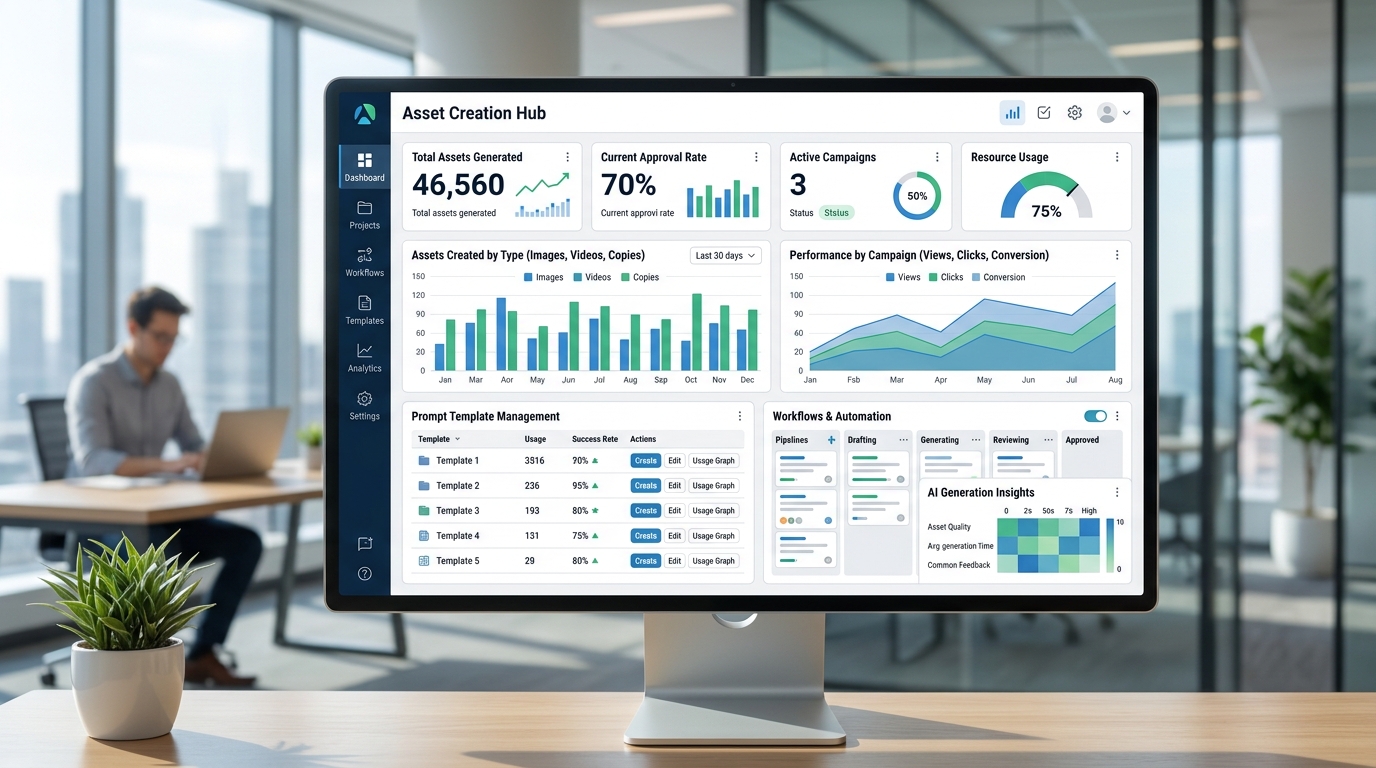
A marketing dashboard provides a centralized view for managing and scaling AI-generated assets across various ecommerce campaigns.
Top AI Creative Automation Tools Evaluated
There is no single best category of AI creative automation tools for every team. The right choice depends on workflow maturity, technical resources, security needs, and the kinds of assets being produced.
Evaluate tools in four broad categories:
-
Hosted image generation platforms
These are useful for teams that want a fast start and lower infrastructure burden. They may offer interfaces, templates, and collaboration features. Confirm usage rights, data policies, and workflow limitations before adopting. [SOURCE NEEDED] -
Model APIs
APIs are useful when developers need to embed image generation into custom tools, campaign systems, or product workflows. They can support repeatable job execution without requiring local GPU management. -
Self-hosted Stable Diffusion workflows
Teams that need more control may choose to automate Stable Diffusion through tools such as ComfyUI workflows, local servers, or custom orchestration. -
Hybrid creative operations systems
Larger teams may combine hosted APIs, self-hosted generation, DAM integrations, review steps, and analytics.
When evaluating tools, ask:
- Can the tool support our approval process?
- Does it allow prompt and workflow versioning?
- Can it generate the formats our channels require?
- Does it integrate with our product data or DAM?
- What are the privacy, licensing, and governance constraints? [SOURCE NEEDED]
How to Implement Automated Product Photography AI
Implementation should begin with one high-value workflow rather than a broad mandate to “use AI for product images.” Choose a repeatable asset type with clear inputs and review criteria.
A practical implementation plan:
-
Choose a use case
Start with a focused need, such as seasonal product backgrounds, category landing page visuals, or marketplace image variations. -
Collect inputs
Gather product data, existing photography, brand guidelines, approved visual references, and required output formats. -
Define prompt templates
Build templates by product category or campaign type. Include brand style, scene direction, product constraints, and negative guidance. -
Set quality rules
Decide what makes an asset acceptable: product visibility, background fit, composition, text-free output, brand alignment, and channel readiness. -
Pick infrastructure
Decide whether to use a hosted platform, API, local generation, or a hybrid model. Review cloud vs local image generation before committing. -
Create review workflows
Assign reviewers for brand, product, and campaign suitability. -
Measure rework
Track which prompts fail, which assets are rejected, and what manual edits are still required. -
Scale by category
Once the first workflow is stable, expand to adjacent product categories or campaign types.
Building Brand Consistency at Scale
Brand consistency is the central challenge in AI product image generation. Generating many images is easy to attempt; generating many usable, brand-aligned images requires governance.
Build consistency through:
- Approved prompt libraries: reusable templates for each asset type.
- Visual style rules: lighting, composition, background, color, and mood guidance.
- Negative prompts and restrictions: elements the model should avoid.
- Reference assets: examples that define the desired look.
- Review rubrics: clear acceptance criteria for marketers and designers.
- Workflow versioning: tracking which prompt, model, and settings produced each output.
- Asset metadata: recording product, campaign, channel, variation, and approval status.
The best systems combine automation with creative governance. AI expands production capacity, but the brand still needs a point of view.
FAQ
Can you automate product photography with AI?
You can automate parts of product photography with AI, including background generation, scene variation, creative testing, and channel-specific formatting. Human review is still needed for product accuracy, brand fit, and final approval.
What is the best use case for AI product image generation?
The best starting use case is a repeatable asset type with structured inputs, such as ecommerce listing variations, seasonal product backgrounds, or paid social concept images.
How does an AI image pipeline for marketing work?
It uses product data, prompt templates, model execution, post-processing, review steps, and asset storage to produce marketing images through a repeatable workflow.
What should marketing teams evaluate before choosing AI creative automation tools?
Teams should evaluate integration needs, workflow controls, approval features, data policies, usage rights, output quality, and whether the tool supports the formats and volume required by the business.