
Top Open Source LLM Use Cases and Automation Scripts for Sysadmins
Most LLM content is written for developers building chatbots. Meanwhile, the people who arguably benefit most from a locally hosted model — sysadmins and infrastructure engineers drowning in logs, YAML, and one-off scripts — get told to “just use the API,” which is exactly what their security policy forbids.
This guide covers the open source LLM sysadmin use cases that actually pay off in day-to-day ops work: what to automate, what to keep human, and how to wire a local model into the workflow you already have.
Why Sysadmins Should Care About Local LLMs
Three properties make locally hosted open-weight models (LLaMA, Mistral, Gemma, and friends) a different proposition from cloud AI services for ops teams:
- Your data stays on your hardware. Logs, configs, and inventory data are full of hostnames, IPs, usernames, and secrets that should never touch a third-party API. A local model can read all of it, because nothing leaves the box. This is the core of the privacy benefits of air-gapped LLMs for regulated environments.
- No per-token bill. Batch-processing a month of logs through a metered API is a budget conversation. On a local model it’s just CPU time you already own.
- It’s scriptable like everything else you run. Tools like Ollama expose a plain REST API on localhost. That means
curl, cron, and pipes — the native tooling of ops — work out of the box.
And no, you don’t need a GPU: quantized 3B–8B models run acceptably on an ordinary Linux server for exactly these kinds of tasks.
Use Case 1: Parsing and Analyzing System Logs Securely
The highest-value use case, because it attacks the worst signal-to-noise problem in ops. A local model is very good at reading a wall of log text and answering: what actually went wrong here?
Practical patterns:
- Incident triage summaries. Pipe the last N lines of a failing service’s journal into the model and ask for the probable root cause and the first three things to check.
- Nightly log digests. A cron job that summarizes each host’s error-level events into a short morning report.
- Alert enrichment. When a monitoring alert fires, have a hook fetch the relevant log window, summarize it locally, and attach the summary to the ticket.
A minimal working example against a local Ollama instance:
journalctl -u nginx --since "1 hour ago" | tail -n 200 | \
  curl -s http://localhost:11434/api/generate -d @- <<'EOF' | jq -r .response
{"model":"mistral:7b","stream":false,
 "prompt":"Summarize these nginx logs. Identify the most likely root cause of any errors:\n$(cat)"}
EOF
Because inference is local, this works on production logs without a data-handling exception — and keeping sensitive logs compliant is usually the argument that gets the deployment approved in the first place.
Use Case 2: Generating Local LLM Automation Scripts for Ops
The second pillar of local LLM automation scripts for ops: using the model as a first-draft script writer. Bash for glue, Python for anything with logic, Ansible tasks for config management — a mid-size local model drafts all of these competently from a clear prompt.

An open-source LLM can draft bash automation scripts, saving sysadmins time on repetitive tasks.
Where it shines:
- One-off admin scripts you’d otherwise cobble together from three Stack Overflow answers: disk-usage reporters, log rotators, certificate-expiry checkers.
- Translations between formats: docker-compose to systemd units, crontab entries to systemd timers, JSON to YAML.
- Boilerplate with your conventions baked in — feed the model a system prompt containing your shop’s script header, error-handling style, and logging convention, and every draft comes back pre-formatted.
The non-negotiable rule: the model drafts, you review. Local models will occasionally invent a command flag that doesn’t exist. Treat generated scripts like a junior admin’s pull request — read them, run them in a sandbox, then promote them. Model choice matters here too: our benchmarks identify the fastest model for bash scripting on CPU-only hardware if script generation is your main workload.
Use Case 3: Explaining Complex Cron Jobs, YAML, and Regex
The unglamorous use case that saves the most cumulative minutes. Every sysadmin regularly confronts artifacts written by someone else (often past-you):
- A crontab line like
0 3 */2 * 1-5 /opt/sync.sh --prune— ask the model to state exactly when it fires. - A 400-line Helm values file — ask which settings differ from typical defaults and what they change.
- A regex like
^(?:\d{1,3}\.){3}\d{1,3}(?::\d+)?$— get a plain-English breakdown before you modify it.
This is a perfect local-LLM task: the input is small, the answer is verifiable, and the loop is instant. Alias it:
alias explain='f(){ echo "Explain concisely: $*" | ollama run gemma2:2b; }; f'
What are the Best Open Source LLM Automation Scripts for Ops?
The highest-leverage starter scripts, in rough order of payoff:
- Log summarizer (cron + journalctl + Ollama API) — the nightly digest described above.
- Alert explainer — a webhook receiver that enriches monitoring alerts with a local-model summary of the surrounding log context.
- Config diff explainer — pipe
git diffof your infra repo into the model for a plain-English change summary before review. - Runbook drafter — after an incident, feed the timeline and commands used into the model to produce a first-draft postmortem/runbook entry.
explainshell alias — the smallest script with the highest daily usage.
All five follow the same architecture: existing ops tooling gathers the text, a local HTTP call does the thinking, and the output lands somewhere you already look (ticket, email, terminal). No new platforms, no data leaving the network.
How to Integrate Local LLMs into Your Existing Ops Workflow
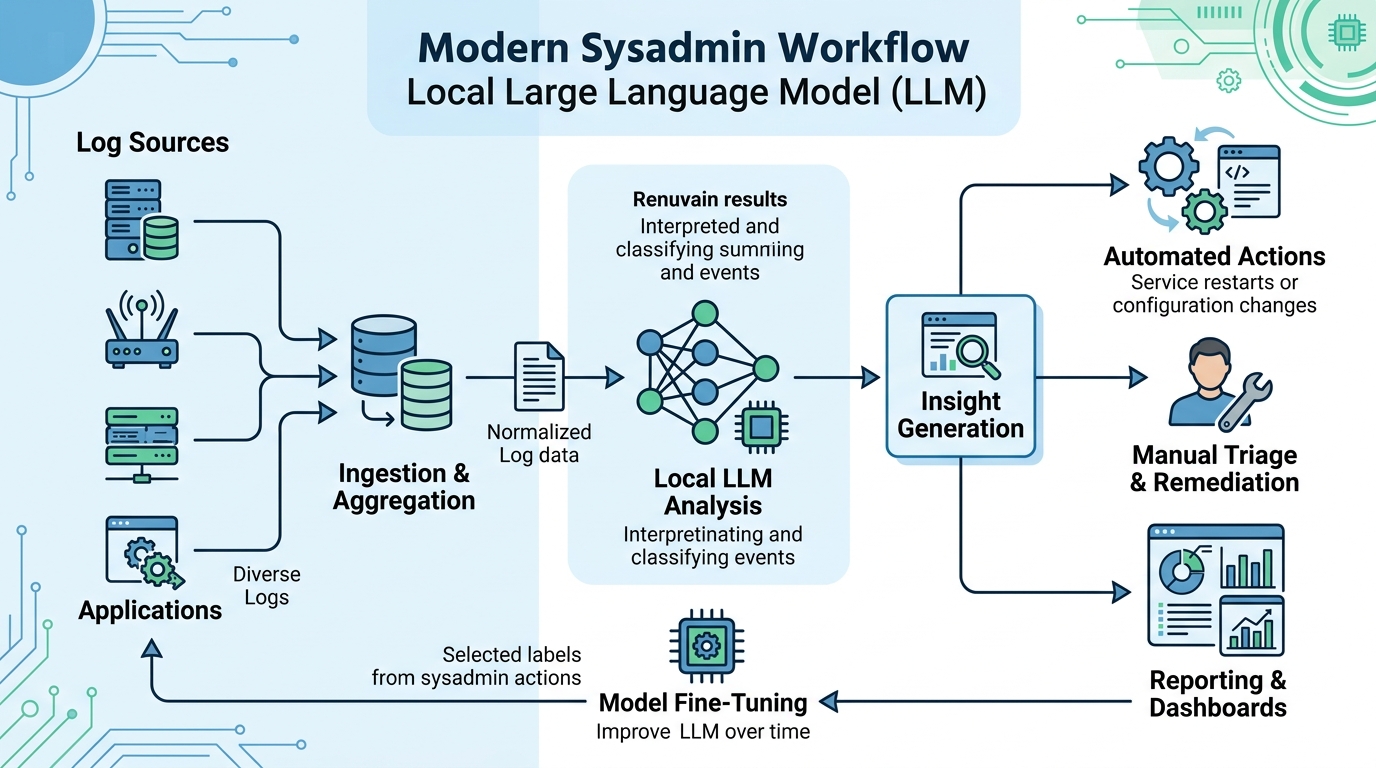
Integrating local LLMs into existing ops workflows, particularly for log analysis, can streamline incident response and reporting.
A pragmatic rollout path:
- Pick your tool. For headless servers and scripting, that decision is straightforward — start with our Ollama vs LM Studio comparison to confirm the fit for your environment.
- Start on one box with one model. A 7B-class quantized model on a 16 GB host covers all three use cases above.
- Wire in the lowest-risk win first. The read-only use cases — log summarization and explanation — carry no execution risk and build trust fastest.
- Standardize prompts as code. Keep your summarization and script-generation prompts in the same git repo as your automation, versioned like any other config.
- Add guardrails before generation tasks go wide. Generated scripts go through the same review/CI path as human-written ones. No exceptions.
- Scale by benchmarking, not by hype. When usage grows, measure which model your tasks actually need — smaller and faster usually beats bigger and idle.
The pattern to internalize: a local LLM is not a platform migration. It’s one more well-behaved Unix service that reads text and writes text — which makes it a natural citizen of every pipeline you already run.
FAQ
What is the best open source LLM use case for a sysadmin to start with?
Log summarization. It’s read-only (no execution risk), delivers immediate value during incidents, and works with a small model on modest hardware.
Can I trust automation scripts generated by a local LLM?
Trust but verify. Models occasionally hallucinate flags or commands, so treat generated scripts like a junior admin’s PR: review, sandbox-test, then deploy through your normal pipeline.
Do I need a GPU for these use cases?
No. Quantized 3B–8B models handle log analysis, script drafting, and explanation tasks acceptably on CPU-only servers with 16 GB of RAM.
Which model should I use for ops automation?
It depends on the task mix — a small model for high-volume batch summaries, a 7B–8B model for script generation. Our guide to the fastest model for bash scripting breaks down the trade-offs on CPU hardware.
Why use a local LLM instead of a cloud AI API for ops tasks?
Logs and configs contain sensitive data that often can’t leave your network. A local model processes everything on-premise, avoids per-token costs, and keeps your deployment within existing compliance boundaries.