
Windmill vs n8n vs Nora: Which Local Automation Tool is Right for You?
Selecting an enterprise workflow automation tool used to be straightforward: you either built custom internal tools from scratch or subscribed to a cloud-based SaaS platform like Zapier or Make. However, in 2026, data privacy regulations, cloud infrastructure expenses, and security mandates have forced sysadmins, DevOps engineers, and IT leaders to rethink cloud-first automation.
Today, teams are seeking solutions that keep sensitive scripts, API keys, and corporate data inside the local network. This shift has driven massive interest toward self-hosted and local workflow engines. Three tools dominate this conversation: n8n, Windmill, and Nora.
While all three tools aim to solve script orchestration and workflow management, their underlying architectures, operational overhead, and target environments differ significantly. This direct guide compares Windmill vs n8n vs Nora to help you determine which platform fits your technical requirements, security stance, and operational workflow.

A conceptual illustration comparing the core features and operational distinctions of Windmill, n8n, and Nora for local automation.
Introduction to the Automation Landscape
Modern IT operations rely on automating repetitive execution flows: server patching, user provisioning, database backups, alert escalation, and multi-script sequences across PowerShell, Python, and Bash. Historically, running these workloads locally meant relying on rigid Windows Task Scheduler setups or complex Cron jobs that lacked observability, audit logging, and visual error handling.
To modernize, IT organizations evaluated open-source and self-hosted workflow tools. However, many quickly realized that traditional self-hosted software is not necessarily “local.” Platforms like n8n and Windmill typically require running Linux containers, configuring PostgreSQL or Redis instances, managing WebSockets, and maintaining continuous server infrastructure.
For IT managers and sysadmins who need a lightweight, self-contained desktop solution—especially in Windows-heavy environments—managing dedicated Linux servers or Docker engines just to schedule local scripts introduces unnecessary complexity. This fundamental gap created two distinct categories in 2026:
- Self-Hosted Server Automation: Tools designed to run on central Linux servers or Kubernetes clusters (n8n, Windmill).
- Local-First Desktop Automation: Applications that run natively on desktop operating systems without requiring external server setup or container engines (Nora).
Understanding this operational distinction is crucial when evaluating local automation tools for your organization.
n8n: The Popular Self-Hosted Option
Originally launched as a fair-code, node-based workflow automation platform, n8n has become one of the most widely adopted open-source alternatives to cloud automation platforms. It provides a highly visual canvas where users drag and drop nodes representing web API services, databases, and custom JavaScript functions.
Pros and Cons
Pros:
* Extensive Integration Ecosystem: Features hundreds of pre-built connectors for popular SaaS applications, database systems, and communication platforms like Slack and Teams.
* Intuitive Node Canvas: The visual interface makes complex branching logic and webhook triggers easy to visualize for technical and non-technical staff alike.
* Active Community: A vast user base means abundant community templates, custom nodes, and shared workflows.
Cons:
* Infrastructure Management Overhead: Requires deploying Node.js applications alongside databases (PostgreSQL/SQLite) and maintaining Docker images, updates, and environment variables.
* Server Dependency: n8n is architected as a server application. Running it as an n8n alternative local workflow on a workstation requires local container virtualization (Docker Desktop), consuming considerable RAM and CPU resources.
* Licensing Limitations: The self-hosted version uses a Sustainable Use License, which restricts commercial distribution and embedding without proprietary licenses.
Ideal Use Cases
n8n excels in multi-tenant or server-centric environments where IT teams want to centralize API integrations, process webhooks, and sync data between cloud services using hosted Linux servers.
Windmill: The Developer-Focused Engine
Windmill is an open-source, developer-first platform designed as an alternative to Retool and Temporal. It allows developers to turn scripts written in Python, TypeScript, Go, Bash, or SQL into auto-generated UI dashboards and scalable background workflows.
Pros and Cons
Pros:
* Code-Native Orchestration: Writes workflows in pure code or combines scripts into DAGs (Directed Acyclic Graphs) with automatic type safety.
* High Performance: Built with Rust and Postgres, Windmill offers low latency and high execution throughput for heavy workloads.
* Auto-Generated Interfaces: Automatically converts function parameters in your scripts into interactive web forms and user interfaces.
Cons:
* Steep Infrastructure Requirements: Deploying Windmill requires running multiple Docker containers (workers, server, database, worker dependencies), making local workstation execution complex.
* Developer-Centric Barrier: Requires strong comfort with code, Git repositories, and dependency management. It is less suitable for sysadmins seeking simple drag-and-drop workflow assembly.
* Windows Host Complexity: While Windmill runs inside Linux containers on Windows, it is not a native Windmill alternative Windows application. Accessing host-level Windows APIs or PowerShell modules directly requires specialized mounting and container configuration.
Ideal Use Cases
Windmill is best suited for software engineering teams and DevOps organizations building complex, script-heavy internal developer platforms (IDPs) on Linux infrastructure.
Nora: The Local-First Windows Champion
Nora is built from the ground up as a native, local-first workflow orchestrator designed specifically for desktop environments, with tier-one support for Windows infrastructure. Rather than forcing users to spin up Docker daemons, configure databases, or manage web servers, Nora operates as a lightweight, stand-alone application.
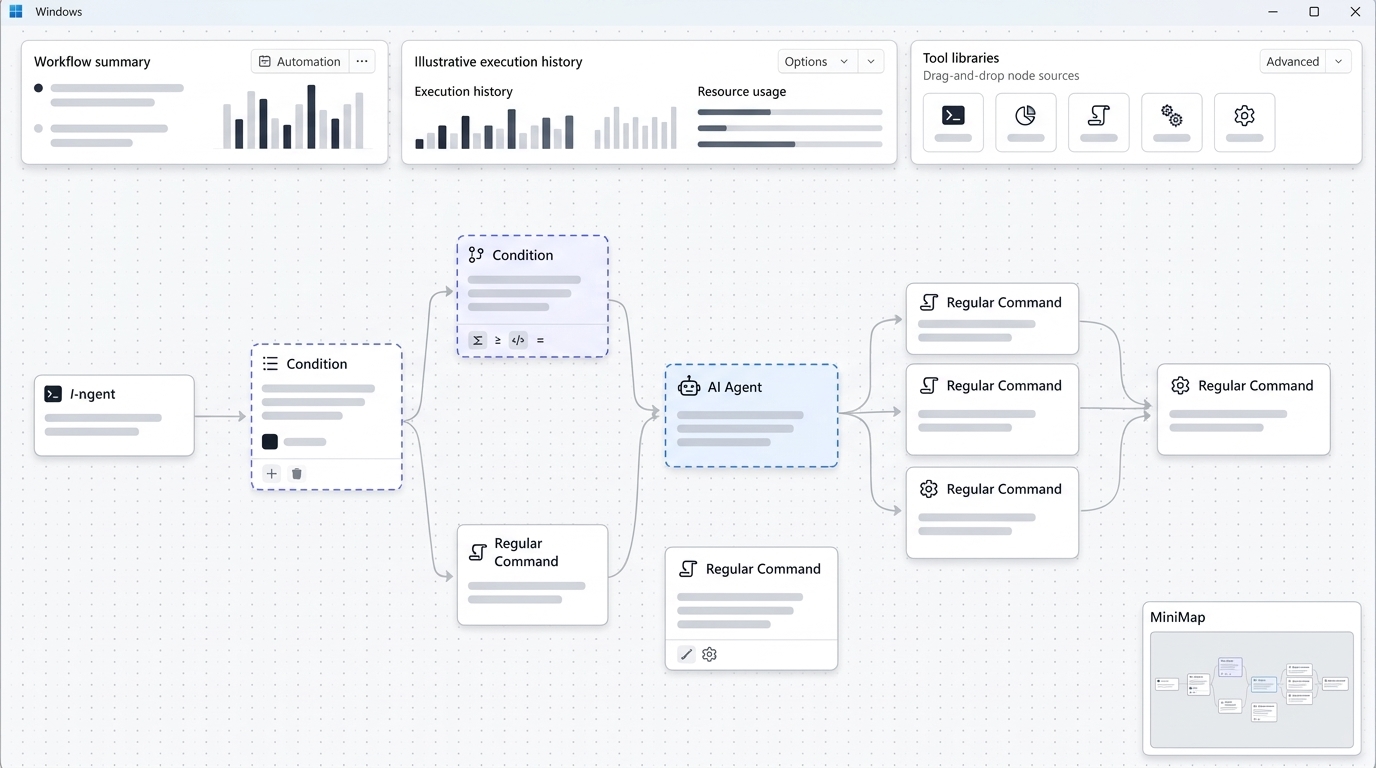
An illustrative dashboard of Nora, showcasing its local-first Windows automation interface.
Zero-Cloud Architecture
Unlike traditional web-based automation engines that require network connectivity to external servers, Nora executes all workflows entirely on your local machine.
- Zero Cloud Dependency: Workflows, execution logs, credentials, and configuration files remain stored on local disk space.
- No Docker Required: Runs as a native executable on Windows, completely eliminating container setup, exposed ports, and reverse proxy management.
- Complete Offline Capability: Automations execute uninterrupted without active internet access, ideal for air-gapped systems or secure enterprise segments.
Why Sysadmins Prefer Local Desktop Automation
For system administrators managing local active directory environments, client machines, or on-premise infrastructure, relying on a native Windows automation tool provides significant advantages:
- Native Execution of Local Scripts: Runs PowerShell scripts, batch files, Python scripts, and CLI utilities directly within the host security context without container abstraction layers.
- Instant Setup: Download, install, and execute within minutes. There is no need to configure PostgreSQL databases, Redis queues, or reverse proxies.
- Low Resource Footprint: Uses minimal system memory and CPU compared to full-stack web server containers running locally.
Direct Comparison: Windmill vs n8n vs Nora
To provide a clear overview when evaluating automation platforms, the following matrix breaks down key feature sets across all three workflow orchestrators:
| Feature / Dimension | n8n | Windmill | Nora |
|---|---|---|---|
| Architecture | Web App / Server Container | Developer Engine / Server | Native Desktop Application |
| Primary OS Target | Linux Server / Cloud | Linux Server / Docker | Native Windows / Desktop |
| Deployment Overhead | Medium (Docker / Node / DB) | High (Multiple Containers / Rust / Postgres) | Zero (Native Executable) |
| Local Script Execution | Requires Docker mounts | Requires Docker mounts | Native host script execution |
| Offline / Air-Gapped | Requires local server config | Requires local server config | Native full offline support |
| Primary Languages | JavaScript / TypeScript | Python, TypeScript, Go, Bash | PowerShell, Python, Batch, Shell |
| Interface | Visual Node Canvas | Code Editor + Auto-UI | Drag-and-Drop + Script Runner |
| Licensing | Sustainable Use License | AGPL v3 / Enterprise | Single-user / Perpetual Options |
Setup & Infrastructure Overhead
- n8n: Deploying locally requires Docker Desktop or npm installation. Managing container storage, port mapping, and node updates requires ongoing maintenance.
- Windmill: Requires composing multiple Docker services (PostgreSQL, server node, workers). It demands high familiarity with container orchestration.
- Nora: Installs directly as a desktop application. Requires zero database configuration, background services, or network port forwarding.
Security & Data Privacy
- n8n & Windmill: Data security depends on how well you secure the underlying Linux host, web endpoints, database encryption, and Docker socket permissions. If configured incorrectly, web-based admin dashboards can expose internal network endpoints.
- Nora: Employs a zero-trust, local-only threat model. Credentials are stored in local encrypted keyrings (such as Windows Credential Manager). No execution data, payload metrics, or telemetry leave the host machine.
Pricing Models & Licensing
- n8n: Free self-hosted version for personal use; commercial usage restrictions apply under fair-code terms. Cloud subscriptions bill on monthly workflow executions.
- Windmill: Open-source self-hosted tier with usage limits on user seats and enterprise features; paid team tiers use seat-based SaaS subscriptions.
- Nora: Offers transparent desktop pricing with perpetual licensing options, allowing IT departments to buy software once without incurring monthly execution or active-user surcharges.
Which Workflow Orchestrator Should You Choose?
Choosing between Windmill, n8n, and Nora comes down to your primary environment, team capabilities, and operational requirements:
- Choose n8n if: You require a hosted, web-accessible visual automation server with hundreds of pre-built SaaS API connectors, and your team is comfortable maintaining Linux or Docker infrastructure.
- Choose Windmill if: You are a software engineering team building developer utilities, need microsecond execution speeds for script DAGs, and have dedicated resources to manage multi-container self-hosted deployments.
- Choose Nora if: You are a sysadmin, IT specialist, or ops manager who needs a secure, native Windows application to run scripts locally without managing servers, Docker engines, or continuous subscription fees.
By eliminating cloud dependencies and server configuration, Nora delivers the speed, security, and simplicity needed for modern desktop workflow automation.
Frequently Asked Questions (FAQ)
What is the main difference between self-hosted and local-first automation?
Self-hosted automation (like n8n or Windmill) runs as a web server or Docker container stack that users access via a browser. Local-first automation (like Nora) runs natively on your desktop operating system as a single application without requiring server infrastructure or database hosting.
Can Nora run existing PowerShell and Python scripts?
Yes. Nora allows you to orchestrate existing PowerShell, Python, batch, and shell scripts directly within visual workflows without altering your code or wrapping scripts inside container environments.
Does Nora require Docker or WSL on Windows?
No. Nora runs as a native Windows application and executes scripts directly in the host OS environment, completely removing the requirement for Docker Desktop, Hyper-V, or Windows Subsystem for Linux (WSL).
Is Nora capable of running entirely offline in air-gapped environments?
Yes. Nora features a zero-cloud architecture. All workflow logic, execution history, and credential storage are handled locally on the host machine, making it completely operational without an active internet connection.