
Comparing Automation Platforms: A Buyer’s Guide for IT
Selecting the right automation platform is one of the most consequential decisions an IT leader, sysadmin manager, or operations director will make in 2026. As business operations become increasingly digital, automation tools dictate how quickly an organization can process data, manage infrastructure, resolve incidents, and scale workflows.
However, the automation software landscape has become crowded and confusing. Products range from lightweight consumer visual builders to complex developer framework engines, with pricing models spanning monthly SaaS subscriptions, per-task execution fees, and perpetual licenses.
When comparing automation platforms, IT buyers must evaluate architecture, ease of use, security, total cost of ownership (TCO), and infrastructure complexity. This buyer’s guide breaks down the automation landscape, evaluates deployment models, analyzes pricing structures, and provides an actionable procurement checklist for IT teams.

Evaluation checklist for comparing automation platforms and deployment models.
The Current Landscape of Automation Platforms
In 2026, automation platforms fall into three primary architectural categories:
- Cloud SaaS Platforms (Zapier, Make, Workato): Hosted entirely in public vendor clouds. Designed primarily for connecting web APIs and consumer web applications. While fast to set up, they charge per-step execution fees, require sending data off-site, and lack native access to local behind-the-firewall infrastructure.
- Self-Hosted Server Platforms (n8n, Windmill, Apache Airflow): Web applications deployed on customer-managed Linux servers, Docker containers, or Kubernetes clusters. These offer data privacy and developer flexibility but require significant server administration, database maintenance, and container orchestration overhead.
- Local-First Desktop Orchestrators (Nora): Standalone desktop applications installed natively on client workstations or dedicated local PCs. These run workflows and schedule scripts directly on local hardware without cloud dependencies, server setups, or container maintenance.
Understanding these structural differences is essential to matching software capability with your team’s operational reality.
Key Factors when Comparing Automation Platforms
When evaluating candidate platforms, technical procurement teams should assess tools across two critical dimensions: deployment architecture and user accessibility.
Deployment Model (Cloud vs Self-Hosted vs Local)
The deployment model dictates your ongoing maintenance burden, data privacy boundary, and network architecture:
- Cloud SaaS: Zero infrastructure management, but high ongoing cost and potential security risks regarding data sovereignty and third-party data access.
- Self-Hosted Server: Full control over network boundaries, but demands dedicated IT resources to maintain Linux servers, manage Docker/Kubernetes container updates, patch web proxies, and back up relational databases.
- Local-First Desktop: Complete data sovereignty and zero server overhead. Workflows execute natively within the local OS environment, making it ideal for managing local scripts, internal network shares, and desktop operations.
For a side-by-side technical teardown of top server and local engines, read our detailed comparison of Windmill vs n8n vs Nora.
Ease of Use vs Developer Focus
Automation platforms vary widely in their target user personas:
| Category | Platform Approach | Target Persona | Learning Curve |
|---|---|---|---|
| No-Code Visual | Pure drag-and-drop web blocks | Non-technical users / Marketing | Very Low |
| Code-Native DAGs | Written entirely in Python/Rust/Go code | Software Engineers / DevOps | High |
| Hybrid Local Orchestrator | Visual drag-and-drop canvas chaining native scripts | Sysadmins / Ops Teams / IT | Low / Balanced |
Sysadmins and ops personnel often benefit most from hybrid local orchestrators. These tools provide an intuitive visual drag-and-drop canvas while retaining the ability to execute native PowerShell, Python, and Batch scripts directly.
Pricing Models: Subscriptions vs Perpetual Licenses
Software licensing models have shifted dramatically over the past decade. SaaS vendors heavily promote recurring subscription tiers based on execution volume (e.g., charging per active workflow or per 1,000 executed tasks). For high-volume IT operations, this pricing model creates unpredictable operating expenses.
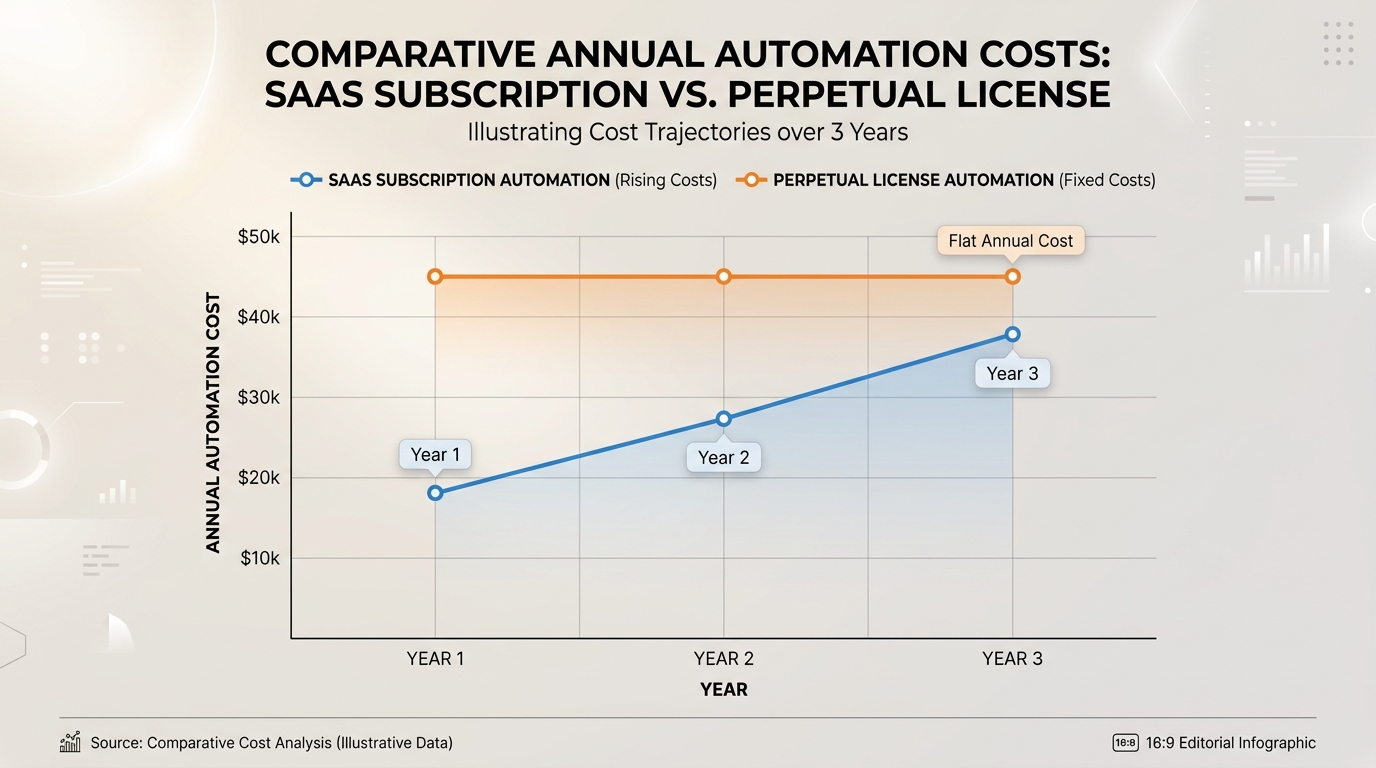
Chart comparing perpetual license automation versus SaaS subscription costs over time.
ANNUAL AUTOMATION COST OVER 3 YEARS:

Cost ($)
 |
 |      /  SaaS Subscription (Recurring Task Fees & Monthly Seats)
 |     /
 |    /
 |   /
 |  /______________________ Perpetual License (One-Time Purchase + Optional Updates)
 |________________________
 0        Year 1       Year 2       Year 3
The Appeal of Perpetual License Automation
To achieve cost predictability, enterprise IT buyers are increasingly seeking perpetual license automation models.
- Predictable Capital Expenditure: Pay a single upfront license fee per machine or seat rather than accumulating indefinite monthly subscription fees.
- No Execution Penalties: Run millions of local script executions, file transfers, or system checks without incurring additional per-step surcharge fees.
- Budget Alignment: Aligns software procurement with traditional capital expenditure (CapEx) budgets rather than variable operational expenditure (OpEx).
When reviewing software budgets, switching from usage-based cloud pricing to perpetual desktop licensing delivers significant long-term cost reductions.
Security Considerations for Software Evaluation
Before approving any new automation software, IT security teams must evaluate potential attack vectors and risk exposures:
- Credential Storage Architecture: How does the platform store credentials? SaaS platforms store encrypted credentials in public clouds. Self-Hosted platforms store them in server databases. Local-first tools leverage native OS encrypted keyrings (such as Windows Credential Manager or DPAPI), keeping secrets isolated on host disk space.
- Network Exposure & Inbound Ports: Does the application require opening inbound network ports or configuring public reverse proxies? Local desktop tools require zero open inbound ports, operating entirely behind your local firewall.
- Third-Party Telemetry & Data Leakage: Does the software transmit diagnostic data, workflow metadata, or payload variables to vendor servers? Enterprise-grade local tools offer zero-telemetry operational modes for air-gapped compliance.
For teams managing critical internal operations, adopting modern best tools for ops teams ensures your workflows meet strict enterprise compliance standards.
Checklist: Selecting the Right Platform for Your Team
Use this 5-point evaluation checklist when comparing automation software during vendor trials:
- [ ] 1. Architecture Fit: Does the platform run without requiring complex server infrastructure, Docker, or external cloud dependencies?
- [ ] 2. Native Script Support: Can the tool orchestrate your existing PowerShell, Python, and Batch scripts without requiring code rewrites?
- [ ] 3. Security & Compliance: Are credentials stored in native encrypted OS keyrings, with zero payload data sent to third-party cloud servers?
- [ ] 4. Transparent Pricing: Does the software offer clear, predictable pricing (such as perpetual desktop licensing) without per-task execution surcharges?
- [ ] 5. Time-to-Value: Can your IT team download, install, and construct an operational visual workflow in under 15 minutes?
By selecting standalone desktop automation software solutions like Nora, organizations achieve rapid deployment, total data privacy, and reliable long-term performance.
Frequently Asked Questions
What should I look for when comparing automation platforms?
Focus on five key factors: deployment model (cloud vs self-hosted vs local-first), script language compatibility, security/credential storage, total cost of ownership (subscription vs perpetual licensing), and ease of use for your team’s technical skill level.
Why are perpetual licenses becoming popular again in IT automation?
Perpetual licenses give organizations total cost predictability. Unlike cloud SaaS subscriptions that charge per workflow step or monthly user, perpetual licensing allows teams to run unlimited script executions locally without incurring extra charges.
How does local desktop automation software lower total cost of ownership (TCO)?
Local desktop software eliminates server hardware provisioning costs, hypervisor management, database administration hours, and recurring SaaS task-tier fees, allowing a single upfront purchase to cover long-term operational needs.
Is local-first software suitable for enterprise IT environments?
Yes. Local-first software like Nora is specifically designed for enterprise IT environments that prioritize data privacy, zero-cloud risk, air-gapped execution, and native integration with Windows and local network infrastructure.