
GGUF vs GGML vs Safetensors: Local LLM Formats Compared
Running open-source large language models (LLMs) on your local hardware gives you complete control over your data, zero subscription costs, and full offline usability. However, as soon as you visit model hubs like Hugging Face or launch applications like Ollama and LM Studio, you are immediately confronted with a bewildering variety of file formats and extensions: .gguf, .ggml, .safetensors, .bin, and .pt.
Choosing the wrong format can lead to sluggish inference times, out-of-memory errors, or complete incompatibility with your chosen inference engine. To maximize your hardware’s capabilities, you need a clear understanding of GGUF vs GGML and safetensors vs GGUF.
This comprehensive comparison breaks down the evolution, performance mechanics, memory footprint, and ideal hardware use cases for each major local AI model format.
The Evolution of Local AI Model Formats
The open-source AI community moves at a rapid pace. Just a few years ago, running a 7-billion or 13-billion parameter model on a consumer laptop or desktop PC was virtually impossible. PyTorch checkpoints (.pt or .bin files) required full 16-bit or 32-bit floating-point precision, consuming tens of gigabytes of High-Bandwidth Memory (HBM) on expensive enterprise GPUs.
To make LLMs accessible on everyday hardware, developers needed two core breakthroughs:
1. Model Quantization: Reducing precision from 16-bit floats (FP16) to 4-bit or 8-bit integers (INT4 / INT8), drastically cutting memory usage with minimal drop in accuracy.
2. Unified Single-File Container Formats: Storing all weights, tensor shapes, tokenizers, and metadata into a single encapsulated file that can be loaded quickly into system RAM or GPU VRAM.
This evolution unfolded in three major stages: PyTorch/Safetensors for full-precision and GPU training, GGML for early CPU-based quantized inference, and GGUF as the modern, extensible standard for edge and desktop AI execution.

A visual comparison of GGUF and GGML, highlighting GGUF’s advancements in performance and memory efficiency.
What is GGML? (The Predecessor)
GGML (GPT-Generated Model Language) was a pioneering C/C++ machine learning library created by Georgi Gerganov in early 2023. It was specifically engineered to allow large language models—starting with Meta’s LLaMA—to run efficiently on consumer CPUs, including Apple Silicon (M1/M2/M3 chips) and standard x86 processors.
Key characteristics of GGML included:
* CPU-First Design: Designed from the ground up for high-speed matrix multiplication on system RAM without requiring high-end NVIDIA GPUs.
* Early Quantization Support: Introduced integer quantization formats like Q4_0, Q4_1, Q5_0, and Q8_0, making 7B models fit into 4GB–8GB of system RAM.
* Binary File Structure: Merged model weights into a binary layout readable by llama.cpp.
The Limitations of GGML
While revolutionary, GGML had critical structural flaws that ultimately led to its deprecation:
* Rigid Architecture: Metadata (such as hyperparameter settings and context length) was hardcoded into strict binary offsets. Adding a new feature or architectural change required modifying the C++ codebase and breaking compatibility with older files.
* Fragile Tokenizer Integration: Tokenizer metadata was separated or awkwardly embedded, leading to frequent tokenization errors when loading custom models.
* No Backward Compatibility: Every major update to the GGML library broke compatibility with previously downloaded GGML file versions, forcing users to re-download multi-gigabyte models repeatedly.
Because of these limitations, the developer community officially deprecated GGML in August 2023 in favor of a redesigned container format.
What is GGUF? (The Modern Standard)
GGUF (GPT-Generated Unified Format) is the direct successor to GGML. Designed by the llama.cpp core team, GGUF solved the architectural flaws of GGML by introducing an extensible, key-value metadata system embedded directly within the file header.
When considering understanding the GGUF file format, it helps to view GGUF not just as a raw weights container, but as an self-contained AI archive containing everything an inference client needs to execute a model.
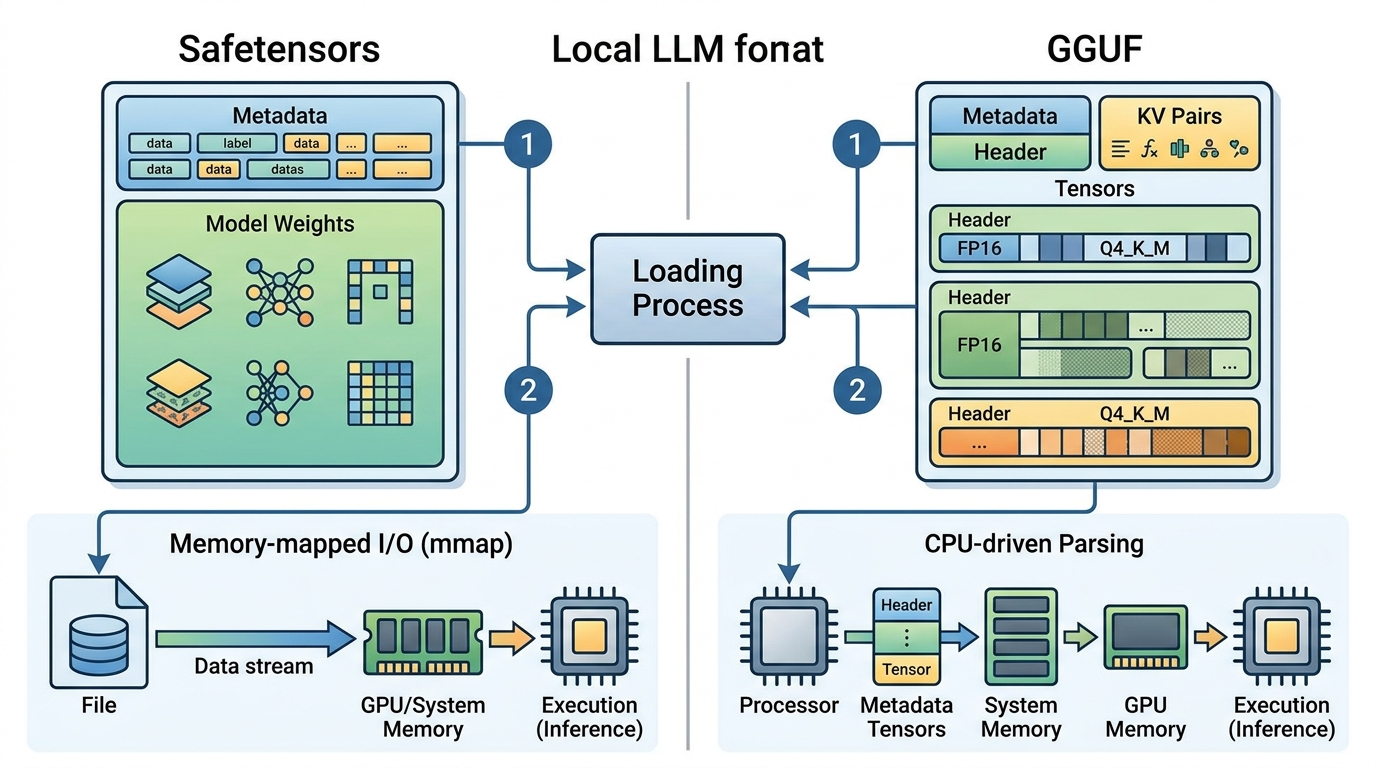
Architectural comparison of Safetensors and GGUF, detailing their distinct approaches to model storage and loading.
GGUF vs GGML Difference
The fundamental GGUF vs GGML difference lies in file structure, extensibility, and metadata management:
| Feature | GGML (Legacy) | GGUF (Modern Standard) |
|---|---|---|
| Header Architecture | Fixed binary offset | Key-value store (Extensible) |
| Metadata Flexibility | Inflexible; breaking changes on update | Fully extensible without breaking parser |
| Tokenizer Integration | Separate or loosely coupled | Embedded directly inside file header |
| Model Support | LLaMA architecture variants only | LLaMA, Mistral, Mixtral, Gemma, Qwen, Phi, Command R, etc. |
| Quantization Types | Basic (Q4_0, Q4_1, Q8_0) | Advanced K-quantization (Q4_K_M, Q5_K_S, IQ3_XS, etc.) |
| Backward Compatibility | Poor; old files fail on new software | Strong; new attributes are ignored by old parsers |
GGUF vs GGML Performance
In terms of GGUF vs GGML performance, GGUF delivers measurable improvements across loading speeds, memory overhead, and token generation rates:
- Faster Load Times (mmap): GGUF fully supports memory-mapped I/O (
mmap). Instead of reading gigabytes of weights into memory sequentially upon startup, GGUF maps the file direct to virtual memory, allowing models to launch almost instantaneously. - Superior Quantization Efficiency (K-Quants and I-Quants): GGUF introduced modern quantization methods such as
Q4_K_M(Medium) andQ5_K_M. These algorithms selectively quantize critical model layers (like attention blocks) at higher precision while compressing less sensitive feed-forward layers. This maintains perplexity scores nearFP16baseline levels while cutting VRAM/RAM demands by 60–70%. - GPU Offloading Flexibility: Unlike early GGML implementations, GGUF allows precise layer-by-layer offloading to GPU VRAM (using CUDA, Metal, ROCm, or Vulkan). Users can offload 20 out of 32 layers to a VRAM-constrained GPU while running the remaining 12 layers in CPU system RAM.
What are Safetensors?
While GGUF dominates CPU and hybrid-offload inference, Safetensors is the golden standard format for GPU-native deep learning workflows, model training, fine-tuning, and PyTorch ecosystem integration.
Created by Hugging Face, Safetensors was designed to replace Python’s legacy pickle files (.pt or .bin). Pickle files execute arbitrary Python code upon deserialization, creating severe security vulnerabilities where malicious actors could embed arbitrary shell commands inside downloaded model files.
Safetensors solves this security risk completely:
* 100% Safe Deserialization: Safetensors contains zero executable code. It stores purely raw tensor data and a light JSON header describing tensor shapes and data types.
* Zero-Copy Loading: Safetensors utilizes memory-mapping to achieve blazingly fast load times on GPUs, transferring tensor buffers directly from storage to GPU VRAM without host CPU serialization overhead.
Safetensors vs GGUF
Comparing safetensors vs GGUF comes down to target execution environment and precision:
- Hardware Target: Safetensors is optimized for dedicated GPUs with ample VRAM (NVIDIA CUDA, AMD ROCm). GGUF is optimized for resource-constrained consumer hardware, hybrid CPU+GPU offloading, and Apple Silicon unified memory.
- Precision: Safetensors files typically hold full unquantized weights (
FP32,FP16, orBF16) or standard GPTQ/AWQ weights. GGUF files are predominantly quantized (Q4_K_M,Q5_K_M,Q8_0) to fit within typical desktop memory limits. - Ecosystem: Safetensors is native to PyTorch, Hugging Face
transformers, vLLM, TensorRT-LLM, and ComfyUI/Stable Diffusion. GGUF is native tollama.cpp, Ollama, LM Studio, Jan, and KoboldCPP.
GGML vs Safetensors
In the historic matchup of GGML vs Safetensors, Safetensors proved superior for security and GPU pipeline performance, while GGML was preferred solely for consumer CPU quantization. Today, GGUF has completely superseded GGML, leaving Safetensors and GGUF as the two primary formats dominating the AI landscape.
Which Format Should You Choose?
Selecting the right format depends entirely on your target hardware, software runtime, and use case. Use the following decision matrix to choose your ideal file format:
1. Choose GGUF If You Are:
- Running models on consumer PCs, laptops, or Apple Silicon Macbooks.
- Using local desktop inference apps like Ollama, LM Studio, Jan.ai, or
llama.cpp. - Operating with limited GPU VRAM (e.g., 8GB–12GB VRAM) and need to offload partial layers to system RAM.
- Looking for quantized models (
Q4_K_M,Q5_K_M) that maximize performance per gigabyte of RAM. - Before downloading, check our recommendations on the best local LLM format for your hardware.
2. Choose Safetensors If You Are:
- Fine-tuning, training, or merging LLMs using PyTorch or Hugging Face libraries.
- Running high-throughput enterprise inference pipelines using vLLM, TGI, or TensorRT-LLM on dedicated GPU servers (e.g., NVIDIA A100/H100/RTX 4090).
- Generating images or video using Stable Diffusion, Flux, or ComfyUI workflows.
- Requiring uncompressed
FP16orBF16precision for maximum output fidelity.
Frequently Asked Questions
Can I convert Safetensors to GGUF?
Yes. You can convert Safetensors models to GGUF using the conversion scripts provided directly in the llama.cpp repository (convert_hf_to_gguf.py). This converts full-precision Safetensors weights into FP16 GGUF format, which can then be quantized down to 4-bit or 5-bit GGUF files.
Is GGML still supported in 2026?
Virtually all modern local inference engines (including Ollama, LM Studio, and llama.cpp) have dropped active support for legacy .ggml files. Modern tools require .gguf files. If you still have .ggml files on your hard drive, it is strongly recommended to replace them with updated GGUF downloads.
Which GGUF quantization level is the sweet spot?
For most 7B, 8B, and 14B models, Q4_K_M (4-bit Medium) and Q5_K_M (5-bit Medium) offer the best balance between speed, memory efficiency, and response accuracy. Q4_K_M retains over 99% of the full FP16 perplexity while consuming less than a third of the memory.
Next Steps for Your Local AI Setup
Understanding local AI formats is the first step toward building an efficient local setup. Once you know which format suits your system:
* Step through our tutorial on setting up Ollama GGUF models for step-by-step configuration.
* Explore how local automation engines integrate local LLMs directly into custom workflows without relying on cloud APIs.