
How Operations Teams Can Leverage Python Automation
Python automation for operations teams is not about replacing every Bash or PowerShell script overnight. It is about giving sysadmins and infrastructure engineers a more maintainable tool for workflows that have outgrown shell scripting: API calls, cloud orchestration, inventory reporting, data parsing, and cross-platform automation.
If your team already knows PowerShell or Bash, that experience is an advantage. You already understand systems, services, permissions, logs, failure modes, and the cost of repetitive work. Python simply gives you a cleaner way to express more complex automation.

Python provides a clean and maintainable way to express complex automation workflows for operations teams.
This guide explains where Python fits, which libraries matter, and how to adopt it without creating another pile of unsupported scripts.
Why Operations Teams are Adopting Python
Operations teams are adopting Python because infrastructure work is increasingly API-driven and cross-platform. The job is no longer just logging into a server and running a local command. Modern operations work often involves coordinating between cloud platforms, monitoring systems, ticketing tools, identity providers, configuration files, and CI/CD pipelines.
Python is a strong fit because it is:
- Readable enough for teams transitioning from shell scripting
- Cross-platform across Windows, Linux, and macOS
- Excellent for JSON, YAML, CSV, and text processing
- Well-suited for REST API interactions
- Easier to structure and test than large shell scripts
- Supported by a broad ecosystem of libraries
Python does not eliminate the need for Bash or PowerShell. It gives operations teams a better default for orchestration and data-heavy automation.
If your team is still deciding where Python fits, compare it against other options in our guide to reviewing the best scripting language for sysadmins.
Replacing Legacy Bash and Batch Scripts
Most operations teams have legacy scripts that began as quick fixes. Over time, those scripts accumulate flags, special cases, copied functions, and undocumented assumptions.
Good candidates for Python migration include scripts that:
- Parse complex command output
- Manipulate JSON, YAML, or CSV
- Call multiple APIs
- Need better logging
- Need reusable functions
- Run on both Windows and Linux
- Have grown beyond a few dozen lines
- Are risky because only one person understands them
Not every script should be migrated. A five-line Bash script that restarts a local Linux service may be fine. A simple PowerShell script that creates an AD report may also be fine. Python is most valuable when the workflow needs structure.
A migration approach:
- Identify the script’s real purpose.
- Write down inputs, outputs, and side effects.
- Preserve existing behavior with sample test cases.
- Rebuild the workflow in Python with logging and parameters.
- Run both versions in parallel for validation where practical.
- Retire the legacy script once the Python version is trusted.
For Microsoft-centered tasks, keep using PowerShell where it is strongest and follow PowerShell automation best practices.
Key Python Libraries for Sysadmins
Python’s value for operations comes from a small set of standard modules and practical third-party packages. You do not need to learn the entire ecosystem to become productive.
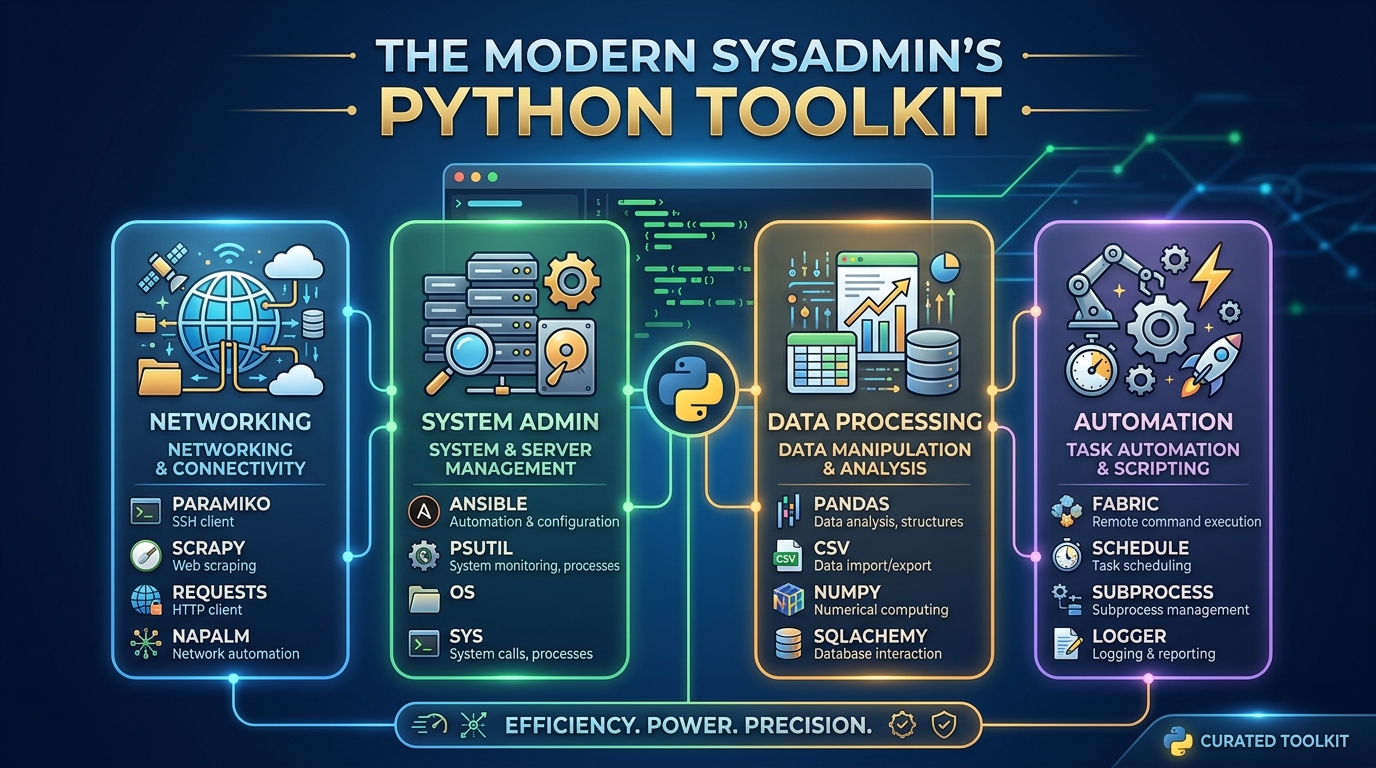
A small set of standard modules and practical third-party packages form the core of a sysadmin’s Python toolkit.
OS and Subprocess modules
The os module helps with environment variables and operating system interactions. The subprocess module lets Python run external commands safely when needed.
Example:
import os
import subprocess

app_env = os.environ.get("APP_ENV", "dev")

result = subprocess.run(
    ["hostname"],
    capture_output=True,
    text=True,
    check=True,
)

print(f"Environment: {app_env}")
print(f"Hostname: {result.stdout.strip()}")
Use subprocess.run() with a list of arguments instead of building shell strings. This reduces quoting problems and avoids unnecessary shell interpretation.
Other standard library modules worth learning:
pathlibfor cross-platform pathsjsonfor API payloads and structured outputcsvfor reportsloggingfor operational logsargparsefor command-line parametersdatetimefor timestamps and retention logic
Paramiko (SSH automation)
Paramiko is a Python library for SSH automation. It can be useful when you need to run commands on remote Linux systems from a Python workflow.
Typical use cases:
- Running remote health checks
- Collecting inventory details
- Executing controlled maintenance commands
- Copying files over SSH in automation workflows
A simplified pattern:
import paramiko

client = paramiko.SSHClient()
client.set_missing_host_key_policy(paramiko.AutoAddPolicy())
client.connect("server01.example.com", username="automation")

stdin, stdout, stderr = client.exec_command("uptime")
print(stdout.read().decode())

client.close()
In production, handle host key validation, authentication, timeouts, errors, and secrets management carefully. Do not hard-code credentials in scripts.
Requests (API interactions)
The requests library is one of the most useful packages for operations teams because so much infrastructure is managed through HTTP APIs.
Example:
import requests

response = requests.get(
    "https://api.example.com/assets",
    headers={"Authorization": "Bearer TOKEN_FROM_SECRET_STORE"},
    timeout=30,
)
response.raise_for_status()

for asset in response.json():
    print(asset["hostname"], asset["status"])
Use API automation for:
- Asset inventory
- Monitoring integrations
- Ticket creation
- Cloud resource queries
- User lifecycle workflows
- Configuration validation
Replace the placeholder token pattern with your organization’s approved secret management method.
Building a Python Operations Toolkit
A Python operations toolkit is a shared set of scripts, modules, and patterns your team can reuse. The goal is to avoid every engineer writing a different style of automation.
A practical toolkit structure:
ops-automation/
  README.md
  pyproject.toml
  scripts/
    inventory_report.py
    check_cert_expiry.py
  opslib/
    logging.py
    config.py
    api_client.py
    platform.py
  tests/
    test_config.py
Include standards for:
- Logging format
- Configuration loading
- Command-line arguments
- Error handling
- API retries and timeouts
- Secrets access
- Output formats
- Testing
- Packaging and execution
A simple logging setup:
import logging

logging.basicConfig(
    level=logging.INFO,
    format="%(asctime)s %(levelname)s %(message)s",
)

logging.info("Starting inventory job")
For cross-platform work, centralize OS detection:
import platform

system = platform.system()
if system == "Windows":
    print("Run Windows-specific operation")
elif system == "Linux":
    print("Run Linux-specific operation")
else:
    raise SystemExit(f"Unsupported OS: {system}")
If you are designing workflows across Windows and Linux, see our guide to cross-platform automation scripts.
Overcoming the Python Learning Curve
The biggest obstacle for operations teams is usually not Python syntax. It is the shift from command snippets to maintainable programs.
Focus on these concepts first:
- Variables and data types
- Lists and dictionaries
- Functions
- Error handling with
tryandexcept - Reading and writing files
- Parsing JSON and CSV
- Calling APIs
- Logging
- Virtual environments
- Installing packages
Avoid trying to learn everything at once. Start by rewriting one legacy reporting script. Then add command-line parameters. Then add logging. Then add tests for the parts that make decisions.
Common early mistakes:
- Hard-coding credentials
- Ignoring HTTP errors
- Skipping timeouts on API calls
- Mixing configuration with code
- Writing giant scripts with no functions
- Not pinning or documenting dependencies
- Running different Python versions on every machine
A simple adoption rule: every Python automation script should have a README, required runtime version, dependency list, and example command.
Next Steps for Your Team
Start small, but set standards early.
A practical 30-day adoption plan:
- Pick one painful legacy script.
- Define inputs, outputs, and success criteria.
- Rebuild it in Python using functions and logging.
- Store it in Git.
- Add a README and example usage.
- Run it from a controlled runner or scheduled job.
- Review it with the team.
- Extract reusable code into a shared module.
Python will not replace every operational tool, and it should not. Keep Bash for simple Linux-local automation. Keep PowerShell for Microsoft administration. Use Python where operations work needs structure, portability, APIs, and maintainability.
That balance gives your team a cleaner automation stack without throwing away the expertise you already have.
FAQ
Can operations teams use Python for automation?
Yes. Python is a strong fit for operations teams automating APIs, reports, inventory, cloud workflows, configuration parsing, and cross-platform orchestration.
Is Python better than Bash for operations work?
Python is better for complex workflows, APIs, structured data, and maintainability. Bash is still better for simple Linux-local command automation.
What Python libraries should sysadmins learn first?
Start with pathlib, os, subprocess, json, csv, logging, and argparse from the standard library. Then learn requests for APIs and Paramiko for SSH automation where needed.
How should a team manage Python dependencies?
Use a project-level dependency file, document the supported Python version, and run scripts in a controlled environment such as a virtual environment, container, or standardized automation runner.
Should Python replace PowerShell?
No. Python should not replace PowerShell for tasks where PowerShell is clearly stronger, such as Active Directory, Windows Server, Microsoft 365, and many Azure administration workflows.