
Marketing Automation for Technical Founders: Build Systems, Not Campaigns
There’s a specific kind of frustration reserved for technical founders doing marketing: you spend your days building systems that run themselves, then spend your evenings doing marketing tasks by hand — copying leads into spreadsheets, writing the same follow-up email for the fifth time, updating a CRM that’s somehow always stale.
The frustration is a signal. Marketing, as most founders experience it, is a pile of undesigned manual processes — and undesigned manual processes are exactly what you already know how to fix. Technical founder marketing automation isn’t about becoming a marketer. It’s about refusing to do by hand what a system should do, and applying the architecture skills you already have to the funnel.
The Marketing Bottleneck for Technical Founders
The bottleneck isn’t knowledge — it’s structure. Most founder marketing fails in predictable, mechanical ways:
- Follow-up latency. A lead signs up, and hears back… whenever you next check the inbox. In sales terms, that latency is lethal; in engineering terms, it’s an unhandled event.
- State scattered everywhere. Leads live in email threads, form dashboards, a spreadsheet, and your memory. There’s no single source of truth, so leads silently drop.
- Non-repeatable output. Every landing page, email, and post is hand-crafted from scratch. Output scales linearly with your hours — and your hours are spoken for.
- Campaign thinking. Marketing advice pushes “campaigns”: discrete, manual, high-effort pushes that end. Founders don’t need campaigns; they need infrastructure — pipelines that run continuously without attention.
Framed that way, the fix is obvious. You wouldn’t accept a production system where events go unhandled, state lives in five places, and every deployment is artisanal. Don’t accept it from your funnel.
How Do Technical Founders Automate Lead Capture?
The short answer: by treating lead capture as an event-driven pipeline rather than an inbox-checking habit.
The pattern, which will look familiar:
- Event — a visitor submits a form, books a call, or downloads a resource.
- Webhook — the capture surface emits the event as an HTTP POST the moment it happens.
- Processing — a workflow receives the payload, validates it, enriches the lead with available context (source page, segment, campaign), and classifies it.
- State update — the lead is written to the CRM with the right stage, tags, and owner. One source of truth, updated by machine.
- Side effects — a notification fires for hot leads; a nurture sequence starts for the rest; the analytics event is logged.
Every step after the form submission runs without a human. Your involvement begins where automation should end: the actual conversation with a qualified prospect.
Founders implement this pipeline three ways — scripts and serverless functions (maximum control, maximum maintenance), cloud automation platforms (fast, but per-task pricing scales against you), or local visual workflow tools like NORA, where the pipeline is a node graph you can see, run, and modify without maintaining code or paying per execution. The right choice depends on how much engineering time you’re honestly willing to spend on marketing plumbing — for most founders, the answer should be “as little as possible.”
How to Automate Your Lead Capture Workflow
Here’s the build, in the order that works.
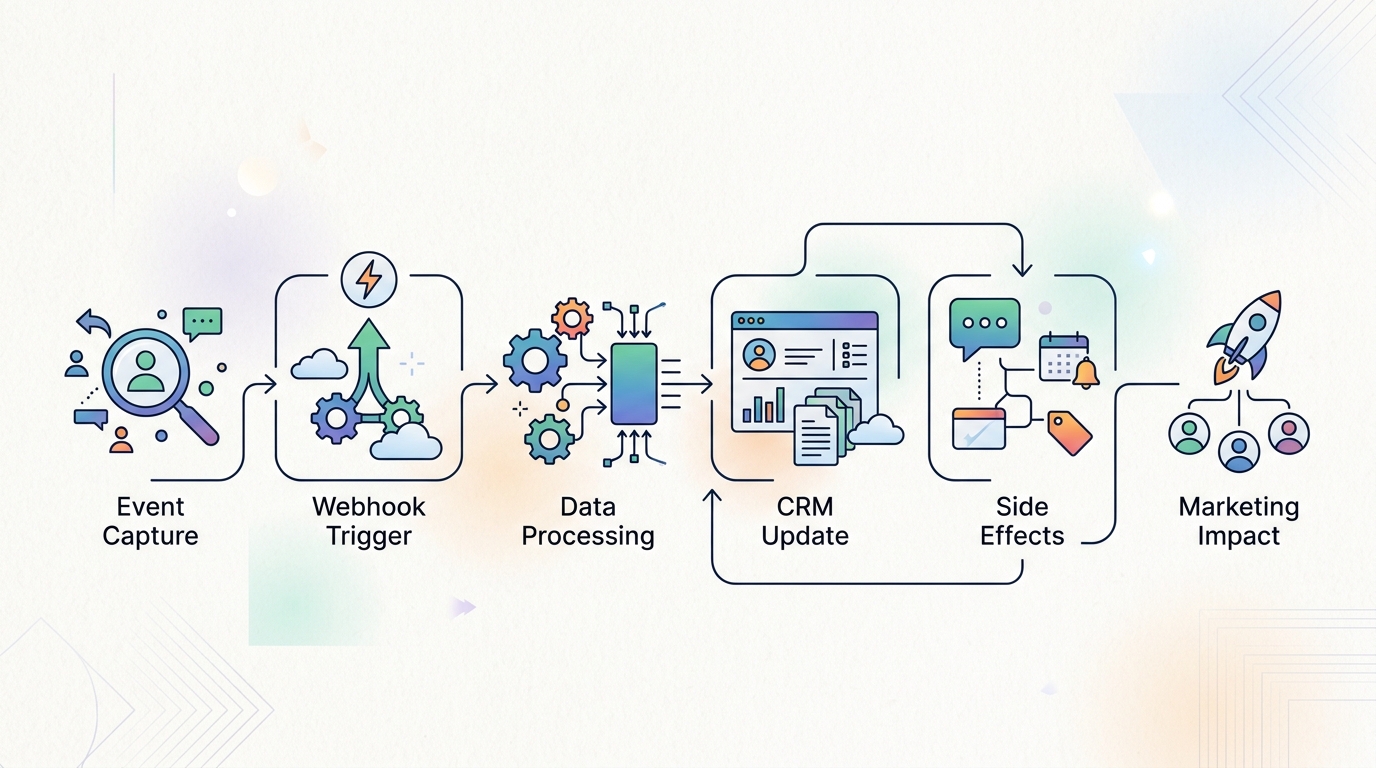
A visual representation of an automated lead capture workflow, detailing the journey from initial event to CRM update and subsequent actions.
Setting Up Webhooks and API Triggers
Start at the edges — the places leads enter:
- Inventory your capture surfaces. Site forms, newsletter signups, demo bookings, contact email. Anything that produces a lead is a surface.
- Turn every surface into an event emitter. Most form tools, schedulers, and page builders can fire a webhook on submission. Configure each to POST to your workflow endpoint. For surfaces without native webhooks, poll on a schedule — less elegant, still automated.
- Normalize the payload. Different surfaces send different shapes. The first node in your workflow should map everything to one lead schema: name, email, source, segment, timestamp, raw context. Future-you will be grateful.
- Validate and deduplicate. Reject malformed submissions, merge repeat signups into the existing lead record, and log anomalies instead of dropping them.
- Handle failures loudly. If the CRM write fails, retry, then alert. A lead pipeline that fails silently is worse than no pipeline — you’ll trust it while it loses leads.
This layer typically takes an afternoon to stand up and immediately eliminates the “found a three-week-old lead in the form dashboard” failure mode.

Diagram illustrating the integration of APIs and webhooks to create an automated lead capture workflow, showing data moving between different components.
Structuring the CRM Pipeline
The CRM is your state machine. Design it like one:
- Define explicit stages — for example: New → Qualified → Contacted → In Conversation → Won/Lost. Each stage should have an unambiguous entry condition, exactly like state transitions.
- Automate the transitions you can. New leads land in New via the webhook workflow. Scoring rules or an AI classification step promote clear fits to Qualified automatically. Human judgment takes over from Contacted onward.
- Tag with routing context. Source, segment, and intent tags let downstream automation branch: a pricing-page lead gets a faster, more direct sequence than an ebook download.
- Enforce hygiene by machine. Every automated touch logs itself. The rule to protect: no lead state is ever updated manually if a workflow can update it — manual state updates are where CRMs go to rot.
With capture and state handled, layer on the outbound side: AI-drafted nurture sequences triggered by stage and tags. That’s covered in depth in our guide to AI marketing automation for startups.
Treating Marketing Like a Software Architecture Problem
Once lead capture runs itself, the same engineering translation applies to the rest of the funnel:
- Content is a build pipeline. Inputs (keywords, briefs, brand context) flow through generation and review stages to a publish step — an automated content creation workflow is CI/CD for marketing assets.
- Landing pages are templated deployments. Structured data in, rendered pages out — the same variables-plus-template pattern you’d use anywhere. Our guide to automating landing page creation walks through it.
- Sequences are cron jobs with branching. Written once, triggered by events, adjusted by behavior.
- Metrics are observability. Leads per week, capture-to-conversation rate, follow-up latency. Instrument the funnel like you’d instrument a service, and debug the stage with the worst numbers.
The architectural principles carry over directly: loose coupling (tools connected by webhooks and APIs, swappable independently), single source of truth (the CRM owns lead state), fail loudly (alerts on pipeline errors), and iterate on the bottleneck (fix the funnel stage that’s dropping the most, then re-measure).
The payoff isn’t just saved hours. It’s that marketing stops being a recurring tax on your attention and becomes what everything else you build is: a system that runs, measurable and improvable, while you work on the product.
FAQ
What’s the minimum viable marketing automation setup for a founder?
Webhook-driven lead capture into a CRM with defined stages, plus one automated follow-up sequence. That alone eliminates the two most expensive failure modes — slow first touch and forgotten leads — and it’s typically an afternoon of setup.
Do I need a full CRM, or is a spreadsheet enough?
A spreadsheet works as a state store only if machines update it. The moment you’re manually copying rows, you’ve rebuilt the problem. Choose the lightest tool with API/webhook write access — what matters is automated state transitions, not vendor brand.
Should I build my marketing automation in code?
Only if marketing pipelines are genuinely strategic infrastructure for you. Otherwise, glue code becomes a maintenance liability nobody prioritizes. Visual workflow tools deliver the same event-driven architecture without the upkeep, which for most founders is the better trade.
How do I know if my lead capture automation is working?
Instrument three numbers: time-to-first-touch (should be minutes), percentage of leads with complete CRM records (should be ~100%), and capture-to-conversation rate. If you can’t read those numbers from your system, that’s the first thing to fix.