
The Top Self-Hosted n8n Alternative for 2026
n8n earned its popularity honestly: it gave technical users a visual workflow builder they could self-host, at a time when the alternative was cloud-only tools like Zapier. For many teams it was the first taste of automation on their own terms.
But a growing number of developers who chose n8n for its self-hosting story are now searching for a self-hosted n8n alternative — not because self-hosting was the wrong idea, but because they want it taken further: less deployment overhead, clearer licensing, native AI orchestration, and a platform where local execution is the default rather than an option. This page covers why teams look elsewhere, how n8n and Zapier actually compare for developers, and what a true local-first alternative looks like.
Why Developers are Looking for n8n Alternatives
The common threads in why technical teams start evaluating alternatives:
- Self-hosting is a project, not a checkbox. Running n8n yourself means owning deployment, upgrades, scaling, backups, and security hardening. For a small team, the operational tax of maintaining an automation server can rival the work it automates.
- Licensing and tiering require attention. n8n is source-available under a fair-code model rather than a classic open-source license, and some capabilities sit behind paid tiers. Teams that assumed “self-hosted” meant “fully ours” sometimes discover the fine print later.
- Hybrid gravity. Like many source-available products, the vendor’s center of mass includes a cloud offering. Teams that want a platform whose primary mode is local can find themselves swimming against the product’s current.
- AI workflows raise the stakes. Orchestrating AI agents means prompts and responses full of sensitive content flowing through the automation layer. That has pushed many teams from “self-hosting is nice” to “local execution is a hard requirement.”
None of this makes n8n a bad tool. It makes it a specific trade-off — and trade-offs deserve alternatives.
n8n vs Zapier for Developers
Since most evaluations shortlist both, here is the honest n8n vs Zapier for developers comparison.
Pros and Cons of Cloud-first Zapier
Pros:
- The largest integration catalog in the category — if a SaaS tool exists, Zapier probably connects to it
- Zero infrastructure: nothing to deploy, patch, or scale
- Easy enough that non-technical colleagues can build and maintain their own workflows
Cons:
- Cloud-only: every payload, credential, and workflow execution lives on Zapier’s infrastructure — there is no self-hosted option
- Task-based pricing scales with usage, which penalizes high-frequency workflows
- Limited depth for technical work: internal APIs, custom scripts, and complex branching push against the platform’s ceiling
For developers, Zapier is best understood as excellent SaaS glue and a poor fit for infrastructure-adjacent or data-sensitive automation.
Limitations of n8n for Deep Technical Workflows
n8n is the more developer-friendly of the two — code nodes, generic HTTP requests, and a self-host option. The limitations show up at the edges:
- You become the platform team. The self-hosted deployment is yours to run, monitor, upgrade, and secure. Every hour spent maintaining the automation server is an hour not spent automating.
- Feature gating. Some collaboration and enterprise capabilities are reserved for paid tiers, so the self-hosted experience may not match the full product.
- Server-centric architecture. n8n assumes a hosted server deployment; for individuals and small teams, that is more infrastructure than the job requires.

A developer weighing the pros and cons of n8n and Zapier for complex technical workflows.
What to Look for in a True Local-First Alternative
If the goal is automation on your own terms, evaluate alternatives against this checklist:
- Local execution as the default, not a deployment option — no cloud dependency, no feature gap between hosted and self-hosted versions.
- Minimal operational overhead — the platform should not need its own maintenance rotation.
- AI-native orchestration — model calls (across multiple providers) as first-class workflow nodes, since AI steps are where automation value concentrates in 2026.
- Script orchestration — your existing scripts should become workflow building blocks, keeping your logic portable and your migration reversible.
- Pricing without a meter — no per-task or per-execution billing that grows with adoption.
- Data that never leaves — credentials, payloads, prompts, and logs stored and processed on your infrastructure.
The deployment model is the foundation of all six points — to see why, it helps to understand the risks in cloud automation vs self-hosted architectures before finalizing a choice.
Introducing the Best On-Premise Workflow Solution
NORA (Node Orchestration & Runtime Automation) was built for exactly this gap: a visual, node-based workflow builder that runs as a local-first desktop application, with no cloud dependency at all.
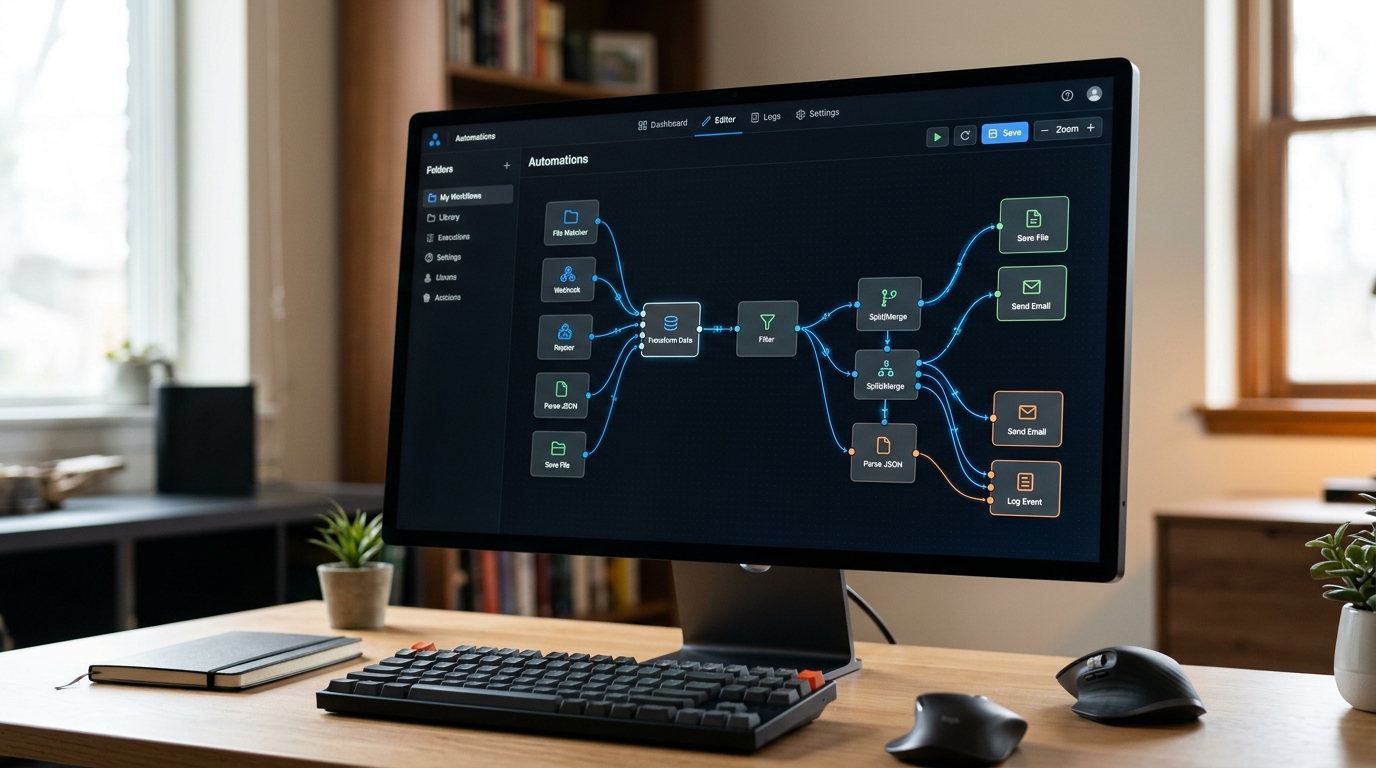
The intuitive dashboard of NORA, a premier self-hosted n8n alternative, demonstrating its local-first workflow automation capabilities.
How it answers the checklist above:
- Local by design. NORA runs on your machine, inside your environment. There is no vendor cloud in the data path — workflow data, credentials, and execution history stay with you.
- No server to maintain. As a desktop application, it delivers the data posture of self-hosting without the deployment and upkeep project of a server-based stack.
- AI-native nodes. Claude, GPT, and Gemini connect as first-class workflow steps using your own API keys, making multi-model agent pipelines straightforward to build and swap.
- Runs your scripts. Existing automation assets plug in as nodes — no rewrite, no proprietary trap.
- No per-task pricing. Local execution is unmetered; high-frequency workflows do not generate a scaling bill.
For the full feature picture, you can try our premier self-hosted automation platform — and if you are still mapping the broader category, read our comprehensive AI workflow builder comparison to see how the orchestration field lines up.
Migration: How to Move Your Workflows Safely
Switching automation platforms goes wrong when it is attempted as a big bang. The safe pattern:
- Inventory your workflows. List every active workflow, its trigger, its integrations, and its owner. Retire the dead ones now — do not migrate cruft.
- Rank by risk and value. Start migration with high-value, low-risk workflows; leave anything business-critical for last.
- Rebuild in parallel, not in place. Recreate each workflow on the new platform while the old one keeps running. Compare outputs side by side over real executions.
- Cut over one workflow at a time. Disable the old version only after the new one has run cleanly through a representative period, including its edge cases.
- Keep the old system readable until the end. You will want to consult its configurations for the workflows nobody documented.
Because NORA orchestrates your existing scripts and standard API calls, migrations tend to be rebuilds of workflow structure rather than rewrites of logic — the most portable parts of your automation move as-is.
Frequently Asked Questions
What is the best self-hosted n8n alternative?
For teams whose priority is true local-first execution with minimal operational overhead, NORA is the strongest alternative: it runs as a desktop application with no cloud dependency, orchestrates scripts and multi-provider AI models natively, and has no per-task pricing. Teams wanting a server-based, source-available stack may still prefer to self-manage n8n and accept the maintenance burden.
Is n8n better than Zapier for developers?
For technical depth, generally yes — n8n offers code-level extensibility and a self-host option that Zapier lacks entirely. Zapier counters with a far larger integration catalog and zero infrastructure. The right answer depends on whether your workflows are SaaS glue (Zapier’s territory) or technical and data-sensitive (where n8n — or a fully local-first tool — fits better).
Can I migrate my n8n workflows without downtime?
Yes, if you migrate in parallel: rebuild workflows on the new platform while the originals keep running, verify outputs against real executions, and cut over one workflow at a time. Avoid disabling anything on the old platform until its replacement has proven itself.
Why choose a local-first tool over self-hosting a server product?
Self-hosting a server product gives you data control but makes you the platform team — deployment, upgrades, scaling, and security are yours. A local-first desktop platform delivers the same data posture without the standing infrastructure, which is usually the better trade for individuals and small teams.