
A Guide to Building Local Internal Tools for IT and Ops
In modern IT environments, internal tools are the backbone of operational efficiency. From automating employee onboarding and resetting server configurations to running database diagnostic checks and deploying software patches, custom utilities allow engineering and operations teams to execute recurring tasks rapidly.
However, the industry’s recent push toward SaaS-based internal tool builders has introduced unforeseen hurdles for enterprise IT organizations. Mandating cloud connections for local administrative actions creates security vulnerabilities, incurs recurring subscription fees, and leaves operations vulnerable to network disruptions.
Building local internal tools offers an alternative path—one that restores total data privacy, eliminates cloud dependencies, and provides uncompromised script execution performance. In this comprehensive guide, we examine why enterprise IT and DevOps teams are shifting toward local tool architectures, explore popular local development frameworks, provide actionable technical implementations using Python and PowerShell, and demonstrate how to orchestrate these utilities cleanly.

An illustrative architecture diagram showing how local internal tools operate independently of cloud infrastructure.
Why Build Internal Tools Locally?
Building internal applications directly within your local network or desktop environment eliminates the architectural liabilities of web-hosted low-code platforms. When you build internal tools locally, system execution remains strictly aligned with your organization’s physical and virtual perimeter.
Escaping Vendor Lock-in and Cloud Subscriptions
Cloud-hosted internal tool platforms frequently employ per-seat or per-workflow execution pricing. As your engineering team grows and automation usage expands, licensing costs escalate rapidly.
- Unpredictable Operational Costs: SaaS pricing models often penalize active teams. Running frequent automated health checks or scaling admin dashboards across hundreds of internal engineers results in steep monthly invoices.
- Proprietary Ecosystem Lock-in: Applications created in cloud low-code builders are typically stored in non-standard JSON formats tied to the vendor’s runtime engine. Exporting or migrating logic out of a SaaS builder requires completely rewriting the application from scratch.
- Forced Feature Upgrades: SaaS platforms frequently change APIs, phase out legacy components, or push mandatory UI updates that can break existing administrative workflows without warning.
Local internal development mitigates these risks entirely. By leveraging standard programming languages and open-source GUI frameworks, your codebase remains portable, diffable in Git, and free from recurring per-user SaaS tax.
Security Benefits of Internal Tools with No Cloud
For organizations managing sensitive customer data, intellectual property, or critical server infrastructure, deploying internal tools no cloud is a mandatory security requirement.
- Zero Outbound Data Egress: Local tools process database records, active directory credentials, and configuration files strictly in memory on host machines. No data packets ever leave the internal network.
- Simplified Compliance Auditing: Frameworks like SOC 2, HIPAA, and ISO 27001 require strict governance over data transmission. Local tool execution drastically reduces audit scope by ensuring sensitive telemetry never transits external third-party infrastructure.
- Air-Gapped Operational Capability: Local tools function seamlessly without active internet connections, enabling IT teams to maintain operations during network blackouts or within strict air-gapped server environments.
Key Frameworks for Internal Tool Development Local
When planning internal tool development local strategies, engineering leads can select from several mature UI and execution frameworks based on team skill sets and complexity requirements:
1. Python Desktop Frameworks (PyQt / CustomTkinter)
Python is the preferred language for sysadmins and data engineers. Frameworks like PyQt6, PySide6, and CustomTkinter allow developers to wrap native Python automation scripts in clean desktop user interfaces. (PyQt6)
* Pros: Native system library support, cross-platform execution, rich data science/processing library ecosystem.
* Cons: Requires desktop UI layout coding and state management handling.
2. Electron and Tauri (Web Tech on Desktop)
For web developers proficient in React, Vue, or TypeScript, frameworks like Tauri (Rust-backed) and Electron allow teams to compile web-based frontends into standalone desktop binaries.
* Pros: Modern UI component libraries, familiar CSS/JS styling.
* Cons: Higher resource footprint (Electron) or IPC (Inter-Process Communication) overhead between UI and native system calls.
3. PowerShell WPF / Windows Forms
For Windows-centric IT environments, native PowerShell host interfaces built with Windows Presentation Foundation (WPF) or WinForms enable rapid GUI creation directly from .ps1 scripts. (Windows Presentation Foundation (WPF))
* Pros: Zero external runtime dependencies on Windows, native Active Directory and WMI/CIM integrations.
* Cons: Limited UI styling capabilities, restricted to Windows operating systems.
How to Build Internal Tools Locally Using Python and PowerShell
To demonstrate the practical simplicity of local tool development, let’s look at a practical pattern: combining a Python automation backend with a PowerShell execution handler to build a local server management utility.
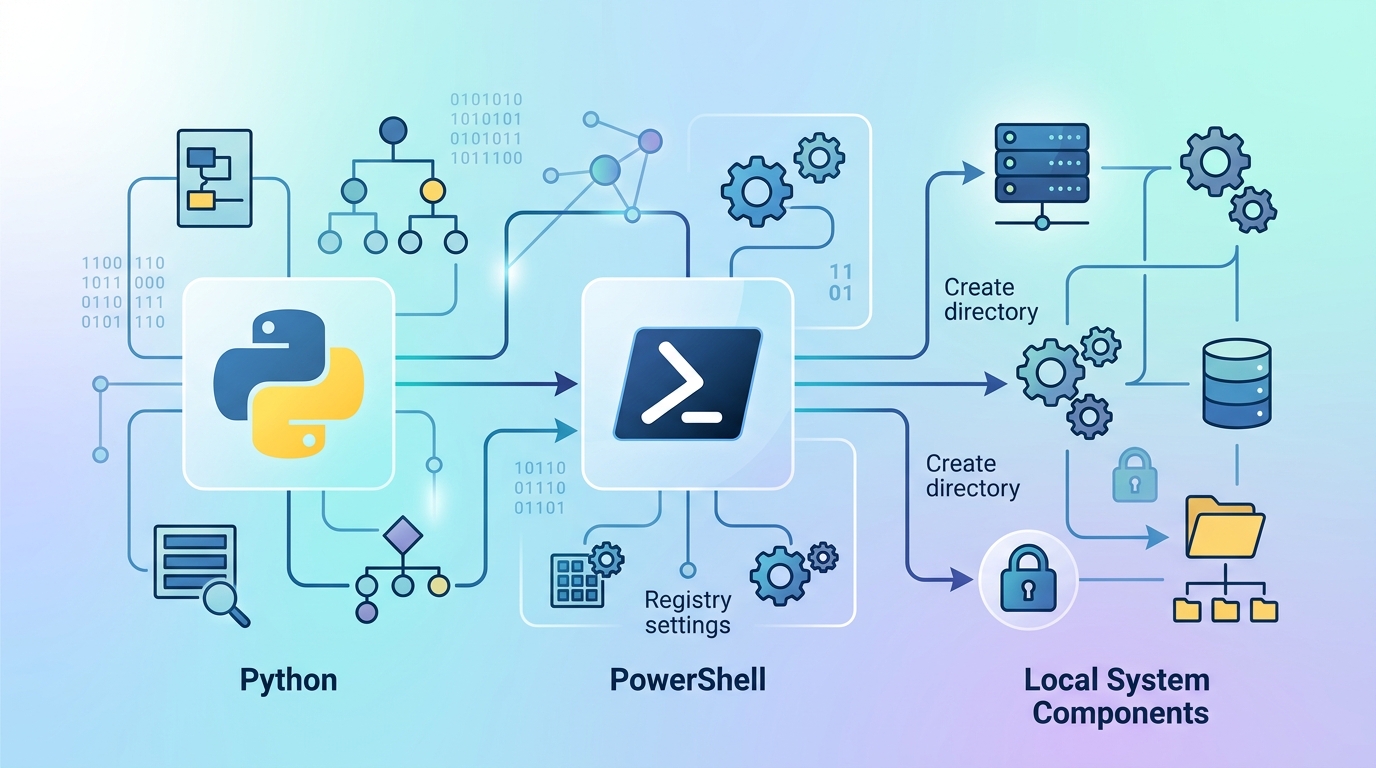
An illustrative diagram demonstrating the execution flow of Python and PowerShell scripts for local internal tools.
Step 1: Writing the Local Backend Script (Python)
First, we create a structured Python script (server_health.py) that checks local disk usage, memory pressure, and system services, outputting structured JSON data:
import sys
import json
import psutil

def get_system_metrics():
    metrics = {
        "cpu_percent": psutil.cpu_percent(interval=1),
        "memory_percent": psutil.virtual_memory().percent,
        "disk_percent": psutil.disk_usage('/').percent,
        "status": "HEALTHY"
    }

    if metrics["cpu_percent"] > 85 or metrics["memory_percent"] > 90:
        metrics["status"] = "WARNING"

    return metrics

if __name__ == "__main__":
    print(json.dumps(get_system_metrics(), indent=2))
Step 2: Creating the Local Execution Script (PowerShell)
Next, we write a PowerShell script (Invoke-Maintenance.ps1) that executes local administrative actions based on the target server parameters passed to it:
[CmdletBinding()]
param (
    [Parameter(Mandatory=$true)]
    [string]$TargetService,

    [Parameter(Mandatory=$false)]
    [switch]$ForceRestart
)

Write-Host "Checking service status: $TargetService" -ForegroundColor Cyan

$service = Get-Service -Name $TargetService -ErrorAction SilentlyContinue

if ($null -eq $service) {
    Write-Error "Service $TargetService not found on local system."
    exit 1
}

if ($service.Status -ne 'Running' -or $ForceRestart) {
    Write-Host "Restarting service: $TargetService..." -ForegroundColor Yellow
    Restart-Service -Name $TargetService -Force
    Write-Host "Service $TargetService successfully restarted." -ForegroundColor Green
} else {
    Write-Host "Service $TargetService is running normally." -ForegroundColor Green
}
Step 3: Local Execution Advantages
Executing these scripts locally via standard command-line interfaces or desktop launchers guarantees rapid response times, zero network overhead, and granular control over host system security contexts.
However, as the number of local scripts grows across an IT organization, managing individual script executions manually or relying on disjointed scheduled tasks quickly becomes inefficient.
Orchestrating Your Local Internal Tools with Nora
While custom Python scripts and PowerShell modules provide powerful building blocks, managing dependencies, visual user inputs, error logging, and sequential task execution across multiple scripts requires a dedicated local orchestration layer.
This is where the Nora orchestrator transforms local internal tool development. Rather than building custom GUI wrappers or maintaining complex wrapper scripts for every utility, Nora acts as a unified desktop automation engine:
- Visual Workflow Canvas: Map out complex multi-step automation workflows visually, passing variables seamlessly between Python scripts, PowerShell modules, and system commands.
- Interactive Desktop Inputs: Prompt users for execution parameters, file uploads, or confirmation prompts directly within native desktop UI components.
- Full Script Control: Maintain complete access to low-level OS calls, local file systems, and hardware interfaces through full script control automation.
- Zero Cloud Overhead: Store workflow definitions locally in clean, human-readable formats easily managed inside existing Git repositories.
By migrating away from bloated SaaS portals to a unified local orchestrator, IT operations teams achieve superior security, instantaneous responsiveness, and complete independence from cloud vendor pricing tiers.
If your organization is currently evaluating visual tool builders, see our comprehensive analysis comparing desktop orchestration against cloud platforms in our guide to choosing a Retool alternative.
Frequently Asked Questions
What are local internal tools?
Local internal tools are administrative software applications, scripts, and utilities designed to run directly on local host operating systems or internal corporate networks without sending data or dependencies to external cloud servers.
How do local internal tools improve enterprise security?
By keeping processing, database queries, and script execution entirely within the local host memory and internal network, local internal tools eliminate external attack vectors, prevent vendor-side data leaks, and drastically simplify regulatory compliance (e.g., SOC 2, HIPAA, GDPR).
Can local internal tools handle visual user interfaces?
Yes. Local tools can leverage lightweight desktop GUI frameworks like PyQt, CustomTkinter, or WPF, or be orchestrated through desktop workflow applications like Nora, providing intuitive visual interfaces while retaining local script execution power.
How do local internal tools compare to cloud low-code builders in cost?
Cloud low-code builders typically charge recurring per-user monthly subscription fees or per-workflow execution costs that scale up indefinitely. Local internal tools leverage standard open-source runtimes or desktop software licenses, resulting in significantly lower and predictable long-term costs.