
Finding the Best Desktop Automation Tool for Offline Use
As enterprise IT infrastructure grows increasingly complex, system administrators, network engineers, and operations managers face mounting pressure to automate repetitive operational tasks. For years, cloud-first automation platforms dominated marketing headlines, promising seamless integration across web services.
However, real-world IT operations frequently encounter strict boundaries where cloud-based automation fails. Secure air-gapped subnets, on-premise Windows servers, local file processing routines, and sensitive system administration tasks require local execution capabilities. When external network connectivity drops or third-party cloud APIs experience downtime, cloud automations come to a complete halt.
To ensure resilience, privacy, and performance, enterprise technical teams are returning to local-first software. Finding the optimal desktop automation tool requires understanding the critical architectural requirements of local execution, evaluating software pricing models, and selecting tools built specifically for desktop environments.
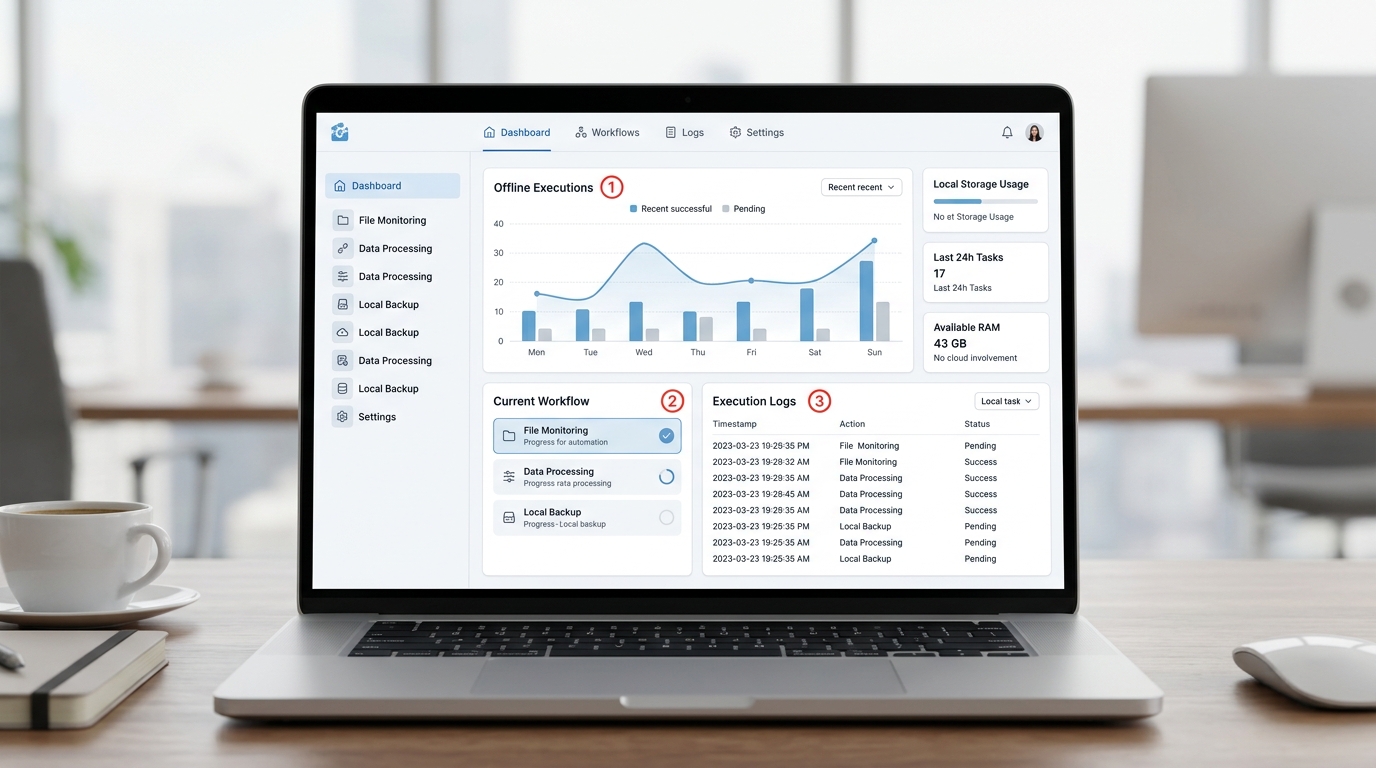
Dashboard of a leading desktop automation tool designed for offline workflow automation showing local execution status and analytics.
The Shift Toward Local-First Automation
The movement toward local-first automation represents a practical response to the operational vulnerabilities of pure cloud architectures. Modern sysadmins recognize that while cloud services excel at inter-SaaS data syncs, local workstations and internal servers remain the true control center for enterprise IT infrastructure.
- Deterministic Speed and Zero Latency: Local automations execute directly on host processors and local memory interfaces. Eliminating WAN network roundtrips and HTTP API polling ensures lightning-fast execution for large file transformations, system diagnostics, and local script runs.
- Complete Data Sovereignty: In local-first paradigms, automation logic, runtime variables, and logs remain strictly inside host memory and local disk storage. Sensitive active directory credentials, system passwords, and internal network maps never leave your physical perimeter.
- Resilience Against External Cloud Outages: When third-party SaaS vendors suffer outages or cloud API endpoints change, local desktop automations continue operating without disruption.
Top Features of a Desktop Workflow Automation Platform
When evaluating a desktop workflow automation platform for engineering and sysadmin tasks, technical leaders should prioritize features that support native host operating system capabilities over fragile browser-based abstractions.
The Need for an Offline Automation Tool
Selecting a true offline automation tool requires verifying that core platform functionality operates independently of cloud phone-home checks or cloud server dependencies.
- Disconnected Operation: The platform must execute complex multi-step workflows in air-gapped environments, isolated VLANs, or remote field devices without requiring active internet connectivity.
- Native System Scripting Integration: Rather than forcing users into proprietary visual drag-and-drop actions for every operation, a robust desktop platform must seamlessly trigger native Python scripts, PowerShell modules, Batch files, and compiled binaries.
- Local Event Triggers: Automated workflows should trigger based on local OS events—such as file creation in local directories, system startup, scheduled local timer ticks, or keyboard hotkeys.
Why Perpetual License Automation Matters for IT Budgets
Software procurement models significantly impact long-term operational feasibility. Over the past decade, SaaS subscription fatigue has driven enterprise procurement departments to seek predictable cost structures.
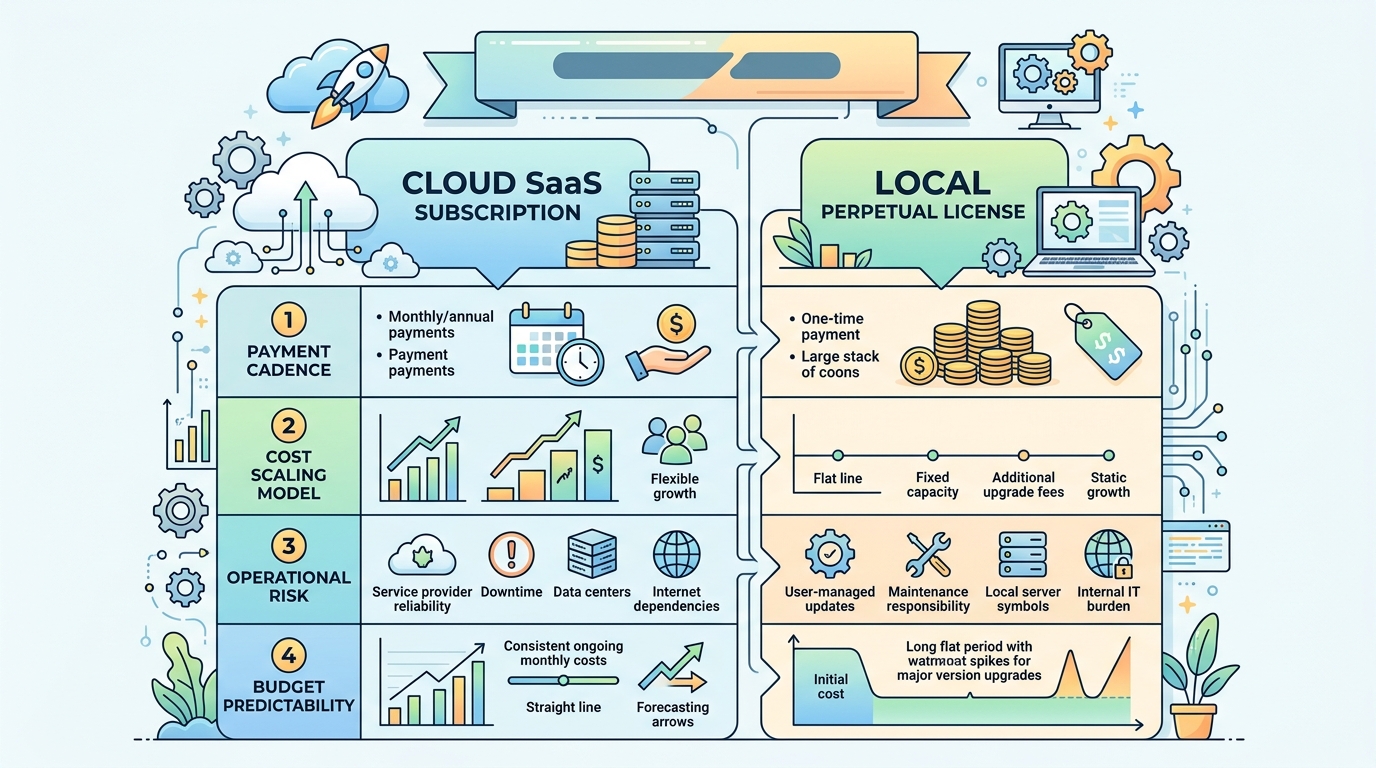
Visual comparison of desktop workflow automation pricing architectures highlighting the benefits of perpetual license automation over SaaS subscriptions.
| Pricing Architecture | SaaS Cloud Subscription | Local Perpetual License |
|---|---|---|
| Payment Cadence | Monthly / Annual Recurring Fee | One-time Upfront License + Optional M&S |
| Cost Scaling Model | Scales per User / per Workflow Task | Fixed License Cost per Workstation / Node |
| Operational Risk | Access revoked if subscription ends | Perpetual software usage rights |
| Budget Predictability | Unpredictable usage overages | 100% predictable capital allocation |
Choosing a platform with perpetual license automation empowers organizations to lock in software costs permanently. Rather than facing escalating monthly fees as task volume expands, IT departments maintain full financial control over their toolset.
Best Desktop Automation Tools for Windows in 2026
Evaluating the top desktop automation software options for Windows requires matching tool capabilities with specific technical use cases. Here is an overview of leading solutions in 2026:
1. Nora Workflow Orchestrator
- Best For: Technical IT admins, sysadmins, and developers seeking full script control, visual workflow orchestration, and native offline execution.
- Key Strengths: Seamless Python and PowerShell integration, local data execution, zero cloud dependency, intuitive visual canvas combined with native script parameters.
- Licensing: Perpetual and local desktop licensing options.
2. AutoHotkey (AHK)
- Best For: Lightweight Windows desktop UI scripting, hotkey mapping, and simple macro creation.
- Key Strengths: Highly lightweight runtime, active community, excellent for simple GUI automation.
- Limitations: Lacks modern visual workflow canvases, enterprise error handling, and structured multi-language script orchestration out of the box.
3. Microsoft Power Automate Desktop
- Best For: Enterprise environments deeply integrated into Microsoft 365 cloud ecosystems requiring basic UI recording.
- Key Strengths: Bundled into modern Windows enterprise environments, familiar Microsoft interface.
- Limitations: Heavy reliance on Microsoft cloud accounts, complex licensing tiers for advanced enterprise features, and limited support for custom non-Microsoft script control.
4. UiPath Community / Enterprise Desktop
- Best For: Large enterprise Robotic Process Automation (RPA) targeting legacy desktop software UI clicking.
- Key Strengths: Extensive UI selector recognition, legacy mainframe automation capabilities.
- Limitations: High operational overhead, steep enterprise pricing, complex server deployment infrastructure required for orchestration.
How Nora Excels as an Offline Automation Tool
While traditional RPA tools focus heavily on imitating human mouse clicks on legacy UI screens, Nora approaches desktop automation from an engineering-first perspective. Designed specifically as a high-performance offline automation engine, Nora provides the ideal balance between visual workflow design and low-level system control.
Nora empowers sysadmins and developers to build resilient automated workflows without cloud friction:
- Direct Local Execution: Execute local system administration tasks directly through native OS handles without container overhead or cloud API middleman services.
- Native Script Orchestration: Easily integrate existing script libraries into visual workflows. For an in-depth look at implementing multi-language execution workflows, review our guide to custom script automation.
- Enterprise Security and Privacy: Keep all administrative logs, variables, and sensitive tokens securely stored on local host storage.
- Unified IT Workflows: Build comprehensive solutions ranging from simple local file monitoring to enterprise-grade Windows automation software implementations.
By combining the speed of local script execution with modern workflow visibility, Nora enables IT teams to build robust, maintainable, and cost-effective operational utilities.
To explore how local workflow orchestration simplifies system management, consult our guide to building custom local internal tools, or visit the official Nora workflow orchestrator page to download and test the platform today.
Frequently Asked Questions
What defines a local-first desktop automation tool?
A local-first desktop automation tool is software designed to execute workflow logic, system commands, and script processing directly on local host operating system hardware without requiring continuous cloud server communication or internet connectivity.
How does offline automation software handle software updates and licensing?
Offline automation software typically uses local license key validation or periodic offline license file activation, allowing the application to operate indefinitely in air-gapped networks without requiring active phone-home connections.
Can desktop automation tools execute PowerShell and Python scripts natively?
Leading developer-focused desktop automation tools like Nora execute PowerShell and Python scripts natively by launching local OS runtime interpreters, passing structured input arguments, and parsing execution exit codes and standard output streams directly.
What are the main financial benefits of perpetual license automation?
Perpetual licensing eliminates recurring monthly user and per-task cloud fees, providing predictable fixed software costs and significantly lowering total cost of ownership (TCO) over the software lifecycle.