
How to Build a Local RAG System with Ollama
Retrieval-Augmented Generation (RAG) has revolutionized how developers interact with private document collections. By combining external document retrieval with large language models (LLMs), RAG systems grounding AI responses in precise, verified domain knowledge. However, relying on third-party cloud APIs poses significant risks concerning data privacy, recurring costs, latency, and vendor lock-in.
In 2026, building a local RAG system has become the gold standard for organizations and developers seeking full sovereignty over their data. Using open-source tools like Ollama, you can host both embedding models and generative LLMs directly on your own hardware without transmitting a single byte over the public internet.
This comprehensive tutorial guides you through the full Ollama RAG setup process. You will learn how to design a local RAG tutorial architecture, prepare an Ollama knowledge base, parse and chunk internal documents, perform vector similarity search, and generate accurate, context-aware answers completely offline.
What is a Local RAG System?
A local RAG system is an architecture that executes all three primary phases of Retrieval-Augmented Generation—document processing, semantic vector search, and language model inference—on local infrastructure or personal hardware.
Traditional cloud-based RAG architectures stream private files and vector representations to external SaaS APIs. In contrast, a fully offline custom RAG Ollama framework processes files, generates vector embeddings, stores vectors in a local database, and invokes local LLM weights without external API calls.

A visual representation of a local RAG system powered by Ollama, detailing the indexing and retrieval pipelines.
Why Choose Ollama for RAG?
Ollama has emerged as the premier open-source tool for running large language models locally across macOS, Linux, and Windows. Key reasons developers choose Ollama for local RAG implementations include:
- Simplified Model Management: Ollama abstracts complex model quantization, CUDA dependencies, and GGUF runtime configurations into simple CLI commands like
ollama run llama3.2. - Built-in Embeddings Support: Beyond text generation, Ollama natively serves dedicated embedding models (such as
nomic-embed-textorbge-m3), enabling unified model management. - Open REST API: Ollama exposes an OpenAI-compatible HTTP REST API on port 11434, making integration with orchestration frameworks like LangChain, LlamaIndex, or custom Python scripts effortless.
- Hardware Acceleration: Ollama automatically optimizes memory usage and leverages Apple Silicon Metal, NVIDIA CUDA, or AMD ROCm GPUs for fast inference.
If you are looking to secure your private RAG system for sensitive data, running Ollama locally provides complete air-gapped isolation for high-compliance environments.
RAG Architecture for Local Environments
To build a robust RAG architecture local pipeline, it is essential to understand how information flows through the system. A local RAG framework consists of two primary workflows: the Indexing Pipeline and the Retrieval & Generation Pipeline.
1. The Indexing Pipeline
- Document Ingestion: Local documents (PDFs, Markdown files, Word documents, text files) are loaded from your disk.
- Text Chunking: Long documents are split into smaller text chunks (e.g., 500 to 1,000 characters with overlapping boundaries) to ensure chunks fit within model context windows.
- Vector Embedding: Text chunks are passed to Ollama’s local embedding model, converting raw text into dense mathematical vector representations.
- Vector Storage: Embedded vectors along with original metadata and text content are saved into a local vector store (such as Chroma, LanceDB, or FAISS).
2. The Retrieval & Generation Pipeline
- User Query: The user asks a question via CLI or web UI.
- Query Embedding: The query string is converted into a vector using the exact same local embedding model.
- Similarity Search: The vector store computes cosine or Euclidean distance to retrieve the top $K$ most relevant document chunks.
- Prompt Assembly: The retrieved text chunks are formatted alongside system instructions and the original query into a structured context prompt.
- Local LLM Inference: The local Ollama LLM processes the contextual prompt and synthesizes a concise, grounded answer.
Step-by-Step: Ollama RAG Setup
Let us walk through a practical hands-on guide to set up and run a working local RAG pipeline from scratch.
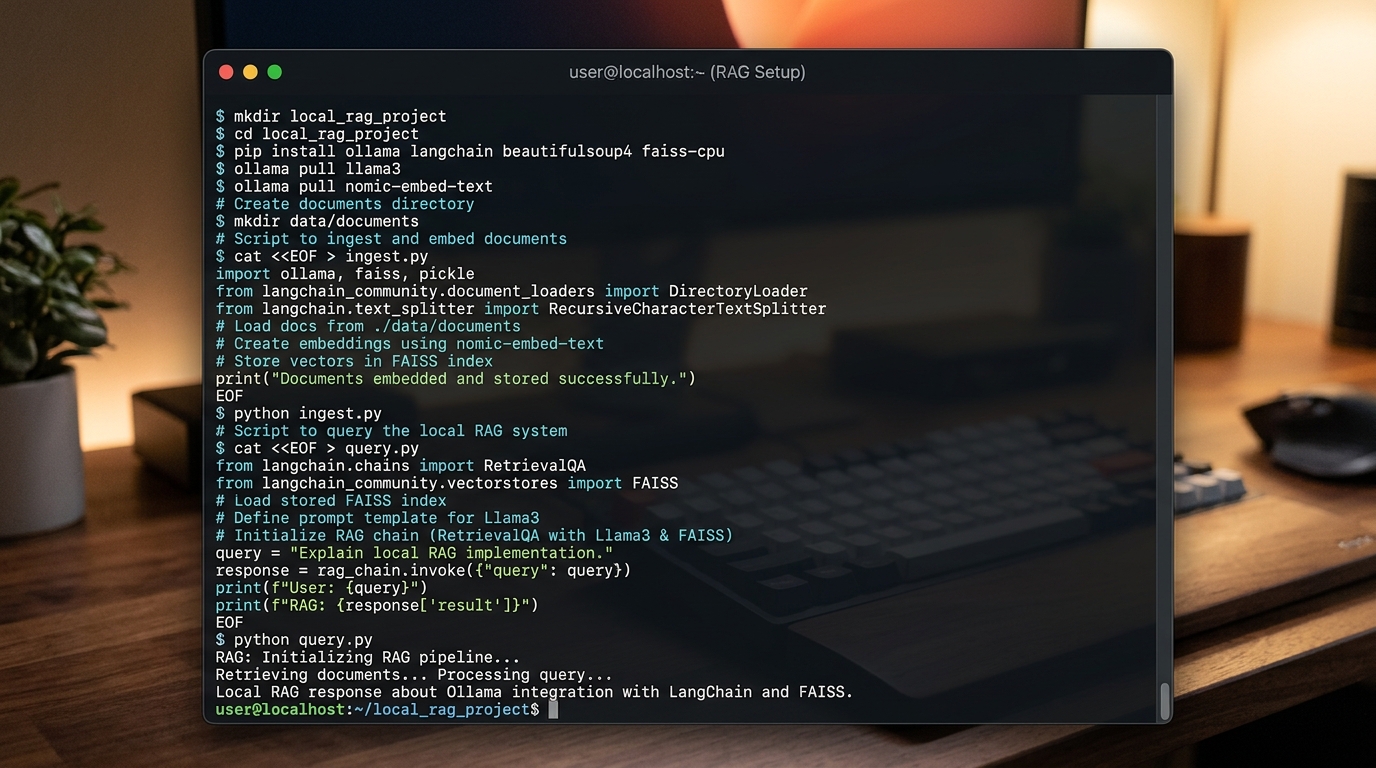
A terminal screenshot showcasing the essential commands to set up Ollama and its dependencies for a local RAG pipeline.
Step 1: Installing Ollama and Dependencies
First, download and install Ollama on your system.
For macOS / Linux:
curl -fsSL https://ollama.com/install.sh | sh
For Windows:
Download the official executable installer from the Ollama website and run the setup wizard.
Once installed, verify that Ollama is running and pull your preferred generative model and embedding model:
# Pull a generative LLM (e.g., Llama 3.2 or Mistral)
ollama pull llama3.2

# Pull a dedicated embedding model
ollama pull nomic-embed-text
Next, establish a virtual Python environment and install the required orchestration libraries:
python3 -m venv rag-env
source rag-env/bin/activate  # On Windows: rag-env\Scripts\activate

pip install langchain langchain-community langchain-ollama chromadb pypdf
Step 2: Creating Your Ollama Knowledge Base
To build your Ollama knowledge base, organize your source documents inside a local directory named ./data. Place your text, Markdown, or PDF files into this folder.
Create a Python script ingest.py to ingest and vectorise your files:
import os
from langchain_community.document_loaders import PyPDFDirectoryLoader, DirectoryLoader, TextLoader
from langchain_text_splitters import RecursiveCharacterTextSplitter
from langchain_ollama import OllamaEmbeddings
from langchain_community.vectorstores import Chroma

# Path configuration
DATA_PATH = "./data"
DB_PATH = "./chroma_db"

def build_knowledge_base():
    print("Loading documents from local directory...")
    # Load PDF files
    loader = DirectoryLoader(DATA_PATH, glob="**/*.txt", loader_cls=TextLoader)
    documents = loader.load()

    print(f"Loaded {len(documents)} document(s). Splitting into chunks...")
    text_splitter = RecursiveCharacterTextSplitter(
        chunk_size=1000,
        chunk_overlap=200,
        add_start_index=True
    )
    chunks = text_splitter.split_documents(documents)
    print(f"Created {len(chunks)} text chunks.")

    print("Generating local embeddings and building vector database...")
    embeddings = OllamaEmbeddings(model="nomic-embed-text")

    vector_store = Chroma.from_documents(
        documents=chunks,
        embedding=embeddings,
        persist_directory=DB_PATH
    )
    print("Knowledge base indexing complete! Stored at:", DB_PATH)

if __name__ == "__main__":
    build_knowledge_base()
Run the ingestion script to create your local vector database:
python ingest.py
Step 3: Generating Responses (Retrieval)
Now that your Ollama knowledge base is indexed locally in Chroma DB, create a query script query.py that connects the retriever to your local LLM.
import sys
from langchain_ollama import OllamaEmbeddings, OllamaLLM
from langchain_community.vectorstores import Chroma
from langchain.prompts import ChatPromptTemplate

DB_PATH = "./chroma_db"

PROMPT_TEMPLATE = """
Answer the question based only on the following context provided below:

{context}

---

Answer the question based on the context above: {question}
"""

def query_rag(query_text: str):
    # Prepare local embedding model and load existing vector store
    embedding_function = OllamaEmbeddings(model="nomic-embed-text")
    db = Chroma(persist_directory=DB_PATH, embedding_function=embedding_function)

    # Search the vector DB for top 3 relevant chunks
    results = db.similarity_search_with_score(query_text, k=3)

    context_text = "\n\n---\n\n".join([doc.page_content for doc, _score in results])
    prompt_template = ChatPromptTemplate.from_template(PROMPT_TEMPLATE)
    prompt = prompt_template.format(context=context_text, question=query_text)

    # Instantiate local Ollama model
    model = OllamaLLM(model="llama3.2")
    response_text = model.invoke(prompt)

    # Output sources
    sources = [doc.metadata.get("id", None) for doc, _score in results]
    print("\n=== Response ===")
    print(response_text)
    print("\n=== Context Sources ===")
    for doc, score in results:
        print(f"- Source: {doc.metadata.get('source', 'Unknown')} (Score: {score:.4f})")

if __name__ == "__main__":
    if len(sys.argv) > 1:
        query_text = sys.argv[1]
        query_rag(query_text)
    else:
        print("Please provide a search query. Example: python query.py 'How do I deploy a local model?'")
Execute a query against your local documents:
python query.py "What are the core hardware requirements for our on-premise server?"
This workflow enables you to enable document Q&A with a local LLM cleanly and efficiently without relying on cloud software.
Building a Custom RAG with Ollama
When taking a custom RAG Ollama solution to production, generic default parameters are rarely sufficient. To achieve high retrieval accuracy and fast response times, consider configuring custom pipeline components:
1. Custom Text Splitting Strategies
Default character splitting often breaks context in structured documents like code files, Markdown tables, or technical manuals. Use specialized splitters:
* MarkdownHeaderTextSplitter to preserve section hierarchies.
* PythonCodeTextSplitter or code-aware chunking for software documentation.
* Semantic chunking based on embedding similarity thresholds rather than rigid character counts.
2. Hybrid Search (Vector + Keyword)
Pure vector search (dense retrieval) occasionally fails on specific exact-match terms, serial numbers, or acronyms. Integrating Sparse Retrieval (e.g., BM25) alongside dense vector search produces a hybrid retriever that significantly boosts overall recall.
3. Re-Ranking Models
Passing the top 20 retrieved chunks through a local re-ranker model (such as bge-reranker-large via CrossEncoder) ensures that only the most contextually relevant 3-5 snippets are injected into the final LLM prompt context window.
To explore deeper technical setups including database vector plugins and advanced pipeline chaining, explore the full Ollama LangChain RAG technical stack.
Best Practices for Maintaining Your RAG Setup
Operating a high-performing local RAG deployment requires continuous maintenance and monitoring. Follow these operational best practices:
- Embeddings Consistency: Never switch your embedding model without re-indexing your document store. If you switch from
nomic-embed-texttoall-minilm, all stored vectors become incompatible and must be generated again. - Hardware and Memory Management: Ensure your system has sufficient VRAM/RAM. Models quantized to 4-bit (Q4_K_M) offer an optimal balance of throughput and accuracy for mid-tier GPU setups.
- Context Window Tuning: Be mindful of your local LLM’s context limit (e.g., 4,096 or 8,192 tokens). Exceeding context limits causes silent truncation and context loss.
- Document Lifecycle Sync: Implement automated directory watches using tools like
watchdogin Python to incrementally index new files and delete stale embeddings when files are modified or removed. - Local Backups: Periodically snapshot your vector store disk directory (
./chroma_db) to prevent data loss during system maintenance or software upgrades.
Frequently Asked Questions (FAQ)
How to build RAG system locally without an internet connection?
To run a local RAG system offline, download Ollama, your target generative LLM weights, and embedding models while connected to the internet. Once downloaded, disconnect your network adapter or run in air-gapped mode. Ollama and local vector stores operate 100% offline without external network dependency.
What are the system requirements for running an Ollama RAG setup?
For smooth local execution, we recommend a minimum of 16 GB unified RAM (Apple Silicon M-series) or a dedicated GPU with at least 8 GB VRAM (e.g., NVIDIA RTX 3060 or higher). Storage requirements depend on your document store size and model weights (typically 4–8 GB per quantized model).
Can I use custom domain documents like PDFs, Markdown, and Word files?
Yes. Document loaders available in LangChain, LlamaIndex, or unstructured parsing libraries allow you to extract text from PDFs, DOCX files, Markdown files, JSON, CSVs, and HTML pages directly into your local vector database.
What is the difference between local LLM text generation and Ollama embeddings?
Generative LLMs (e.g., llama3.2) read prompt text and generate natural language responses token by token. Embedding models (e.g., nomic-embed-text) output high-dimensional numerical arrays (vectors) representing the semantic meaning of input text, allowing fast vector distance calculations.
How do I evaluate local RAG accuracy?
You can evaluate local RAG accuracy using open-source evaluation tools like Ragas running with local judge models. Key metrics to monitor include Context Precision, Context Recall, Faithfulness, and Answer Relevance.