
How to Fix a Local LLM That Isn’t Following Instructions
Running large language models (LLMs) on local hardware provides unparalleled privacy, zero API costs, and total control over your AI stack. However, many developers and AI enthusiasts quickly encounter a frustrating roadblock: a local LLM not following instructions consistently.
You might prompt your model to strictly return JSON, adhere to a specific persona, or follow negative constraints like “Do not include introductory commentary”, only to receive unstructured conversational prose or completely ignored rules. While commercial cloud APIs like GPT-4 or Claude 3.5 Sonnet handle complex multi-step instructions with ease, smaller open-weights models (such as 7B to 14B parameter variants) require specific engineering techniques to maintain high instruction adherence. (Claude 3.5 Sonnet)
In this comprehensive guide, we will break down why local models ignore system prompts, how quantization and architecture impact reasoning, and concrete, step-by-step solutions to fix inconsistent responses and regain full control over your local LLM outputs.
Why Your Local LLM Ignores System Prompts
Understanding why a local model strays from your instructions requires looking under the hood at model architecture, parameter weights, and context processing. When you experience a local LLM ignoring system prompts, one or both of the following core factors are usually at play.
Model Size vs. Instruction Following Capability
Instruction-following capability is an emergent property that scales significantly with model parameter count. A 70B parameter model inherently possesses stronger attention mechanisms and superior reasoning pathways than a 7B or 8B parameter model.
When you ask a 7B parameter model to execute complex logic—such as evaluating five constraints simultaneously while formatting output as a nested JSON object—the model’s limited neural bandwidth often prioritizes the most dominant tokens, dropping secondary or negative instructions altogether.
Key reasons smaller models fail instruction following include:
* Attention dilution: Smaller attention heads struggle to weight early system prompt tokens equally against long user queries.
* Limited training distribution: Open models may have been fine-tuned on narrower instruction-tuning datasets compared to proprietary cloud models.
* Over-reliance on dominant patterns: Smaller models default heavily to conversational patterns learned during pre-training rather than strict system role mandates.
Quantization Impact on Reasoning Capabilities
To run LLMs on consumer GPUs or Apple Silicon, quantization techniques like GGUF (4-bit or 5-bit precision, e.g., Q4_K_M or Q5_K_M) compress model weights by reducing float precision. (GGUF)
While 4-bit quantization reduces VRAM requirements by over 60% with minimal loss in general perplexity scores, fine-grained instruction adherence and logical reasoning are often the first capabilities to degrade.
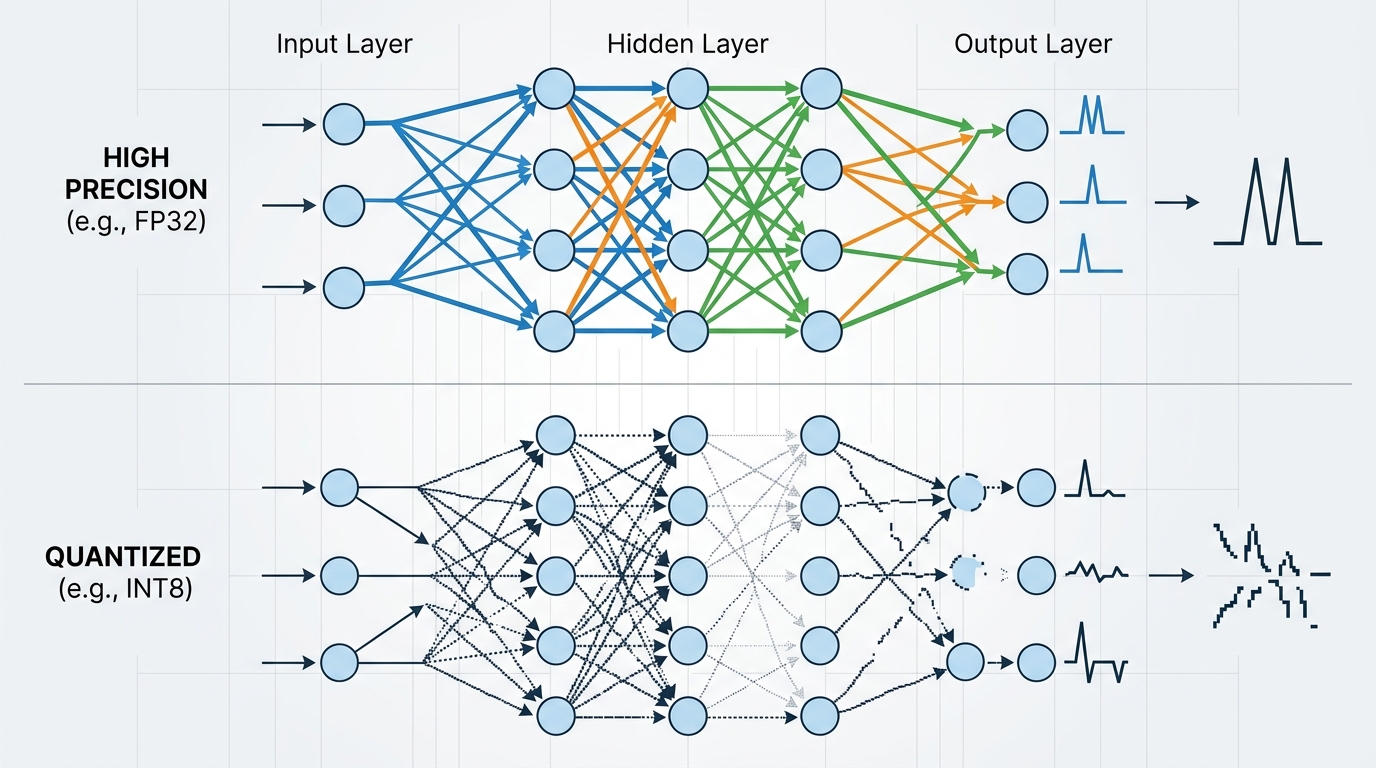
Aggressive quantization, while reducing VRAM, can introduce noise into the subtle weight activations critical for strict instruction adherence in smaller LLMs.
When weights are quantized aggressively (e.g., Q2_K or IQ3_XS), the subtle weight activations responsible for strict syntax compliance or negative constraint enforcement become noisy. If your application demands absolute precision, switching from a 4-bit quantization to a 5-bit or 6-bit quantization (or using an 8-bit model if VRAM allows) can immediately resolve erratic behavior. If you notice overall output quality dropping, take time to understand why local models give worse answers before restructuring your hardware constraints.
How to Make Local LLM Follow Instructions Consistently
If you want to know how to make local LLM follow instructions reliably, you must transition from unstructured conversational prompting to structured, system-level prompt engineering tailored specifically for local open-weights models.
Standardizing Prompt Formats (ChatML, Llama-3 format)
Every local model architecture is trained on a specific prompt template syntax. If your inference server (such as Ollama, LM Studio, or llama.cpp) sends raw text without the exact control tokens the model was fine-tuned on, the system prompt will be treated as plain conversational history or ignored entirely.
For example, models fine-tuned on the ChatML format expect specific tags:
<|im_start|>system
You are a precise data extraction assistant. Output JSON only.<|im_end|>
<|im_start|>user
Extract the name and age from: "John is 34 years old."<|im_end|>
<|im_start|>assistant
Meanwhile, Llama 3 models require header tokens:
<|begin_of_text|><|start_header_id|>system<|end_header_id|>

You are a precise data extraction assistant. Output JSON only.<|strt_header_id|>user<|end_header_id|>

Extract the name and age from: "John is 34 years old."<|eot_id|><|start_header_id|>assistant<|end_header_id|>
When building custom pipelines, always ensure your system prompt is wrapped in the model’s native template syntax. To prevent output degradation, it is critical to fix your system prompts to ensure adherence across all client requests.
Adjusting Generation Parameters (Temperature, Top_p)
Generation parameters dictate how deterministically the model selects its next token. Default parameter settings in generic client tools are often tuned for creative writing rather than strict instruction adherence.
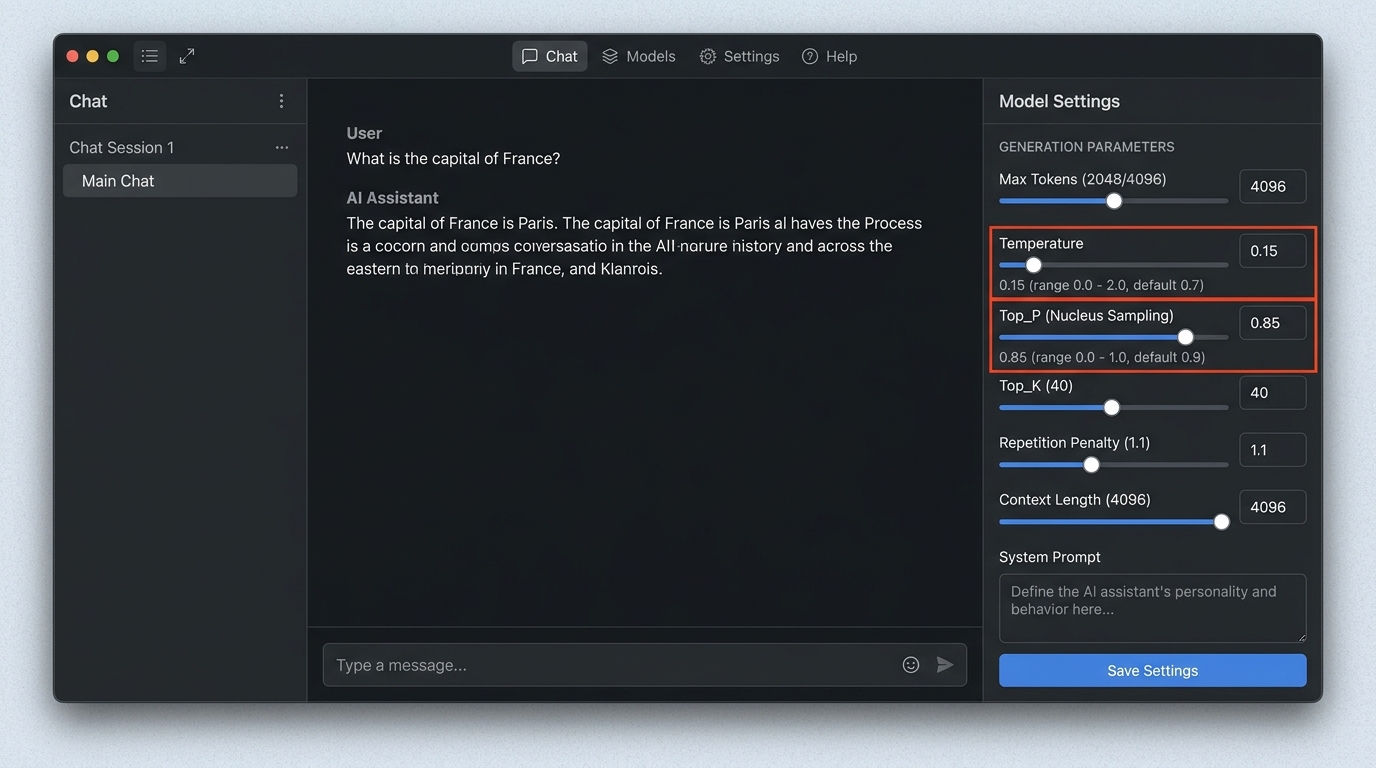
Adjusting generation parameters like Temperature and Top_P in your inference client can significantly improve a local LLM’s instruction adherence.
To force high instruction compliance, adjust your sampler settings as follows:
- Temperature (0.0 – 0.2): Lower temperature drastically reduces randomness. For structured output (JSON, code, extraction), set temperature between
0.0and0.1. - Top_P (0.8 – 0.9): Restricts the token pool to the top cumulative probability mass, eliminating tail end, off-topic tokens.
- Mirostat / Repeat Penalty: Set
repeat_penaltybetween1.05and1.15. If set too high (>1.3), the model will avoid repeating required structural syntax (like JSON brackets).
Using Few-Shot Prompting to Guide Behavior
Zero-shot prompting (giving instructions without examples) frequently fails on smaller local LLMs. Implementing few-shot prompting—providing 2 to 3 input/output examples within the prompt—is the single most effective method to improve instruction following.
SYSTEM: Extract entities from user text into JSON.

USER: Alice visited Paris.
ASSISTANT: {"person": "Alice", "location": "Paris"}

USER: Bob bought a laptop from Apple.
ASSISTANT: {"person": "Bob", "location": null, "organization": "Apple"}

USER: Charlie went to Tokyo yesterday.
ASSISTANT:
By providing clear input-output pairs, you anchor the model’s attention mechanisms directly to the desired target output format.
Common Fixes for Inconsistent Responses
When local LLM responses fluctuate between perfectly accurate and totally off-the-rails, system configuration issues are usually the root cause.
Managing and Limiting Context Windows
Exceeding or improperly managing the context window is a primary cause of instruction drift. As conversation logs grow longer, early system instructions get pushed out of the model’s effective attention span.
- Context Truncation: Ensure your context window setting (
num_ctxin Ollama orn_ctxinllama.cpp) matches your model’s true architecture limit (e.g., 8192 or 16384 tokens). - System Prompt Placement: Always re-inject or keep system instructions pinned at the root of the prompt stack.
- Context Overflowing: If your input exceeds the maximum allocated context, the model will silently drop early tokens—which are almost always your system instructions! Learn how to resolve context window limitations before running batch tasks.
Simplifying Overly Complex System Prompts
Cloud models can parse multi-page system prompts filled with edge cases and conditional statements. Local models perform significantly better with concise, high-priority rules.
- Avoid double negatives: Instead of writing “Do not answer in bullet points and do not use informal language”, write “Write exclusively in full paragraphs using formal language.”
- Use explicit delimiters: Wrap key data or rules in XML tags (e.g.,
<rules>...</rules>or<data>...</data>). Small LLMs recognize structured tags far better than inline prose instructions.
Step-by-Step: Debug Local LLM Prompt Issues
Follow this systematic checklist when you need to debug local llm prompt issues:
- Inspect Raw Output & Tokens: Enable raw terminal logging or inspect API payloads to ensure prompt template tags are not escaping or double-encoded.
- Test Zero-Temperature Baseline: Set
temperature = 0.0. If the model follows instructions at zero temperature but fails at0.7, your temperature setting was introducing unwanted randomness. - Isolate the System Prompt: Remove user input and run a single direct test query with your system prompt. Determine if the model fails immediately or only after continuous chat turns.
- Upgrade Precision/Quantization: If using a
Q3orQ4model, test the same prompt on aQ5_K_MorQ8_0quant to verify if quantization loss is causing the failure. - Enforce JSON Mode / Grammars: If your goal is structured data, use GBNF (GGML Backus-Naur Form) grammars or native JSON mode parameters supported by your inference engine to force valid syntax at the decoding level.
FAQ on Local LLM Output Control
How to fix local model instructions if they wander off topic?
To prevent a local model from wandering off-topic, reduce the temperature parameter to 0.0 or 0.1, lower top_p to 0.85, and implement strict stop sequences (such as ["\n\nUser:", "###"]). Additionally, keep your context window clean by summarizing past turns and keeping the system instruction at the top of every context payload.
Why does my local LLM ignore negative constraints?
Small local LLMs process negative constraints poorly because word embeddings for concepts like “don’t” or “never” activate the very tokens you are asking the model to avoid (e.g., “Do not use markdown code blocks” strongly activates the token “markdown”). Rephrase negative constraints into affirmative directives, such as “Respond exclusively in plain text.”