
The Ultimate Script Orchestration Tool for Ops Teams
System administrators and IT operations managers rely on custom scripts to keep enterprise environments running smoothly. Over time, however, IT environments accumulate dozens—or even hundreds—of standalone PowerShell files, Python scripts, batch routines, and shell commands scattered across servers and administrator workstations.
When these scripts execute in isolation via basic task schedulers, managing dependencies, capturing error logs, and tracking execution status becomes a major operational challenge. A single silent failure in a prerequisite script can cause cascading errors across downstream operations.
A dedicated script orchestration tool unifies fragmented scripts into robust visual workflows, giving sysadmins complete control and visibility over their operational environment.
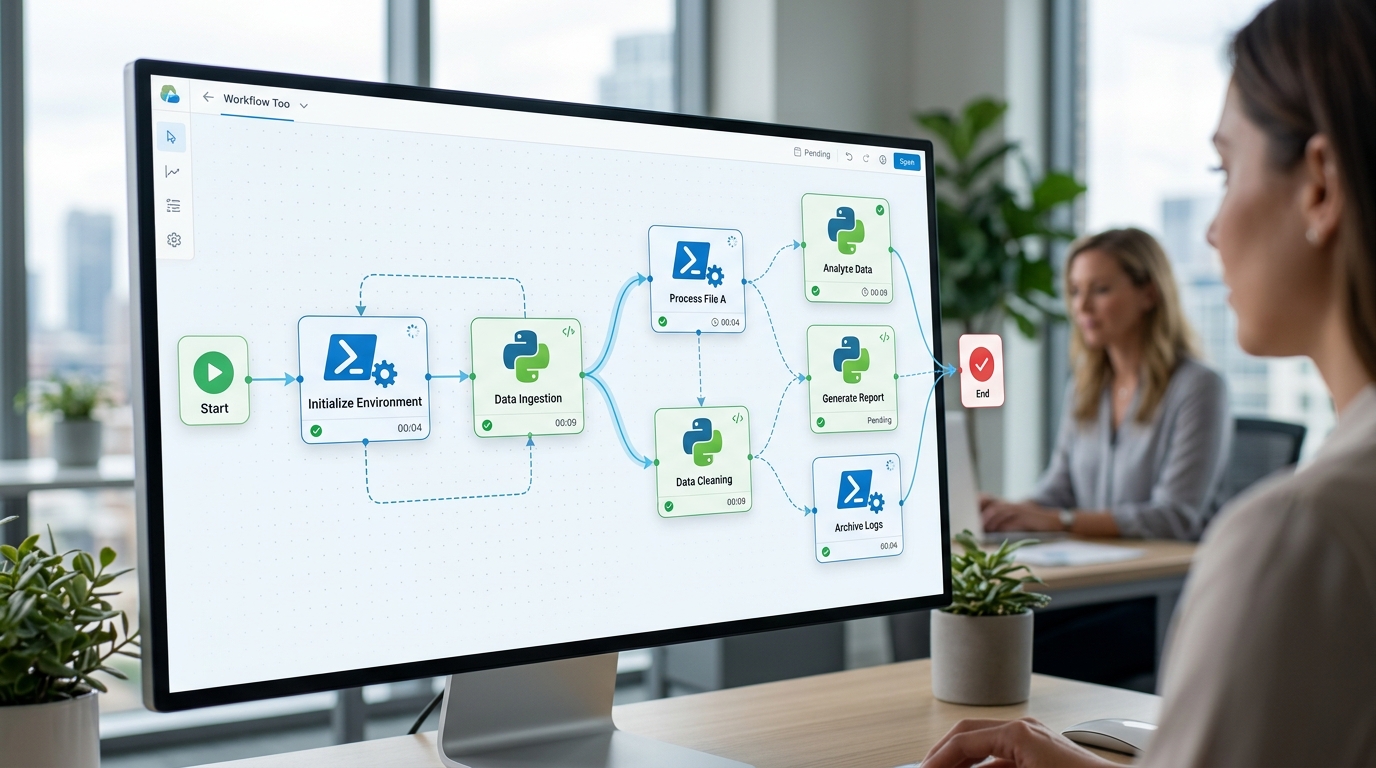
A script orchestration tool unifies disparate scripts into a cohesive visual workflow. (Illustrative)
Managing Complex and Fragmented Script Environments
Fragmented scripting environments create significant risks for IT organizations. Without central orchestration, sysadmins encounter four primary pain points:
- Brittle Master Scripts: Attempting to chain tasks together by writing massive, monolithic “master” scripts that call sub-scripts leads to unmaintainable, hard-to-debug code.
- Silent Execution Failures: Scheduled tasks that fail silently leave system issues undetected until end users report system downtime or corrupted data.
- Lack of Execution Visibility: Determining whether a scheduled script ran successfully requires manually searching through text logs or checking Event Viewer logs across multiple servers.
- Polyglot Language Incompatibility: Combining PowerShell, Python, and CLI tools often requires writing complex file-parsing wrappers to pass parameters between different scripting runtimes.
Deploying a modern script orchestration tool resolves these challenges by providing a unified control plane that coordinates script execution regardless of language.
How to Orchestrate PowerShell Scripts Effectively
PowerShell is the gold standard for managing Windows infrastructure, Active Directory, and Azure environments. (Azure environments) However, orchestrating PowerShell scripts effectively requires more than simple scheduled execution.
To optimize PowerShell script orchestration:
- Standardize Output Codes: Ensure all PowerShell scripts use explicit
exit 0for success andexit 1(or custom codes) upon caught exceptions. - Separate Parameters from Script Logic: Define dynamic input parameters at the orchestrator node level rather than hardcoding paths or credentials into
.ps1files. - Capture Standard Output and Error Streams: Utilize orchestrators that stream PowerShell
$InformationPreferenceand$ErrorActionPreferencelogs directly into unified visual interfaces. - Enforce Execution Policies: Ensure script execution policies (e.g.,
RemoteSignedorBypass) are configured cleanly at the orchestrator execution level.
By structuring PowerShell automation around these principles, sysadmins build resilient, enterprise-grade workflows.
Transitioning from Standalone Scripts to a Unified Workflow
Migrating from scattered scripts to a unified workflow is a straightforward process when guided by visual orchestration software.
- Inventory Operational Scripts: Catalog all standalone PowerShell and Python scripts, noting their dependencies, required input parameters, and expected output files.
- Group Tasks into Logical Sequences: Organize scripts into functional workflows, such as “Nightly Backup and Maintenance” or “User Onboarding and Provisioning.”
- Map Dependencies Visually: Use a visual orchestrator to connect script nodes in sequence, defining exact execution paths and prerequisite logic.
- Test Branching Logic: Simulate step failures to verify that fallback scripts or error notification nodes trigger as expected.
By taking these steps, IT teams transform isolated scripts into reliable, self-healing automated processes.
Key Features of a Reliable PowerShell Workflow Tool
A purpose-built PowerShell workflow tool provides visual management capabilities designed specifically for sysadmin workloads.

Visual dashboards provide immediate clarity regarding workflow health and script execution. (Illustrative)
Advanced Error Handling and Logging
Enterprise operations require granular control over failure handling. Modern orchestration tools allow admins to define precise retry policies (e.g., retry up to 3 times with exponential backoff) and configure conditional fallback paths when a step fails. Full console outputs, warning streams, and execution timestamps are preserved in structured local log files for fast troubleshooting.
Visual Monitoring for Script Execution
Visual dashboards provide immediate clarity regarding workflow health. Admins can view active execution nodes, monitor progress bars, inspect real-time stdout streams, and verify completion states at a glance.
By moving away from hidden background tasks and adopting visual script orchestration, teams gain complete operational control over simple workflow automation routines.
To see how visual orchestration simplifies desktop script management, explore how admins can orchestrate scripts visually across their local Windows environments.
Frequently Asked Questions
What is the difference between a task scheduler and a script orchestration tool?
A task scheduler simply triggers a script at a specified time. A script orchestration tool manages complex execution graphs, handles dependencies between multiple scripts, passes variables between steps, provides visual status monitoring, and manages error retry paths.
Can a script orchestration tool run PowerShell and Python scripts together?
Yes. Modern orchestration platforms allow you to sequence PowerShell, Python, Bash, and executable binaries within a single visual workflow, passing parameters between different scripting runtimes seamlessly.
How does script orchestration handle sensitive credentials?
Credentials should be stored securely using standard local OS vault mechanisms or encrypted environment variables, allowing scripts to reference parameters without hardcoding sensitive passwords into source files.
Does Nora Automation require modifying existing PowerShell scripts?
No. Nora Automation executes existing .ps1 files directly via native system shells, requiring no custom wrapper modules or code rewrites.