
How to Add Memory to Your Local LLM (So It Stops Forgetting)
Running Large Language Models (LLMs) locally using tools like Ollama, LM Studio, or llama.cpp provides complete privacy, zero API costs, and total control over your hardware. However, many developers and system administrators encounter a frustrating wall when deploying local AI: the model appears to have amnesia. You spend twenty minutes explaining a complex coding framework or software architecture, only for the model to completely ignore earlier instructions five prompts later.
If you are wondering why your setup seems incapable of retaining context, you are not alone. In this comprehensive guide, you will learn why local models forget prior messages, how context windows operate, and three practical methods to add memory to a local LLM—ranging from simple chat history array injection to persistent vector database systems.
Why Does a Local LLM Forget Previous Messages?
To fix memory loss in local AI systems, you first need to understand the fundamental architecture of neural language models.
Understanding the Stateless Nature of LLMs
By default, every Large Language Model is completely stateless. When you submit a prompt to an LLM running on your GPU or CPU, the model performs mathematical matrix multiplications across billions of parameters to predict the most probable sequence of tokens that follows your input.
Once the final output token is generated and returned to your screen, the inference engine clears its active state. The model itself retains no internal memory, database, or state change across inferences. It does not “remember” you or your previous prompt.
When a chat interface appears to “remember” your conversation, it is actually re-sending the entire message history back to the model behind the scenes with every single new message you submit.
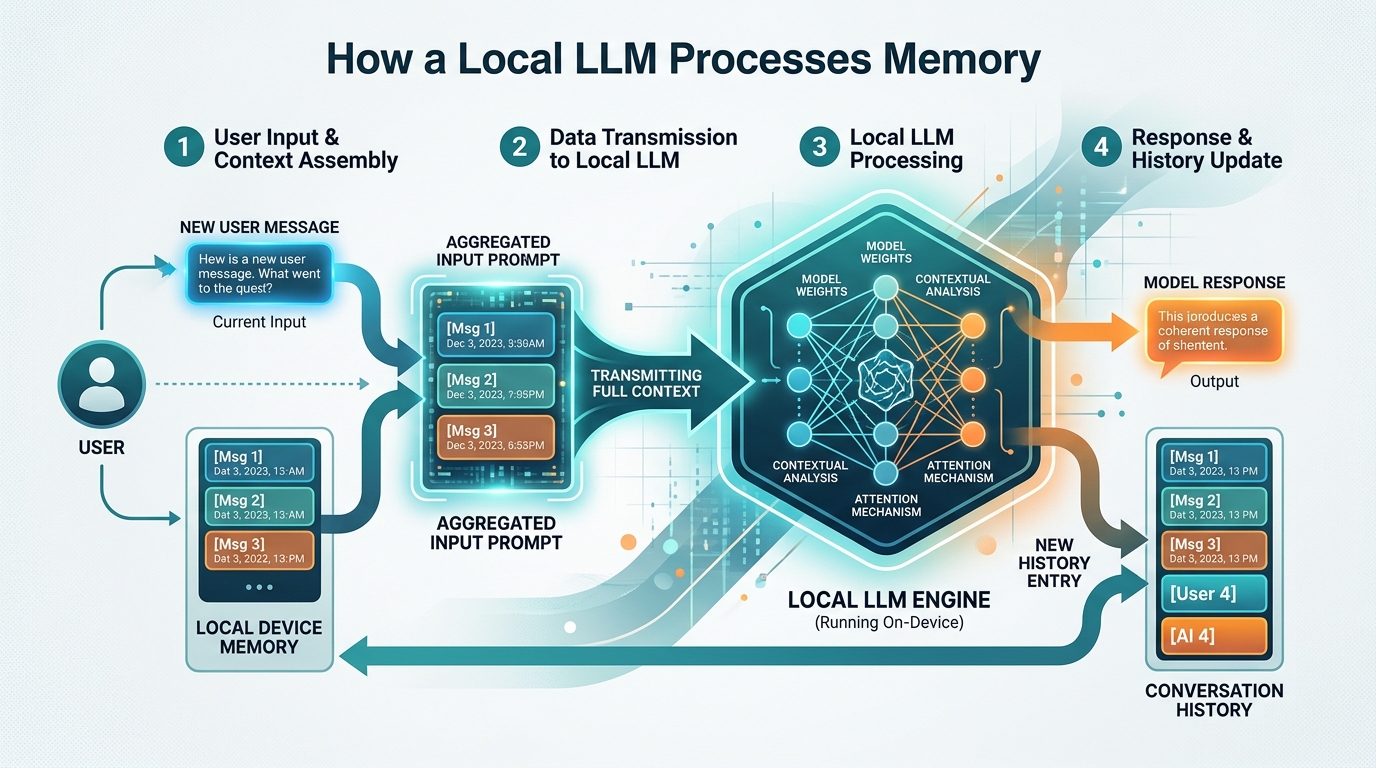
A diagram showing how a local LLM can simulate memory by re-injecting the full conversation history into each new prompt.
What is a Context Window?
The amount of text a model can process during a single inference call is bounded by its context window, measured in tokens (roughly 0.75 words per token). Common open-weight models like Llama 3, Mistral, or Qwen 2.5 support context lengths ranging from 4,028 tokens up to 128,000 tokens.
However, local hardware imposes strict operational limits:
- VRAM Consumption: Expanding context size drastically increases VRAM requirements due to the key-value (KV) cache. A model running comfortably in 8 GB of VRAM at a 2,048-token context window may crash with an Out-of-Memory (OOM) error if pushed to 32,024 tokens.
- Context Degradation (The “Lost in the Middle” Phenomenon): As context length increases, model attention mechanisms often struggle to recall details placed in the middle of long chat transcripts.
- Truncation: To prevent crashing, local frontends automatically truncate or discard older messages once total tokens exceed the context limit.
How to Make a Local LLM Remember (Core Strategies)
Adding memory to a local model requires architecting a system that manages context before feeding it into the model. Here are the three primary architectural strategies used in 2026.

Conceptual representation of adding long-term memory to a local LLM, often achieved by managing and re-injecting chat history or summaries.
Method 1: Client-Side Chat History Injection (Appending)
The simplest way to simulate memory is client-side message array injection. Instead of sending raw user text, your application maintains an array of JSON objects representing prior dialogue turns.
[
  {"role": "system", "content": "You are a helpful coding assistant."},
  {"role": "user", "content": "We are building a Python backend using FastAPI."},
  {"role": "assistant", "content": "Understood. I will provide code using Python and FastAPI."},
  {"role": "user", "content": "What framework are we using?"}
]
When sent to the local inference API (such as Ollama or LM Studio), the model reads the whole sequence and correctly replies, “We are using FastAPI.”
- Pros: Simple to code, exact message fidelity.
- Cons: Rapidly fills the context window; token consumption grows exponentially with each turn.
Method 2: System Prompts and Context Summarization
When conversations exceed token limits, sending raw conversation history becomes unsustainable. Context summarization resolves this by periodically condensing older turns into a high-level summary stored in the system prompt or conversation head.
- Trigger Condition: Monitor token count. When chat history reaches 70% of maximum context capacity, run a secondary background prompt.
- Summarization Prompt: Instruct the local LLM: “Summarize key user preferences, architectural choices, and technical details from the past 10 messages.”
- Context Replacement: Replace the oldest 10 raw messages with a single summary block in the system prompt, keeping only the most recent 2-3 turns raw.
This technique allows long-running sessions to persist essential facts without consuming tens of thousands of tokens.
Method 3: Long-Term Memory via Vector Databases (RAG)
For true infinite long-term memory across multiple sessions, days, or project files, client-side arrays and summaries are insufficient. You need Retrieval-Augmented Generation (RAG).
With RAG, past conversations and document notes are converted into numerical vector embeddings using a local embedding model (such as nomic-embed-text or all-MiniLM-L6-v2) and stored in a local vector database. When you submit a new query:
- The system converts your query into an embedding vector.
- It queries the local vector database to fetch the top $K$ most semantically relevant chat snippets from days or months ago.
- It injects those relevant snippets into the prompt context dynamically.
To set up an end-to-end vector pipeline locally, check our guide on how to build a local RAG system with Ollama.
Adding Memory to Local LLMs: Step-by-Step Integration
Let’s walk through an architectural workflow showing how to combine sliding context windows with local persistence in Python.
Step 1: Initialize Local Connection
Connect your application logic to a local inference runner like Ollama or LM Studio running on http://localhost:11434 or http://localhost:1234. If you are deciding between engines, read our breakdown of Ollama vs LM Studio memory handling.
Step 2: Maintain a Rolling Context Buffer
Implement a token counter. When total tokens approach your threshold (e.g., 4,096 tokens), slide the history window by keeping:
– The immutable System Prompt.
– An updated Summarized Memory block.
– The last $N$ turns of raw chat history.
Step 3: Integrate Developer Frameworks
Rather than building token counting and array manipulation from scratch, developer frameworks streamline implementation significantly. If you want to build Python-based automation or agent loops, see our detailed tutorial on how to use a local model with LangChain.
The Best UIs That Handle Long Term Memory for Local LLMs
If you prefer a complete graphical interface over custom Python coding, several open-source frontends come with built-in memory management, document retrieval, and custom context settings:
- Open WebUI:
– Best Feature: Native support for local web search, document RAG, and configurable conversation context retention.
– Memory Handling: Automatically handles Ollama chat history storage in a local SQLite database and supports dynamic model context scaling. - AnythingLLM:
– Best Feature: Turnkey desktop application combining local vector storage (LanceDB) with local LLM runners.
– Memory Handling: Offers dedicated workspaces where conversations and uploaded files stay persistently indexed for perpetual recall. - LM Studio (Built-in Chat UI):
– Best Feature: Granular context window sliders and custom prompt templating.
– Memory Handling: Keeps full conversation sessions saved locally on disk, with adjustable token limit overflow rules.
Frequently Asked Questions About Local LLM Memory
Why does my local LLM forget context even though my GPU has 24 GB VRAM?
Having ample GPU VRAM allows you to load larger parameters or allocate a larger context window, but the model itself remains stateless. If your software UI or API request fails to send past chat history or retrieve relevant vector context with each prompt, the model receives only your latest input and will appear to have lost its memory.
Does adding memory slow down response generation?
Yes. As the prompt length grows (due to long chat histories or retrieved RAG context), the local model must process more input tokens during the prefill phase. While token generation speed (tokens per second) remains relatively consistent, initial latency before the first token appears will increase as context expands.
What is the best embedding model for local memory vector search?
Popular lightweight local embedding models include nomic-embed-text, bge-small-en-v1.5, and all-MiniLM-L6-v2. These models run swiftly on host CPUs or GPUs and generate precise vector embeddings for fast semantic retrieval.
Conclusion and Next Steps
Making a local LLM remember previous conversations comes down to effective context engineering. For short sessions, maintaining a clean message history array is sufficient. For longer conversations, context summarization keeps token overhead low. For perpetual, cross-session memory across vast knowledge bases, combining your local runner with a local vector database is the definitive solution.
To explore advanced memory implementations and step-by-step setup guides:
– Learn how to implement semantic search and vector stores in our technical deep-dive on build a local RAG system with Ollama.
– Evaluate local runtime performance in our comparison of Ollama vs LM Studio memory.
– Code programmatic memory workflows using Python by exploring how to use a local model with LangChain.