
Implementing RAG for Local LLM Memory and Context Management
As local open-weight models rival proprietary cloud APIs in reasoning performance, developers and system architects are deploying them for sensitive data operations, technical assistant roles, and autonomous agents. However, scaling local AI interactions encounters a severe hardware and algorithmic bottleneck: context window exhaustion.
While naive chat applications re-inject raw chat history back into the model prompt on every turn, this approach degrades performance and rapidly consumes hardware resources. To achieve true persistent recall across thousands of interactions without crashing hardware, developers must transition from raw message append loops to Retrieval-Augmented Generation (RAG).
This technical deep-dive examines how to implement RAG for local LLM memory, set up a local vector database, master context window management, and architect an efficient local long-term memory retrieval pipeline.
Beyond Chat History: Why You Need RAG for Local LLM Memory
Standard conversational systems rely on linear chat history accumulation. While effective for brief multi-turn prompts, linear history fails at scale due to three core factors:
1. Quadratic Computational Complexity ($O(N^2)$ Attention)
The core self-attention mechanism of Transformer architectures scales quadratically with input sequence length. As conversation length ($N$) grows, the computational overhead required to process the prefill phase increases rapidly. A prompt containing 16,000 tokens of chat history requires significantly more FLOPS and processing time to evaluate than a focused 1,000-token prompt.
2. Key-Value (KV) Cache VRAM Bloat
During inference, GPU memory stores the Key-Value cache for all tokens in the active context window. At a 32k context length, the KV cache alone for an 8B parameter model can consume several gigabytes of VRAM—often forcing offloading to system RAM or causing Out-Of-Memory (OOM) fatal crashes on consumer hardware.
3. Context Degradation and “Lost in the Middle”
Empirical research demonstrates that LLMs pay high attention to tokens at the very beginning (system instructions) and very end (latest prompt) of a context block, but performance degrades significantly when recalling information buried in the middle 60% of a massive prompt window.
The RAG Memory Solution
Instead of forcing the LLM to process thousands of irrelevant historic dialogue tokens, Retrieval-Augmented Generation decouples memory storage from model inference. Chat logs, key entities, facts, and code decisions are indexed into a lightweight vector storage layer. When a user asks a question, the system retrieves only the top $K$ relevant snippets and injects them into the current prompt context.
If you are new to conversational memory fundamentals, review the basics of making a local LLM remember before diving into advanced vector database configurations.
How Context Window Management Works in Local LLMs
Effective context management requires a hybrid architecture that balances raw short-term memory with retrieved long-term memory.
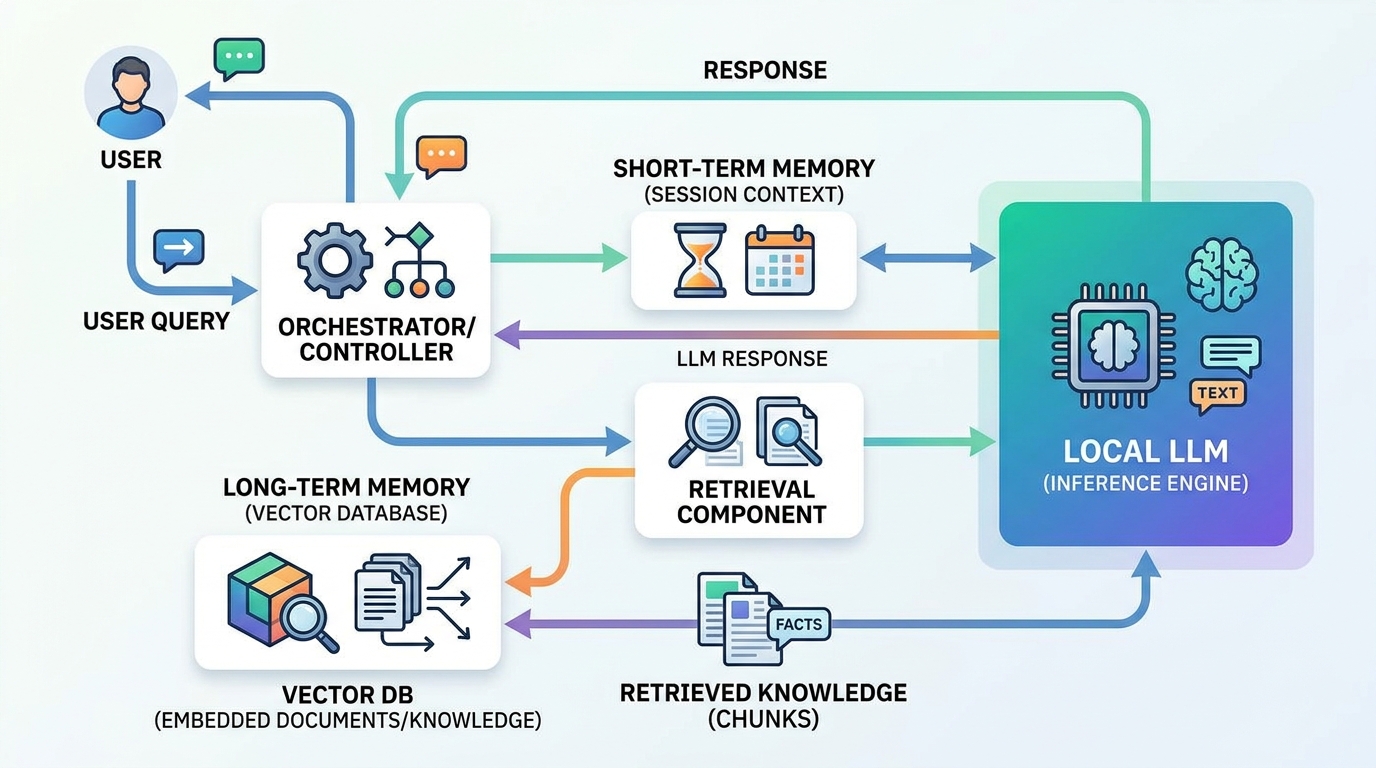
A hybrid architecture for local LLMs, balancing raw short-term memory with retrieved long-term memory via RAG.
Context Window Anatomy
A production-ready local LLM prompt layout should divide available context tokens into distinct, strict budgets:
+-----------------------------------------------------------------------+
|  1. System Prompt & Guardrails (Static)            | ~500 Tokens      |
+-----------------------------------------------------------------------+
|  2. Dynamic Memory Summary (Condensation)           | ~500 Tokens      |
+-----------------------------------------------------------------------+
|  3. RAG Vector Memory Context (Retrieved K Snippets)| ~1,500 Tokens    |
+-----------------------------------------------------------------------+
|  4. Recent Short-Term Dialogue (Last 3-5 Turns)     | ~1,000 Tokens    |
+-----------------------------------------------------------------------+
|  5. User Input Query & Reserve Generation Buffer   | ~500 Tokens      |
+-----------------------------------------------------------------------+
By strictly managing context token allocations, total prompt length stays beneath a lean, fixed budget (e.g., 4,096 tokens), ensuring fast prefill speeds and deterministic VRAM consumption regardless of whether the conversation spans 5 minutes or 5 months.
Setting Up a Vector Database for Local LLM Memory
To build a high-performance vector database local LLM memory system, you need a local, embedded, or serverless vector database that runs on the host system without external cloud dependencies.
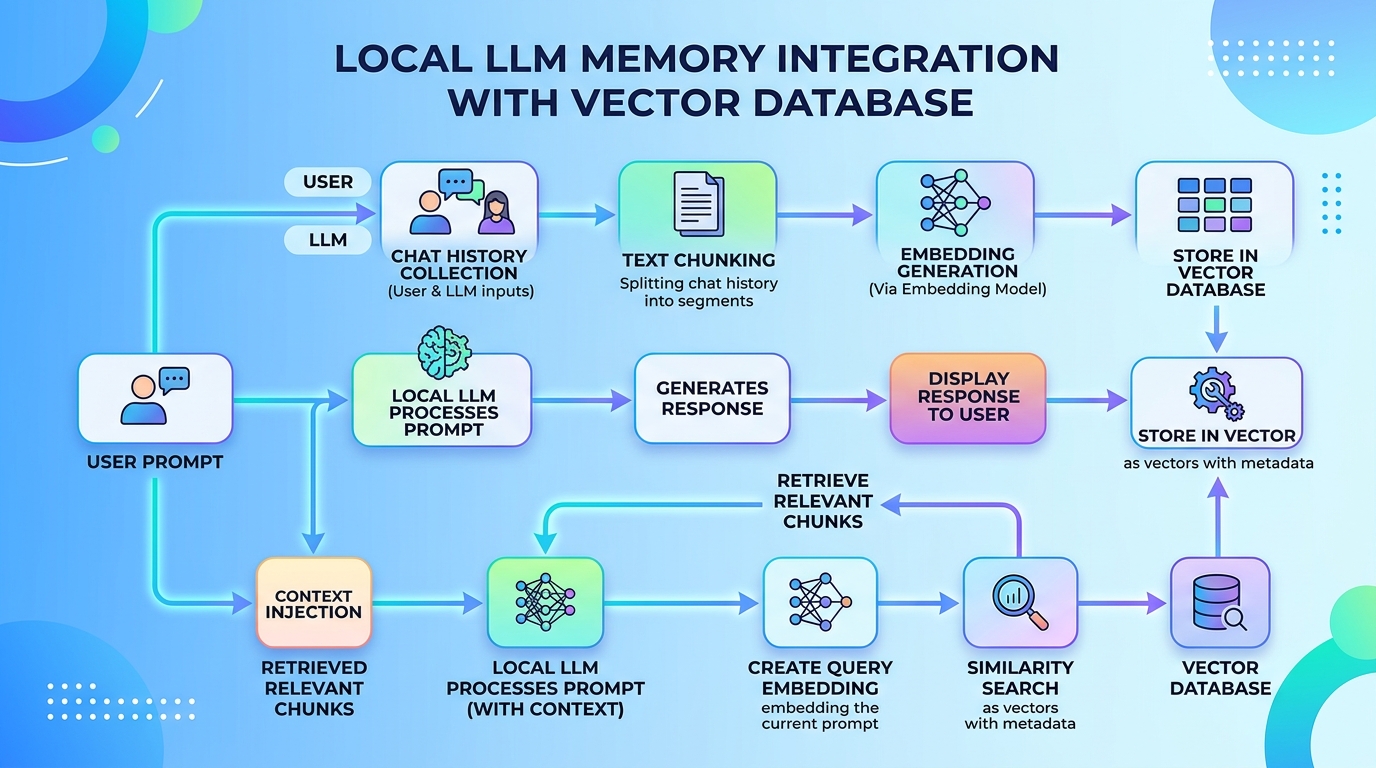
Integrating a local vector database for efficient long-term memory management in LLMs.
Choosing a Local Vector Database (ChromaDB, Milvus, Qdrant)
Here is a technical comparison of the leading local vector storage options for AI developers:
| Feature | ChromaDB | Qdrant (Local / Embedded) | Milvus (Lite) |
|---|---|---|---|
| Deployment Mode | In-process Python / Docker | In-process Rust / Docker | In-process Python / Docker |
| Primary Language | Python | Rust / Python SDK | C++ / Python SDK |
| Best Used For | Fast Python prototyping & local apps | High-performance, production Rust/Python | Enterprise-scale local deployments |
| Storage Engine | ClickHouse / DuckDB / HNSW | Custom Rust Vector Index (HNSW) | Knowhere / HNSW |
| Filtering Capabilities | Basic metadata filtering | Advanced payload filtering | Rich boolean expression filtering |
- ChromaDB: The most popular choice for Python developers due to zero-configuration startup. It runs directly inside Python processes and saves persistence files locally.
- Qdrant (Local): Exceptional speed and memory efficiency powered by Rust. Provides native hybrid search (sparse and dense vector retrieval) out of the box.
- Milvus Lite: A lightweight embedded variant of Milvus ideal for local Linux and Docker environments needing seamless transition to distributed clusters.
Chunking and Embedding Your Chat History
When storing conversational memory in a vector database, raw transcripts cannot simply be dumped into vector collections as giant blocks. They must undergo structured chunking and embedding.
1. Optimal Chunking Strategies
- Turn-Based Chunking: Combine pair sequences of
User Input+Assistant Responseinto atomic document records. This preserves prompt-response context integrity. - Semantic Windowing: Group 3-4 consecutive messages with an overlap of 1 turn to capture contextual shifts in multi-topic discussions.
- Metadata Tagging: Attach metadata payload key-value pairs to every chunk, including
timestamp,session_id,topic_tag, andimportance_score.
2. Local Embedding Models
Generate high-density vector representations using optimized local embedding models via libraries like sentence-transformers or local API services like Ollama:
– nomic-embed-text (137M parameters, 8192 context window, highly accurate for technical text)
– all-MiniLM-L6-v2 (22M parameters, ultra-fast CPU inference)
– bge-base-en-v1.5 (109M parameters, top-tier benchmark ranking for retrieval accuracy)
Building the RAG Architecture for Long-Term Retrieval
Here is a step-by-step Python implementation demonstrating how to build a local vector database memory pipeline using ChromaDB and local embedding models connected to a local LLM runner.
import chromadb
from chromadb.utils import embedding_functions

# Step 1: Initialize local persistent vector store
chroma_client = chromadb.PersistentClient(path="./local_memory_db")

# Step 2: Configure local embedding function (Sentence Transformers)
embedding_func = embedding_functions.SentenceTransformerEmbeddingFunction(
    model_name="all-MiniLM-L6-v2"
)

# Step 3: Create or get memory collection
memory_collection = chroma_client.get_or_create_collection(
    name="llm_conversation_memory",
    embedding_function=embedding_func
)

def store_memory(session_id: str, turn_id: int, user_msg: str, assistant_msg: str):
    """Store dialogue turn into vector database with metadata."""
    combined_text = f"User: {user_msg}\nAssistant: {assistant_msg}"
    memory_collection.add(
        documents=[combined_text],
        metadatas=[{"session_id": session_id, "turn_id": turn_id}],
        ids=[f"{session_id}_turn_{turn_id}"]
    )

def retrieve_memory(query: str, n_results: int = 3) -> str:
    """Retrieve top K relevant past conversation memories."""
    results = memory_collection.query(
        query_texts=[query],
        n_results=n_results
    )

    retrieved_docs = results['documents'][0] if results['documents'] else []
    return "\n---\n".join(retrieved_docs)

# Example Usage
# Store historical facts from previous sessions
store_memory("session_001", 1, "We are configuring PostgreSQL on port 5432.", "Noted. Database port set to 5432.")
store_memory("session_001", 2, "The production server IP is 192.168.1.150.", "Got it. Production server IP saved.")

# Query in a new session weeks later
user_query = "What is the IP address of our production database host?"
retrieved_context = retrieve_memory(user_query)

prompt = f"""
SYSTEM: You are an expert system assistant. Use the following retrieved memories to answer the user query accurately.

RETRIEVED MEMORIES:
{retrieved_context}

USER QUERY: {user_query}
ASSISTANT:
"""

print("Constructed RAG Prompt:\n", prompt)
By decoupling storage from execution, your system can recall details from months ago in less than 50 milliseconds without expanding context windows. For step-by-step instructions on wiring this architecture directly into automated pipelines, read our walkthrough on how to build a local RAG system with Ollama.
If you are interested in extending this architecture into dynamic multi-tool systems, check out our guide on how to build a fully local AI agent.
Optimizing Context Retrieval Speed Locally (Hardware Considerations)
Executing both vector search and neural network generation on consumer workstations requires tuning hardware resources:
1. Dedicated vs Shared Memory Allocation
- GPU VRAM Split: Keep embedding models loaded on system CPU RAM using ONNX Runtime or CPU PyTorch execution if VRAM is tightly constrained by the main 8B/70B LLM. Light embedding models (
all-MiniLM-L6-v2) execute vector searches in under 15ms on modern CPUs. - VRAM Offloading: If you have 16 GB+ VRAM, load both embedding model and main LLM onto GPU VRAM for instant vector operations.
2. Index Types for Scaled Local Memory
When conversation collections exceed 100,000 vector entries, flat brute-force cosine distance checks slow down. Ensure your local vector store uses HNSW (Hierarchical Navigable Small World) graphs, which trade a fraction of a percent of recall accuracy for $O(\log N)$ retrieval latency.
3. Quantization of Vectors
Utilize scalar quantization (SQ8) within vector databases like Qdrant or Milvus. Converting 32-bit floating-point embeddings (float32) to 8-bit integers (int8) reduces memory footprint by 75% with negligible search quality loss.
Frequently Asked Questions About Local RAG Memory
How does RAG memory differ from standard chat history injection?
Standard chat history injection re-sends every previous message in sequence up to the token limit. RAG memory searches an external database of historical interactions, selects only the top relevant fragments based on semantic similarity, and injects those specific facts into the current prompt.
Will a local vector database consume high system resources?
No. Local vector databases such as ChromaDB or Qdrant embedded are lightweight. Un-indexed or HNSW-indexed vector stores with fewer than 50,000 conversational records typically require less than 200 MB of RAM and minimal CPU execution overhead.
Can I combine RAG memory with context summarization?
Yes, combining both produces optimal results. Short-term dialogue turns stay in the immediate context buffer, intermediate context is periodically summarized into the system prompt, and deep historic details are indexed into the vector database for RAG retrieval.
Conclusion
Implementing RAG for local LLM memory completely eliminates context window limits and prevents performance degradation. By indexing past conversation turns into local vector databases like ChromaDB or Qdrant, your local AI applications achieve perpetual memory recall while remaining fast, private, and deterministic.
Take the next step in your local AI implementation:
– Learn the basics in our foundational guide: basics of making a local LLM remember.
– Connect local vector indexes to local models: build a local RAG system with Ollama.
– Scale your Python setup into autonomous workflows: build a fully local AI agent.